
Marketing Automation That Removes the Manual Work From Your Lead Funnel
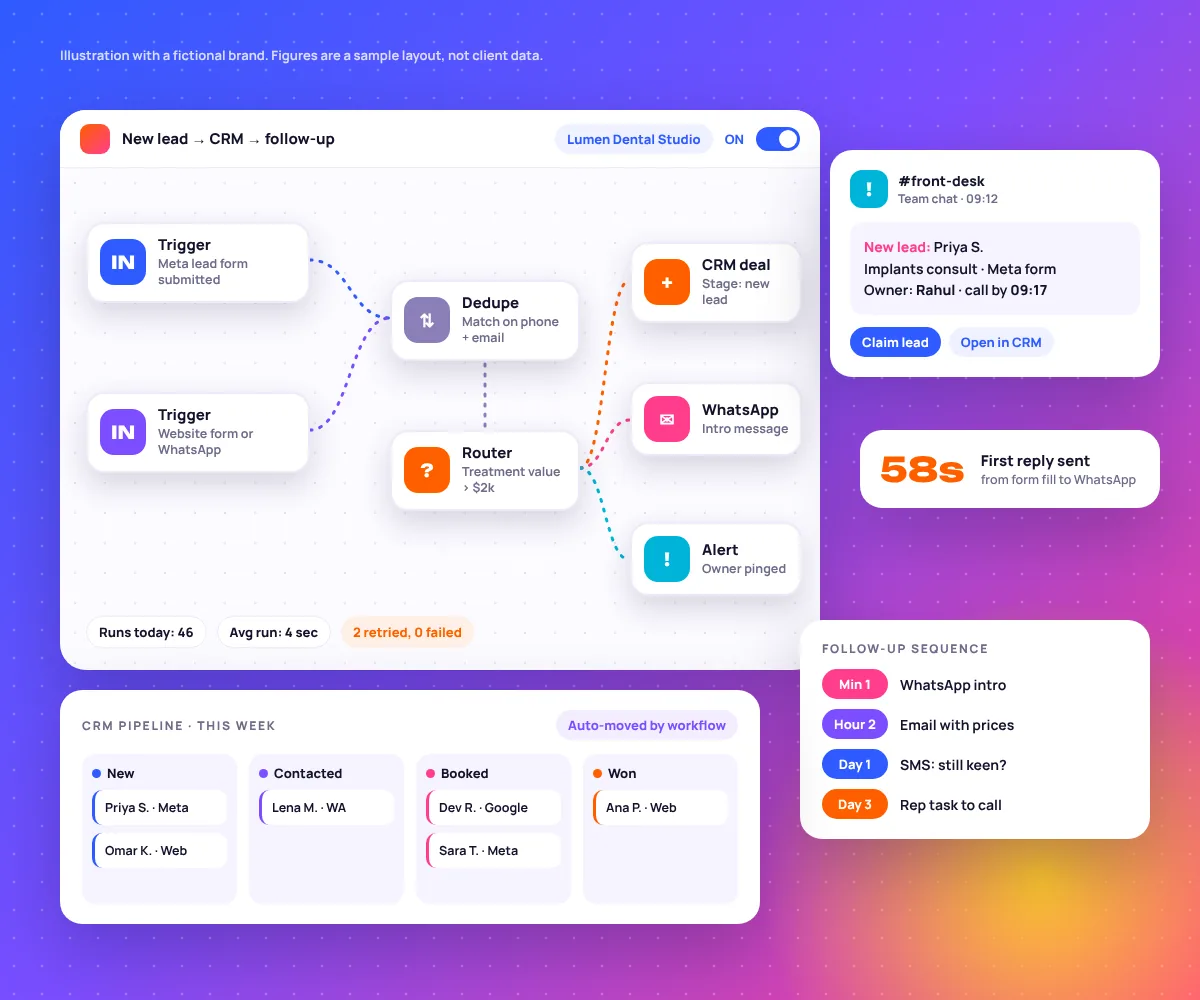
Your ads bring in leads. Then someone copies them into a spreadsheet, forgets to reply, and calls the next morning when the lead has already booked with someone else. We are a marketing automation agency that builds the system between the ad and the sale, so every lead gets a reply, an owner and a follow-up without anyone typing a thing.
when lead.created → dedupe → route(owner) → reply(< 60s) → follow_up(day 1, 3, 7)
Results That Speak for Themselves
Automation is boring when it works. What you notice is that leads stop going cold, reports arrive on their own and your team stops doing data entry at 7pm.
speed-84%average lead response timetasks12+manual tasks removed per clientclients85+businesses supportedapps6platforms we integrate regularlylaunch14 daysto launch core workflows (usually 10 to 14)
Same Lead, Two Very Different Mornings
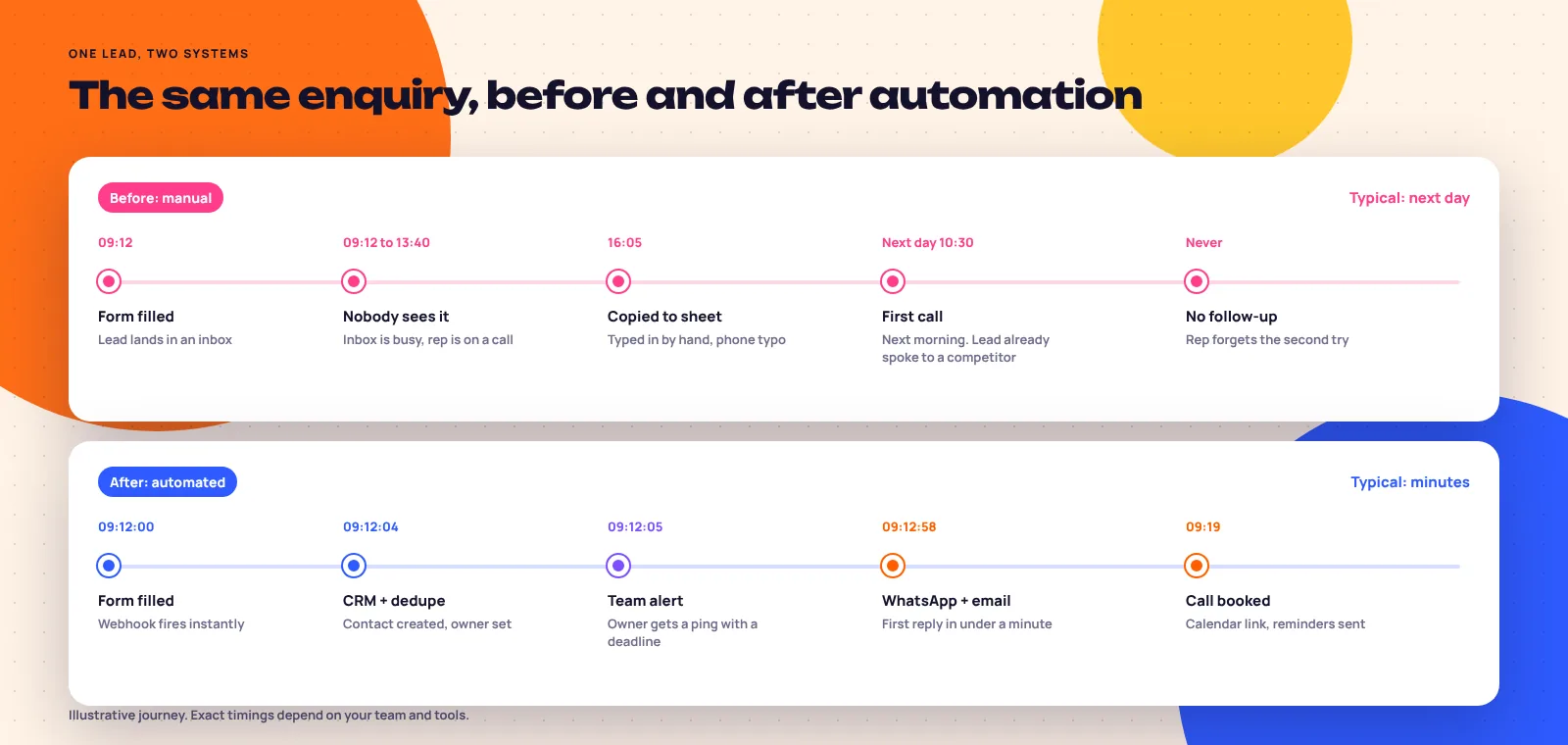
Someone fills in your form at 09:12. Here is what happens next in most businesses we audit, and what happens after we build the automation layer.
Without automation
- Form submitted. An email lands in a shared inbox with 40 other unread messages.
- Someone spots it between calls and flags it to deal with later.
- Copied into a spreadsheet by hand. One digit of the phone number is wrong.
- First call. Wrong number. The email follow-up goes out at lunch.
- Lead replies that they already booked with a competitor who called back in ten minutes.
With automation
- Form submitted. A webhook fires to the automation platform.
- Deduped and created in the CRM with source, campaign and ad set attached.
- Owner assigned by routing rules and pinged in team chat with a five-minute deadline.
- WhatsApp and email reply go out with a booking link, written in your voice.
- Call booked. Reminders scheduled. If nobody calls by 09:17, the manager gets an alert.
Full-Stack Marketing Automation
Six building blocks. Most clients need four or five of them, wired together so data goes in once and shows up everywhere it is needed.
Cross-Platform Integrations
Ad platforms, forms, WhatsApp, CRM, calendar, payments and sheets talking to each other through Zapier, Make or native APIs.
CRM Workflow Automation
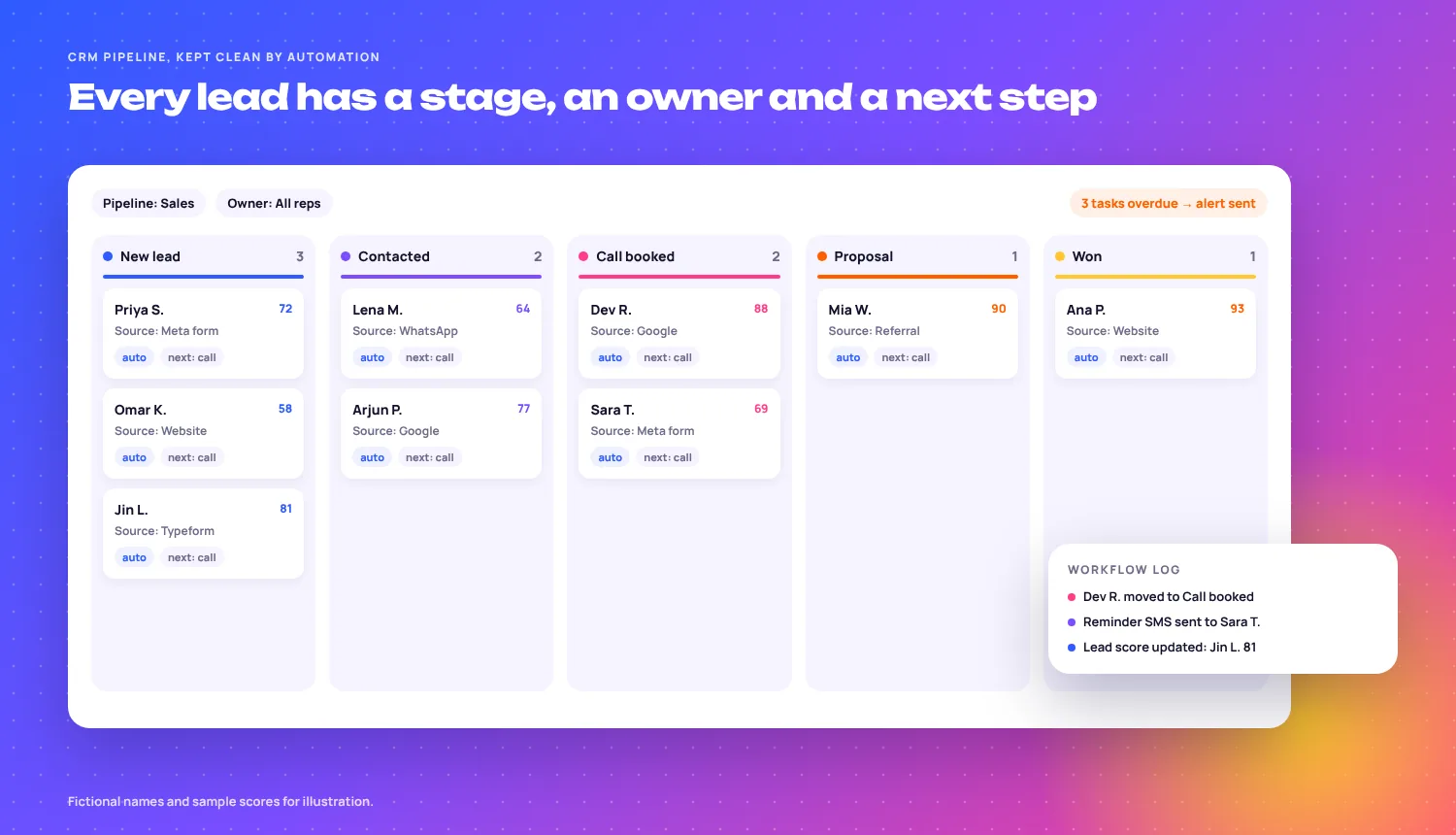
Deals move stages on their own when a call is booked, a quote is opened or a payment lands. Tasks get created so nothing relies on memory.
Lead Routing & Notifications
Rules decide who owns each lead based on value, service, location or language, and that person gets pinged with a deadline.
Automated Follow-Up Sequences
Email and SMS (and WhatsApp where allowed) that keep going until the lead books, replies or asks you to stop. Stops the moment a human takes over.
Reporting Automation
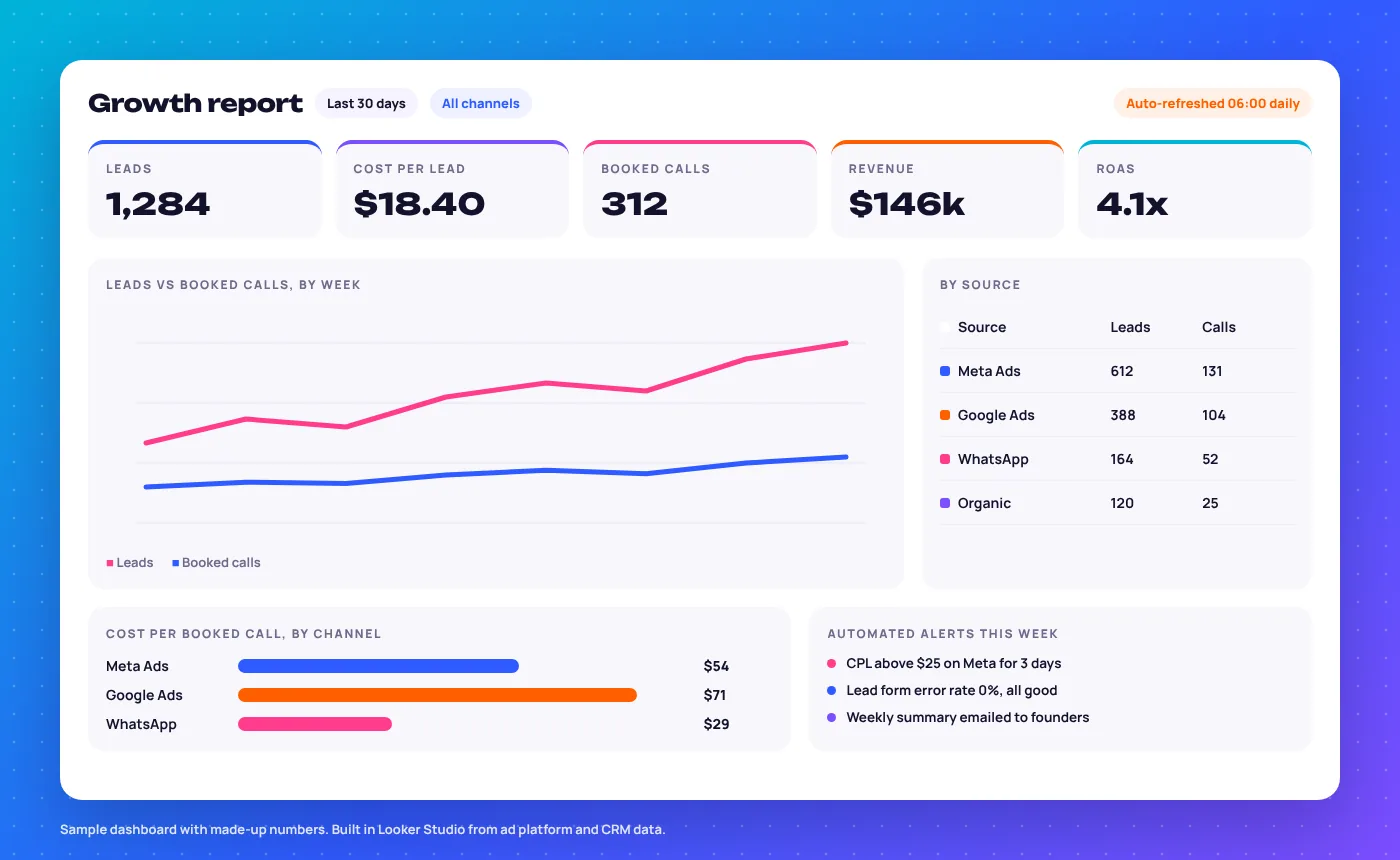
Ad spend, leads, booked calls and revenue pulled into one Looker Studio dashboard that refreshes itself, plus alerts when a number goes wrong.
Funnel & Form Automation
Forms and quizzes that qualify while they capture, then send people to the right page, calendar or price sheet based on their answers.
What One Automation Actually Looks Like
This is the shape of the first workflow we build for most lead-gen clients. Four steps, one error path, and every step has a reason to exist.
meta.leadgen OR site.form OR wa.messageInstant webhooks, not a 15-minute poll. Speed is the whole point.
phone → +E.164
match email OR phone
Formats the number, kills test entries and merges repeat leads instead of creating duplicates.
value > 2000 → closer
else → round robin
Your sales rules, written down once and applied to every lead the same way.
stage = New lead, source = utmtemplate: intro_v3call by now + 5 minRouting Rules We Write Down Before We Build
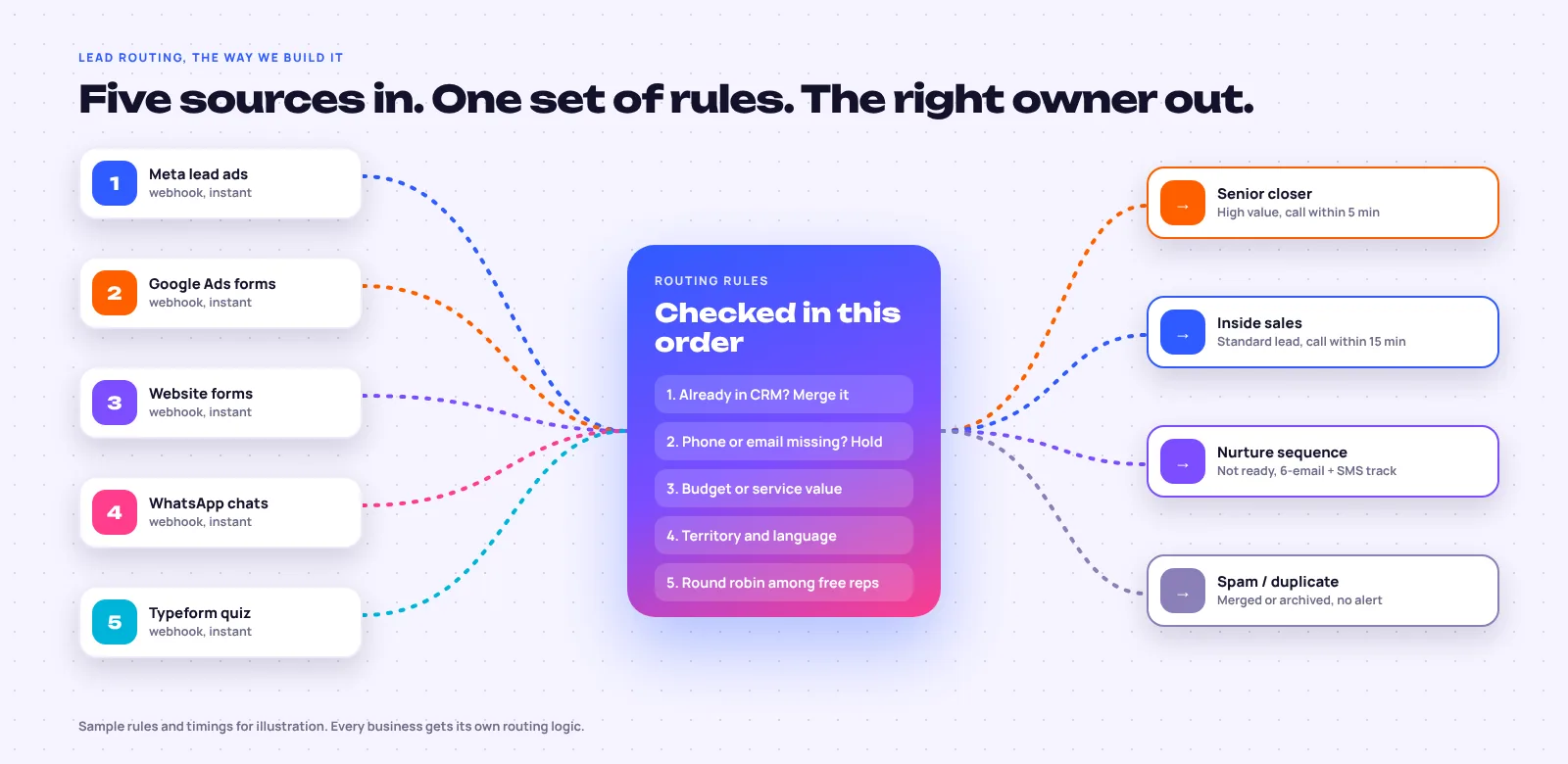
Most sales teams route leads by whoever sees the email first. That means your best closer spends the morning on tyre-kickers while a high-value enquiry waits. We agree the rules with you in plain English, then build them.
| Source | Condition | Owner | SLA |
|---|---|---|---|
| Meta lead ad | Service value over $2,000 | Senior closer | 5 min |
| Google Ads form | Standard enquiry, office hours | Inside sales, round robin | 15 min |
| Website form | Sent after 7pm | Auto-reply now, call task for 9:30 | Next day |
| WhatsApp chat | Asked about price | Inside sales + price sheet sent | 10 min |
| Typeform quiz | Score under 40 | Nurture sequence, no call | Email track |
| Any source | Phone matches existing contact | Existing owner, record merged | Owner told |
Sample rules. Yours will depend on team size, services and opening hours.
Every Automation Breaks Eventually. Ours Fail Loudly.
The worst automation is one that stopped working three weeks ago and nobody noticed. These are the failures we see most in accounts we inherit, and what we build in from day one.
timeout / 5xxThe CRM or app is downThe webhook fires, the CRM does not answer, and the lead disappears.
Automatic retries with a delay, then the raw lead goes to a backup sheet and the team gets an alert.
duplicateSame person, three recordsThey fill the form, message on WhatsApp and click an ad. Three reps call them.
Dedupe on formatted phone and email before anything is created. Repeat leads merge into the first record.
bad formatMessy phone numbers“098 1234”, “+91-98…” and “9812 34” all mean the same number to a human, not to a CRM.
A formatter step converts every number to international format. Missing required fields go to a review queue.
401 unauthorizedA connection expiresSomeone changes a password or leaves the company, and the integration quietly stops.
Connections run on a shared service login, plus a daily health check that alerts if a run count drops to zero.
429 rate limitToo much at onceA big import or a busy launch day hits the app’s limits and half the records fail.
Queues and throttling, so high volume slows down instead of failing.
field missingSomeone renames a fieldA dropdown option changes in the CRM and the filter that relied on it silently matches nothing.
A field map document, filters that error instead of skipping, and a short change log you can read.
Zapier, Make, GoHighLevel or HubSpot?
We are not tied to one platform. The right one depends on how complex your logic is, how many leads you get and who on your team will touch it.
Zapier
- Pick it when
- Flows are fairly simple and your team wants to edit them. It connects to more apps than anything else.
- Watch out for
- Usage is counted per task, so high lead volume or many steps adds up fast.
Make
- Pick it when
- You need branching, loops, data clean-up or high volume. Visual scenarios handle it well.
- Watch out for
- More power means a steeper learning curve if your team wants to change things themselves.
GoHighLevel
- Pick it when
- You are a local service, clinic, coach or studio and want CRM, funnels, SMS, booking and reviews in one login.
- Watch out for
- A busy interface, and email and SMS sending need proper set-up to land well.
HubSpot
- Pick it when
- B2B, several sales reps, longer deals, and you want reporting your sales manager will actually use.
- Watch out for
- Proper workflows sit in the Professional tiers, not Starter.
Our rule of thumb: if you already have a CRM your team uses every day, we keep it and automate around it. Moving CRMs costs more time than people expect. We also work in Zoho CRM, Typeform and Apollo.
How a Fitness Brand Fixed a Broken Lead Handoff
A boutique fitness brand was paying for leads from three places and losing track of them in the gaps between.
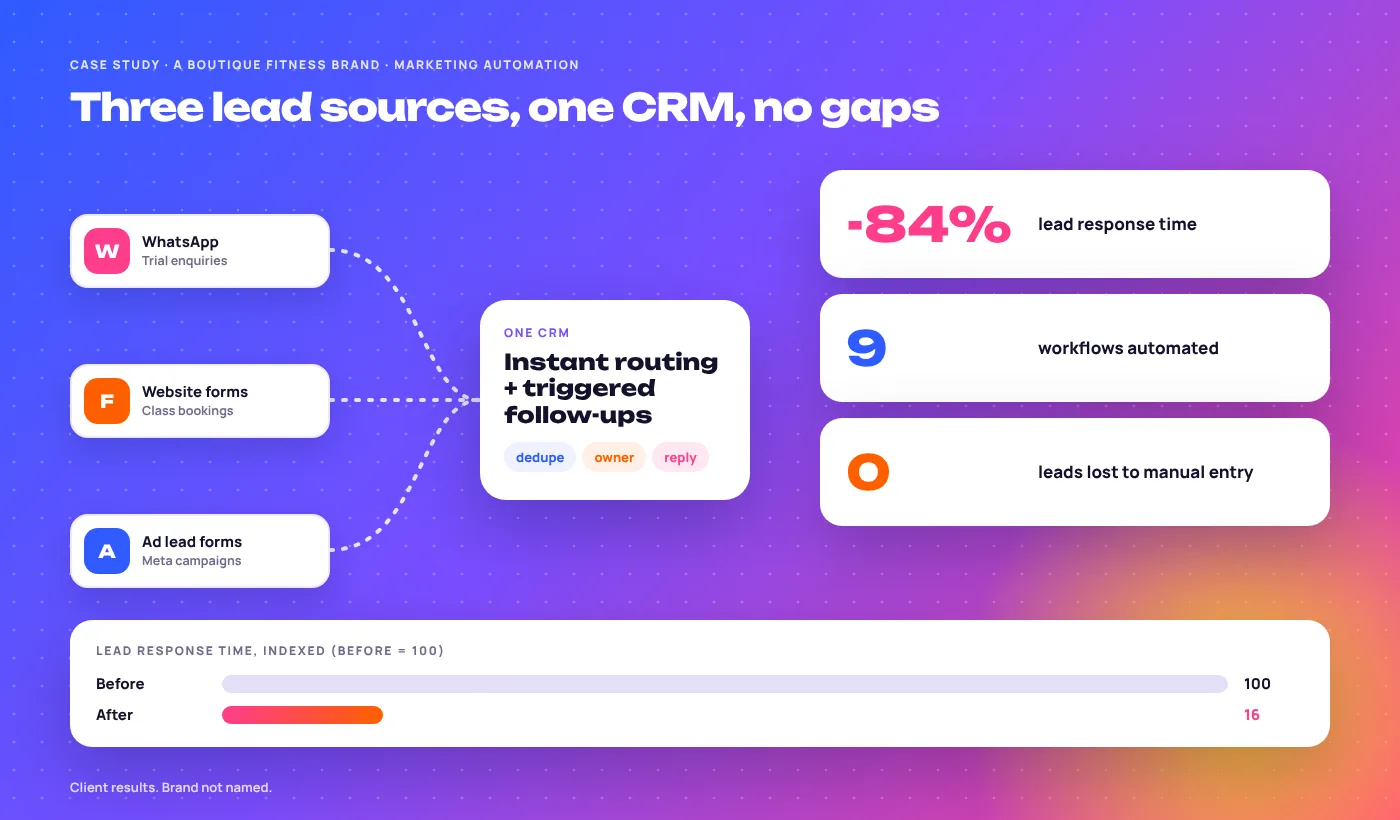
Leads came in through WhatsApp, website forms and ad lead forms, with no single system holding them. Each channel had its own inbox and its own person, so some leads got two calls and some got none.
An automation layer that unified all three sources into one CRM, with instant routing to the right team member and triggered follow-ups that run until the lead books a trial or says no.
- -84%lead response time
- 9workflows automated
- 0leads lost to manual entry
Why Businesses Choose Us as Their Marketing Automation Agency
We Map Before We Build
We follow real leads through your business first, from the ad to the bank. Most automation projects fail because someone automated a process nobody had written down.
Built to Not Break
Retries, dedupe, backup sheets and alerts on every workflow that touches a lead. If something stops, you hear about it the same day, not at month end.
Automation Tied to Revenue
We are a performance marketing agency first. Every workflow is judged by faster replies, more booked calls and cleaner data going back to your ad platforms, not by how clever it looks.
Automation Is Only as Good as Your CRM Fields
Bad data in means wrong routing, broken reports and ad platforms learning from junk. These are the fields we lock down on every build.
Always international format. It is the main key for dedupe and WhatsApp.
Set by the workflow, never typed. Fixed list, no free text.
From UTMs or the lead form, so you can see which ad made the sale.
One stage list for the whole team. Moves only by rules or by the owner.
Set by routing rules. Every lead has exactly one owner.
Required when a deal is marked lost, so you learn why without asking.
How We Build Your Automation System
Each phase hands something concrete to the next one. Core workflows are usually live in 10 to 14 days.
Lead Journey Audit
We trace every lead source to where it ends up and time each manual step your team does.
Workflow Design
We write each workflow in plain English first: trigger, rules, actions and what happens when it fails.
Build & Testing
Built in your accounts, then hammered with test leads: duplicates, missing phones, after-hours, wrong formats.
Launch & Monitor
We switch on in stages and watch every run for the first two weeks, then check health weekly.
Marketing automation services in detail
Marketing Automation FAQs
What founders and sales managers ask us before they let us near their CRM.
Send us one lead source and your CRM. We will show you where leads are slipping on a 30-minute call.
Book the free auditWhat platforms do you build automation in?
Mostly Zapier, Make, GoHighLevel and HubSpot, plus Zoho CRM, Typeform, Looker Studio, Apollo, WhatsApp Business API and the ad platforms themselves. We pick the tool that fits your logic, lead volume and team, and we are happy to work inside what you already pay for.
Do I need a CRM already in place?
No. If you do not have one, we help you choose and set it up as part of the build, usually HubSpot, GoHighLevel or Zoho depending on your business. If you already have one your team uses, we keep it.
How long does it take to build an automation system?
Core workflows are usually live in 10 to 14 days: audit, design, build, testing and a staged launch. Bigger systems with many tools or a CRM migration take longer, and we add those in phases so you see results early.
What happens if an automation breaks?
Every workflow that touches a lead has error handling built in: retries, a fallback that saves the raw lead somewhere safe, and an alert to your team chat or email. On management plans we monitor runs and fix issues, usually the same working day.
Can you connect our ad platforms to our CRM?
Yes. Meta, Google, LinkedIn and TikTok lead forms can go straight into your CRM with the campaign and ad attached. We can also send qualified leads and sales back to the ad platforms, so their bidding learns which leads turn into money.
Do you build automated follow-up sequences?
Yes, across email and SMS, and WhatsApp where the rules allow. Sequences stop as soon as the lead replies, books or a rep takes over, so nobody gets a “just checking in” after they have already paid.
Is marketing automation only for large businesses?
No. Small teams often gain the most, because one person is doing sales, admin and replies at once. A business getting 100 leads a month can save days of work with three or four well-built workflows. That is true for a local business as much as for a property developer, and our clients range from one-person teams to multi-site brands.
Can you automate our reporting too?
Yes. We build Looker Studio dashboards that pull ad spend, leads, booked calls and revenue from your platforms and CRM, refresh on their own, and email a summary each week. We also set alerts for things like a sudden jump in cost per lead.
Will automation replace our sales team?
No. It takes the copying, chasing and reminding off their plate so they spend their time talking to leads. The first reply can be automatic. The conversation that closes the deal should still be a person.
What’s included in ongoing automation management?
Monitoring of every live workflow, fixes when an app changes or a connection drops, small edits like new fields or team members, a monthly health report, and new workflows as your funnel grows, within an agreed number of hours.
Who owns the automations and accounts?
You do. We build inside accounts in your name, paid by you, and document every workflow. If we stop working together, everything keeps running and your team or the next agency can pick it up.
Will automated messages hurt our WhatsApp or email reputation?
Not if they are set up properly. We use approved WhatsApp templates and opt-in, authenticate your sending domain for email, and keep volume and frequency sensible. Spammy automation gets numbers blocked. Helpful, fast replies do the opposite.
Ready to Remove the Manual Work From Your Funnel?
Show us how a lead moves through your business today. We will show you which steps a workflow should be doing instead.