
Meta’s Most Powerful AI Campaigns, Properly Managed
We set up and run Meta Advantage Plus campaigns for brands that want the automation without the blind spots: clean conversion data, existing customers defined, enough genuinely different creative, and a manual control so you can see whether Advantage+ is really winning.
Meta Advantage Plus Campaigns: What You Control and What Meta Controls
Advantage+ hands Meta the decisions a media buyer used to make by hand. That is fine, as long as you are clear about which levers are still yours.
Meta has folded its old Advantage+ shopping campaigns into one sales campaign setup. When you create a sales campaign with Advantage+ audience, Advantage+ placements and Advantage+ campaign budget all switched on, Ads Manager labels it as Advantage+. Switch one of them off and you have a manual campaign with some automation inside it. Neither is wrong. You just need to know which one you are running and why.
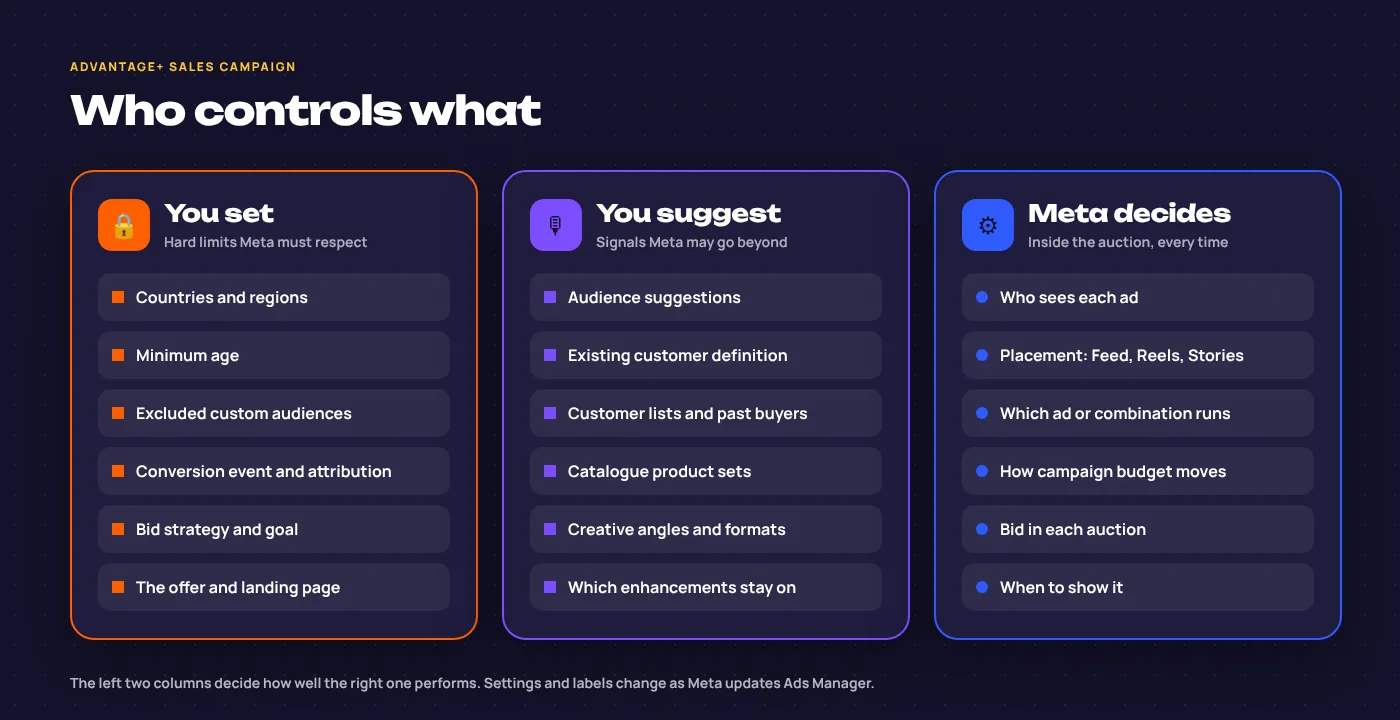
Hard limits
Locations, minimum age, excluded custom audiences, the conversion event you optimise for, the attribution setting, your bid strategy and the offer itself. Meta will not cross these.
Signals
Audience suggestions, your existing customer definition, customer lists, catalogue product sets and the creative you supply. Meta starts here and goes wider when it finds better buyers elsewhere.
The auction
Who sees each ad, in which placement, which ad or combination runs, and how the campaign budget shifts between ads. You cannot steer these directly, only through the first two columns.
When results disappoint, the cause is nearly always in the first two columns: a purchase event firing twice, past buyers counted as new, or twelve versions of one idea. That is where we spend our time, and it is the first thing our Facebook ads audit looks at.
Setting Up Advantage+ Sales Campaigns to Chase New Buyers
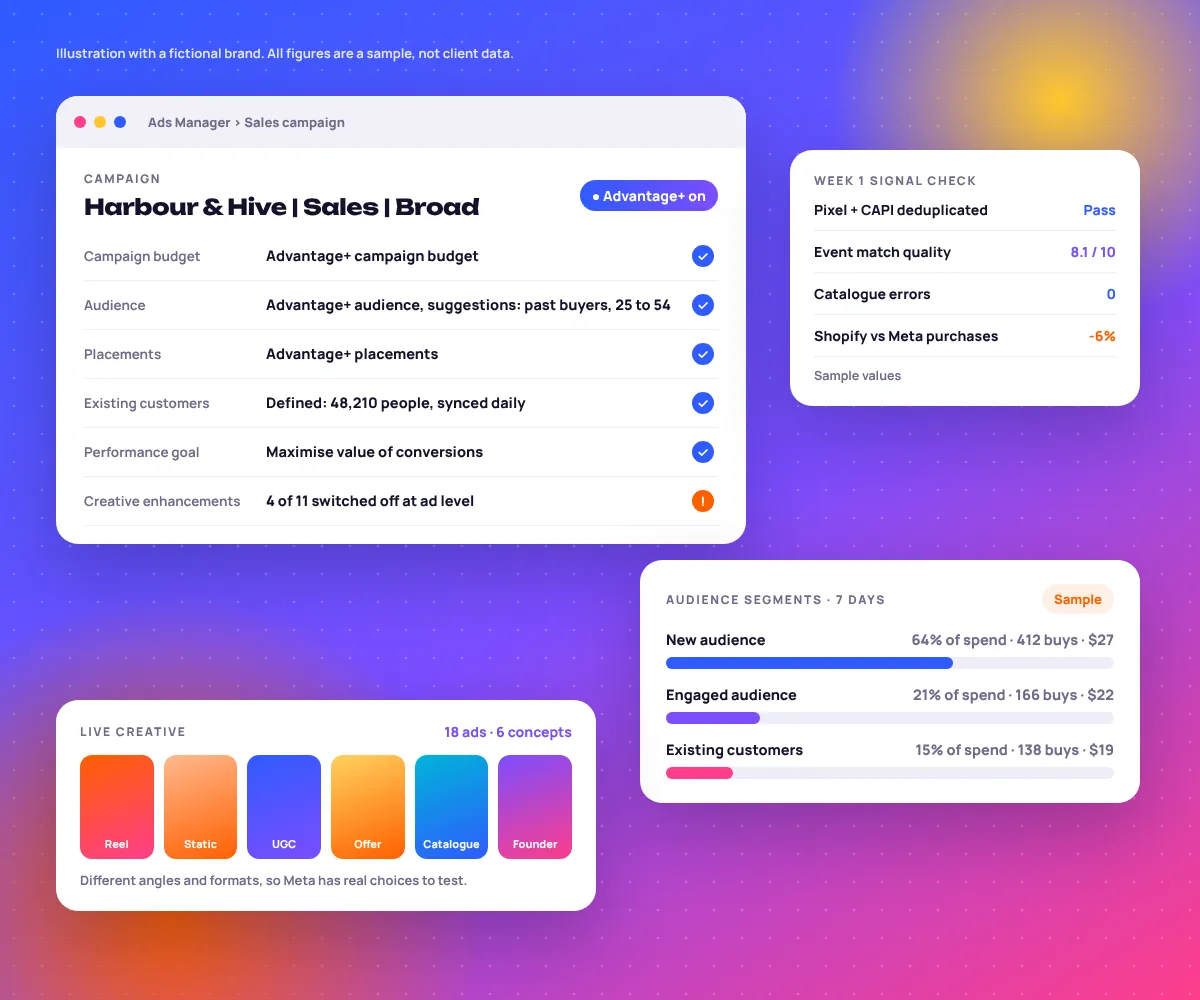
Left alone, an Advantage+ campaign will happily spend on people who already love you. ROAS looks great. Growth does not happen. Here is the setup we use, in the order we do it.
Build complete customer lists
Upload every purchaser from Shopify or Klaviyo with emails and phone numbers, plus website purchasers from the pixel over the longest window available. For the engaged audience, add site visitors and people who engaged with your Instagram and Facebook.
Define existing and engaged customers once
These definitions sit at ad account level and apply to every sales campaign. They also power the new versus returning reporting later, so getting them right pays twice.
Decide how much existing customers can take
Depending on your account, Meta offers either a cap on the share of budget spent on existing customers or an option to focus delivery on new customers. Meta moves these settings around, so we check what your account has today.
Read new versus returning every week
The audience segment breakdown splits spend and purchases between new, engaged and existing customers. We check it against your store’s own first-order versus repeat-order report.
Keep the lists fresh
A list uploaded once goes stale within weeks. We sync it from Shopify or Klaviyo so new buyers move into the existing segment automatically.
| Segment | Share of spend | Purchases | Cost per purchase | What it tells us |
|---|---|---|---|---|
| New audience | 64% | 412 | $27 | The real growth engine. Judge creative here. |
| Engaged audience | 21% | 166 | $22 | Warm, not yet buyers. Fine unless it keeps growing. |
| Existing customers | 15% | 138 | $19 | Cheapest sales, least incremental. Email and WhatsApp can often do this job. |
Advantage+ Audience vs Original Audiences, and the Creative Settings We Change
DefaultAdvantage+ audience
- Your age, interest and custom audience inputs become suggestions, not limits.
- Locations, minimum age and exclusions still hold as hard controls.
- Best for most ecommerce accounts with clean purchase data and varied creative.
SwitchOriginal audiences
- Age, gender and interests become strict limits again.
- Useful for regulated products, B2B niches, a single city or a narrow test.
- Expect higher costs per result and slower learning in exchange for control.
Advantage+ creative enhancements: read the list before you publish
Enhancements are set on each ad, and Meta switches many of them on by default. Some genuinely help. Others rewrite your copy or put your product somewhere it has never been. New ones appear every few months, so we review every ad at publish rather than trusting last quarter’s settings.
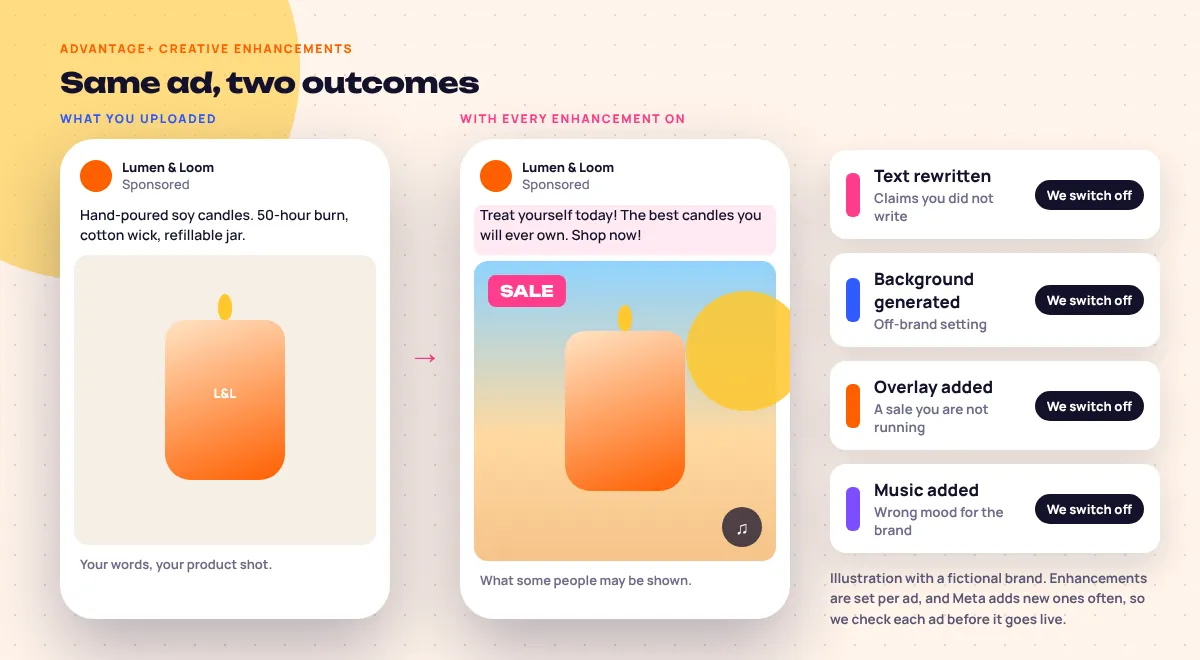
Usually off
- Text improvementsRewrites copy, risky for health, finance or any claim
- Generated backgrounds and image expansionCan distort packaging and product shots
- Added overlays and musicOff-brand, and may suggest offers you are not running
Usually on
- Visual touch-upsSmall crops and brightness fixes per placement
- Relevant commentsShows real comments under the ad
- Placement crops, once we check safe zonesStops a 4:5 static failing in Reels
Test before keeping
- Add catalogue itemsGood for wide ranges, poor if it shows low-margin products
- Image animationSometimes lifts click-through on statics
- Translated textOnly with a native speaker checking it
Creative Diversity Is the Targeting Now
Meta’s ad delivery system now groups ads that look and say the same thing. Twelve recolours of one idea behave like one ad. Six different ideas give it six ways to find buyers.
Typically 10 to 30 live ads in the main campaign, built from 5 or more distinct concepts. More ads of the same idea add nothing.
A few genuinely new concepts each week or fortnight, depending on spend and how fast frequency climbs.
Advantage+ catalogue ads can sit in the same campaign. They are only as good as the feed, which we fix first, as covered in Meta ads for ecommerce.
Moving From Manual Campaigns to Advantage+ Without Losing a Month
Switching everything over on a Monday is how accounts lose their best month. We step across, and each step has a clear test before the next one.
Readiness
Pixel and Conversions API deduplicated, purchase values correct, existing customers defined, at least five distinct concepts ready.
Store and Ads Manager purchases roughly agree.
Run alongside
Launch one Advantage+ sales campaign with a modest share of prospecting spend. Manual campaigns stay untouched.
It exits learning and delivers steadily.
Head to head
Compare on cost per new customer and blended store revenue, not only in-platform ROAS. Shift budget in steps of about 20%.
It beats manual on new customers, not just on returning ones.
Consolidate
Fold overlapping prospecting into Advantage+, keep a testing campaign and a small manual control, and keep feeding new creative.
Monthly review shows the gap still holds.
When we keep a manual campaign alongside
Advantage+ is our default scaling campaign for most stores, not our only one. This sits inside our wider Meta Ads management service, and a few jobs still run better by hand.
- Creative testing. A small capped campaign so new hooks get a fair read before they join the main campaign.
- Launches and new markets. A new product or country that needs guaranteed delivery and its own read.
- Specific warm offers. Cart abandoners or a VIP list with a message only they should see. See Meta retargeting ads.
- Regulated or narrow audiences. Where strict age, location or interest limits are not optional.
- A control. One honest comparison, so you know Advantage+ is earning its share.
Proof From Stores We Run Meta For
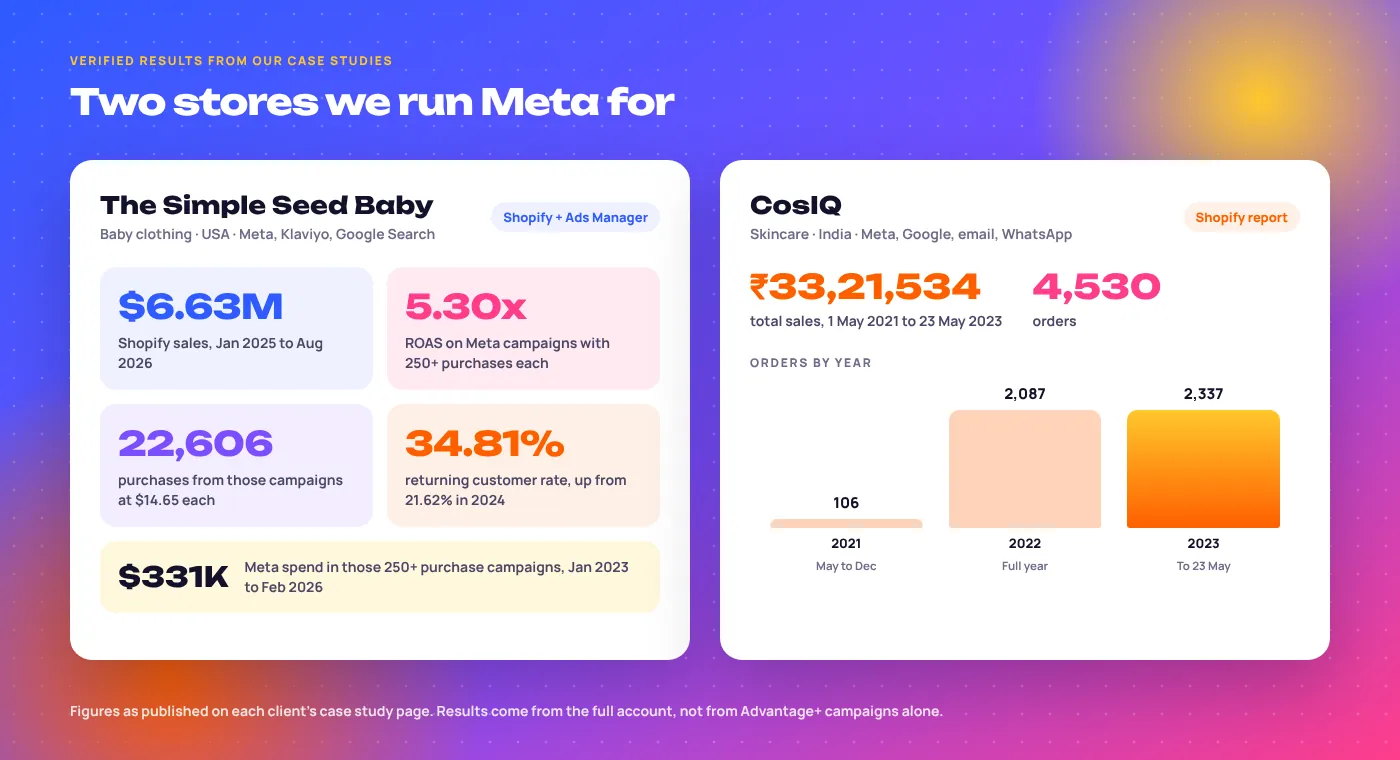
The Simple Seed Baby, USA
Premium bamboo baby clothing. $6.63M in Shopify sales from January 2025 to August 2026. Meta campaigns that each drove 250+ purchases returned 5.30x on $331K of spend, and the returning customer rate rose from 21.62% to 34.81%. Read the Simple Seed Baby case study.
CosIQ, India
Skincare on Shopify: 4,530 orders and ₹33,21,534 in sales between May 2021 and May 2023, with Meta working next to Google, email and WhatsApp. See the CosIQ skincare case study.
These are whole-account results, not an Advantage+ only test. We show them because the same habits apply: clean tracking, steady creative and new customers tracked separately.
Complete Your Meta Ads Strategy
Most Advantage+ work we do is for stores, so see our ecommerce marketing services and B2C marketing services. Browse our clients, more success stories, or practical notes on the EmergingAds blog.
Meta Advantage+ Questions, Answered
What are Meta Advantage Plus campaigns?
They are Meta’s automated campaign setups for sales, app installs and leads. Meta chooses the audience, placements and which ads run, while you supply the conversion signal, creative and a few hard limits.
How does an Advantage+ sales campaign work?
You create a sales campaign with Advantage+ audience, placements and campaign budget switched on. Meta then tests your ads across Facebook, Instagram and its other placements, moving spend toward the people and ads that produce purchases.
What happened to Advantage+ shopping campaigns?
Meta folded them into the unified Advantage+ sales campaign. The ideas are the same: broad delivery, consolidated structure and existing customer controls. New builds use the sales campaign setup.
Is Advantage+ worth it for every brand?
For most ecommerce brands with clean purchase tracking and varied creative, yes. It struggles with very few weekly purchases, broken tracking or one or two ads. We check those three things before recommending it.
How long does an Advantage+ campaign take to learn?
Meta’s rule of thumb is about 50 optimisation events in a week to leave the learning phase. In practice we give a new campaign one to two weeks before judging it, and four to six weeks for a fair comparison with manual campaigns.
Should I exclude existing customers from Advantage+?
Define them first, then decide. A cap or a new customer focus keeps spend on growth, but in repeat categories some spend on returning buyers is profitable. The audience segment breakdown shows which way to lean.
Which Advantage+ creative enhancements should I turn off?
We usually switch off text improvements, generated backgrounds, image expansion, added overlays and music. We keep visual touch-ups and relevant comments, and test catalogue items and image animation before keeping them.
How many ads should an Advantage+ campaign have?
Typically 10 to 30 live ads from at least five clearly different concepts. Diversity matters more than count, because similar ads tend to be treated as one.
Do I still need a manual campaign?
Usually a small one or two: a creative testing campaign and a control. We also keep launches, new markets and tightly restricted audiences manual.
Can Advantage+ work for apps or lead generation?
Yes. Meta runs Advantage+ app and leads campaigns too, with the same need for good signals. See our Meta app campaigns and Meta lead generation ads pages.
Does Advantage+ need the Conversions API?
We treat it as required. Automation optimises toward whatever events it receives, so missing or duplicated purchases teach it the wrong lesson quickly. We set up the pixel and Conversions API together before launch.
How do you measure whether it is working?
Cost per new customer, the audience segment split, and blended revenue from your store against total ad spend. In-platform ROAS alone can flatter a campaign that mostly reaches existing buyers.
Let AI Scale Your Meta Campaigns
Before you press publish on Advantage+, let us check it. The free audit covers your tracking, existing customer setup, creative mix and enhancement settings, and tells you plainly whether Advantage+ fits your account right now.