
Accurate Meta Pixel Tracking Setup That Recovers Lost Signal.
Our Meta Pixel setup covers the browser pixel, the Conversions API and everything between them: shared event IDs, hashed customer details, consent handling and clean purchase values. The goal: Ads Manager agrees with your store or CRM, so Meta learns from real sales and leads.
eventID = event_idvalue + currencyhashed em, phconsent first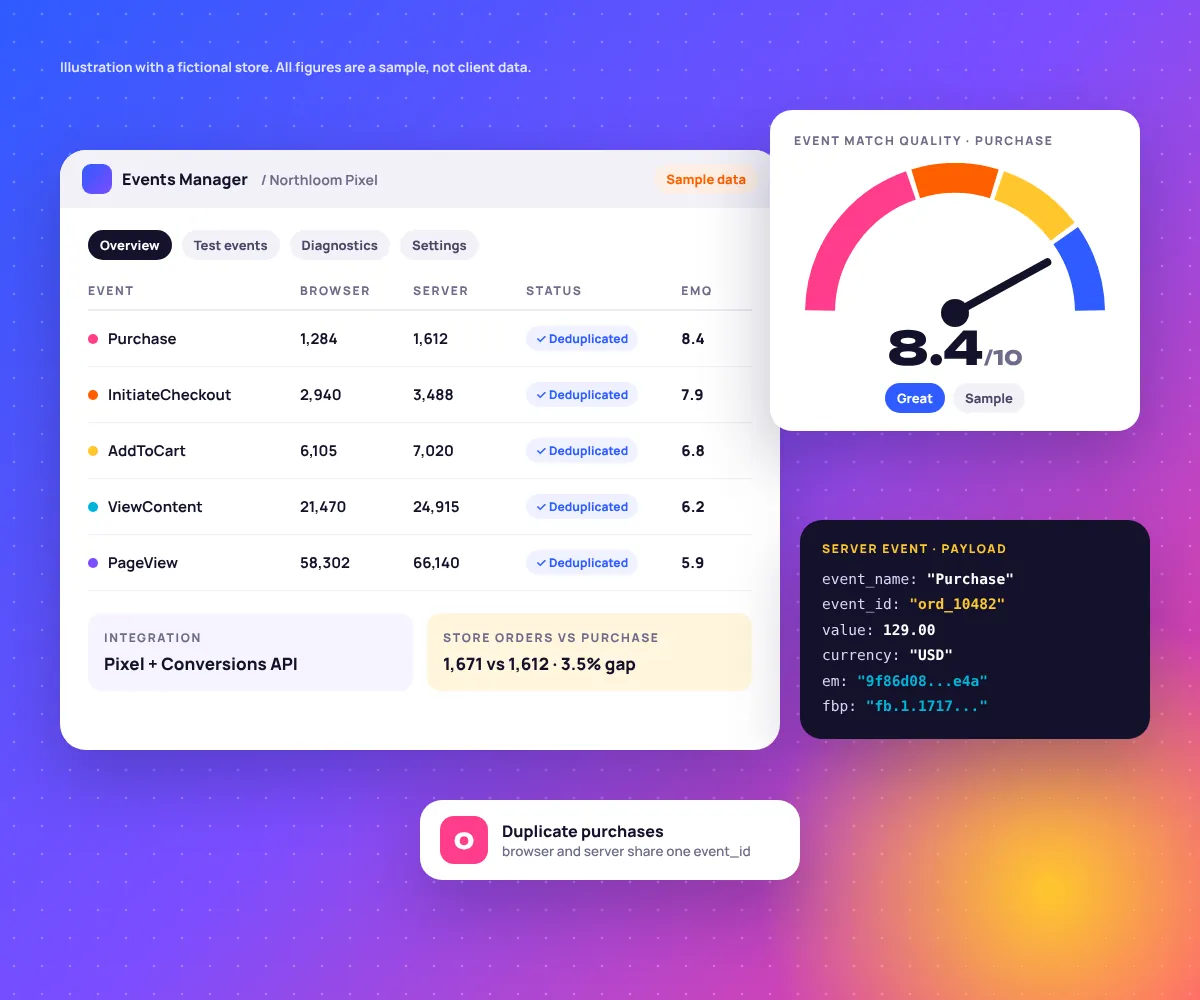
Why Browser Tracking Alone Loses Your Signal.
The pixel is a script in the visitor’s browser, so it only reports what the browser allows. Ad blockers stop it outright. Safari shortens the life of script-set cookies like _fbp, and iOS opt-outs and click ID stripping remove more of the clues Meta uses to tie a sale to an ad. Meta cannot learn from purchases it never sees, so it optimises on a partial picture.
The fix is two routes for every important event. The pixel sends what the browser lets through. The Conversions API sends the same event from your server, where blockers cannot reach it, with extra match keys such as a hashed email. When both copies share an event name and ID, Meta keeps one.
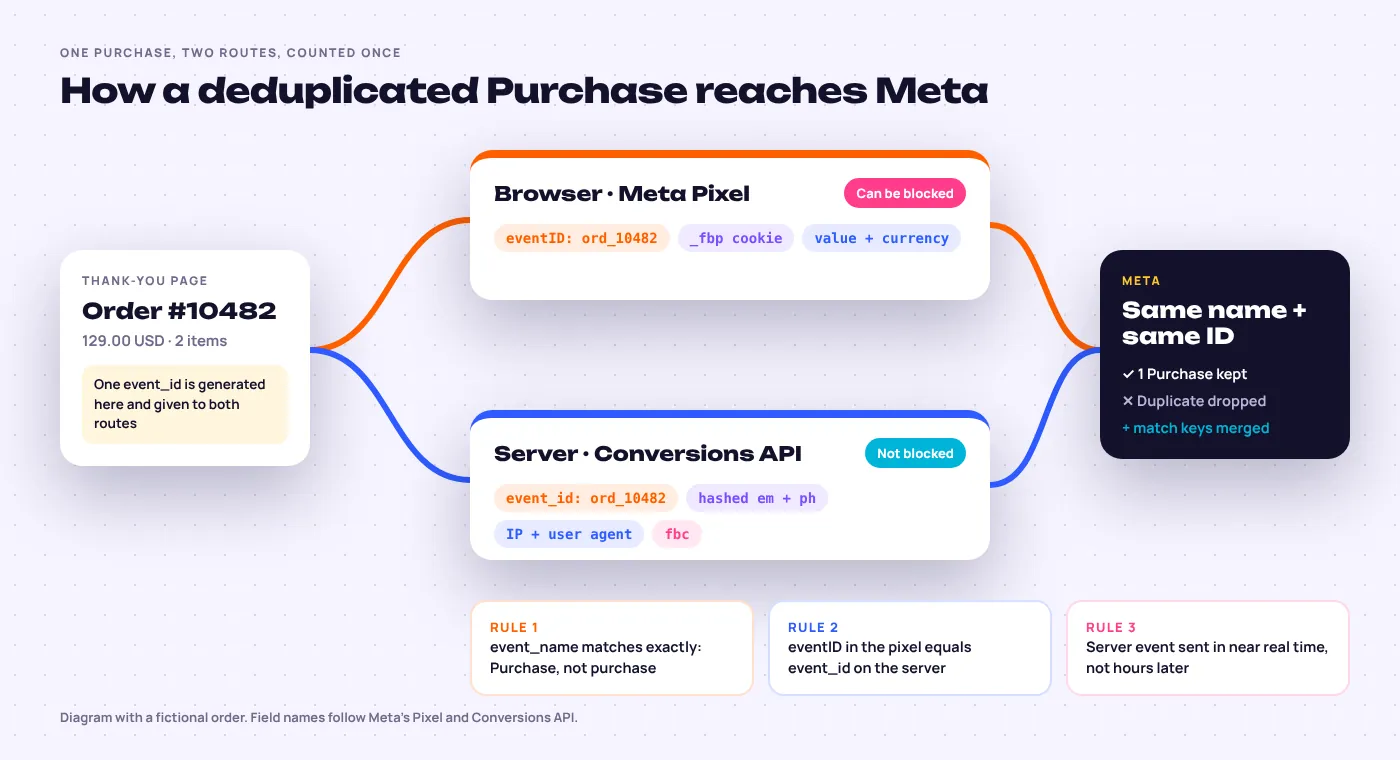
Deduplication is the part most setups get wrong
Here is what a matching pair looks like. The highlighted lines are the ones Meta compares. Get either wrong and every purchase counts twice. Reported ROAS looks brilliant and nobody notices until the bank account disagrees.
fbq('track', 'Purchase', {
  value: 129.00,
  currency: 'USD',
  content_ids: ['NL-204', 'NL-311'],
  content_type: 'product'
}, { eventID: 'ord_10482' });event_name: "Purchase", event_id: "ord_10482", event_time: 1767225731, action_source: "website", user_data: { em, ph, external_id, client_ip_address, client_user_agent, fbp, fbc }, custom_data: { value: 129.00, currency: "USD" }
Build the ID from something both sides already know, like the order number, not a random value made up twice. Send the server copy within minutes; Meta only pairs copies inside a 48-hour window. A good Meta Pixel setup is then proven against your backend orders or CRM, the same discipline our conversion tracking setup applies to Google Ads and GA4.
Facebook Pixel Setup: Base Code, GTM or Native Integration?
There is no single right install. There is a right one for your platform and your team, and one hard rule that applies to all of them.
Pixel base code
Script in the site header, events added to templates.
- Pick it when
- A developer owns the code and the site is custom built.
- Watch for
- Hard-coded events forgotten after a redesign.
Google Tag Manager
Tags fired from a data layer the site pushes.
- Pick it when
- You run several ad platforms and want one place to manage them.
- Watch for
- Click triggers that fire Lead before the form actually submits.
Shopify or WooCommerce native
Meta’s Shopify app or official WooCommerce plugin.
- Pick it when
- Your checkout is standard and you want CAPI without custom code.
- Watch for
- An old pixel copy left in the theme: the top cause of doubled purchases we see.
Partner integration
Shopify, WooCommerce, HubSpot and others send server events once connected.
- Pick it when
- The platform already holds the order or lead data.
- Watch for
- Limited control over which customer fields are sent, so Event Match Quality can stall.
Conversions API Gateway
Meta’s gateway mirrors pixel events from a cloud instance, with little coding.
- Pick it when
- You want server events quickly and the site has no clean data layer.
- Watch for
- It copies what the pixel sees, so it cannot add CRM data the browser never had.
Server-side GTM
A tagging server receives events once and forwards them to Meta, Google and others.
- Pick it when
- You need full control of payloads and consent across platforms.
- Watch for
- Another system someone must own after launch.
The rule we never break: one source per event per route. If the Shopify app sends Purchase, nothing else in the theme or in GTM may send Purchase from the browser too.
Event Match Quality: The Score Behind Every Sale
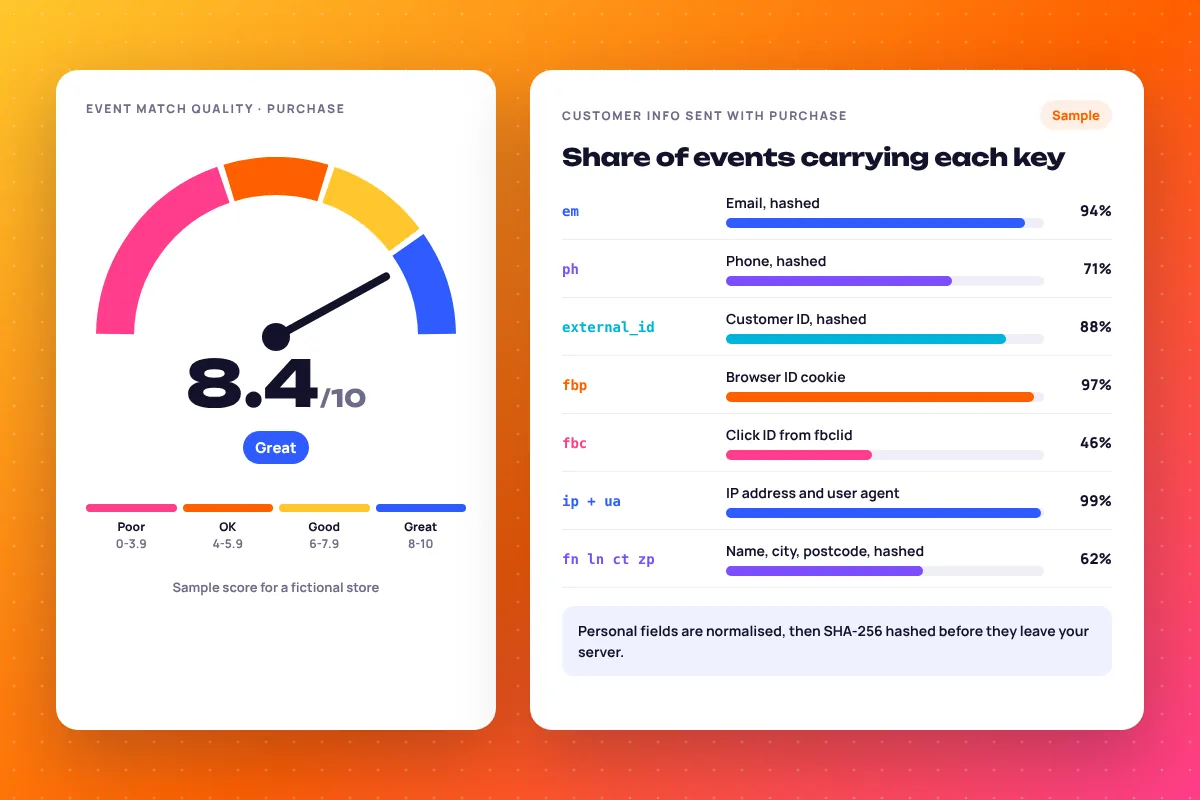
Events Manager scores each server event from 0 to 10 on how well Meta can tie it to a real account. Higher scores mean more conversions attributed and bigger retargeting pools. Meta labels it poor, OK, good or great. On Purchase and Lead we aim for good at least, and great wherever checkout or the form collects email and phone.
Normalise, then hash with SHA-256
emphfnlnctstzpcountryexternal_id
Lowercase and trim emails; phones as digits with country code. Hash an unclean value and it matches nobody.
Send as they are
client_ip_addressclient_user_agentfbpfbc
Read fbp and fbc from the request cookies. Missing fbc is a common reason ad clicks go unattributed.
The Meta Pixel Setup Event Map We Start From
Before writing code we agree which events matter and what each must carry. One starting map for stores, one for lead businesses.
ViewContentViewContent on service pagescontent_ids matching your catalogue, content_typeAddToCartContact for calls and WhatsApp tapsvalue, currency, product IDsInitiateCheckoutSchedule or a custom form-start eventEvent ID on both routes; fires once per session, not on every reloadPurchase on confirmed orders onlyLead on a successful submit, never on page loadOrder or lead ID as event ID, hashed email and phone, value, currencyexternal_id, stage, original event timeValue and currency, done properly
Send value as a number, not a string with commas, and currency as a three-letter code like USD or INR. Pick one definition of value, with or without tax and shipping, and use it everywhere.
Multi-currency stores must send the currency the customer paid in, or value-based bidding learns from wrong numbers. Our ecommerce marketing clients get this checked on every launch.
Lead gen: send the CRM stages back
A form fill is not a customer. Send qualified and won stages from your CRM through the Conversions API and delivery learns who actually buys. Offline events now run through the same API.
Instant Forms match on Meta’s lead ID; website forms on hashed email or customer ID. Campaign side: our Meta lead generation ads guide.
Domain Verification, AEM and Consent: The Settings Nobody Rechecks
They live outside the code, so they break quietly when a domain moves or a banner changes.
Domain verification
Verify with a DNS TXT record so your business portfolio, not a former freelancer, owns the domain. It controls link preview edits and keeps events with the right account when agencies change.
What changed with AEM
AEM arrived in 2021 for iPhone users who opt out of tracking, along with a rule to rank eight events per domain. Meta has since retired that manual ranking, so guides telling you to configure it are out of date.
Consent and cookie banners
Meta has no Google-style consent mode. In the UK and EU the pixel loads revoked and is granted only when the visitor accepts marketing cookies, via your banner tool or Shopify’s privacy settings. The server route follows the same choice.
US state privacy rules
For US states with their own privacy laws, Meta’s Limited Data Use flag restricts processing. We set it where your policy requires, on both routes.
The QA Checklist We Run Before Handover
How to test a Meta Pixel properly: real orders and form fills, on phone and desktop, checked in four tools.
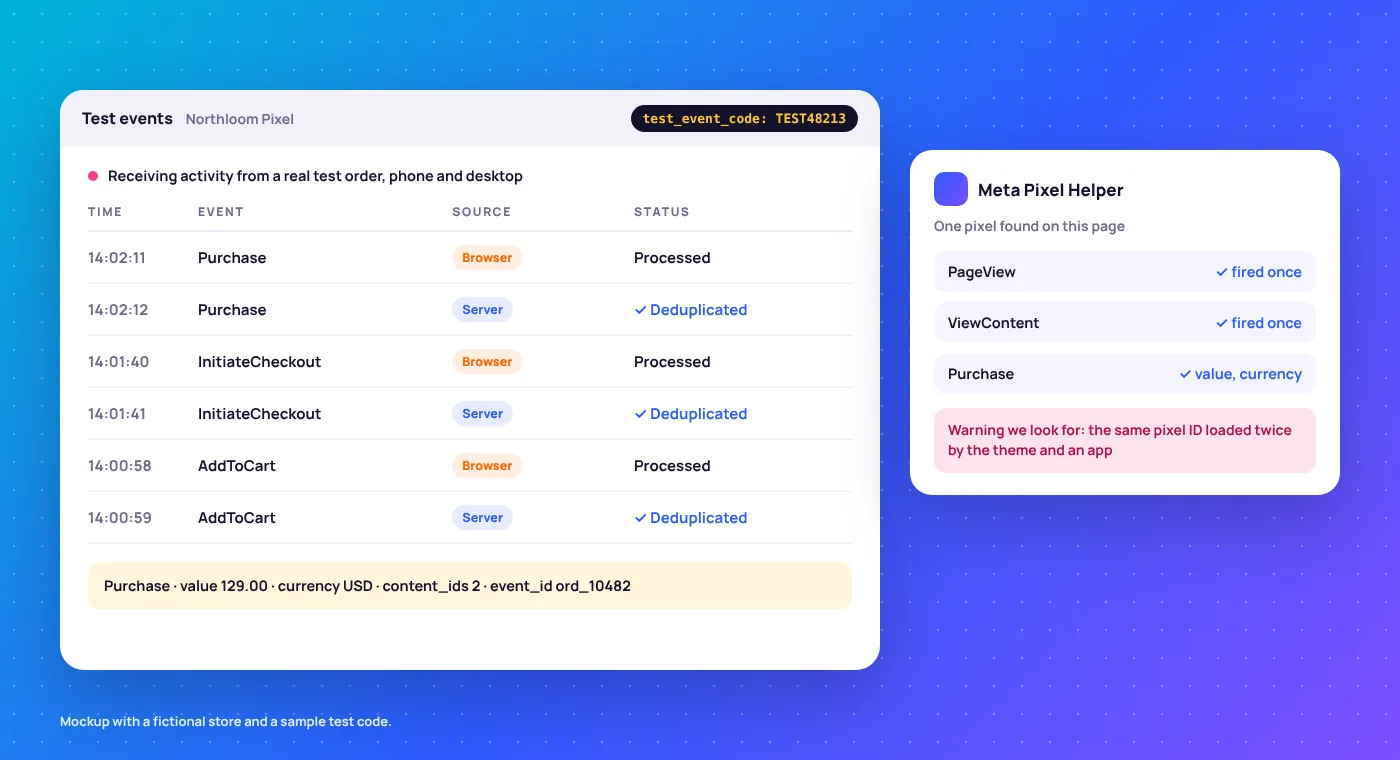
- Meta Pixel HelperOne pixel ID per pageeach event fires once, with no duplicate pixel warnings.
- Meta Pixel HelperParameters on every key eventvalue, currency and content IDs show the real basket.
- Test EventsBrowser and server both arriveeach server event shows as deduplicated against its browser twin.
- Test EventsConsent respecteddeclining cookies stops the browser events, and the server route follows suit.
- Events ManagerDiagnostics cleanno open warnings for missing parameters, mismatched IDs or bad currency codes.
- Events ManagerMatch quality after real trafficPurchase or Lead scores good or better a few days after launch.
- Your store or CRMCounts reconcileMeta purchases sit within a few percent of backend orders over a full week.
- Your store or CRMTest code removedthe test event code is out of the live server payload.
How We Set Up Meta Tracking.
A standard Meta Conversions API setup takes two to five working days including testing. Server-side builds take longer; we agree timelines upfront.
Tracking audit
Pixels, apps, GTM tags and domains checked for duplicates and gaps.
audit notesPlan the event map
Events, parameters and IDs tied to how you optimise.
event map sheetBuild both routes
Pixel and Conversions API with shared IDs and consent handling.
live setupTest and validate
The eight checks above, then a week of reconciled counts.
QA logDocument and monitor
Plain-English docs, and a re-test after every site change.
handover docReal Brands. Real Numbers.
Two accounts where tracking came before scaling. These are account results, not tracking metrics.

Shot Vet: fixed tracking first
Shot Vet was running Meta ads on broken conversion tracking, so decisions were being made on incomplete data. We fixed the data first, then built a lead system that could actually learn.

Mad Over Maldives: every lead tagged
Every enquiry from a short landing page form was tagged with its campaign and package, so each lead tied back to the ad that brought it in.
Mad Over Maldives figures are from Meta Ads Manager for 1 Jul to 10 Oct 2022, with the change in cost per lead confirmed by the client. Shot Vet results are client-reported. For more on long booking cycles see our travel industry marketing page, browse all client success stories or meet the 85+ brands we work with.
Complete Your Meta Ads Strategy.
These services build directly on clean tracking. For the full account picture, see our Meta Ads management service.
With trustworthy events, Meta retargeting ads usually improve first, because cart and form audiences finally fill. Practical tracking write-ups land on our marketing blog.
Common Questions Answered.
What founders and developers ask us most.
What is the Meta Pixel and the Conversions API?
The pixel is a browser script that reports actions like add to cart and purchase. The Conversions API sends the same events from your server. Together and deduplicated, they recover signal that blockers and privacy settings remove.
Do I still need the pixel if I use the Conversions API?
Yes, in almost every case. The browser supplies signals the server lacks, like the fbp cookie, and the server fills the browser’s gaps. Meta recommends both, with matching event IDs.
How does event deduplication work?
Meta compares the event name and event ID of browser and server events from the same pixel. If both match and the copies arrive within 48 hours of each other, it keeps one. If the IDs differ, are missing or are random on each side, you get double counting.
What is a good Event Match Quality score?
Scores run 0 to 10. Aim for good or better on Purchase and Lead. Page views score lower because visitors have not shared details yet.
How do I know if my pixel is broken?
Orders that do not match Ads Manager, leads firing on page load, a pixel loaded twice, missing purchase values or diagnostics warnings. A gap above 10 to 15 percent between backend orders and Meta purchases usually means missing or doubled events.
Can you set this up on Shopify, WooCommerce or custom sites?
Yes. Native integrations where they are reliable; GTM, server-side GTM or the Conversions API Gateway where they are not. On custom sites we work with your developer on a data layer.
How long does Meta Pixel and CAPI setup take?
Two to five working days for a standard Meta pixel setup including testing, longer for server-side builds. Match quality and reconciliation need about a week of real traffic before sign-off.
Is the Conversions API worth it for a small business?
Usually yes, and on Shopify or WooCommerce it is often a settings job. Smaller accounts have fewer conversions to learn from, so every missed one hurts more.
Is this compliant with GDPR and cookie consent?
We set tracking to respect consent on both routes, and apply Limited Data Use for US states where your policy requires it. Please confirm your legal obligations with a qualified adviser.
Can you send offline or CRM conversions to Meta?
Yes. Qualified, booked or won stages go from your CRM through the Conversions API, so Meta learns from customers, not just form fills.
Will better tracking lower my ad costs?
Often, because Meta optimises on accurate data. We do not promise a figure, but fixing missing or doubled events is one of the most reliable improvements an account can make.
What happens after setup?
You get the event map and documentation. If we manage your ads, we re-test after every site change; if not, we show your team how.
Fix Your Meta Tracking Before Your Next Campaign.
Book a free tracking audit. We check your pixel, Conversions API, deduplication and match quality, and show which events are missing, doubled or carrying the wrong value.