
Updated
Advanced website trackingMake Every Marketing Decision With Accurate, Reliable Data
Our server-side tracking setup moves your measurement onto your own subdomain, so Google, Meta, TikTok and LinkedIn get cleaner, consent-checked, deduplicated events, and your reports finally sit close to your real orders and leads.
- browser
- data.yourbrand.com
- GA4 · Ads · CAPI
What Is Server-Side Tracking?
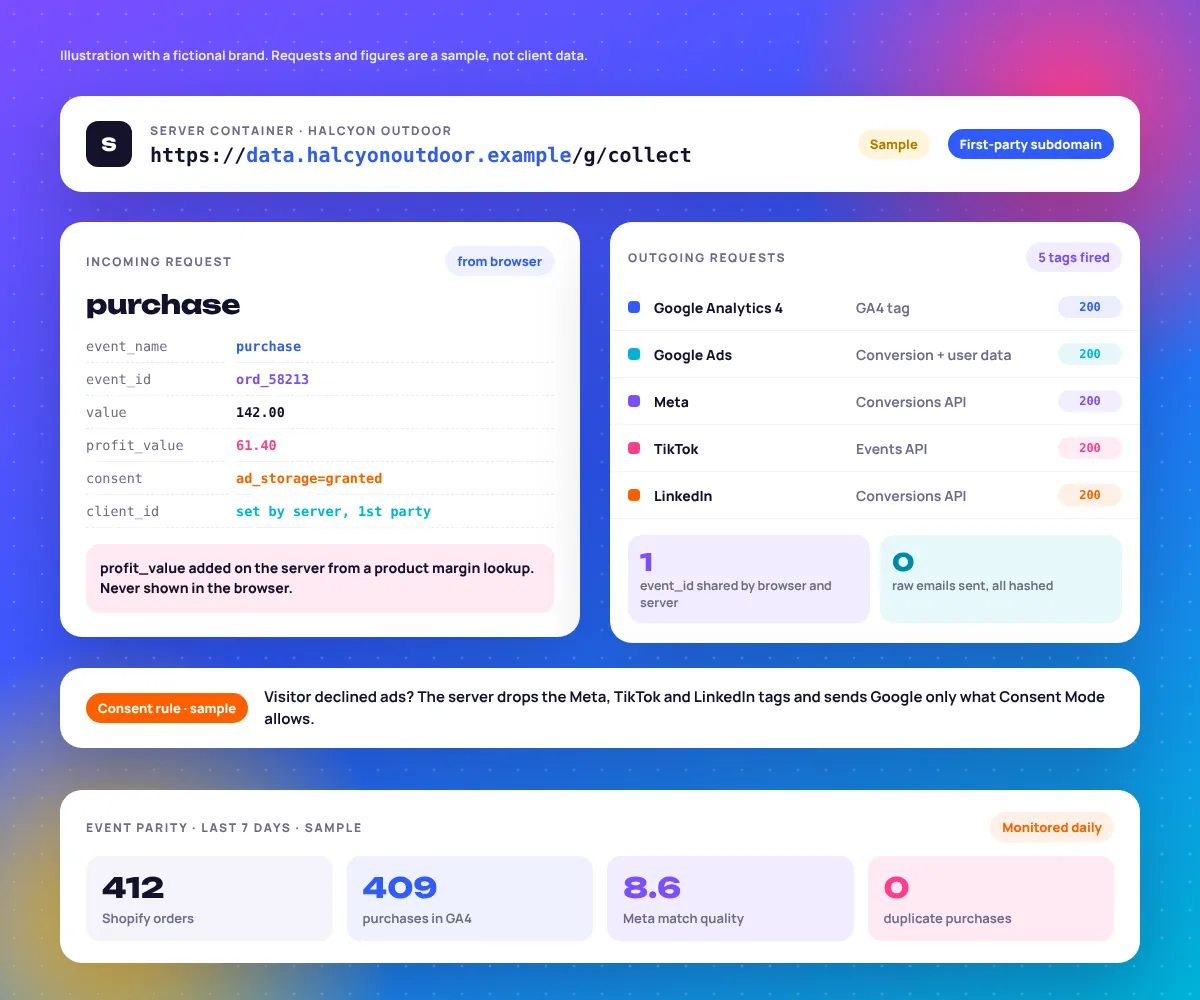
Server-side tracking is a measurement setup where your website sends each event once to a server container you control, usually server-side Google Tag Manager on a subdomain like data.yourbrand.com, which then decides what to forward to GA4, Google Ads, Meta and other platforms.
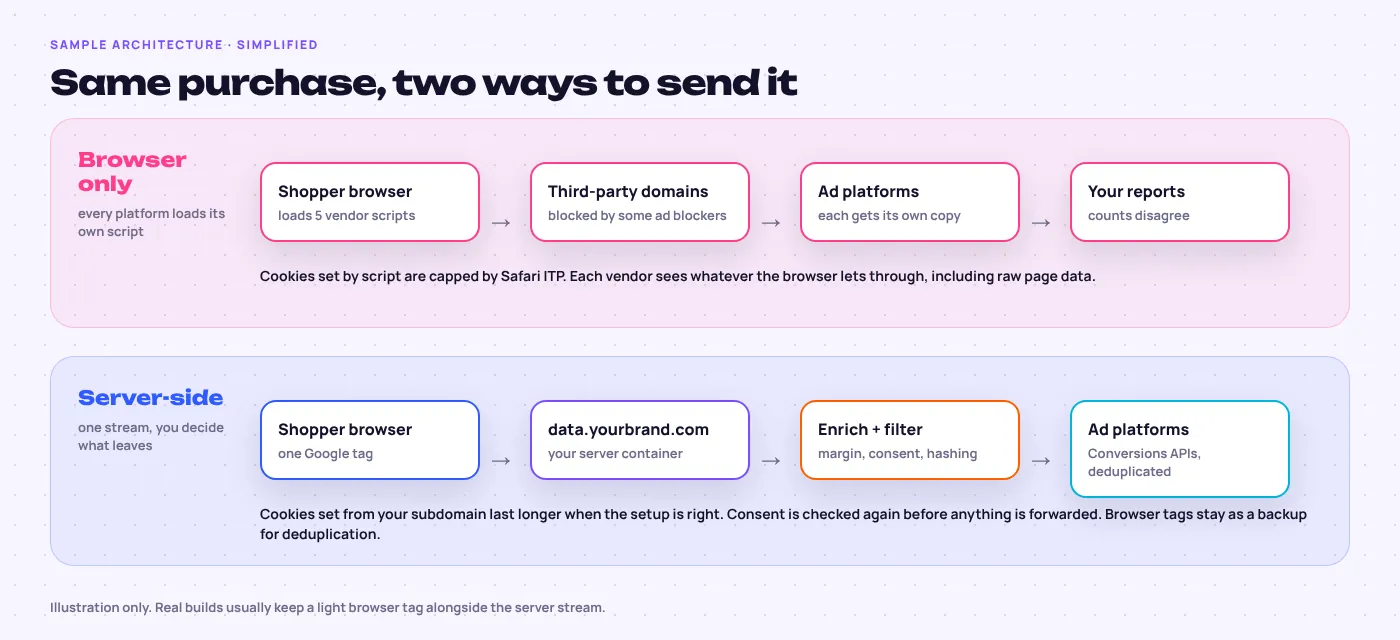
In a browser-only setup, every platform loads its own script and takes whatever the browser allows, which is why GA4, Meta and Shopify rarely agree. A server-side tracking setup does not create conversions. It stops you losing real ones and puts you in charge of what each vendor receives. It also forwards broken events faithfully, so the basics come first.
Start with a sister service if…
- You are not sure which actions count as conversions: conversion tracking setup.
- Your web container is a mess of old tags: Google Tag Manager setup.
- GA4 still runs on defaults: Google Analytics 4 setup.
- Only Meta is the problem: Meta Pixel and Conversions API setup.
Does Server-Side Tracking Bypass Ad Blockers?
Partly. Requests to your own subdomain are blocked less often than requests to well-known tracking domains, so you usually recover some lost events. Some blockers still catch first-party setups, and nothing on the server should override a visitor who refused consent. Treat it as resilience, not a loophole.
| Problem | Does server-side fix it? | What actually fixes it |
|---|---|---|
| Ad blockers stopping vendor scripts | Partly | First-party subdomain or Google tag gateway, plus Conversions APIs |
| Safari ITP shortening cookie life | Mostly | Server-set cookies on a subdomain whose IP matches your site |
| Visitor declined cookies | No | Nothing should. Google’s consent modelling fills some gaps |
| iOS App Tracking Transparency opt-outs | No | Hashed email and phone as match keys |
| Same order counted twice | Yes, if built right | One shared event_id on browser and server events |
| Wrong or missing order values | No | A correct data layer |
| Too many scripts slowing the site | Yes | Vendor tags moved to the server |
How Does Server-Side GTM Work?
Server-side GTM adds a second container that runs on a cloud server, typically Google Cloud Run or a managed host, mapped to a subdomain of your site. Your web container sends one stream of events to it; “clients” inside the server container read the requests, and server tags forward clean versions to each platform.
Google’s server-side Tag Manager documentation covers the parts. We build and document these five.
Web container
The Google tag and a lean data layer.
Server container
At least two instances, with logging on.
Subdomain
data.yourbrand.com, or a same-origin path.
Clients and tags
The GA4 client receives; server tags forward.
Lookups
Margins and customer flags, never exposed.
What is first-party tracking, and why do cookies matter?
First-party tracking means the data is collected on your own domain and the cookies belong to your site. Safari caps cookies written by JavaScript at seven days, and since Safari 16.4 it can cap server-set cookies too when the tracking server’s IP address does not match your site. So the hosting choice decides how long cookies last.
We confirm cookie lifetime in a real Safari session, not a diagram.
What is the Google tag gateway?
Google tag gateway for advertisers serves the Google tag and its measurement requests through your own domain, using your CDN or load balancer, such as Cloudflare or Google Cloud. It is a lighter step than full server-side GTM and covers Google’s tags only, with no server-side enrichment or Conversions APIs.
Google only? The gateway can be enough. Add Meta, TikTok or LinkedIn and a full server container usually wins.
Server-Side Conversions API for Meta, TikTok, LinkedIn and Google
Each platform has its own endpoint and its own rule for matching server and browser events, so nothing counts twice. The Meta Conversions API documentation and the TikTok and LinkedIn developer guides set these rules; this is how we apply them.
| Platform | Server endpoint | Deduplication | Match keys we send (hashed) |
|---|---|---|---|
| Meta | Conversions API | Same event_name and event_id as the Pixel | Email, phone, external ID, plus fbp and fbc cookies |
| TikTok | Events API | Shared event_id with the TikTok Pixel | Email, phone, external ID, ttclid |
| Conversions API | Shared event ID with the Insight Tag | Email, plus the first-party li_fat_id click ID | |
| Google Ads | Server conversion tag with enhanced conversions | Transaction ID on every purchase | Email, phone, address, plus gclid, gbraid or wbraid |
B2B brands can also send CRM deals back as offline conversions; see SaaS campaign management.
What Data Can You Add on the Server?
The server can add data the browser should never see: product margin, whether the buyer is new or returning, predicted lifetime value and stock status. It can also remove data that should never leave, such as emails sitting in page URLs. Ad platforms then optimise on business value, not just checkout totals.
event: "purchase"
event_id: "ord_58213"
value: 142.00
currency: "USD"
page_location: ".../thanks?email=ana@mail.example"
items: [ "HX-TENT-2P", "HX-MAT-01" ]event: "purchase" event_id: "ord_58213" value: 142.00 currency: "USD" page_location: ".../thanks" profit_value: 61.40new_customer: trueltv_band: "high"user_data.em: sha256(...)
Struck line removed on the server. Highlighted lines added from a margin and customer lookup. Fictional order.
Should you bid on profit instead of revenue?
Often, yes, if your margins vary a lot between products. Sending profit as the conversion value lets Target ROAS chase money you keep, not volume on low-margin items. The trade-off: platform ROAS figures drop, so everyone reading the reports needs to know what the value now means.
New customers and lifetime value
A server lookup against your customer list tells Google Ads who is new, so it can bid more for them. For repeat-purchase brands on our ecommerce marketing accounts, an LTV band beats a single order value.
How Do You Enforce Consent on the Server?
Your consent banner sets the four Consent Mode v2 signals in the browser, and those signals travel with every event to the server. Each server tag then checks them again before firing, so a declined visitor is never forwarded to Meta, TikTok or LinkedIn, and Google only gets what Consent Mode permits.
- Gate 1: signals inAll four Consent Mode v2 signals read from every request.
- Gate 2: tag rulesEvery server tag fires only on the consent state it needs.
- Gate 3: data outEmails hashed, IPs trimmed, sensitive URL parameters removed.
- Gate 4: regionServer location matched to your customers, documented.
BigQuery, Data Warehousing and Attribution Modelling Basics
Every platform claims credit for the same sale. A warehouse holds one copy of the truth: GA4’s BigQuery export, server events streamed from sGTM, and orders or CRM deals joined on a transaction ID. Attribution modelling then becomes a question you answer with your data, not a dashboard setting you accept.
Standard GA4 properties can export up to one million events a day to BigQuery, plus a streaming option. First click, linear, time decay and position-based models were retired in Google Ads and GA4 in 2023, leaving data-driven attribution as the default and last click as the alternative. Here is how the main approaches compare.
| Method | Question it answers | What it needs | Use it when |
|---|---|---|---|
| Data-driven attribution | Which Google clicks get credit? | Clean conversion events in Google Ads or GA4 | Day-to-day bidding and reporting |
| Multi-touch attribution (MTA) | Which cross-channel paths lead to sales? | User-level paths in a warehouse | Checking overlap, with consent gaps |
| Marketing mix modelling (MMM) | What does each channel add over months? | Usually two to three years of weekly spend and sales data | Planning across channels; Google Meridian and Meta Robyn are open-source options |
| Incrementality testing | Would these sales have happened without the ads? | A holdout or geo test, or a platform Conversion Lift study | Proving a channel is truly adding sales |
Server-Side Tracking Monitoring: What We Check and When
Tracking breaks quietly. A checkout app update can halve purchase events overnight while platforms keep bidding on the broken numbers.
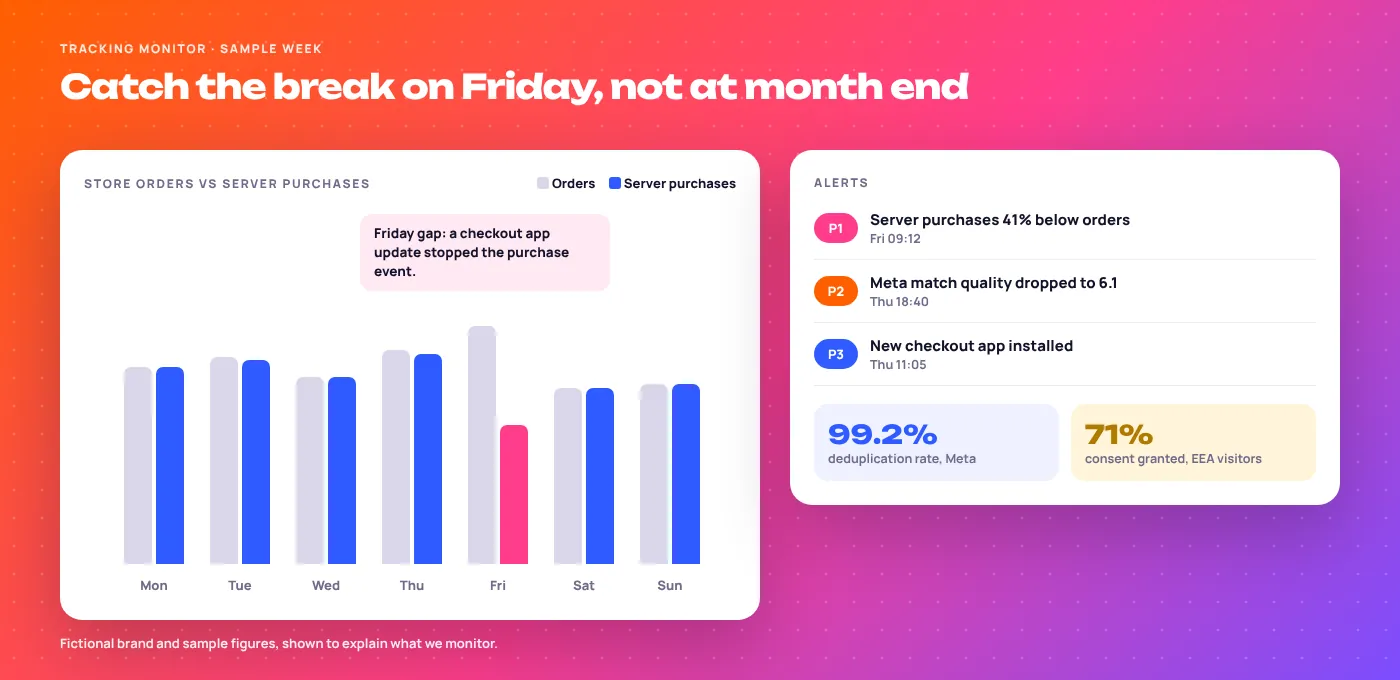
- DailyServer purchases or leads against real orders or CRM records.
- DailyServer container errors and response codes from each platform.
- WeeklyMeta Event Match Quality, deduplication and enhanced conversions diagnostics.
- WeeklyConsent rate by region.
- Every releaseA real test order through Preview on both containers.
- QuarterlySafari cookie lifetime and what each vendor receives.
Our Server-Side Tracking Setup, Step by Step
Each step names who does the work, so your developer knows when they are needed.
Audit what exists
Read-only access everywhere. A week of orders matched against every report.
EmergingAdsAgree the event plan
Events, values, platforms, and what counts as a real sale.
BothFix the data layer
Order IDs, values and customer fields pushed reliably on every key page.
Your developer, our specDeploy the server
Server container in your cloud account, plus DNS.
EmergingAds, one DNS change from youBuild server tags
GA4, Google Ads, Meta, TikTok and LinkedIn, with consent rules and event IDs.
EmergingAdsAdd enrichment
Margin, new customer and LTV lookups, only where they will change bidding.
BothRun in parallel
Old and new side by side, checked daily against real orders.
EmergingAdsHand over and monitor
Documentation, access in your name, and the monitoring runbook above.
EmergingAds
What Two Real Accounts Taught Us About Tracking
EmergingAds is a performance marketing agency founded in 2021 in Gurugram, India, working with 85+ brands across the US, UK, UAE, India and Australia. Neither case below is a server-side build. Both show why the counting has to be right before anything else.
220,674 “conversions”, 10,271 purchases
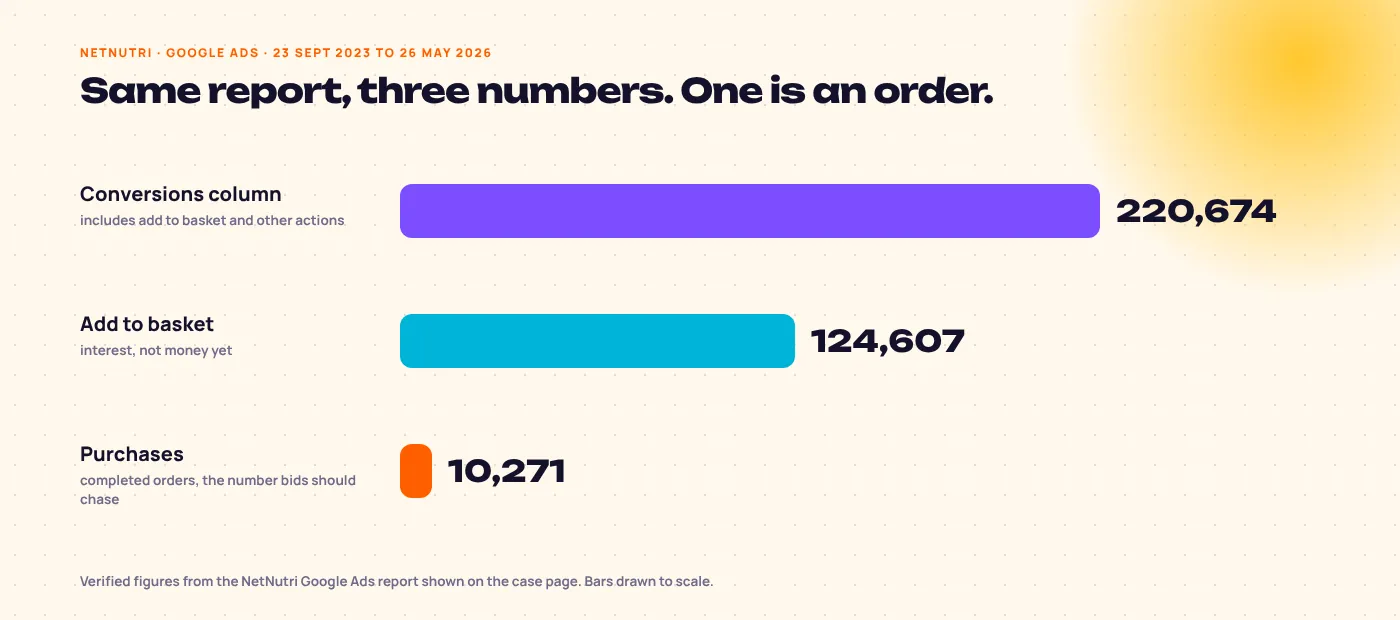
NetNutri’s Google Ads report showed 220,674 conversions because the column counted add to basket and other actions. We track purchases as their own column and steer by them: 10,271 purchases and $794,281 in conversion value, 2.21x per dollar, from Shopping and Performance Max.
Read the NetNutri supplement Google Ads case study →Fixed tracking first, then scaled
Shot Vet’s Meta ads were running on broken conversion tracking. We repaired the data before touching campaigns, then rebuilt Meta and added Google.
In under 3 months, per the case page, which describes a tracking repair, not a server-side build. More in healthcare marketing.
Read the Shot Vet case study →Related Tracking and Google Ads Services
Advanced tracking feeds better signals into our Google Ads management service and every other paid channel we run.
Advanced Tracking: Frequently Asked Questions
Is server-side tracking worth it for my business?
Usually yes, if you advertise on two or more platforms and sell or capture leads online. A server-side tracking setup then gives you fewer lost events, one deduplicated stream and control over what each vendor receives. On Google alone with modest traffic, the Google tag gateway and enhanced conversions may be enough.
How long does server-side tracking take to set up?
Typically 10 to 14 working days for a full build, plus about a week of parallel running. Data layer fixes are the usual cause of delays.
Why is my GA4 data different from my ad platform reports?
Because each tool counts differently: attribution models, conversion windows, consent and duplicates all differ. Server-side tracking narrows the gap but never fully closes it.
Does server-side tracking work without cookie consent?
No, and it should not. Consent signals travel to the server and every tag respects them. For Google, Consent Mode v2 can model some of the conversions you cannot observe.
What is the difference between server-side GTM and the Google tag gateway?
The gateway only routes Google’s tags through your domain. Server-side GTM is a full server container that can enrich, filter and forward events to Meta, TikTok, LinkedIn and others as well.
Do I still need the Meta Pixel if I use the Conversions API?
Yes, in most setups. Meta recommends running both with a shared event ID, so it deduplicates and keeps browser-only signals.
Does server-side tracking work on Shopify?
Yes. Shopify’s Customer Events can pass checkout events to your server container, and order webhooks can confirm purchases from the backend.
Who owns the server container and the data?
You do. The container, cloud project and BigQuery dataset sit in your accounts, and we work with access you grant.
Can you send offline or CRM conversions as well?
Yes. Qualified leads and closed deals from your CRM can go back to Google Ads, Meta and LinkedIn, so bidding learns from revenue instead of form fills.
Do I need marketing mix modelling?
Not until you run several channels steadily for years. Most brands get more from clean tracking plus one incrementality test.
Ready to Make Decisions With Accurate Data?
Book a free tracking audit. We compare your platform numbers with your real orders or leads and list what to fix first.
- audit.scope
- GTM, GA4, Google Ads, Meta, TikTok, LinkedIn
- audit.output
- A prioritised fix list, browser and server