
Your Shopify Store, Managed for Maximum Revenue
Our Shopify store management services cover the work that keeps a store selling after launch: product uploads, collections, theme updates, apps, promotions, Shopify Markets and Flow. Every change is built on a draft, tested, logged and reported back to you each month.
- Catalogue
- Theme
- Promotions
- Apps
- Markets + Flow
- Backups + reports
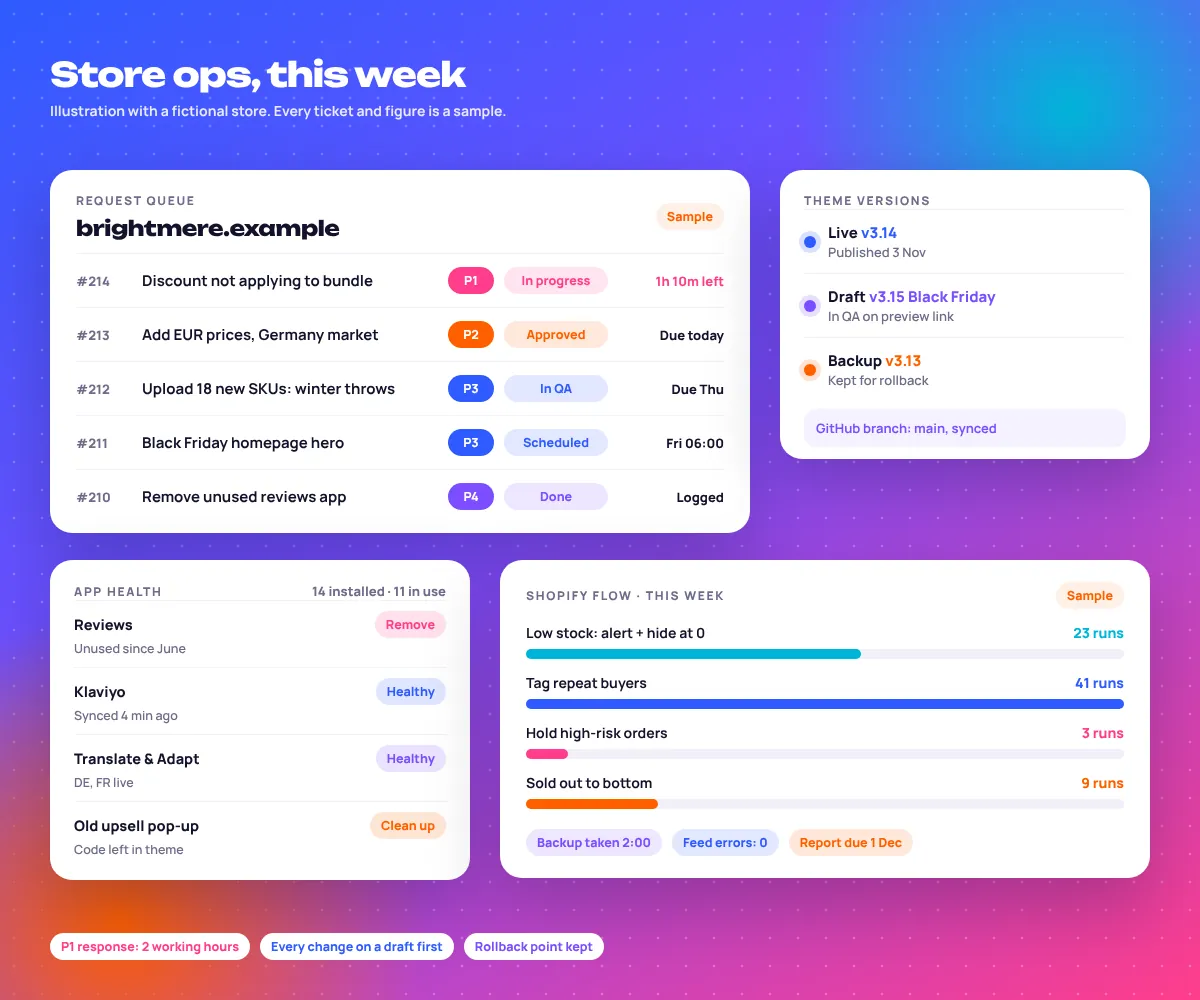
What Is Shopify Store Management?
Shopify store management is the ongoing monthly work of keeping a live Shopify store accurate, stable and ready to sell: products and collections, theme changes, apps, discounts, inventory, international markets, automations, backups and reporting, handled by one accountable team. Think of it as store operations, not design.
Most stores do not break in one go. They drift: an old pop-up app still loading, collections showing sold-out products first, a theme edit nobody can trace. Shopify store maintenance is the routine that stops the drift.
EmergingAds is a performance marketing agency founded in 2021 and based in Gurugram, India, working with brands in the US, UK, UAE, India and Australia; we have served 85+ brands. Because we also run the ads, we see straight away when a store change hurts paid traffic.
How is it different from setup, speed and conversion work?
Setup, speed and conversion work are projects with a clear end date. Shopify website management is the monthly service that runs after them, keeping what those projects built in good order and handling every change request your team sends in between.
| Service | When | Main job |
|---|---|---|
| Store setup | Before launch | Build, wire tracking, configure payments and policies |
| Speed optimisation | A project, usually 1 to 2 weeks | Core Web Vitals, app weight, images, scripts |
| Conversion optimisation | Test cycles | Product pages, cart and checkout friction, A/B tests |
| Store management | Every month | Catalogue, theme versions, apps, promos, Markets, Flow, backups, reports |
What Our Shopify Store Management Services Include
Monthly Shopify management runs on the default rhythm in this task table. We adjust it to your catalogue, launches and markets.
| Area | Daily | Weekly | Monthly |
|---|---|---|---|
| Catalogue | New product requests, price and copy fixes | Merchant Center feed errors, missing images and alt text | Duplicate SKUs, empty metafields, product taxonomy |
| Collections | As requested | Sold-out products pushed down, sort order on top collections | Search filters, synonyms, seasonal collections |
| Theme | Broken sections, banner swaps | Preview checks on mobile for live campaigns | Theme update review, version log, unused code |
| Apps | Failed syncs and alerts | Klaviyo, reviews and feed apps connected | App audit: keep, replace or remove |
| Promotions | Live discount checks during sales | Upcoming codes built and scheduled | Expired discounts cleared, combination rules reviewed |
| Stock + Markets | Low-stock and oversell alerts | Inventory by location | Market prices, currencies, translations |
| Backups + reports | Backup app, if used | Change log updated | Exports, theme copy, monthly report |
Shopify Store Maintenance, Area by Area
Where the work happens in Shopify admin, and what we check there.
Shopify product uploads and catalogue hygiene
Products › Import
Small drops go in by hand. Big ones go through Shopify’s product CSV import, which accepts files up to 15 MB, after we check handles so an upload never overwrites a live product by accident.
- One SKU per variant, no duplicates
- Product category set from Shopify’s standard taxonomy
- Alt text, weights and metafields filled before publishing
Collections and merchandising
Products › Collections › Conditions
Automated collections save hours but quietly fill up with the wrong things. We review conditions on your top collections and keep best sellers and in-stock items at the top.
- Search & Discovery app: filters, synonyms, boosts
- Seasonal collections built ahead of the date
- Product recommendations checked on key pages
How should Shopify theme updates be handled?
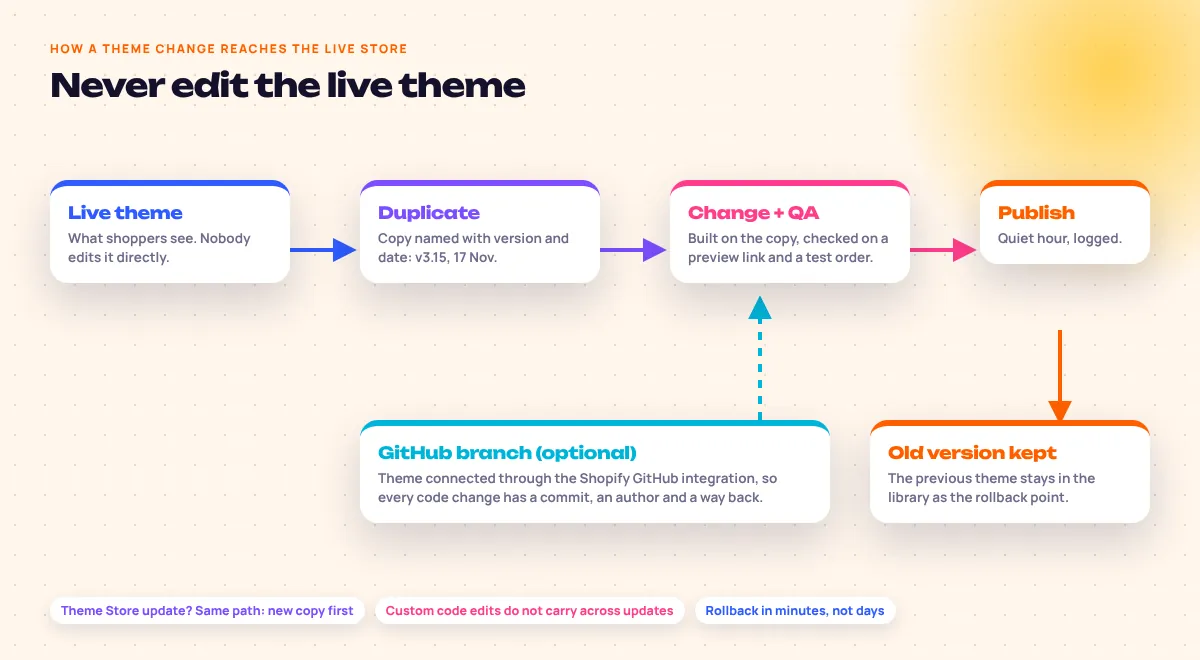
On a copy, never on the live theme. Duplicate the published theme, name it with a version and date, make and test the change on a preview link, then publish. The old theme stays in your library as an instant rollback.
With Shopify theme updates from the Theme Store, Shopify brings across theme editor settings but not custom code edits, so we compare and carry them over by hand. For stores with regular code work we connect the theme through the Shopify GitHub integration so every edit has an author and a history.
Apps and integrations health
Settings › Apps and sales channels
Every app gets a monthly verdict: keep, replace or remove. Uninstalling is not the end, because some apps leave code in the theme that still loads. Heavy leftovers go to our Shopify speed optimisation work.
- Klaviyo, reviews and Google & YouTube app connected
- Staff and collaborator access reviewed
Promotions and discount setup
Discounts › Create discount
Most sale-day problems are discount problems: codes that stack when they should not, or end at midnight in the wrong time zone. We build promotions days ahead, set start and end times, and test them with a real cart.
- Combination rules for product, order and shipping discounts
- Automatic discounts checked against active codes
Inventory and Shopify Markets
Settings › Markets
Selling abroad means local currencies, rounding, translated content and duties set per market. We keep market prices and translations (through Shopify’s Translate & Adapt app) in step with the main catalogue, as covered in Shopify’s Help Center on selling internationally.
- Stock by location, low-stock thresholds
- Market-specific prices checked after each catalogue change
Shopify Flow automation
Apps › Flow › Create workflow
Shopify Flow automation handles the jobs a person forgets. Typical workflows we run: alert the team and hide a product when stock hits zero, tag repeat buyers for Klaviyo, and hold high-risk orders for review. See Shopify’s Flow documentation for what triggers are available.
Backups and change logs
Products › Export · Themes › Download
Shopify keeps the platform running, but restoring your own data is on you. We keep monthly exports of products and customers, a downloaded theme copy before every publish and, for larger catalogues, a backup app. Every change goes into a shared log.
How Often Should a Shopify Store Be Updated?
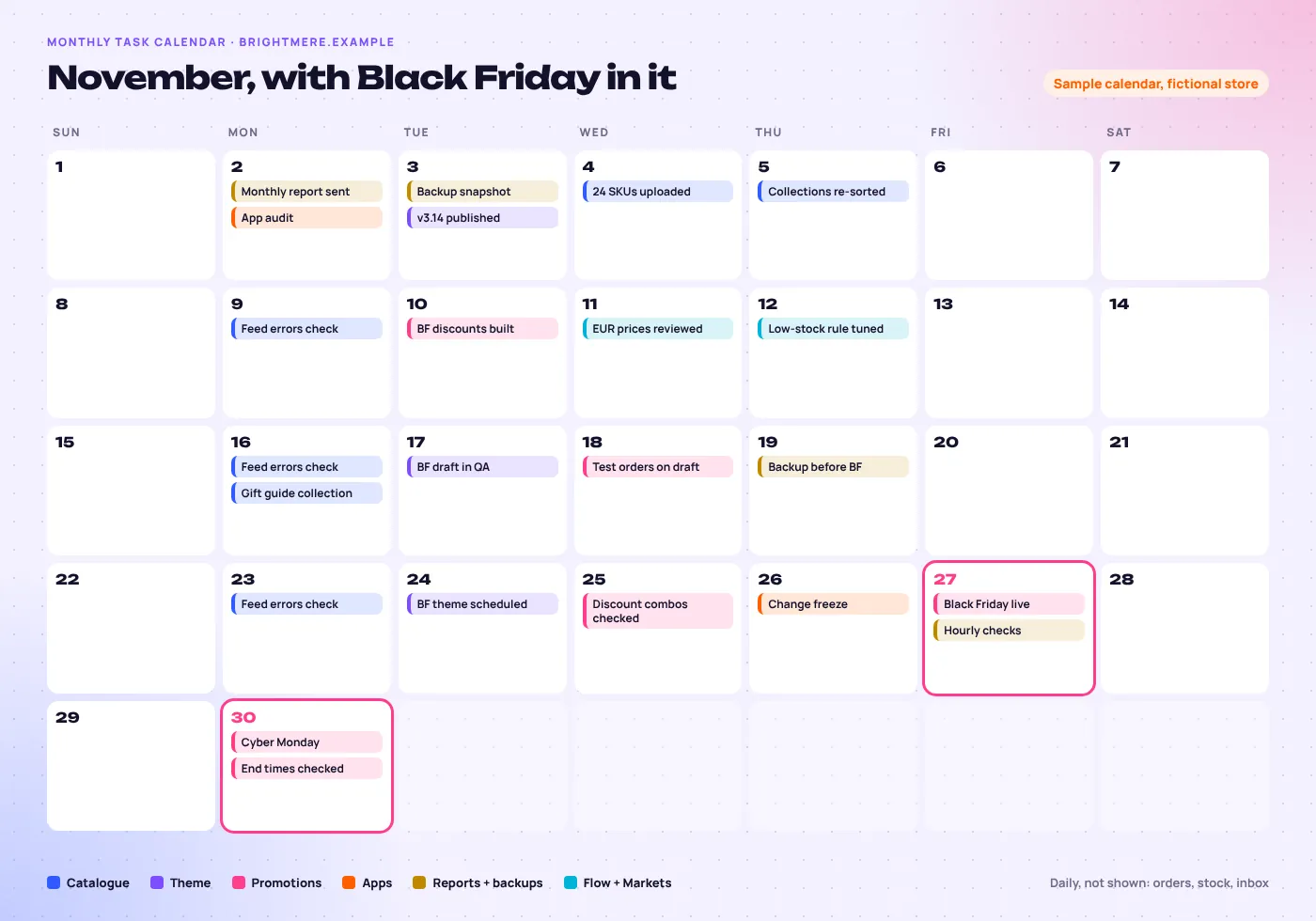
Small updates weekly, structural work monthly, and nothing risky in the week before a big sale. Products, prices and banners change as often as the business needs; theme updates and app changes go into a planned monthly slot so they can be tested properly.
Why a change freeze before Black Friday?
Because that is when stores break. We finish the sale theme, discounts and test orders by the Thursday before, then stop installing apps or editing code until the sale ends.
What goes in the monthly report?
- Sessions and conversion rate
- Average order value
- Returning customer rate
- Top and slow products
- Changes shipped, with dates
- Apps added or removed
- Open tickets and SLA times
- Next month’s plan
How Does Shopify Store Management Work, From Request to Live?
You raise a request, we triage it against an SLA, build it on a draft or duplicate theme, test it, publish it at a quiet hour and log it. Anything touching checkout, prices or discounts gets your sign-off before it goes live.
- You
Raise the request
On the shared board, in plain words. A screenshot or a voice note is fine.
- EmergingAds
Triage and start the clock
We set the priority, P1 to P4, and confirm the time it will be answered by.
- Both
Scope and approve
For anything that changes prices, discounts or checkout, we write what will change and you approve it.
- EmergingAds
Build on a draft
Duplicate theme, draft product or scheduled discount. The live store is untouched.
- EmergingAds
Test
Phone and desktop, two browsers, and a test order when the cart or checkout is involved.
- Both
Publish at a quiet hour
You get the preview link first, then we publish when traffic is lowest.
- EmergingAds
Log and keep the rollback
The change log gets the date, the reason and the previous version.
How long does onboarding take?
About 14 days. In that time we get collaborator access, take full exports and a theme copy, list every app and what it does, fix anything urgent, and send a baseline report so the first monthly report has something to compare against.
Support SLAs for Shopify Maintenance Services
Shopify maintenance services are only as good as the response when something breaks on a Saturday sale. So every request gets a priority and a response time you can hold us to.
Response means a person replying with a plan, not an auto-reply. P1 issues also go to WhatsApp. Fix times depend on the cause: a broken third-party app may need its own developer.
If you also want the store to convert better, that runs as Shopify conversion optimisation alongside management, with its own test plan.
- P1
- Store down or checkout brokenPayments failing, site not loading
- 2 hours
- P2
- Sale or feature not workingDiscount wrong, app failing, wrong prices
- Same day
- P3
- Content and product changesUploads, banners, collection edits
- 2 working days
- P4
- Improvements and new featuresNew sections, apps, automations
- Planned monthly
Times are first response. Every ticket and its time is listed in the monthly report.
Shopify Results From Brands We Market
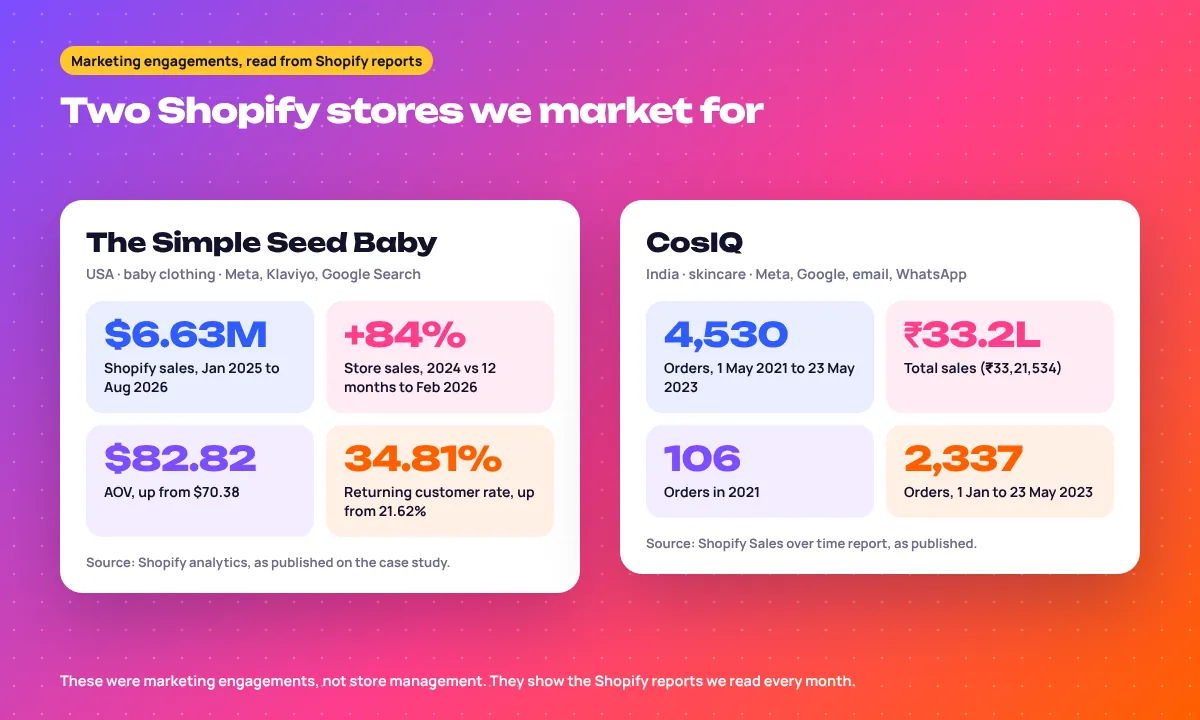
To be clear, these two brands are marketing clients, not store management clients. Their numbers come straight from Shopify reports, the same data we read for every managed store.
The Simple Seed Baby, USA
We run Meta Ads, Klaviyo email and Google Search for this baby clothing brand. Its store took $6.63M from January 2025 to August 2026, and the returning customer rate rose from 21.62% to 34.81%. Read the Simple Seed Baby case study.
CosIQ, India
Paid ads, email and WhatsApp automation for a skincare brand. Its Shopify report shows 4,530 orders and ₹33,21,534 in sales from May 2021 to May 2023. Read the CosIQ skincare case study.
More results by industry are on our client success stories page, and the full list of brands is on our clients.
Related Shopify and Ecommerce Services
Shopify services
Planning a rebuild rather than ongoing care? Start with our Shopify and WordPress website design and development service, then move to monthly management after launch.
Shopify Store Management Questions
What is Shopify store management?
It is the ongoing monthly care of a live Shopify store. That covers products, collections, theme changes, apps, discounts, inventory, Markets, Flow automations, backups and reporting, handled by one team on a set schedule.
How does Shopify store management work with an agency?
You send requests to a shared board and we handle them against agreed response times. Every change is built on a draft or duplicate theme, tested, published at a quiet hour and logged, and you get a monthly report.
Is Shopify store management worth it for a small store?
Yes, once the store has more products, apps or promotions than one person can keep tidy. If you spend hours a week on uploads and fixes, or a sale has gone wrong because of a discount error, it usually pays for itself in time saved.
Do you work with Shopify Plus?
Yes. We manage standard Shopify and Shopify Plus stores, including Plus features such as expansion stores and checkout customisation where the store has them.
Can you manage our store alongside our in-house team?
Yes, and that is the most common setup. Your team keeps customer service and buying decisions, and we handle the technical and catalogue work with clear owners for each task.
Do you handle Shopify product uploads?
Yes. Product uploads, variants, images, alt text, metafields and SEO titles are part of the monthly service, by hand for small drops and by CSV import for large ones.
How do you decide which Shopify apps to keep?
We audit every app during onboarding and monthly after that. Each one is kept, replaced or removed, and nothing is uninstalled without your approval and a check for leftover theme code.
Will theme updates break my customisations?
Not if they are done properly. Shopify carries theme editor settings into an updated theme but not custom code edits, so we update on a copy, move the custom code across and test before publishing.
Does Shopify back up my store automatically?
No, not in a way you can restore with one click. Shopify keeps the platform running, but store owners are expected to keep their own exports, so we take product and customer exports and a theme copy every month.
Do you also run ads for the stores you manage?
Often, yes. EmergingAds is a performance marketing agency, so many managed stores also use our Meta, Google or email services, and store changes are timed around campaigns.
Ready to Get More From Your Shopify Store?
Book a free store audit. We review your theme versions, app stack, catalogue and discounts, then send the first five things we would fix in month one.
