
WhatsApp Automation That Responds Faster Than Your Competitors
Most leads message two or three businesses at once and book with whoever answers first. As a WhatsApp marketing agency, we build bots, broadcasts and CRM links that answer in seconds, ask the right questions, and hand serious buyers to your team with the whole conversation attached.
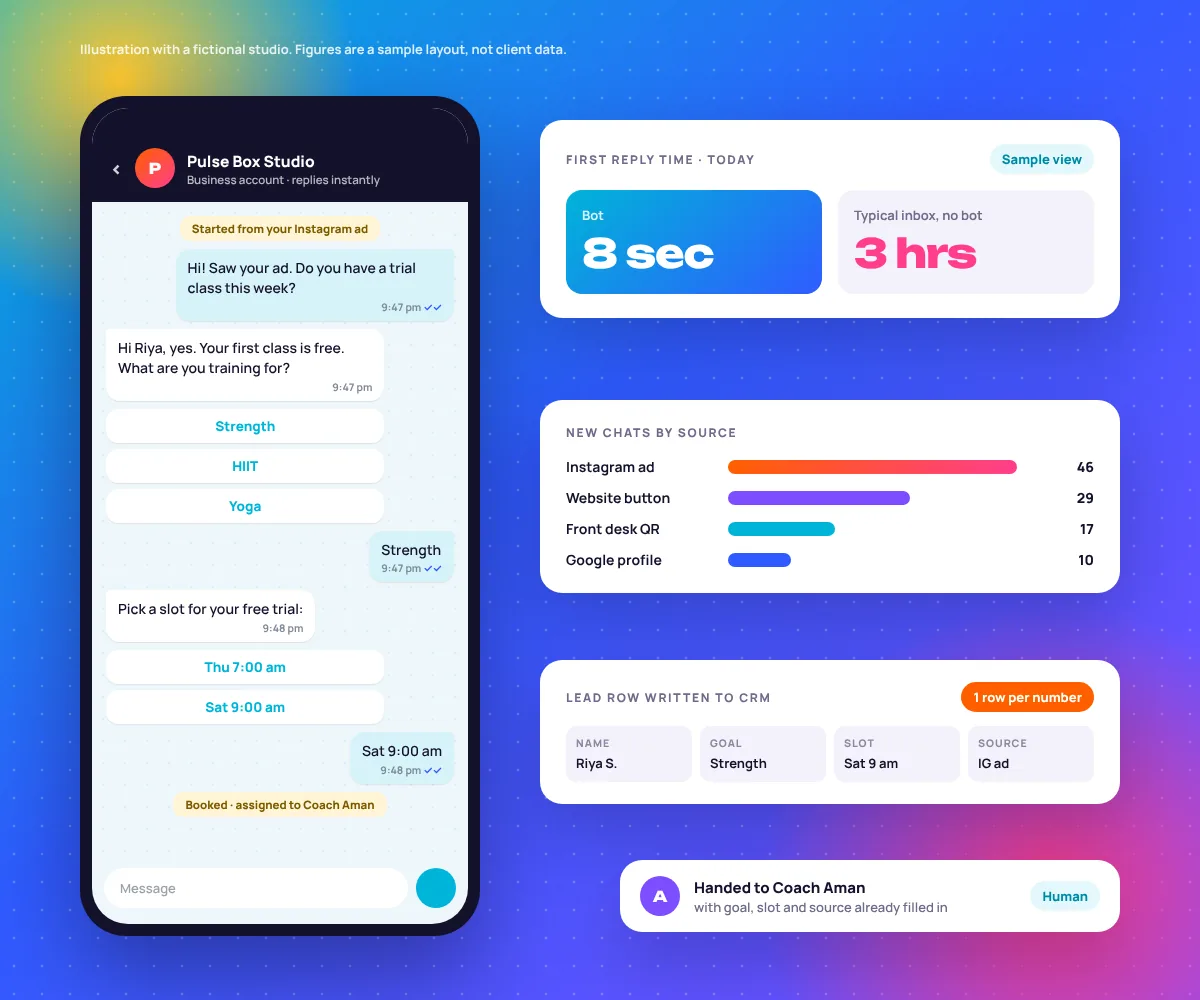
The First Reply Usually Wins the Lead
Same lead, same Tuesday night, two businesses. One has a bot that knows when to step aside. The other has a phone on the front desk.
An illustrative timeline, not a client log. The pattern is real though: the longer a lead waits, the more likely the chat ends with “thanks, already joined somewhere.”
Full WhatsApp Automation Management
Six jobs, one team. We set up the WhatsApp Business API, design the flows, connect them to where your leads live and keep the whole thing healthy after launch.
You do not need all six on day one. A studio with 40 enquiries a week usually starts with a bot, a CRM link and a shared inbox. Broadcasts and cart flows come once the basics run on their own.
Chatbot Flow Design
Menus, quick replies and question paths written for how your customers actually talk. Three questions max before they get something useful. Chatbot setup
Broadcast Campaigns
Approved templates sent to opted-in segments, with frequency rules so people do not block you. Broadcast campaigns
CRM & Sheets Integration
Every chat becomes one clean row in HubSpot, Zoho or Google Sheets, updated as the lead moves. Built with Zapier, Make or native connectors.
Dashboard & Reporting
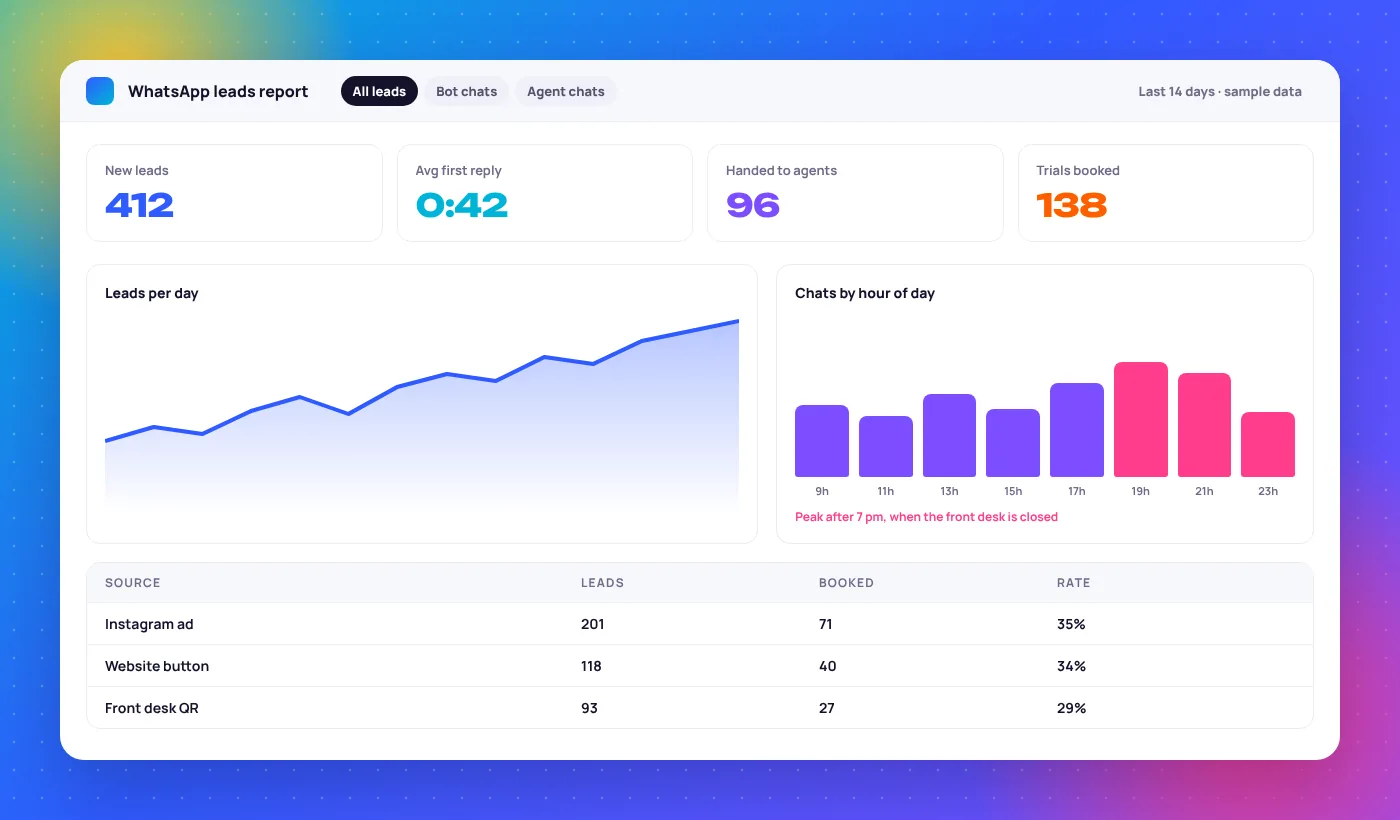
Response times, lead volume, sources and bookings in one Looker Studio report your team will open. Looker Studio dashboards
Abandoned Cart & Order Updates
Cart reminders, order confirmations and delivery updates from Shopify or WooCommerce, sent as the right template category. WhatsApp for ecommerce
Team Inbox & Handoff Setup
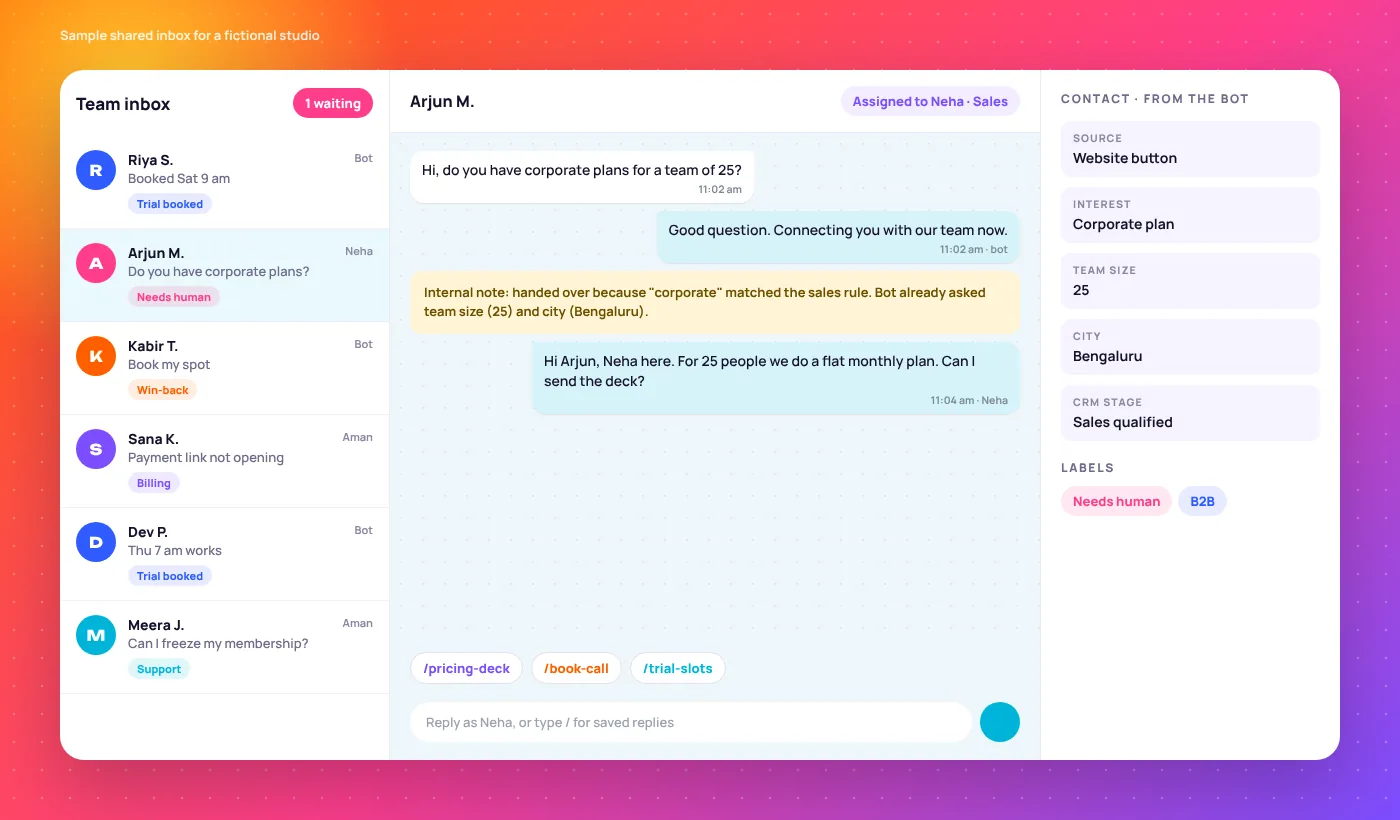
Shared inbox, agent roles, routing rules and saved replies, so a human picks up with the full context.
What a Good Bot-to-Human Handoff Looks Like
The bot does the boring part fast. The moment a chat needs judgement, a person takes over and never has to ask “sorry, what was your name again?”
The bot answers
Price, timings, location and offers. The questions your front desk answers 30 times a day, answered at 7:31 pm on a Sunday.
intent = pricingsource = ig_adThe bot qualifies
Two or three questions that decide who handles the chat and how urgent it is. Every answer is saved as a field, not buried in a transcript.
branch = HSRcall_time = after 6 pmA human closes
The chat lands with the right person, tagged and assigned, with every answer on screen. They open with the call time, not with questions.
owner = Nehastage = call bookedWhen we hand over: the person types “human” or “agent”, asks something off-menu twice, mentions a high-value keyword like “corporate” or “bulk”, or it is a complaint. Bots that refuse to let go are the fastest way to lose a buyer.
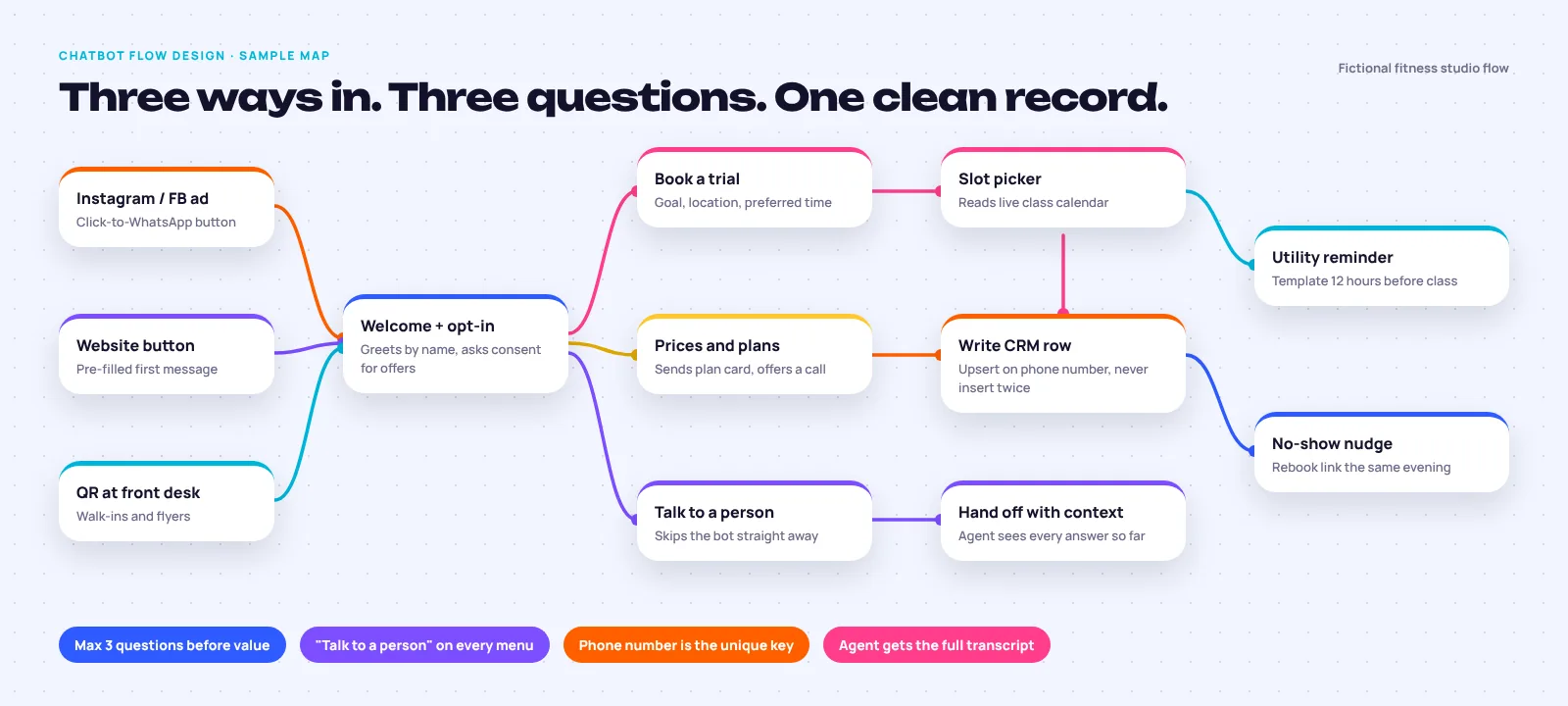
Four Message Types, and When to Use Each
Once you use the API, every template message falls into one of four categories, and each one has its own rules for what it can say and when you can send it. Getting the category right is half the work.
- Use it for
- Offers, launches, win-backs, event invites. Anything that sells.
- The rule
- Needs marketing opt-in, and counts as marketing even inside an open chat.
- Use it for
- Booking reminders, order and delivery updates, payment receipts.
- The rule
- Keep it transactional. Add a promo line and Meta can reclassify it as marketing.
- Use it for
- One-time passwords and login codes. Nothing else.
- The rule
- Fixed wording. Meta sets the text, so there is little to write.
- Use it for
- Any free-form reply while the customer’s chat is open, bot or human.
- The rule
- Free-form replies within 24 hours of the customer’s last message. After that, you need a template to restart.
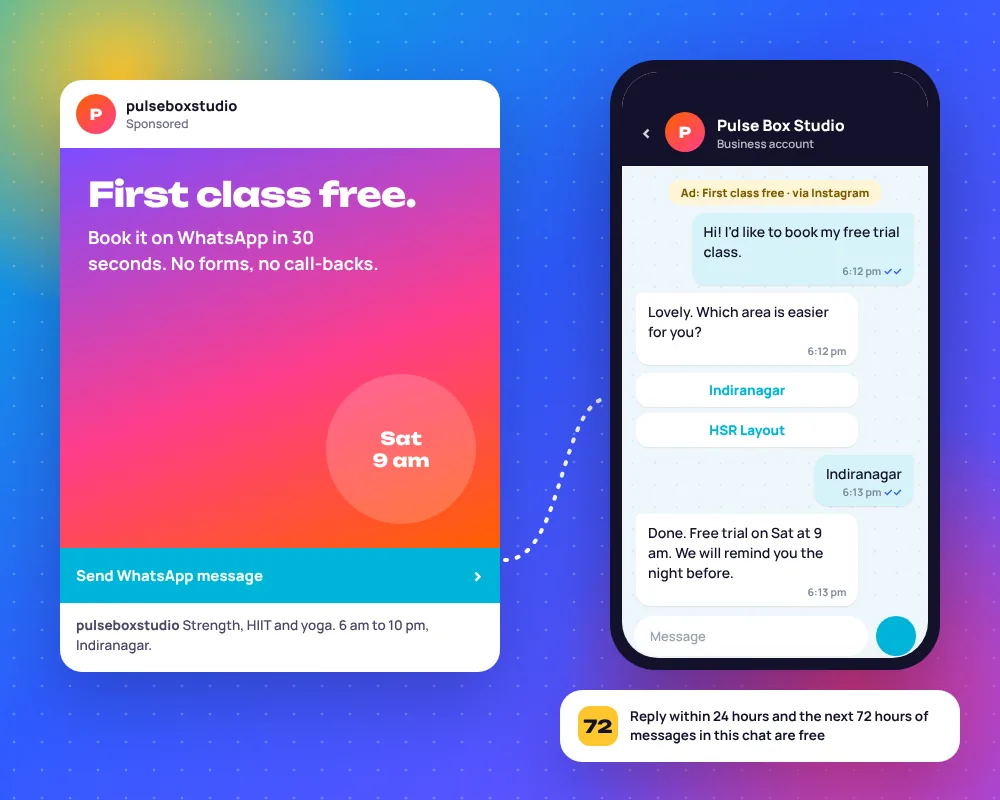
Chats that start from a Click-to-WhatsApp ad get a 72-hour messaging window if you reply within 24 hours. Meta updates its category rules a few times a year, so we check the current ones for your markets during the audit.
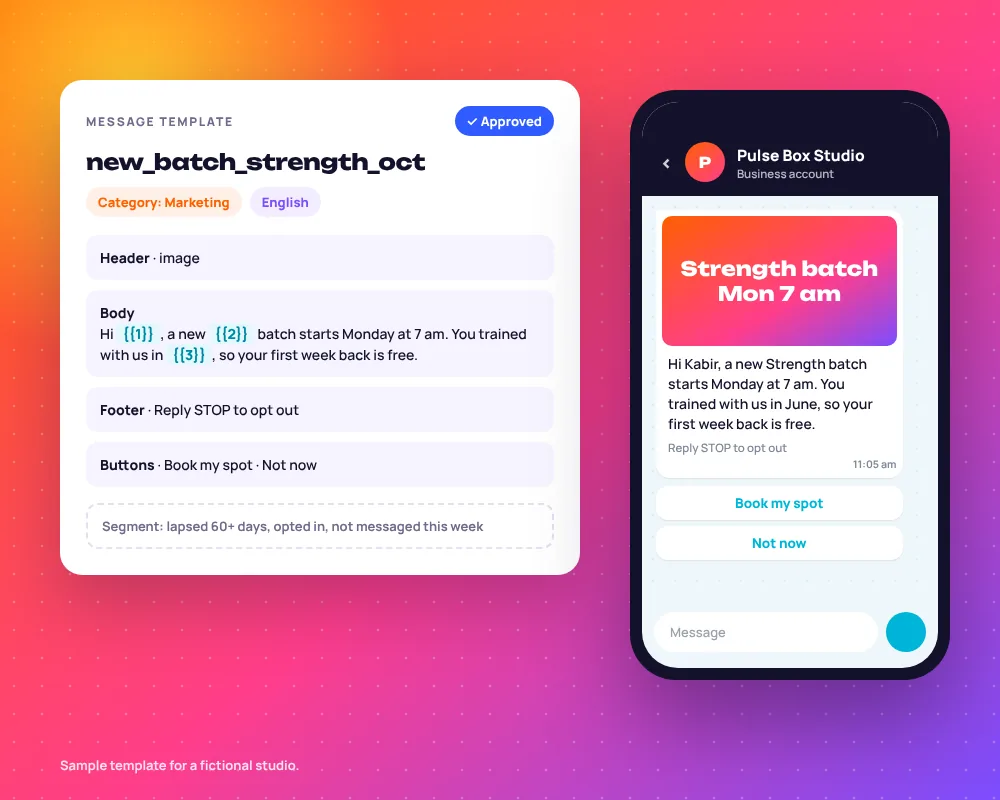
Send to Segments, Not to Your Whole Contact List
A broadcast to everyone is how numbers get blocked. Every block and report drags your quality rating down, and a low rating cuts how many people you can message each day.
Our default rule: no one gets more than one marketing message a week from you, and every template has an opt-out button. Meta also limits how many marketing messages one person receives from all businesses, so a smaller, sharper send often lands better than a big one.
One Lead, One Row, Updated as the Chat Moves
Here is the same lead’s CRM row at five moments. Highlighted cells are what got filled in at that step. The row never duplicates, because the phone number is the key.
| Moment | Source | Name | Goal | Slot | Owner | Stage |
|---|---|---|---|---|---|---|
| 6:12:04 pmTaps the ad | IG ad · First class free | empty | empty | empty | empty | New chat |
| 6:12:31 pmAnswers the bot | IG ad · First class free | Priya R. | Strength | empty | empty | Qualified |
| 6:13:05 pmPicks a slot | IG ad · First class free | Priya R. | Strength | Sat 9:00 am | empty | Trial booked |
| 6:40 pmAgent confirms | IG ad · First class free | Priya R. | Strength | Sat 9:00 am | Coach Aman | Trial booked |
| Sat 10:05 amAfter class | IG ad · First class free | Priya R. | Strength | Sat 9:00 am | Coach Aman | Trial attended |
Why Businesses Choose Our WhatsApp Marketing Agency
We are a performance marketing agency first. A WhatsApp bot is only worth building if it turns ad spend into booked customers you can count.
Instant Lead Response
Under a minute, day or night, including the late-evening hours when the front desk is closed and most ad leads come in.
Built to Avoid Duplicate Data
We design the data model before the bot. One person is one record, so your CRM count matches real people and your sales team stops calling the same lead twice.
Data You Can Actually Use
Response times, lead volume, sources and bookings in one report. You see which ads fill chats with buyers and which just fill the inbox.
Results That Speak for Themselves
Numbers from the WhatsApp builds we have shipped, read like messages coming in.
How a Fitness Brand Fixed Broken Lead Capture on WhatsApp
What was happening
- The WhatsApp bot was creating duplicate lead entries, so the lead sheet overstated demand and the team followed up with the same people more than once.
- Context got lost between the bot and human agents. Agents picked up chats without the answers the bot had already collected.
What we changed
- Rebuilt the flow architecture so each path had a clear start, end and handoff point.
- Fixed the duplicate-row bug at source, in the flow itself, rather than cleaning the sheet afterwards.
- Connected a two-tab Google Sheets setup to Looker Studio, so both tabs report as one.
- each bot step adds a new row
+ one row per phone number, updated at each step
- agent starts the chat from scratch
+ agent sees every answer the bot collected
How We Build Your WhatsApp Automation
Seven days from kickoff to a live bot, then weekly tuning. Each step ends with something you can look at, not just a status update.
1. Flow Mapping & Audit
We read your last few hundred chats, list the ten questions people actually ask, and audit any bot, number or integration you already have.
- You get: a flow map and the field list for your CRM
2. Bot Build & Integration
API number set up and verified, flows built on WATI or your platform, templates submitted to Meta, and the CRM or Sheets link wired in.
- You get: a test number to try every path yourself
3. Testing & Team Training
We break it on purpose: wrong answers, voice notes, the same person messaging twice. Then a 45-minute session with your team on the inbox and handoffs.
- You get: a one-page guide for your agents
4. Optimize & Report
We read drop-off points in the flow, rewrite the steps where people stop replying, test templates and send a short note on what changed.
- You get: the live dashboard and a weekly summary
Opt-In and Template Approval, Done Properly
Every business-started message on the API goes through a template Meta has reviewed. This is what a healthy review queue looks like, including the mistakes we see most.
trial_reminder_12hUtilityApprovedTied to a booking the customer made. Plain, no promo line.
new_batch_strengthMarketingApprovedClear sender, one offer, opt-out button included.
trial_reminder_promoUtility to MarketingRecategorisedSomeone added “20% off this week” to a reminder. Meta moved it to marketing, with marketing rules.
win_back_v1MarketingPausedSent to the full list. Blocks spiked and Meta paused the template. Rebuilt for the lapsed segment only.
hey_check_thisMarketingRejectedVague wording, no business context and a variable as the first word. Rewritten and approved the same day.
Opt-in on your website
A separate, unticked checkbox on forms and checkout. It names WhatsApp and your business.
Send me class updates and offers from Pulse Box Studio on WhatsAppOpt-in inside the chat
People who message you can be asked in the first reply. We save the answer as a field, with a timestamp.
Yes, send me offers here. I can reply STOP anytime.Opt-in offline
Front-desk QR codes and sign-up sheets, with the wording on the poster. Imported lists without consent never go into broadcasts.
Scan to get class reminders and offers on WhatsAppWho Answers What in Your Shared Inbox
One WhatsApp number, many people. We set up roles so chats reach the right person and nobody replies to the same customer twice.
The Bot
First responder- Gets chats when
- Always first, and alone after hours.
- Hands over when
- Asked for a human, stuck twice, or a sales keyword appears.
Sales Agent
Closer- Gets chats when
- The lead is qualified, asks about price twice or wants a call.
- Sees
- Every bot answer, ad source and CRM stage.
Support Agent
Existing customers- Gets chats when
- The number matches a member or a past order.
- Handles
- Billing, freezes, order problems, complaints.
Manager
Oversight- Sees
- All chats, waiting times and who is overloaded.
- Steps in when
- A chat waits longer than your agreed reply time.
WhatsApp automation
- WATI WhatsApp automation
- WATI business automation
- WhatsApp chatbot setup
- WhatsApp broadcast campaigns
- WhatsApp for ecommerce
- Gallabox WhatsApp automation
- Interakt WhatsApp automation
- Looker Studio dashboards
- WhatsApp and lead generation success stories
- Travel marketing with WhatsApp enquiries
Tools we connect
WhatsApp Marketing FAQs
The questions founders ask before they hand us their WhatsApp number.
What is the difference between WhatsApp Business App and the Business API?
The Business App is free and built for one person replying by hand on a phone, which is fine for a small shop. The Business API is what you need for automation: chatbots, broadcasts to opted-in lists, CRM integrations and several agents on one number. It runs through a platform such as WATI, with Meta approving each template message.
Do you build the chatbot yourselves or use templates?
We build every flow ourselves, custom to your business. We start from your real chats and the questions people actually ask, not a generic bot that greets everyone with a ten-item menu.
Is WhatsApp broadcasting compliant with Meta’s policies?
Yes, when it is done properly. People must opt in to hear from you on WhatsApp, every business-started message uses a template Meta has approved, and marketing templates include a way to opt out. We set up the opt-in capture and the templates, and keep broadcasts to segments so your quality rating stays healthy.
Can WhatsApp automation integrate with our CRM?
Yes. We connect to HubSpot, Zoho, Google Sheets and others, using native integrations where they exist and Zapier or Make where they do not. Each person becomes one record, updated as the chat moves, with the ad source saved from the first message.
What platform do you use for WhatsApp automation?
Primarily WATI. We also build on Gallabox, Interakt and other platforms when a client already uses one or needs something specific, such as a feature that suits their market better.
How fast can a chatbot respond compared to a human agent?
A bot replies in seconds; across our builds the average bot response time is under a minute. A human team, even a good one, often takes minutes in working hours and hours after them. The bot covers that gap and qualifies the lead, so when your team replies they already know who they are talking to.
Can you fix an existing broken WhatsApp bot?
Yes, and it is a big part of our work. Common problems are duplicate leads, chats that lose context when a human takes over, dead-end menus and broken CRM links. We audit the flow, fix the cause at source, and keep your existing number and history.
Do you provide reporting on WhatsApp performance?
Yes. We build a Looker Studio dashboard showing lead volume, response times, handoffs, bookings and results by source, plus broadcast delivery and replies. It updates automatically, so you are not waiting on a monthly PDF.
What businesses benefit most from WhatsApp automation?
Businesses with a lot of inbound chats: fitness studios, ecommerce brands, clinics, salons, real estate, education and any appointment-based business. If your team answers the same ten questions every day, or leads arrive after hours, automation pays back quickly.
What’s included in ongoing WhatsApp management?
Flow updates as your offers change, new templates and approvals, broadcast planning and sending, CRM and integration checks, quality rating monitoring, the live dashboard and a short weekly note on what we changed and why.
Can we run Click-to-WhatsApp ads into the bot?
Yes, and it is one of the best lead sources for WhatsApp. Meta and Instagram ads open a chat with a pre-filled message, the bot replies straight away, and the ad and campaign are saved to the lead’s record. If you reply within 24 hours, that chat stays open for 72 hours, which gives you room to follow up.
Ready to Respond to Every Lead in Under a Minute?
Send us your current WhatsApp setup, even if it is just the Business App on one phone. We will map where leads are slipping through and what a bot would fix first.
now ✓✓