
A WhatsApp Chatbot That Qualifies Leads Around the Clock.
Updated
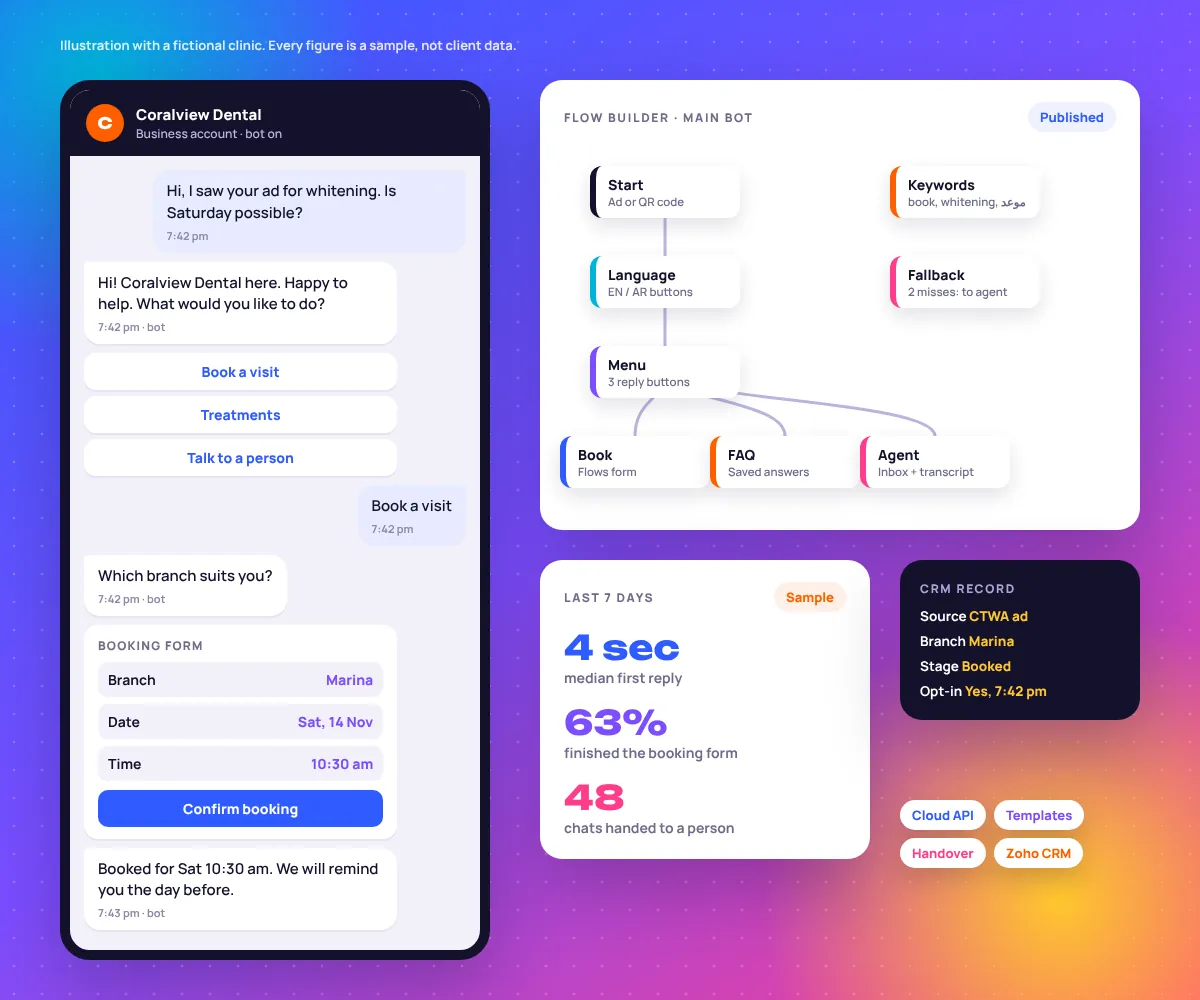
Our WhatsApp chatbot setup puts an official bot on your business number that replies in seconds, asks the three questions your sales team needs, books the slot and hands the chat to a person with every answer already on screen. At 2 am, on a Friday, in Arabic or English.
What Is a WhatsApp Chatbot, and Which WhatsApp Do You Need?
What is a WhatsApp chatbot?
A WhatsApp chatbot is an automated conversation on your business WhatsApp number that replies instantly, asks structured questions with buttons, saves the answers to your CRM and hands the chat to a person when needed. It runs on Meta’s WhatsApp Business Platform through an approved provider.
EmergingAds is a performance marketing agency founded in 2021 in Gurugram, India, working with 85+ brands in the US, UK, UAE, India and Australia. We build a WhatsApp chatbot for business clients whose ads fill inboxes faster than a front desk can answer.
WhatsApp Business app vs WhatsApp Business API chatbot
| What you need | WhatsApp Business app | WhatsApp Business Platform (Cloud API) |
|---|---|---|
| Automation | Greeting message, away message, quick replies | Bot flows, keywords, Flows forms, AI replies |
| Team | One phone plus a few linked devices | Shared inbox with agents and assignment rules |
| Buttons and lists | Not available | Reply buttons, list messages, call-to-action buttons |
| CRM and store links | Labels and a catalogue only | CRM, Sheets, Shopify and booking tools via API |
| Messages you start | Broadcast lists to saved contacts | Approved templates to opted-in contacts |
| Setup | Download the app and verify a number | Meta Business verification and a provider |
To run a WhatsApp Business API chatbot, most businesses go through a Business Solution Provider (BSP) such as WATI, Interakt, Gallabox, AiSensy, 360dialog or respond.io, which wrap Meta’s API in a flow builder and team inbox. We are not tied to one and often keep the provider you already use.
The bot is one piece of our wider WhatsApp marketing service.
How Does a WhatsApp Chatbot Work?
A WhatsApp chatbot works as a decision tree triggered by the first message. It reads where the chat came from (an ad, QR code or website button), offers a short button menu, follows the branch the person taps and saves each answer as a field. Every branch ends in a booking, a CRM record or a human.
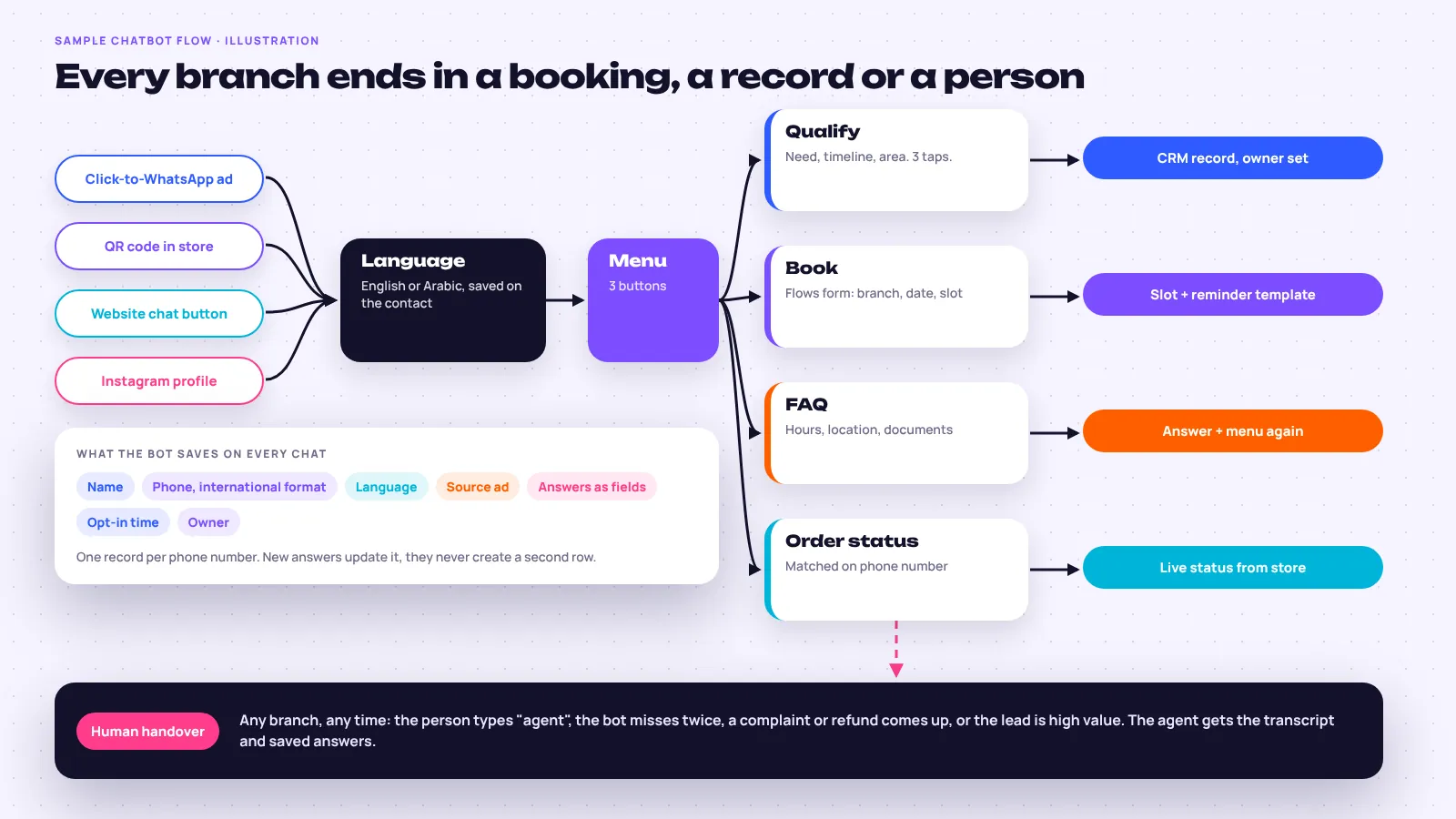
WhatsApp lead qualification bot
- Starts on
- A Click-to-WhatsApp ad or “details”
- Asks
- Need, timeline, area. Three taps.
- Ends with
- CRM record, stage “Qualified”, owner set
- Human when
- “Corporate”, “bulk” or another big-deal answer
Booking bot
- Starts on
- “Book”, or a trial ad
- Asks
- Branch, service, date and slot in one Flows form
- Ends with
- Confirmed slot, reminder the day before
- Human when
- No slot fits
FAQ bot
- Starts on
- The “Questions” button or a keyword
- Covers
- Hours, location, parking, documents
- Ends with
- The answer plus the menu again
- Human when
- Two misses on one question
Order status bot
- Starts on
- “Order”, “delivery”, “parcel”
- Asks
- Nothing if the phone matches an order
- Ends with
- Live status from Shopify or WooCommerce
- Human when
- Damage, refund or a return
Buttons first, keywords second, AI third
Reply buttons allow 3 options of up to 20 characters, list messages up to 10 rows. Keywords catch people who type anyway, in both languages; AI handles only what neither can. Cart and post-purchase messages live on our WhatsApp for ecommerce page.
Opt-In, Message Templates and the 24-Hour and 72-Hour Windows
Do you need opt-in for a WhatsApp chatbot?
Yes, for any message your business sends first. Meta’s WhatsApp Business Messaging Policy requires opt-in before you contact someone, and it must name your business. When a customer messages you first, your bot can reply freely for 24 hours from their last message.
We collect opt-in on forms, from ads and at QR codes, store its time and source on the contact, and a STOP reply removes people from marketing automatically.
What is the 72-hour window on Click-to-WhatsApp ads?
When someone starts a chat from a Click-to-WhatsApp ad or a Facebook Page button and you reply within 24 hours, Meta keeps that conversation open for 72 hours. Inside it you can follow up, templates included, without waiting for the person to write again. Miss the first 24 hours and the window never opens.
The ad’s details arrive with the first message, tagging the CRM record. Running instant forms too? Our Meta lead generation ads team makes both ask the same questions.
Template categories the bot uses
- UtilityConfirmations, reminders, order updates.
- MarketingOffers and win-backs. Needs marketing opt-in.
- AuthenticationOne-time codes only.
Each language version is reviewed separately, often within minutes. Opted-in contacts later feed our WhatsApp broadcast campaigns.
WhatsApp Chatbot Use Cases by Industry
What we build first in the industries we work in most.
| Industry | The bot handles | A person handles | Number we watch |
|---|---|---|---|
| Clinics and dental | Treatment menu, branch, slot booking, pre-visit forms | Medical questions, nervous patients | Booked visits that show up |
| Real estate | Area, property type, ready or off-plan, viewing slot | Negotiation and financing questions | Viewings per 100 chats |
| Fitness studios | Trial booking, branch, class timings | Membership questions, complaints | Trial show-up rate |
| Travel | Destination, month, who is travelling, hotel style | Itinerary changes and the quote | Time from enquiry to quote |
| Ecommerce | Order status, return start, size help | Damaged items, refunds | Chats solved without an agent |
More on how WhatsApp fits each sector: healthcare marketing, real estate marketing and travel industry marketing.
When Should a WhatsApp Chatbot Hand Over to a Human?
Hand over the moment the chat needs judgement: the person asks for someone, the bot misunderstands twice, a complaint or refund comes up, or the lead looks high value. The agent gets the transcript; the customer gets a reply time, never silence.
The bot keeps it
- Repeat questions: hours, location, documents.
- Qualifying: three questions, each a button.
- Booking and rescheduling inside a WhatsApp Flows form.
- Order status matched on the phone number.
- Out of hours: “a planner will reply by 10 am”.
A human takes it
- “Agent”, “human” or “call me” typed at any step.
- Two misses on the same question.
- Complaints, refunds, anything emotional.
- High-value answers such as group, corporate or bulk.
- Quotes and negotiation.
A WhatsApp chatbot with human handover only works if someone picks up, so routing sits with your marketing automation, with alerts when a chat waits.
WhatsApp Flows, CRM Sync, AI Replies and Arabic Bots
What are WhatsApp Flows?
WhatsApp Flows are native forms inside the chat: several screens with dropdowns, date pickers, checkboxes and text fields that open over the conversation. One Flow replaces five typed questions, and connected to your system it can show live slots or stock.
Built to Meta’s WhatsApp Flows documentation.
WhatsApp chatbot CRM integration
For WhatsApp chatbot CRM integration, the bot writes to Zoho CRM, HubSpot, Salesforce or Google Sheets via a native connector, Make or Zapier. Our rules:
- Match on phone number, never insert a second row.
- Answers land as fields, not buried in a transcript.
- Stage changes trigger the next message.
Can a WhatsApp chatbot use AI?
Yes, within limits. AI can read typed questions and answer from your own approved content. Meta’s WhatsApp Business Solution terms, in force since January 2026, do not allow a general-purpose AI assistant as a business number’s main purpose, so our AI stays on your business.
- Answers only from a knowledge base you approve.
- No medical or legal advice, and no offers it was not given.
- Hands to a colleague when unsure; every reply logged.
Arabic WhatsApp chatbot for the GCC
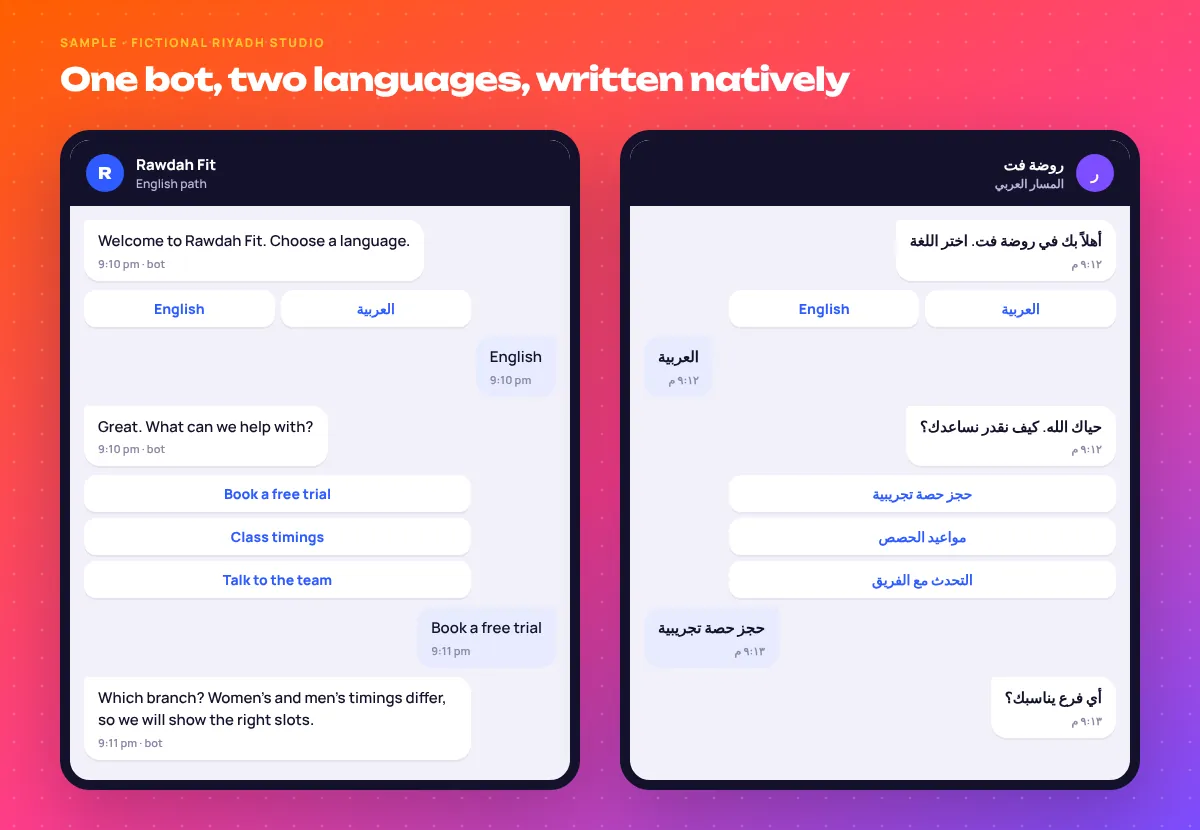
An Arabic WhatsApp chatbot in Saudi Arabia, the UAE and the wider GCC starts with a language choice, and the bot remembers it on the contact. We write Arabic natively, not translated, keep Flows right to left and get templates approved in both languages.
Out-of-hours rules follow local weekends (Friday and Saturday in Saudi Arabia, Saturday and Sunday in the UAE) and Ramadan timings.
WhatsApp Chatbot Setup in 8 Steps
How long does it take to set up a WhatsApp chatbot?
Most bots go live in about 14 days. Meta Business verification and display name review run in the first days, flow writing and template approval in week one, then the build, CRM sync and testing in week two. Two languages, Flows with live data or custom CRM work add time.
Read your last 100 chats
The ten questions people really ask, and the ads behind them.
We doNumber, verification and provider
Meta Business verification, display name, Cloud API via a provider.
With youMap the flow on paper
Every path ends in a booking, a record or a person.
With youWrite the bot and templates
Bot lines, button labels and templates in each language.
You reviewBuild the flows
Menus, keywords, Flows forms, fallbacks, optional AI.
We doConnect CRM and ads
Phone-number matching, ad source fields, owner routing, alerts.
We doTest from a clean number
Every branch, both languages, out of hours, “agent” and STOP.
With your teamLaunch and read the logs
Daily for two weeks, then weekly, with a monthly report.
Ongoing
Other channels a bot can hand off to: automation channels.
Two WhatsApp Builds, With Real Numbers
Verified figures only, from client reports and Meta Ads Manager.
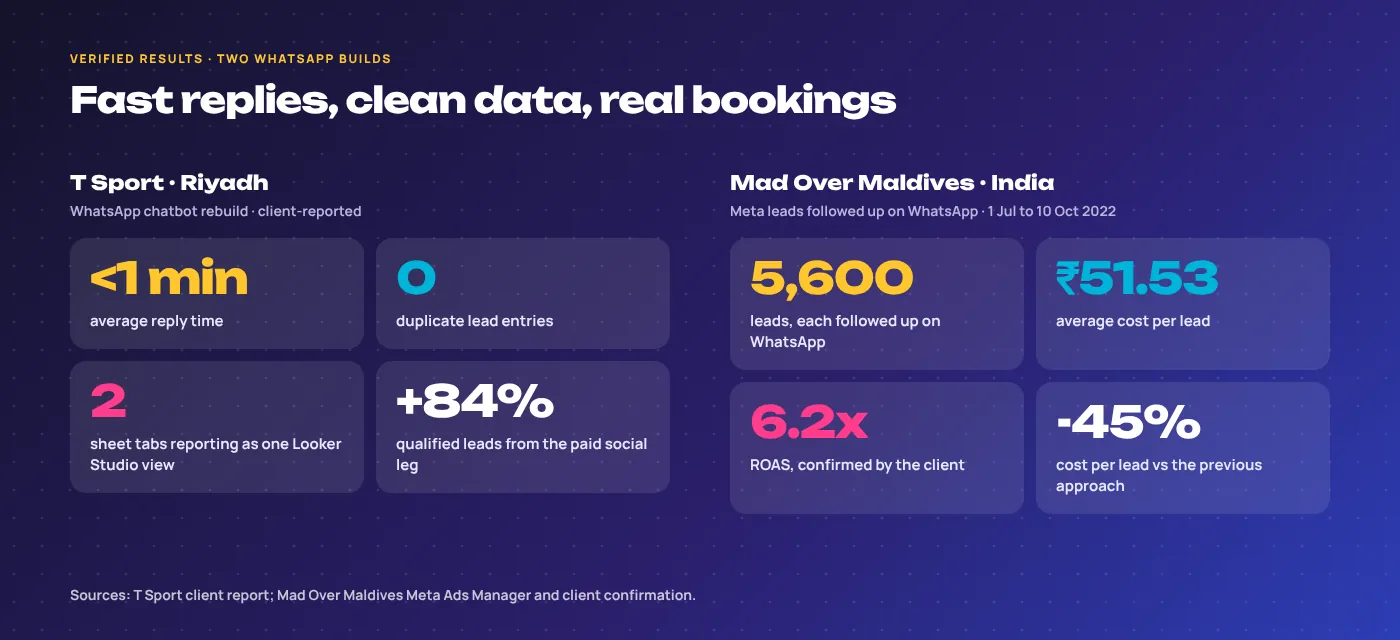
T Sport: replies in under a minute, zero duplicates
The old bot created duplicate lead rows and lost context at handover. We rebuilt the flows with a clear handover point, one row per phone number and a two-tab sheet feeding Looker Studio. Average reply time: under 1 minute, with 0 duplicate leads.
Read the T Sport case study →Mad Over Maldives: 5,600 leads, all followed up on WhatsApp
Meta ads brought 5,600 leads at ₹51.53 each, July to October 2022. Each got a WhatsApp message within minutes with button questions, then a planner. The client confirmed 6.2x ROAS and 45% lower cost per lead.
Read the Mad Over Maldives case →See all client success stories or the 85+ brands we work with.
More WhatsApp and Automation Services
More write-ups on our marketing blog.
WhatsApp Chatbot Questions, Answered
What founders ask us before a bot goes live.
How does a WhatsApp chatbot work for a business?
It answers each incoming message with a short menu, follows the button the person taps, saves the answers to your CRM and passes the chat to your team when needed.
What is the WhatsApp Business API, and do I need it for a chatbot?
Yes, you need it. The WhatsApp Business API, now the WhatsApp Business Platform (Cloud API), is Meta’s interface for automated messaging. Most businesses reach it through a provider.
How long does WhatsApp chatbot setup take?
About 14 days for most bots. Verification, template approval and testing set the pace; two languages or custom CRM work add a few days.
Is a WhatsApp chatbot worth it for a small business?
Yes, if more chats arrive than your team can answer within minutes, or if you run Click-to-WhatsApp ads. At five chats a day, the Business app’s quick replies may be enough.
Which provider is best: WATI, Interakt or Gallabox?
None is best for everyone. We choose on your CRM, languages, team size and flow complexity, and happily build on the provider you already use.
Can a WhatsApp chatbot speak Arabic and English?
Yes. It asks for a language first, remembers it, and runs a natively written Arabic path with right-to-left forms.
Can I use ChatGPT-style AI in my WhatsApp chatbot?
Yes, for questions about your own business. Meta does not allow a general-purpose AI assistant as the main purpose of a business number, so we limit AI to your approved content.
Do I need customer opt-in before messaging people on WhatsApp?
Yes, for any message you send first, and the opt-in must name your business. When a customer writes first, you can reply freely for 24 hours.
Can a chatbot get my WhatsApp number restricted?
It can if people block or report you, which lowers your quality rating and messaging limit. Opt-in, useful templates and a working STOP button prevent that.
Can the bot book appointments straight into my calendar?
Yes. A WhatsApp Flows form shows open slots, writes the booking to Zoho Bookings, Calendly or Google Calendar and triggers a reminder.
Want Every WhatsApp Lead Answered Before It Goes Cold?
Book a free audit. Tell us your daily chats and top questions; we will map your first flow and show where leads drop.