
WhatsApp Ecommerce Automation That Recovers Revenue at Every Stage of the Order.
Updated
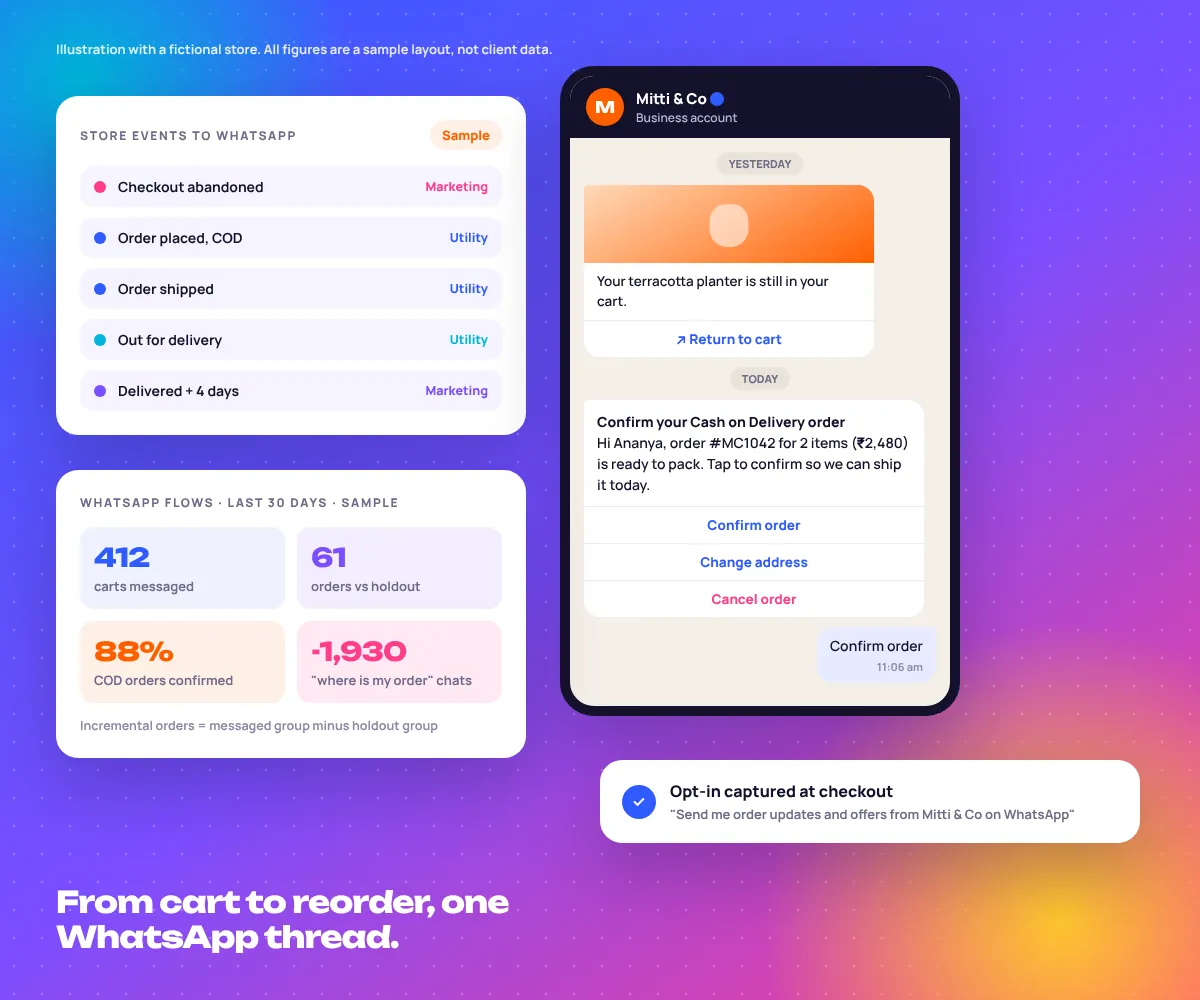
WhatsApp marketing for ecommerce, built around your store’s real order events: abandoned checkouts, COD confirmation, shipping updates, reviews and reorders. We connect Shopify or WooCommerce, get the templates approved in the right category, and report recovered revenue against a holdout group.
What Is WhatsApp Marketing for Ecommerce, and Where Does It Earn Its Place?
WhatsApp marketing for ecommerce is the use of the WhatsApp Business Platform to send order updates, cart reminders, product messages and post-purchase offers that are triggered by store events, to customers who opted in, with every message tied back to orders.
It does not replace email. It earns its place where speed matters: a checkout left five minutes ago, a COD order that needs a yes before packing. Email keeps the newsletters and the full ecommerce email flows, and we build both so nobody gets the same nudge twice.
EmergingAds is a performance marketing agency founded in 2021 in Gurugram, India, working with 85+ brands in the US, UK, UAE, India and Australia. This page is the store-side part of our WhatsApp marketing and automation service.
Which WhatsApp Message Goes Out at Each Moment of the Order?
Every store event gets one message with one job. Meta sorts templates into utility (about an order the customer already placed), marketing (anything that tries to sell) and authentication. Put a discount inside a shipping update and Meta can re-categorise it as marketing, so we keep the two strictly apart.
| Moment | Template category | Goal | Typical timing |
|---|---|---|---|
| Checkout abandoned | Marketing | Bring the shopper back to the same cart | 30 to 60 minutes, then about a day later |
| Order placed | Utility | Confirm items, total and delivery estimate | Within a minute or two |
| COD order placed (India) | Utility | Get a confirm or cancel before packing | Right after the order |
| Shipped, out for delivery | Utility | Tracking link, fewer “where is my order” chats | On each courier status change |
| Delivered | Marketing or Utility | Review request; utility only with no offer attached | 3 to 7 days after delivery |
| Product running out | Marketing | Reorder before they shop elsewhere | A few days before a typical refill date |
| Back in stock, price drop | Marketing | Turn saved intent into an order | When the event fires |
Category rules come from Meta’s message template documentation. Marketing templates need marketing opt-in and fall under Meta’s per-user limits, and delivery of marketing templates to US numbers has been paused since 2025, so we check the current status before any US flow goes live.
How Does WhatsApp Abandoned Cart Recovery Work?
When a shopper enters a phone number at checkout and leaves, Shopify or WooCommerce records an abandoned checkout. Your WhatsApp provider picks up that event, checks for marketing opt-in, and sends an approved template with the product and a link back to the same cart. The sequence stops the moment an order is placed.
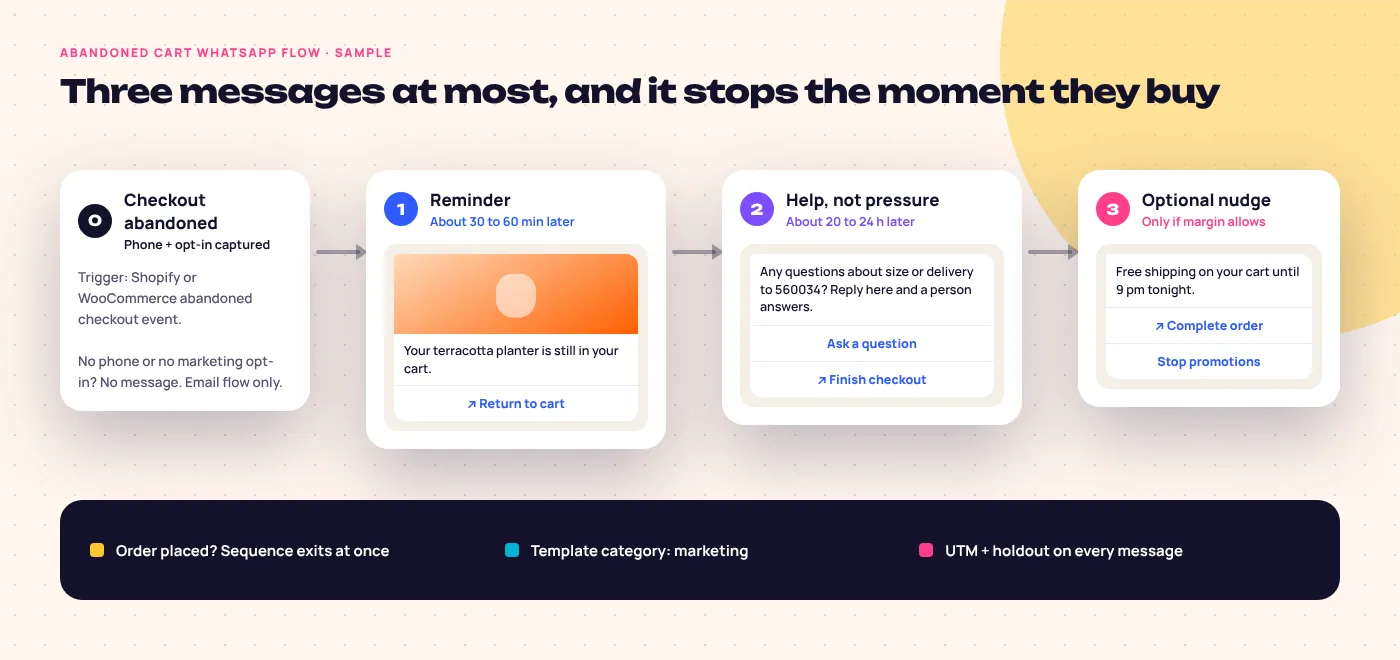
The reminder
Product image, name and a button that reopens the exact cart. No discount.
The question
Asks about size, delivery or COD, and routes replies to a person. This one often recovers more than the offer.
The nudge, if margins allow
Free shipping or a small code with a deadline. Skipped for low-margin SKUs and repeat abandoners.
Exit rules
Order placed, opt-out, or a reply in progress. Every message carries UTM tags and a “Stop promotions” button.
Two catches most stores miss. A cart abandoned before the shopper typed a phone number cannot be messaged, so moving the phone field up widens the pool. And Meta treats a cart reminder as marketing even without a discount, so it needs marketing opt-in.
COD Confirmation on WhatsApp, and the Order Updates Around It
What is COD confirmation on WhatsApp?
COD confirmation on WhatsApp is a utility message sent right after a cash on delivery order, asking the customer to confirm, change the address or cancel with one tap. Orders confirmed ship; cancelled ones never leave the warehouse, which saves the courier fees and stock lock-up of a returned parcel.
Confirm your Cash on Delivery order
Hi Ananya, order #MC1042 for 2 items (₹2,480) is ready to pack. Tap below so we can ship it today.
- Confirm order
Tags the order in Shopify or WooCommerce as confirmed and releases it to packing.
- Change address
Opens a short form or hands the chat to your support team before the label prints.
- Cancel order
Cancels the order, restocks the items and logs the reason.
- No reply
One reminder, then a call or a hold rule you choose.
WhatsApp order confirmation messages and shipping updates
WhatsApp order confirmation messages, plus shipped, out for delivery and delivered updates, are the cleanest utility use cases. We pull courier status from your shipping app (Shiprocket or AfterShip, for example) and send one update per real change. Fewer “where is my order” chats is usually the first win support notices.
WhatsApp Catalogue, Product Messages and Click-to-WhatsApp Ads for Stores
What are WhatsApp product messages?
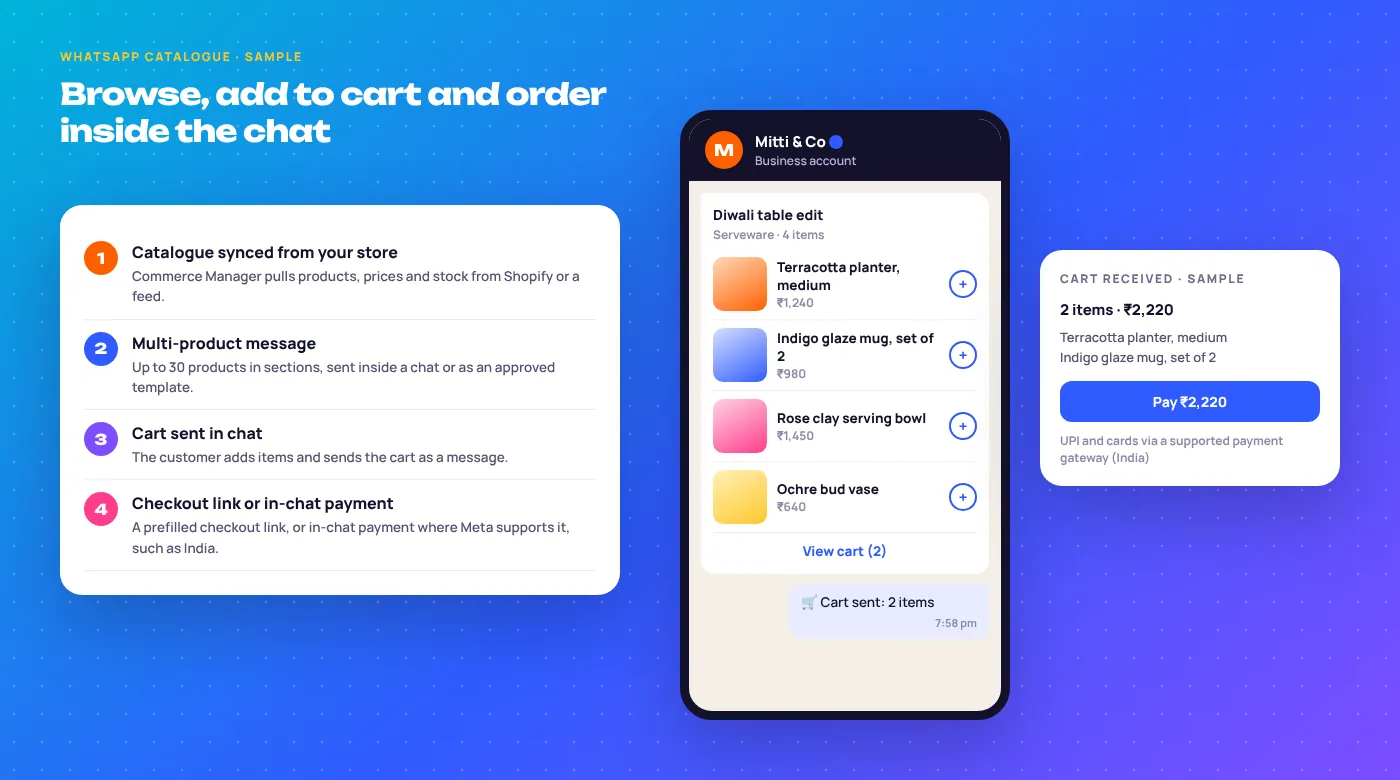
WhatsApp product messages show items from a catalogue linked through Meta Commerce Manager. A single-product message shows one item; a multi-product message shows up to 30 items in sections. The shopper adds items and sends the cart into the chat, and you reply with a checkout link or, where available, an in-chat payment.
Can customers pay inside WhatsApp?
In some markets, yes. In India, Meta supports in-chat payments by UPI and other methods through supported payment gateways, and Brazil has a similar setup. Elsewhere the typical pattern is a prefilled checkout link to your store. We check what your market and payment provider support before promising in-chat checkout.
Click-to-WhatsApp ads for ecommerce
These ads open a chat instead of a product page. Click-to-WhatsApp ads for ecommerce suit COD-heavy markets and high-ticket items where people ask before paying. We run them inside our Meta ads for ecommerce work, with the opening reply and the routing built by our WhatsApp chatbot setup team.
Post-Purchase WhatsApp: Reviews, Reorders and Opt-In at Checkout
When should you ask for a review on WhatsApp?
Ask a few days after the delivered status, once the product has been used, not on the delivery day. Keep it to one tap: a link to your review app, or a quick-reply rating that routes unhappy answers to support before anything goes public. Attach no incentive if you want the template to stay utility.
Reorder nudges suit anything that runs out. We time them from your repeat-purchase data; these are examples:
- 30-day supplement · nudge near day 24
- Skincare, 50 ml · around week 6
- Coffee, 250 g · around week 3
- Pet food, 3 kg · a few days before it ends
How do you get WhatsApp opt-in at checkout?
Add a WhatsApp consent line where the shopper types their phone number: a tick box on the cart or checkout page, or on the thank-you page where your Shopify plan limits checkout edits. The wording must name your store and WhatsApp, and you keep a record of when and where each person agreed.
Shopify’s SMS marketing tick box is not WhatsApp consent. Consent records and sending limits are covered on our WhatsApp broadcast campaigns page.
Shopify WhatsApp Integration and WooCommerce Setup in 8 Steps
How long does WhatsApp ecommerce setup take?
Most stores are live in about 14 days. Business verification can take a few days, templates are usually approved within hours, and the rest is building and testing flows against real orders. Custom WooCommerce builds can take longer.
Audit the store events
Abandonment rate, COD share, top support questions and where phone numbers are captured.
Number and provider
A dedicated number on the WhatsApp Business Platform through WATI, Interakt, Gallabox or your current provider.
Connect the store
A Shopify WhatsApp integration through the provider’s app, or a plugin or webhooks for WooCommerce, mapped event by event.
Add opt-in
Consent wording on cart, checkout or thank-you page, synced to the provider as a tag.
Write and submit templates
Utility and marketing kept apart, with variables, buttons and sample values. English plus Hindi or Arabic if needed.
Sync the catalogue
Commerce Manager catalogue from your store, for product messages and ads.
Test with real orders
Prepaid, COD, partial shipment and cancellation, from a clean phone number.
Launch with a holdout
10% of eligible carts get no message, so the report shows real lift.
CRM and ad wiring runs through our WATI business automation and conversion tracking setup work. New stores can start with Shopify store setup.
How Do You Measure Recovered Revenue From WhatsApp?
Compare the recovery rate of carts that got WhatsApp messages with a random holdout that got none, over the same window. The difference, times carts messaged and average recovered order value, is the revenue WhatsApp added. Counting every order that clicked a link overstates it, because some shoppers were coming back anyway.
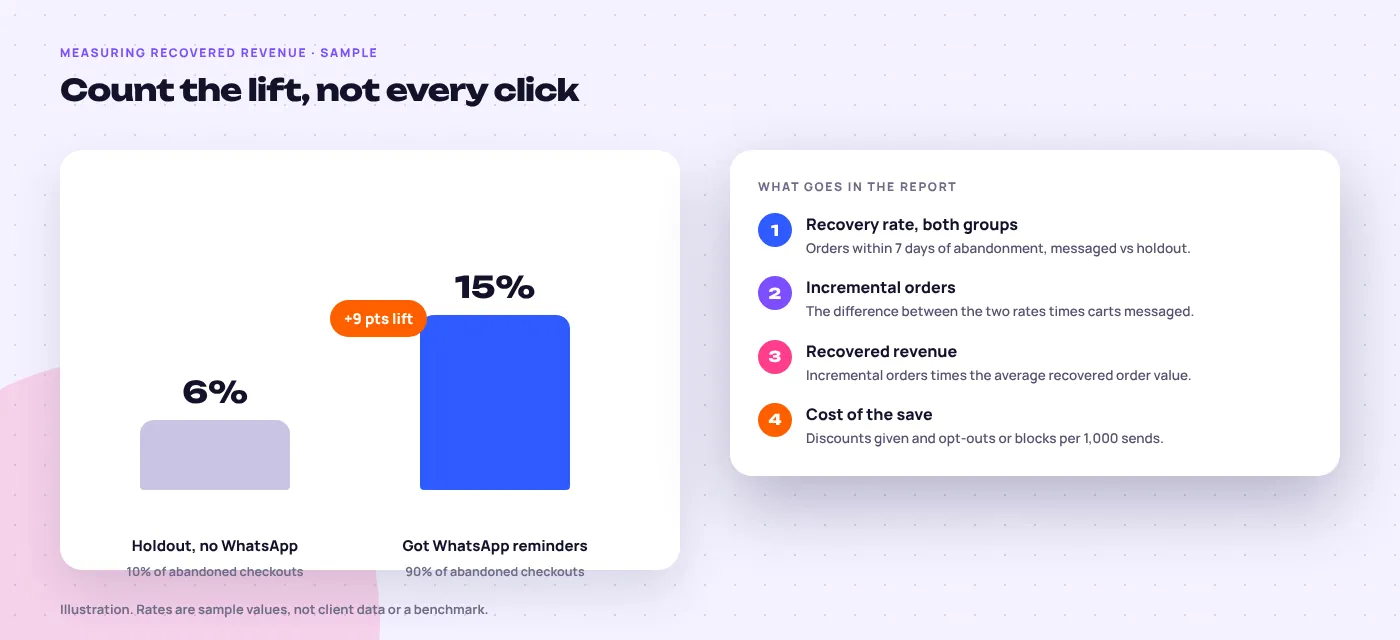
- UTM tags on every button, so GA4 and Shopify both see the WhatsApp source per flow.
- Blocks and opt-outs per 1,000 sends, next to revenue, because a flow that sells but gets blocked costs you quality rating.
Our WhatsApp Results, and Why Neither Is an Ecommerce Store
We do not yet have a verified ecommerce WhatsApp case to publish, so we will not invent one. Below is WhatsApp work from other industries, with figures from account data. Ecommerce results on other channels are on our success stories page.
Mad Over Maldives: 5,600 leads, all followed up on WhatsApp
- 5,600
- website leads from Meta
- ₹51.53
- cost per lead
Meta Ads Manager, 1 Jul to 10 Oct 2022. Every lead was followed up on WhatsApp. Read the Mad Over Maldives case.
T Sport: WhatsApp replies in under a minute
- <1 min
- WhatsApp reply time
- 0
- duplicate leads
A WhatsApp automation rebuild next to Arabic-first Meta and Snapchat ads. Read the T Sport case study.
For a store, we start where money leaks first: COD confirmation in India, cart recovery everywhere else, both with a holdout from day one. See our clients, plus our ecommerce marketing and B2C marketing pages.
More WhatsApp Services
Practical notes on WhatsApp, email and paid social live on the EmergingAds blog.
WhatsApp Ecommerce Questions, Answered
Is WhatsApp marketing worth it for an ecommerce store?
Yes, when your customers already use WhatsApp and you can collect opt-in at checkout. It is strongest in WhatsApp-first markets such as India and the GCC. For mostly US buyers, check Meta’s current US marketing template rules first.
How does WhatsApp abandoned cart recovery work on Shopify?
A provider app listens for Shopify’s abandoned checkout event and sends an approved marketing template to opted-in shoppers. It includes the product and a link back to the same cart, and the sequence stops when an order is placed.
Is an abandoned cart message a utility or a marketing template?
Marketing, in practice. The customer has not completed a transaction, so Meta treats the reminder as promotional even with no discount. It needs marketing opt-in.
Do customers need to opt in to get WhatsApp order updates?
Yes. Meta’s policy requires opt-in for any business-initiated message, including utility updates. One consent line at checkout that names your store and WhatsApp can cover order updates, and a separate tick or wording covers offers.
What is COD confirmation on WhatsApp?
It is a utility message asking a cash on delivery customer to confirm, change the address or cancel before the order ships, so fake or impulse orders never become returned parcels.
Can WhatsApp integrate with WooCommerce?
Yes. Most WhatsApp Business Platform providers offer a WooCommerce plugin, and anything else runs on WooCommerce webhooks through a tool such as Make.
Can I sell products directly inside WhatsApp?
Yes, with a catalogue linked through Meta Commerce Manager. Shoppers build a cart in the chat and pay through a checkout link, or inside WhatsApp where Meta supports it, such as India.
How long does it take to set up WhatsApp for an online store?
About 14 days for most stores. Verification and template approval are usually quick; most of the time goes into mapping events, writing templates and testing real orders.
How many cart recovery messages should I send?
Two, sometimes three. More than that raises blocks, which hurts your number’s quality rating.
How do I know how much revenue WhatsApp recovered?
Use a holdout. Keep about 10% of eligible carts unmessaged and compare recovery rates; the gap, times carts messaged and average order value, is the recovered revenue.
Want to See Where Your Store Loses Orders Before They Ship?
Send us your store URL. We will check your cart capture, COD flow, template categories and tracking, and tell you which WhatsApp flow to build first.