
WATI Business Automation That Converts Leads While You Are Offline.
Updated
We set up WATI WhatsApp automation end to end: your number on the official API, a shared inbox your team actually uses, bots that qualify every enquiry, broadcasts to opted-in segments and a clean sync into your CRM. First replies go out in seconds, even at 2 am.
- Team inbox
- Chatbot builder
- Broadcasts
- Contacts and tags
- Integrations
What Is WATI WhatsApp Automation, and What Does It Replace?
What is WATI?
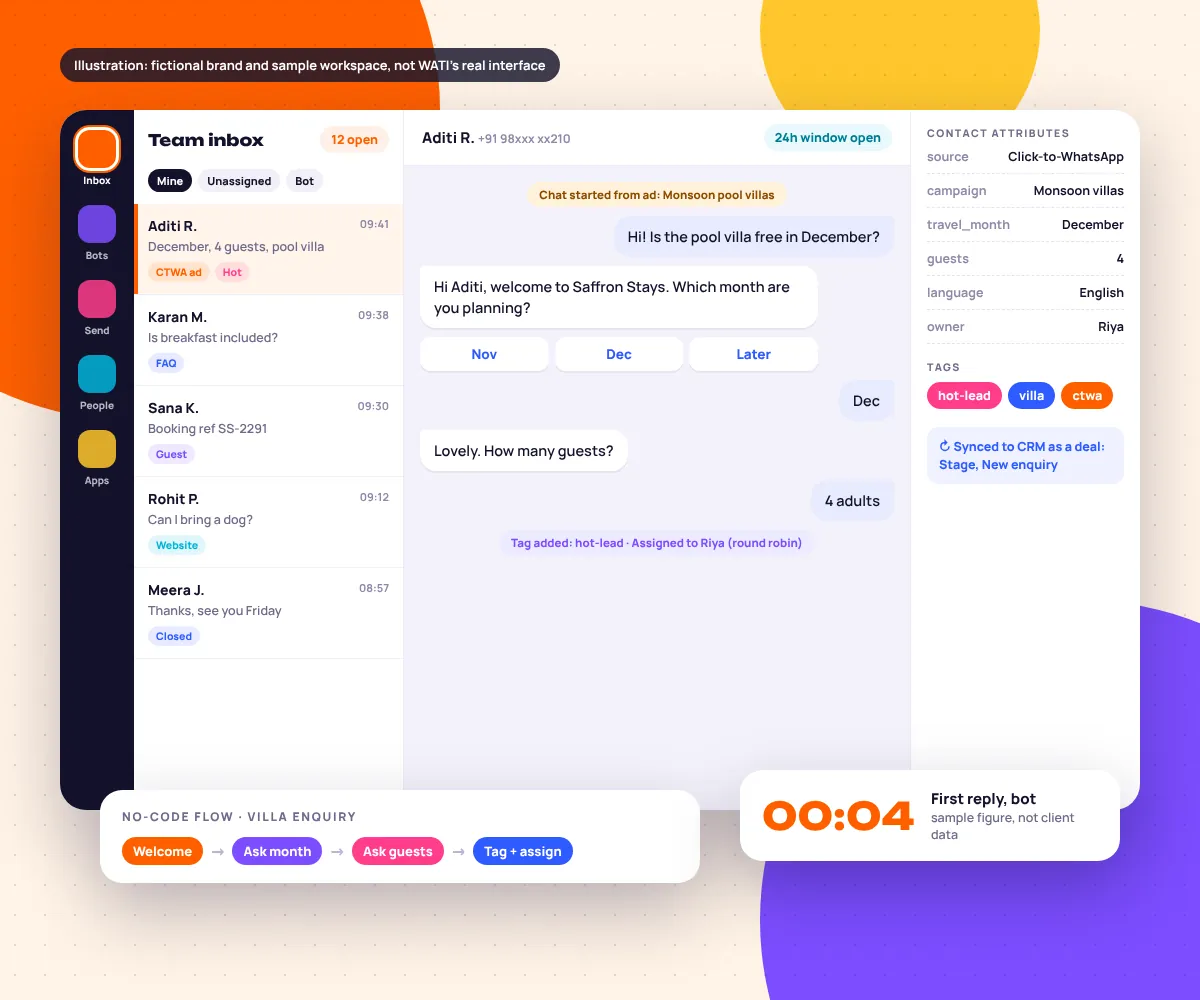
WATI is a WhatsApp Business API platform from an official Meta Business Solution Provider. It gives one business number a shared team inbox, a no-code chatbot builder, template broadcasts, a contact database with tags and attributes, and integrations with stores and CRMs, so many people and bots can work the same WhatsApp line.
It replaces a phone passed around the office and leads that wait until Monday. Our WhatsApp marketing service covers the channel strategy; this page is about building and running the WATI workspace itself.
EmergingAds is a performance marketing agency founded in 2021 and based in Gurugram, India. We work with 85+ brands in the US, UK, UAE, India and Australia, and WATI is the provider we set up most often for clients who sell on WhatsApp.
It suits teams of 2 to 30 people sharing one number. At a handful of chats a day, the Business app’s quick replies are enough.
How Does WATI Work? The Five Modules We Configure
The settings we write down before building. Labels vary between WATI versions; the logic does not.
WATI team inbox
One number, many agents. Each chat shows its history, tags and attributes, so nobody asks twice.
views     = Mine, Unassigned, Bot
status    = open / pending / solved
notes     = internal, never sent
hours     = Sun to Thu 9:00 to 21:00
Mistake we fix: agents replying from personal phones, so history goes missing.
WATI chatbot builder
A drag-and-drop canvas of nodes: messages, questions, buttons, lists, conditions, attribute updates, webhooks and assignment.
trigger   = keyword "villa" or ad referral
ask       = month (buttons), guests (list)
save_to   = travel_month, guests
exit      = "agent" or 2 failed answers
Mistake we fix: free-text questions where a button would do. For deeper bot logic see our WhatsApp chatbot setup page.
Broadcasts
Approved templates sent to an audience filtered by tag or attribute, scheduled, with delivered, read and replied counts.
audience  = tag:opted-in AND tag:villa
exclude   = tag:booked, last_send < 7d
template  = monsoon_offer_v2 (marketing)
send_at   = Thu 19:30 local
Mistake we fix: blasting the whole list. Segment strategy lives on our WhatsApp broadcast campaigns page.
Contact attributes and tags
Attributes hold values such as source or city; tags hold states such as hot-lead or booked. Both drive routing, broadcasts and reports.
attributes = source, campaign, language,
             interest, owner
tags       = new, hot-lead, booked,
             opted-in, opted-out
Mistake we fix: 60 tags nobody understands. We keep 10 to 15, written down.
Assignment rules
Rules decide who owns a chat the moment the bot finishes: a team, a rotation between online agents, or a route by language or city.
if language = Arabic   then team = Riyadh desk
if tag = hot-lead      then team = Sales, rotate
if after_hours         then bot books a callback
if unanswered 10 min   then alert the team lead
Mistake we fix: every chat landing in “Unassigned”, where nobody feels responsible for it.
How Long Does WATI Setup Take? Onboarding in 7 Steps
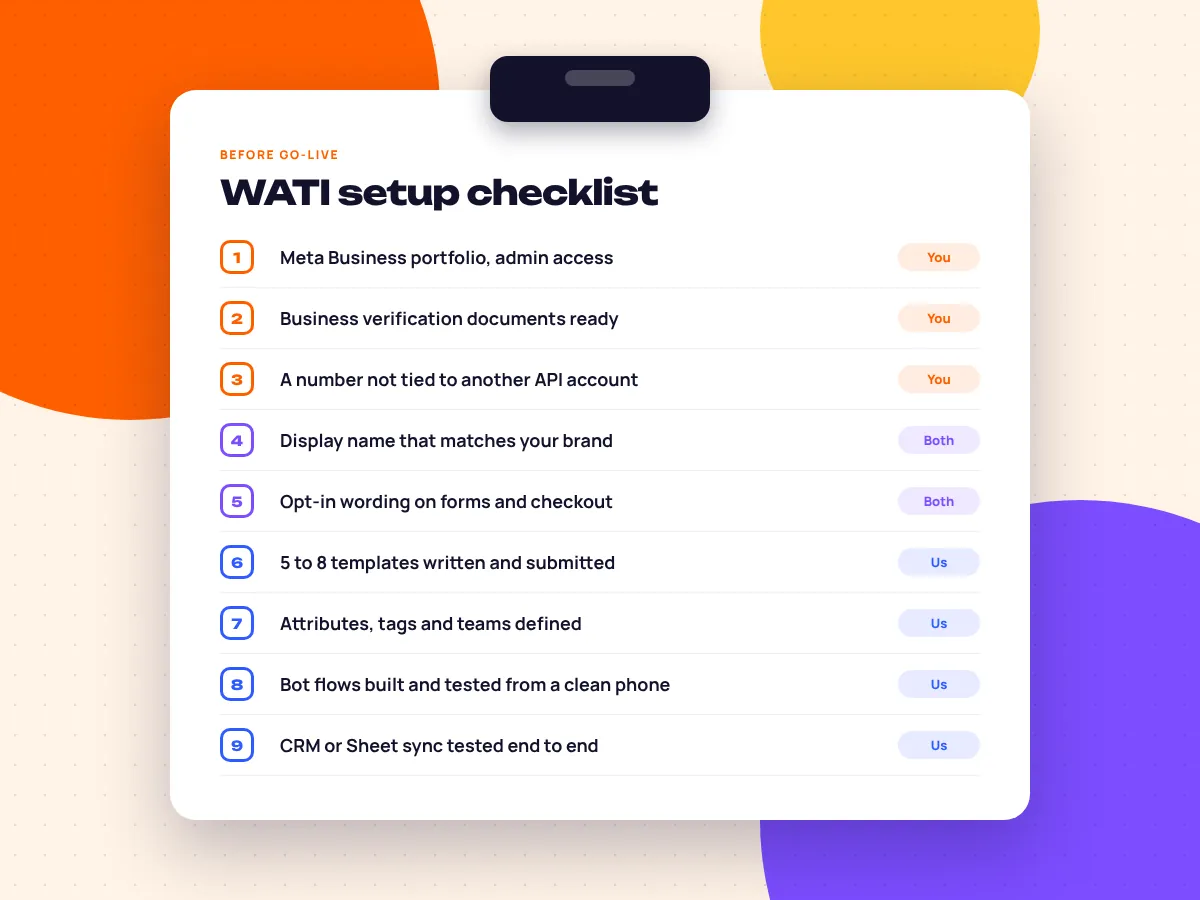
A full WATI setup usually goes live in about 14 days. The build itself takes a few days; the rest is Meta: business verification, display name review and template approval. If your Meta Business portfolio is already verified and your number is free, it can be faster.
Audit your number and chat volume
Is the number on the Business app, another provider or nothing yet? We also read a sample of real chats.
Connect Meta through embedded signup
Inside WATI you log in with Facebook, pick your Meta Business portfolio and create the WhatsApp Business Account (WABA).
Verify the number, name and business
The number is verified by SMS or voice code, the display name goes to Meta for review, and we start business verification so your messaging limits can rise.
Define attributes, tags, teams and hours
The data model comes first: which attributes the bot saves, what each tag means, who sits in which team.
Build bot flows and write templates
Welcome, qualification, FAQ and handover flows in the chatbot builder, plus 5 to 8 utility and marketing templates submitted for approval.
Connect integrations and ads
Store or CRM sync, a Google Sheet backup if you want one, and Click-to-WhatsApp ads pointed at the number with a source attribute set.
Test, train, launch, then review weekly
Testing from a clean phone, a 30-minute inbox training, launch, then weekly log reviews for a month.
Sources: number, display name and verification rules follow Meta’s WhatsApp Business Platform documentation. Opt-in and content rules follow the WhatsApp Business Messaging Policy.
WATI Integrations: Shopify, HubSpot, Zoho, Sheets and Webhooks
How do WATI integrations work?
WATI connects to other tools in three ways: native integrations you switch on inside the workspace, connector platforms such as Zapier and Make, and its own API and webhooks for custom systems. We use native first, then a connector, then webhooks.
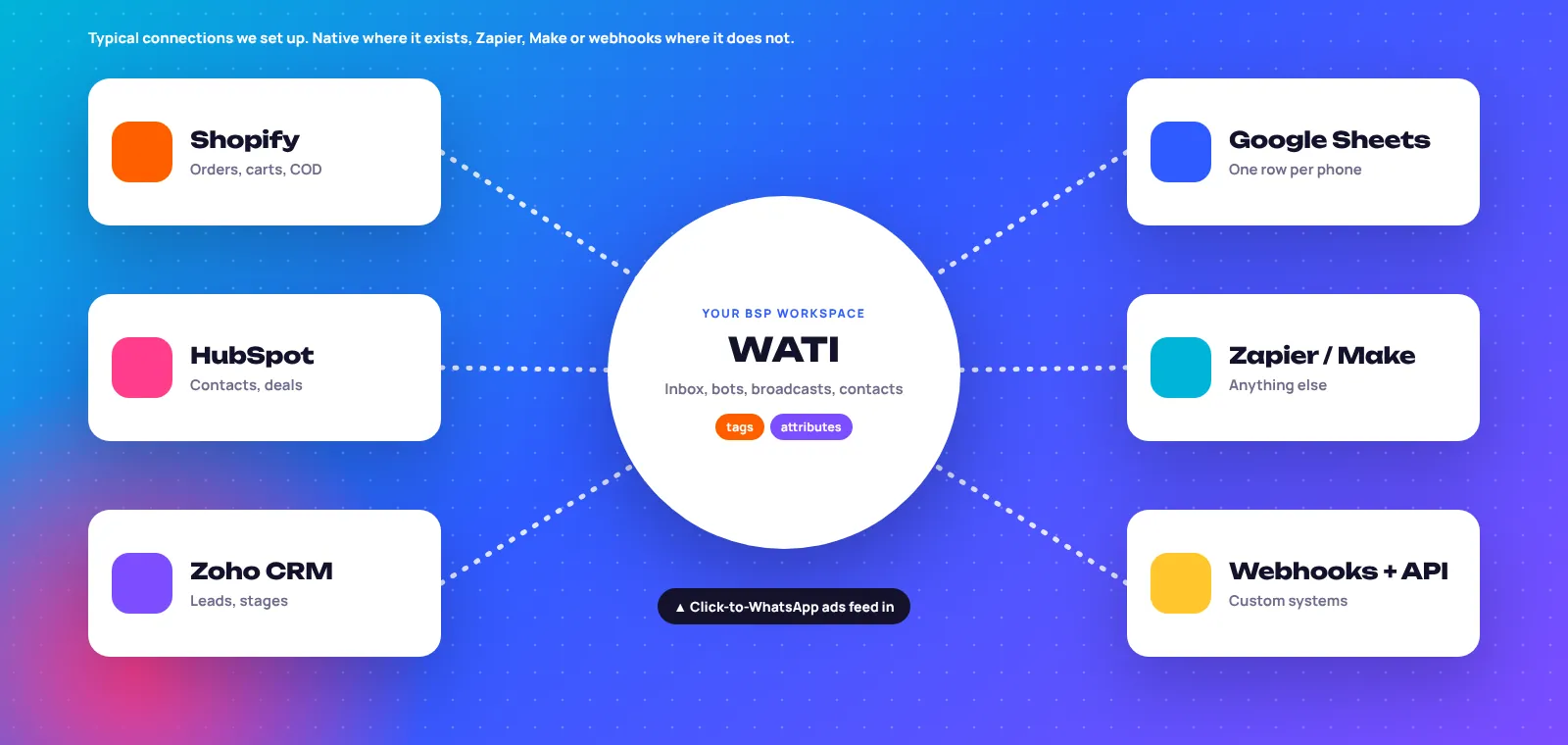
| Tool | What usually syncs | How we connect | What we watch |
|---|---|---|---|
| Shopify | Order updates, abandoned carts, COD checks | Native | Opt-in captured at checkout. Full store flows: WhatsApp for ecommerce |
| HubSpot | Contacts, deal stage, owner, transcript | Native | Match on phone in E.164 format to stop duplicate contacts |
| Zoho CRM | Lead created, lead status, assigned salesperson | Native or Make | Lead vs contact module, so qualified chats are not stuck as leads |
| Google Sheets | One row per phone, updated as the bot collects answers | Native or Zapier | Update the row, do not append a new one each message |
| Zapier / Make | Booking tools, email, Slack alerts | Connector | Error alerts on, so failed runs are seen |
| Webhooks + API | Custom CRMs, booking engines, ERP order status | Webhook | Retries and logging on your side of the call |
We check WATI’s help centre for current native apps before scoping. For CRM-side builds see marketing automation and CRM routing.
WATI Click-to-WhatsApp Ads and Assignment Rules, Logged Step by Step
How do Click-to-WhatsApp ads work with WATI?
A Click-to-WhatsApp ad on Facebook or Instagram opens a chat with your WATI number. Meta passes the ad’s referral details with the first message, so a bot can greet the person in context, save the campaign as an attribute and route the chat. If you reply within 24 hours, the chat gets a 72-hour window.
Below, a sample log of WATI Click-to-WhatsApp ads at work for a fictional villa brand. Timestamps are illustrative.
- AdPerson taps a Click-to-WhatsApp ad; WATI creates the contact with source = ctwa.
- BotWelcome message with month buttons, written for that ad, not a generic menu.
- BotMonth and guest count saved as attributes; tag hot-lead added.
- RuleAssignment rule hands the chat to the next online sales agent. After hours, the bot books a callback instead.
- CRMDeal created in the CRM at stage New enquiry, with the transcript attached.
- AgentAgent replies with villa photos, already knowing month and group size.
- WindowAfter the window closes, only an approved template can restart the chat.
We build the ads in Meta Ads Manager alongside our Meta lead generation ads, so all results sit in one report. This journey is common for travel brands and real estate developers, where buyers would rather chat than fill a form.
WATI vs Interakt, Gallabox and AiSensy: Which BSP Fits?
What’s the difference between WATI and other WhatsApp BSPs?
All four are WhatsApp Business Platform providers with a shared inbox, template broadcasts and a no-code bot builder. They differ in emphasis: integrations, commerce, sales workflows or broadcasting. The right pick depends on your CRM, team and flow complexity.
| Typical strength | WATI | Interakt | Gallabox | AiSensy |
|---|---|---|---|---|
| Usually known for | Bot builder plus a wide native integration list | Commerce: catalogue, store and order messaging | Sales team workflows and drip sequences | Broadcast and retargeting campaigns |
| Shared inbox | Yes, with teams and rotation | Yes | Yes | Yes |
| No-code bots | Yes, node-based flows | Yes | Yes | Yes |
| Market focus | Global, strong in Asia and the Middle East | India-first | India-first, growing abroad | India-first |
| We tend to pick it when | You need CRM sync and multi-team routing | You are an Indian Shopify store | Sales reps chase leads over days | Broadcasts are the main job |
Features change often. Check each provider’s current documentation; we are not paid by any of them. We also build on Interakt WhatsApp automation when that fits better.
Is WATI Worth It? What We Fix in Existing Accounts in Week 1
Yes, WATI is worth it once more chats arrive than your team can answer within a few minutes, or once you run Click-to-WhatsApp ads. Most accounts we inherit lack structure, not features. Six problems we see again and again:
Duplicate contacts in the CRM
Numbers saved with and without country codes. We normalise and match on one format.
No human exit in the bot
People loop and leave. Every flow gets an “agent” path and a two-strike fallback.
Quality rating ignored
Cold-list broadcasts raise blocks. We check the rating weekly in WhatsApp Manager.
Source not recorded
Nobody knows which chats came from ads. Every entry point gets a source attribute.
Templates in the wrong category
Promo copy filed as utility gets rejected or reclassified.
No owner after hours
Night chats sit unassigned. The bot books a callback and a rule assigns it at opening.
WhatsApp Results From Our Clients, Verified
Real numbers from client reports and Meta Ads Manager. Neither case is presented as a WATI build; we show them because the same setup rules apply on any provider.
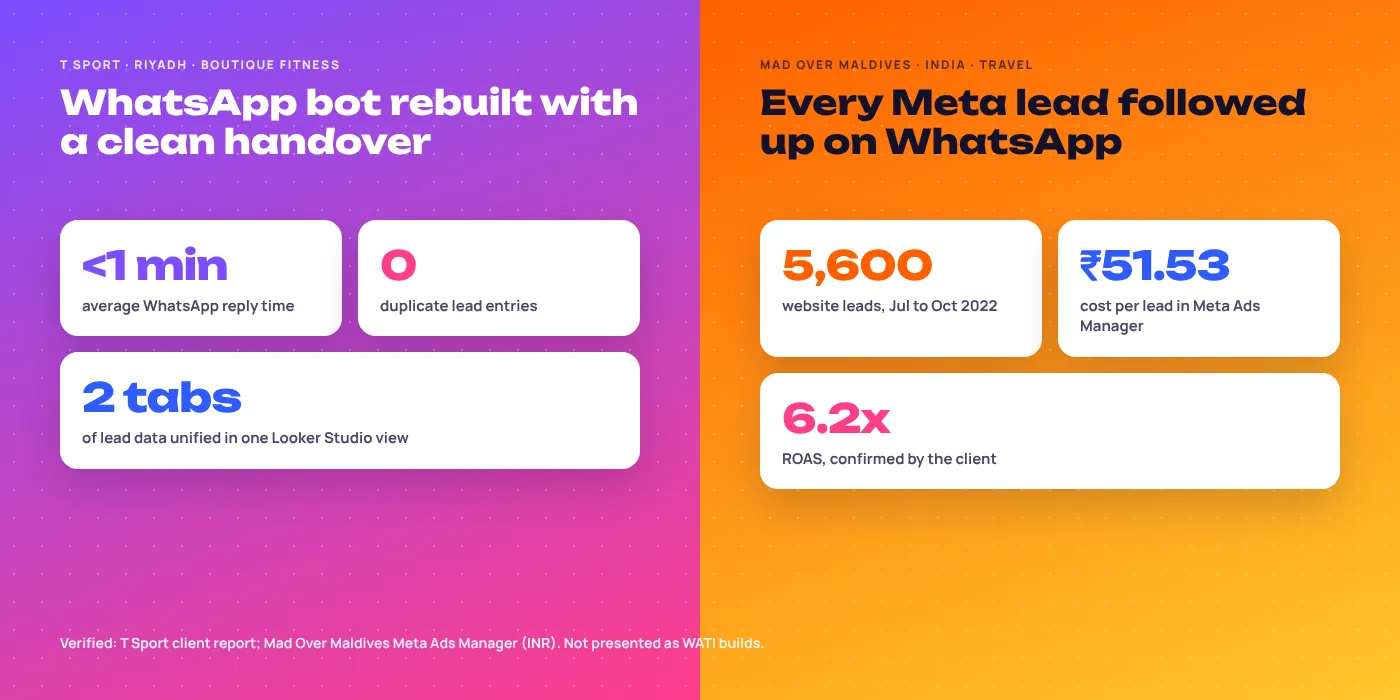
T Sport: under 1 minute replies, 0 duplicate leads
The old bot created duplicate rows and lost context at handover. We rebuilt it with one clear handover, one row per phone and two sheet tabs feeding one Looker Studio view.
Mad Over Maldives: 5,600 leads followed up on WhatsApp
Meta ads brought 5,600 website leads at ₹51.53 each, July to October 2022, each followed up on WhatsApp. The client confirmed 6.2x ROAS.
More in our client success stories and the 85+ brands we work with.
More WhatsApp and Automation Services
WATI Questions, Answered
What founders ask us before moving their WhatsApp onto WATI.
What is WATI and how does it work?
WATI is a WhatsApp Business API platform that puts one business number into a shared inbox with bots, broadcasts and integrations. WATI routes each chat to a bot or an agent and saves what was said.
How long does WATI setup take?
About 14 days for most businesses. Meta verification, display name review and template approval set the pace; the build itself is a few days.
Is WATI worth it for a small business?
Yes, if chats outpace what one person can answer within minutes, or you run Click-to-WhatsApp ads. Below that, the free Business app is usually enough.
Can I keep my existing WhatsApp number when I move to WATI?
Usually yes. A Business app number can move to the API, and Meta now lets some numbers run on both where the provider supports it. We pick the route before touching anything.
Does WATI integrate with HubSpot, Zoho CRM and Shopify?
Yes. WATI typically offers native integrations for HubSpot, Zoho CRM, Shopify and Google Sheets, and anything else connects through Zapier, Make or webhooks.
How does the WATI chatbot builder work?
It is a no-code canvas of connected nodes, started by a trigger such as a keyword or an ad click.
Which is better for my business, WATI or Interakt?
Neither wins for everyone. WATI tends to suit CRM-heavy, multi-team setups; Interakt often suits Indian Shopify stores.
Can WATI run Click-to-WhatsApp ads?
Yes, Click-to-WhatsApp ads can point at your WATI number, and the bot can read which ad started the chat.
Do I need customer opt-in to message people from WATI?
Yes, for any message you start. The WhatsApp Business Messaging Policy requires opt-in that names your business.
Will you manage WATI after setup, or just build it?
Both. Most clients keep us on to manage bots, templates, broadcasts and reporting, on a 3-month minimum, then month to month.
You’re Invited: A Free Look at Your WhatsApp Lead Flow
WATI or not, we will map where chats wait, where leads duplicate and what your ads send into the inbox, then show you the fixes.
- Number and provider check
- Bot and handover review
- CRM sync test
- Ad-to-chat tracking