
Marketing Automation That Works While You Sleep
From cold outreach and CRM automation to attribution and reporting, every tool we use is connected into a single system. Your leads, your data and your revenue all tell the same story.
This page is the map of our stack. If you want us to design, build and run the automation for you, that is our marketing automation service.
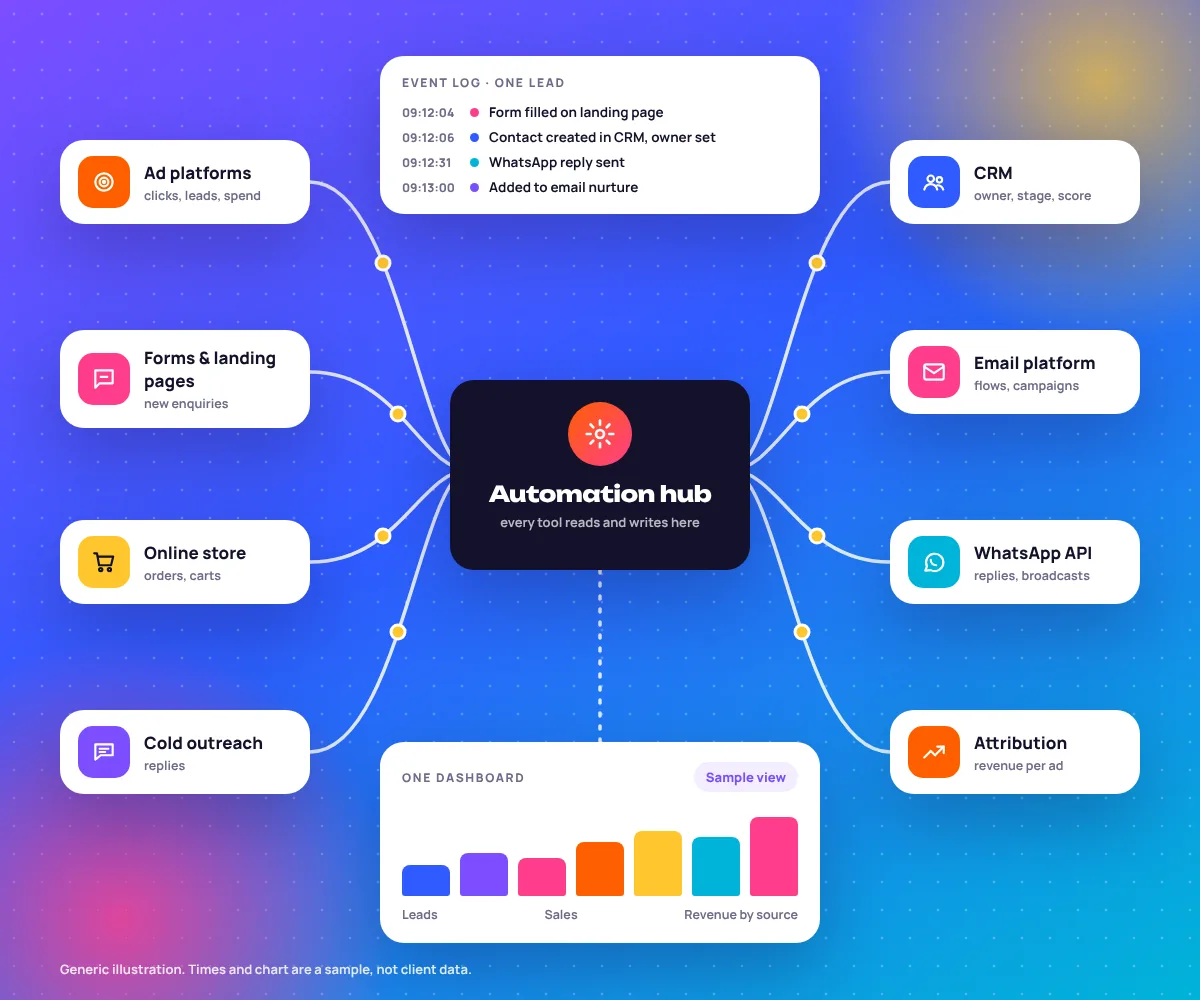
One Strategy. Every Tool Talking to Every Other Tool.
Not a list of logos. A real data pipeline that connects outreach, conversion, retention and reporting, all visible in one Looker Studio dashboard. Follow one contact through it and watch the record fill up.
Cold Outreach
STEP 1Instantly or Smartlead sends a sequence. A reply triggers a CRM entry through Zapier or Make.com.
source: cold_email
replied: yes
owner: ...
stage: ...
revenue: ...
CRM and Lead Routing
STEP 2GoHighLevel or Zoho scores the lead and routes it to the right person. A WhatsApp follow-up goes out within minutes.
source: cold_email
replied: yes
score: hot
owner: sales_rep_2
whatsapp: sent
Nurture and Retention
STEP 3Klaviyo or ActiveCampaign runs the email sequences. WATI handles WhatsApp broadcasts.
score: hot
owner: sales_rep_2
sequence: nurture_b
stage: customer
order: placed
Attribution and Reporting
STEP 4Hyros connects ad spend to revenue. Looker Studio shows the whole picture in one dashboard.
stage: customer
order: placed
revenue: logged
first_touch: matched
dashboard: updated
A Klaviyo purchase event updates Hyros attribution. RevealBot pauses underperforming campaigns based on rules you set once. Every tool feeds the next, so you get one source of truth across outreach, conversion, retention and reporting that updates itself.
Most agencies install tools in isolation. We build systems where each tool makes the others smarter, and every integration is documented, so your team can see exactly how data flows at any point. The field names above are a simplified sample.
The Marketing Automation Tools and Platforms We Work Across
We work across 67+ tools. These 52 have their own page explaining how we use them and how they connect to the rest of your stack. Filter by job, then open any tool.
Connect Every Touchpoint
From the moment someone lands on your site to years into their life as a customer, every interaction is a chance to automate, and so a chance to make revenue without manual effort. Here is which tools plug into which job.
CRM Automation
Leads are captured, scored and routed through your sales pipeline automatically. No lead waits more than minutes for a response.
Lead Scoring
Behaviour and profile scoring that spots your hottest leads in real time, so the sales team spends its time where it matters.
Email Sequences
Welcome series, abandoned cart, post-purchase and win-back. Automated flows that look after customers through their whole lifecycle.
WhatsApp Automation
Order confirmations, cart recovery and promotional broadcasts through the WhatsApp Business API, with open rates of 98%.
Cross-Channel Attribution
Ad spend across Google, Meta and TikTok connected to real revenue, so you know which channels actually make a profit.
Workflow Automation
Zapier and Make.com integrations that sync data between your store, CRM, ad platforms and reporting dashboards on their own.
From Audit to Always-On Revenue System
A four-phase build with clear milestones. You know what is being built, when it goes live and how it will be measured.
Map Your Customer Journey
We document every touchpoint from first ad click to repeat purchase, and find where manual work is causing leaks or delays in your revenue pipeline.
- Current tools and logins listed
- Every hand-off drawn out
Design Automation Logic
Flowcharts and trigger logic for each automation: what starts it, which conditions branch the journey, and what each sequence is for.
- Triggers and exit rules written down
- You approve before we build
Build and Integrate
Technical build across your CRM, email and WhatsApp platform and ad accounts, fully tested before anything reaches your customers.
- Test contacts through every path
- Integration notes for your team
Monitor and Optimise
Ongoing monitoring with monthly optimisation based on conversion data. Automations get better over time, not set and forgotten.
- Monthly flow performance review
- Fixes when a tool or API changes
Real Numbers From Automated Systems We Have Built
Average cart recovery rate
Carts brought back by automated email and WhatsApp reminders.
Email revenue vs. spend
What email earns against what it takes to run.
WhatsApp open rate
Messages people actually see, from order updates to broadcasts.
Flows built per brand
Welcome, cart, post-purchase, win-back, lead routing and more.
Automation & Tools
The directory of every platform we work with and the map of how they connect. Useful when you want to know whether we know your tool.
Back to the directory ↑Marketing Automation service
We design the routing rules, build the workflows, test them and keep them running, with core workflows live in about 14 days.
See the service →Automation, Frequently Asked Questions
What is the difference between marketing automation and running ads?
Ads bring in new traffic and leads. Automation makes sure those leads are nurtured, followed up and turned into repeat revenue without manual effort. Most businesses need both working together to see compound growth.
Which tools do you work with for automation?
Most often Klaviyo for ecommerce email and SMS flows, HubSpot and GoHighLevel for CRM and lead automation, the WhatsApp Business API through WATI, and Hyros for cross-channel attribution. We adapt to your existing stack, and the directory on this page lists every tool with its own page.
How long does it take to build an automation system?
Core flows such as welcome, abandoned cart and lead routing usually take 2 to 4 weeks to design, build and test. A full automation stack with attribution can take 4 to 8 weeks, depending on how complex it is and how many integrations it needs.
Can automation work alongside our existing CRM?
Yes. We integrate with the CRM you already have rather than asking you to switch, unless it has real limits that block what you want to automate. We have worked with Salesforce, HubSpot, Zoho and GoHighLevel, among others.
How do you measure automation ROI?
We track revenue attributed to each automated flow, improvements in lead response time and, where attribution tools are connected, the full revenue impact of automated touchpoints across the customer journey.
Can you run automation alongside our paid ad campaigns?
Yes, and that is where the biggest gains come from. Ad campaigns bring in leads and traffic. Automation converts and keeps them. The two working together consistently beat either one on its own.
Do we need to buy all of these tools?
No. Most businesses need four or five: a CRM, an email platform, often WhatsApp, a way to connect them like Zapier or Make.com, and a dashboard. We start from what you already pay for and only suggest a new tool when it removes real manual work or fixes a data gap.
Who owns the accounts and the automations you build?
You do. Tools are set up under your business accounts and billed to you, and every automation is documented so your team, or another agency, can see how the data flows and change it later.
Can you move us from one tool to another?
Yes. Common moves are Mailchimp to Klaviyo for online stores, spreadsheets to a proper CRM, and WhatsApp on a single phone to the Business API. We move contacts, rebuild the flows and run old and new side by side until the numbers match.
What happens when a tool changes its plans or API?
It happens more often than people expect. While we look after your stack, we watch for failed runs and fix broken connections. If a tool stops fitting the way you work, we tell you and suggest a replacement.
Tell us what you use. We’ll show you how it should connect.
Send us your current tools and we will map where leads and data get lost between them, and what to connect first.
- Your CRM
- Your email tool
- Your WhatsApp
- Your ad accounts
- Your reporting