
Shopify Store Setup That Is Launch-Ready and Revenue-Ready From Day One
Getting a Shopify store live takes an afternoon. Getting one ready for paid traffic takes a checklist: theme, catalogue, payments, tax, shipping, policies and tracking that reports every sale once. We build the store, test it with real orders and hand it over with the data already flowing.
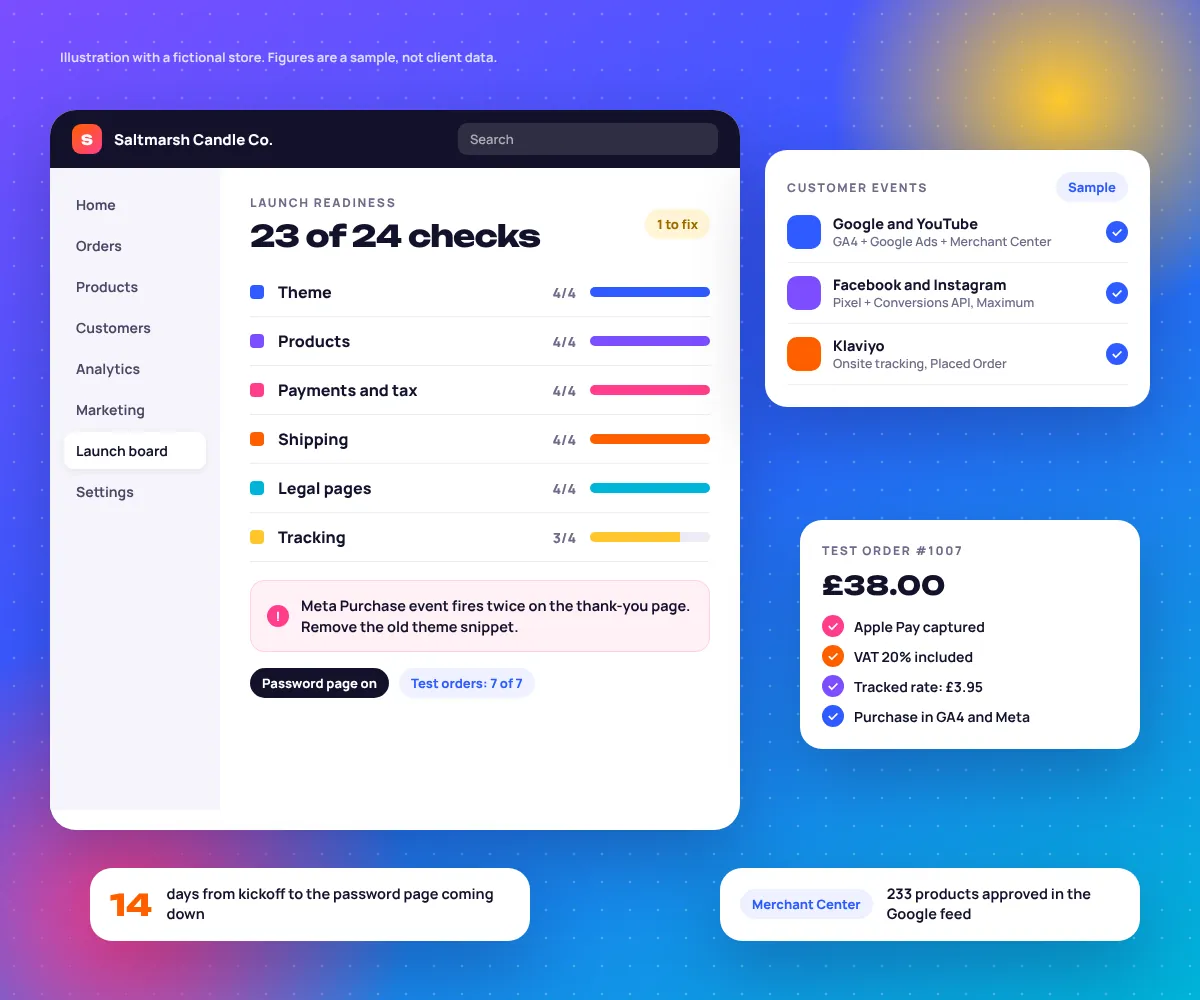
Why a Live Store Isn’t the Same as a Revenue-Ready Store
Most new stores we review are technically open. The theme is installed, products are up, the domain points the right way. Then the first ad campaign goes out and nobody can say what it sold, because the purchase event fires twice, or not at all, or only for card payments.
The faults are rarely dramatic: small settings left on their defaults that cap conversion rate or corrupt the data your ad platforms learn from. After launch they cost more to fix, because weeks of bad numbers already sit in GA4 and Meta.
So we treat launch as a gate. Nothing comes off the password page until the board below is clear.
- What you noticeWhat is usually behind it
- Meta reports more sales than Shopify→A theme snippet and the Facebook app both send Purchase
- GA4 revenue is 30% short→Consent banner blocks tags with no Consent Mode, or PayPal orders skip the thank-you page
- Lots of carts, few checkouts→Shipping cost first appears at checkout and is higher than the category norm
- Shopping ads stuck in review→No return policy or contact page that Merchant Center can find
- Store feels slow on mobile→Six apps each loading their own script on every page
Our Shopify Store Setup Checklist: 24 Checks Before the Password Comes Off
Grouped by area, each with an owner. Pick an area to filter. Every check gets tested, not assumed.
- Online Store 2.0 theme, current versionSections on every template, so you can edit pages without a developer.We do
- Mobile product page above the foldPrice, variant picker, add to cart and delivery promise visible without scrolling.We test
- Images sized before uploadSquare or 4:5, about 2048px on the long side, compressed. No 8 MB hero photos.You supply
- Search, 404 and empty-cart pages designedThe pages nobody plans but every shopper hits at some point.We do
- Product titles written for searchBrand, product type, key attribute. The same title feeds Google Shopping.We do
- Variants, SKUs and barcodes filledGTINs where your products have them, so the Google feed is not limited.You supply
- Automated collections with clear rulesBuilt on tags and product type, so new products land in the right place.We do
- Navigation matches how people shopTwo levels at most, collection names that match search terms.We do
- Payment methods your market expectsShopify Payments with Shop Pay, Apple Pay and Google Pay where available, local gateways and BNPL where buyers expect them.We do
- Tax registrations enteredVAT, GST or US sales tax set per market, prices shown inclusive or exclusive as the market expects.You supply
- Markets and currenciesShopify Markets for each country you sell to, with local currency and rounding.We do
- A real test order per payment methodPlaced, captured, refunded. Not just test mode.We test
- Rates benchmarked against your categoryChecked against three competitors before we set a single rate.We do
- Free shipping threshold set on marginUsually 20 to 40% above your current average order value.We do
- Delivery promise on the product pageDispatch cut-off and delivery estimate shown before the cart, not at checkout.We do
- Packing slips and notifications brandedOrder, shipping and delivery emails in your voice with tracking links that work.We do
- Refund and return policyClear window, condition and who pays return postage. Merchant Center reads it.You supply
- Privacy policy and termsMatching the apps and tracking actually installed, not a generic template.You supply
- Shipping policy and contact pageBusiness name, address or email, and phone where you can offer one.We do
- Cookie banner for UK and EU visitorsShopify’s customer privacy settings, wired to Google Consent Mode v2.We do
- GA4 through the Google and YouTube appPurchase, add to cart and begin checkout, each firing once.We test
- Meta Pixel and Conversions APIFacebook and Instagram app with data sharing set to Maximum, events deduplicated.We test
- Google channel and Merchant CenterProducts synced, policies verified, Google Ads purchase conversion live.We do
- Old scripts removedNo leftover tags in theme.liquid that double-count what the apps already send.We do
GA4, Meta CAPI and the Google Channel, Wired Before the First Visitor
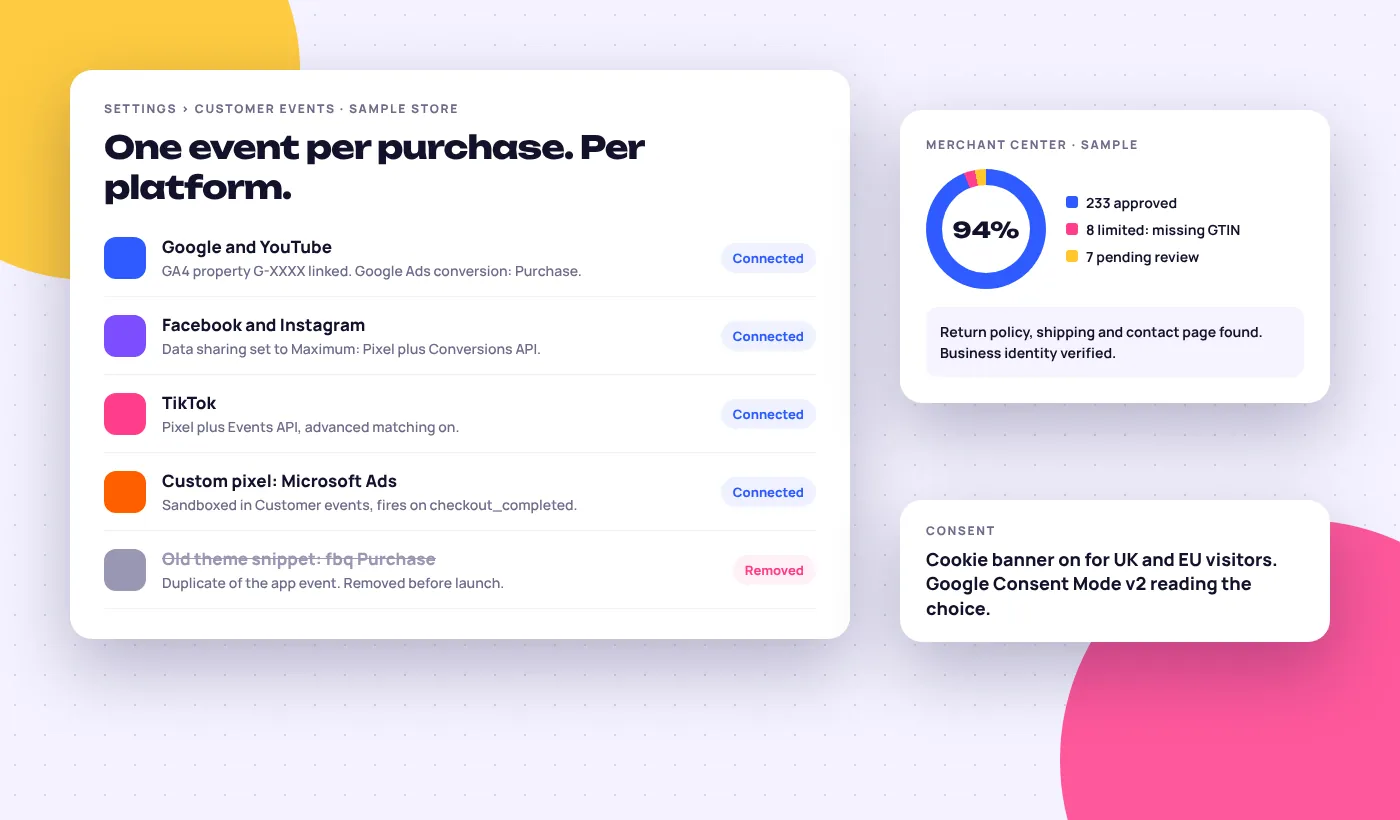
Shopify moved tracking out of the theme and into Customer events. Old thank-you page scripts no longer run, and Google Tag Manager cannot see the checkout. So a 2026 store needs its tracking built the Shopify way, then checked against real orders.
Sales channels › Google & YouTubeGA4 and Google Ads
We connect GA4 and the Google Ads purchase conversion through Google’s own app, then compare GA4 revenue with Shopify orders for a week. A gap above 10 to 15% means something is broken.
Sales channels › Facebook & InstagramMeta Pixel plus CAPI
Data sharing on Maximum sends events from the browser and from Shopify’s server, with a shared event ID so Meta counts each order once. We check match quality in Events Manager before launch.
Merchant Center › ProductsFeed and policies
Product sync, shipping and return settings, and business details verified, so Google Shopping ads can run the week you launch instead of waiting on review.
Settings › Customer eventsEverything else
TikTok, Pinterest and Microsoft pixels through their apps or as sandboxed custom pixels. One owner per event, written down.
The App Stack We Install, and the Apps We Keep Off Your Store
Every app is a monthly fee, a script on your pages and one more thing that can break. We start lean and add apps when a real problem asks for one.
Install Usually on day one
Welcome, cart and post-purchase flows live at launch. We build them as email automation flows, not one-off sends.
Photo reviews, review requests after delivery, and star ratings sent to Google.
Free, official, and the cleanest way to send purchases to both ad platforms.
Better filters and synonyms, plus automations like tagging high-value orders.
Keep off Unless there is a strong reason
They add a script to remove scripts. Fixing the cause works better.
Shoppers see through them, and the timers reset on refresh.
Shopify Markets handles currency properly, and checkout charges in it.
One tool for capture. Your email platform usually has it built in.
Already have a store carrying twenty apps? That is a Shopify speed optimisation job first: we audit what each app loads, remove what is unused and clean the code it leaves behind.
How We Set Up Your Shopify Store
You bring a short list of ingredients, we follow the method. The timings hold for most stores up to a few hundred products.
You send us
- Logo, fonts and brand colours
- Product sheet with prices and SKUs
- Product photos, or a shoot date
- Shipping costs from your courier
- Tax registrations per market
- Your returns rules
- Admin access to ad accounts
Method
- Discovery and planProducts, markets, margins and how you will get traffic. We pick the theme and plan the collections.Days 1 to 2
- Theme and catalogue buildTemplates, navigation, product import, collections and copy for the key pages.Days 3 to 7
- Payments, shipping and legalGateways, tax, Markets, rates, policies and notification emails.Days 6 to 9
- Tracking implementationGA4, Meta CAPI, Google channel, Klaviyo and any other pixels, one owner per event.Days 8 to 10
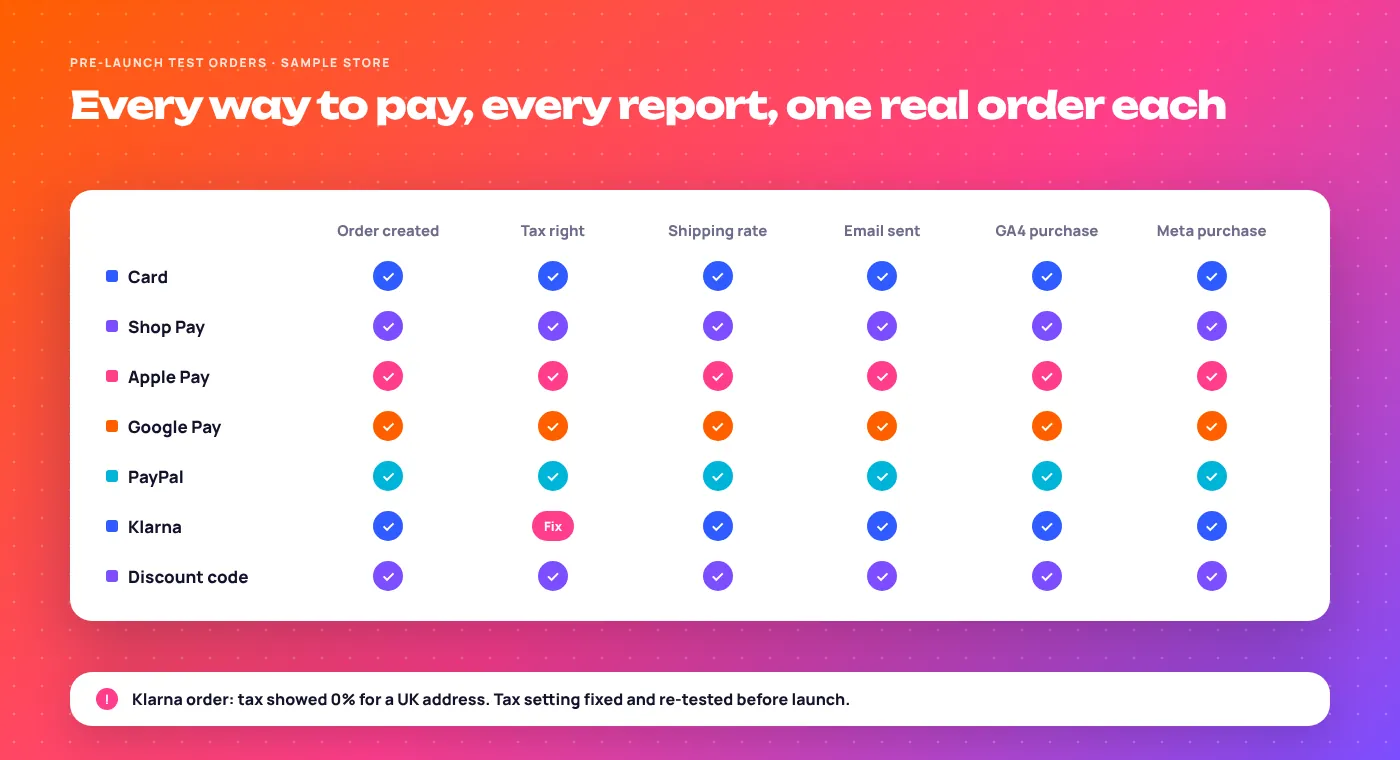
- Pre-launch QAReal test orders through every payment method, checked against every report.Days 11 to 13
- Launch and early monitoringPassword off, domain live, then daily checks for the first two weeks.Day 14 on
The First 30 Days After Launch
Real shoppers find the problems test orders miss. We stay on the store for a month and hand it over in four folders.
Watch every order
- Shopify orders matched to GA4 and Meta, daily
- Checkout errors and failed payments
- Mobile session recordings on product pages
You get: a short daily note
Fix the first leaks
- Search terms with no results
- Pages with high exits on mobile
- Any Merchant Center disapprovals
You get: the fix list, done
Ready for paid traffic
- Tracking signed off for ads
- Klaviyo flows checked with real subscribers
- First Shopping and Meta campaigns briefed
You get: a tracking sign-off sheet
Hand over the keys
- A recorded walkthrough of your admin
- App list with costs and owners
- A 90-day improvement list
You get: full ownership of every login
Want us to keep going after day 30? Our Shopify website management plan covers theme updates, new pages, app changes and monthly conversion work.
Results From Sites and Stores We Have Worked On
No published Shopify setup case yet, so here are the closest two: a website rebuild, and a Shopify store we market, with sales read from its admin.
Professional services firm: +28% conversion rate on the same traffic
Rebuilt around one conversion path, with the weight cut and technical SEO fixed.
CosIQ: 4,530 orders and ₹33,21,534 in total sales
From 106 orders in 2021 to 2,087 in 2022 and 2,337 in 2023 up to 23 May, with Meta, Google, email and WhatsApp feeding one Shopify store.
More results across ecommerce and lead generation on our success stories page, and the full list of brands on our clients page.
Where Shopify Store Setup Usually Leads Next
Store setup sits under our website design and development service. These are the jobs that tend to follow it.
Questions About Setting Up a Shopify Store
How long does Shopify store setup take?
About 14 days for a store with up to 50 products in one market, 3 to 4 weeks for larger catalogues or migrations, and 6 weeks or more for Plus stores with integrations. The usual cause of delay is product data and photos arriving late, so we ask for those first.
What is included in a Shopify setup?
Theme setup, product and collection structure, payments, tax, shipping, legal pages, notification emails, GA4, Meta Pixel with Conversions API, the Google channel with Merchant Center, a Klaviyo welcome flow, real test orders and 30 days of monitoring after launch.
Which Shopify plan should I start on?
Most new stores start on Basic and move up when lower fees on a higher plan save more than the plan costs. Plus suits high-volume stores, B2B or deep checkout customisation.
Is a premium Shopify theme worth it?
Often, yes. A good paid theme is a one-off fee and saves days of custom work. We pick on speed, how product pages handle variants on mobile, and whether the sections match your catalogue, not on the demo photos.
Can you migrate my store from WooCommerce or another platform?
Yes. We move products, customers and order history, then map every old URL with traffic to its new Shopify URL with a 301 redirect. Shopify uses fixed paths like /products/ and /collections/, so a redirect map is not optional.
Will my tracking be accurate from launch?
That is the point of doing it before launch. Every purchase event is tested with real orders across each payment method, and we compare Shopify orders with GA4 and Meta daily for the first two weeks.
Do you set up Google Merchant Center and Shopping feeds?
Yes. We connect the Google channel, sync products, fix feed errors like missing GTINs, and verify the policies Google checks, so Shopping and Performance Max campaigns can start straight after launch.
Who owns the store and the accounts?
You do. The Shopify store, domain, ad accounts, GA4 property and Klaviyo account are created in your name, and we work as staff or collaborator accounts you can remove at any time.
Is it worth having us set it up instead of doing it myself?
If you plan to run ads soon, usually yes. The settings themselves are not hard. The risk is in what gets missed: broken tracking teaches the ad platforms the wrong lessons, and that is far harder to undo than getting setup right first.
Can you run my ads once the store is live?
Yes. Many stores go straight into Meta, Google Shopping or email management with us, with tracking already tested. Ad management runs on a 3-month minimum, then month to month.
Your Store Is Behind a Password. Let’s Open It Properly.
Send us your store, even half-built. We will run it against the 24 launch checks and tell you what is ready, what is missing and what it would take to fix. Free, and no obligation.
Or read more about our website design and development work.
