
Email Automation Flows That Earn Revenue Without Anyone Pressing Send
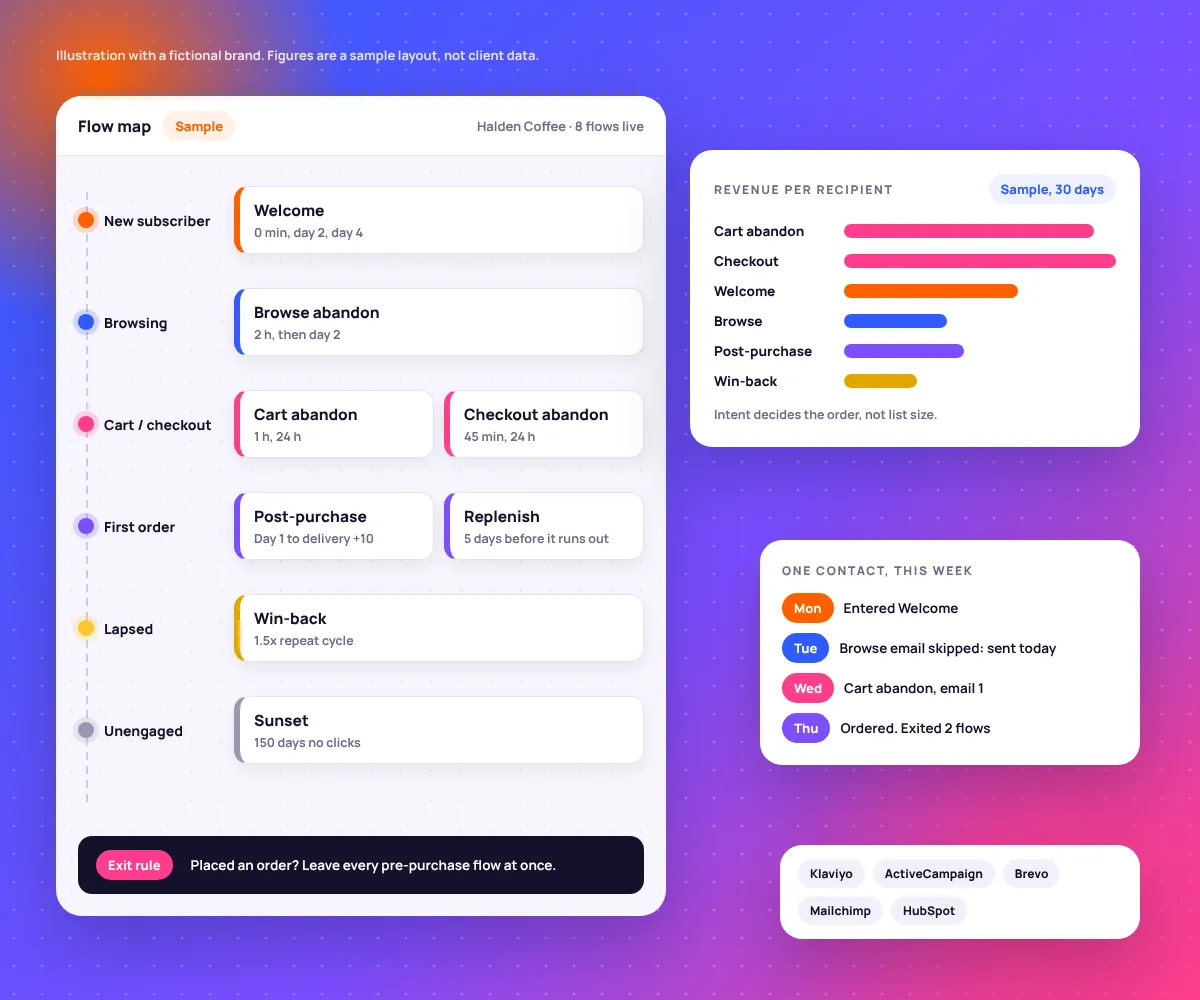
Flows are the emails your customers trigger themselves: by signing up, browsing, leaving a cart, buying or going quiet. We map, build and test the full set, with triggers, filters and exit rules that stop them tripping over each other, and we measure what each one really earns.
- Built in
- Klaviyo
- ActiveCampaign
- Brevo
- Mailchimp
- HubSpot
Why Automation Is the Highest-ROI Email Investment
A campaign is written once and sent once. A flow is written once and sent every time someone does the thing it listens for, at the moment they are most likely to act. That is why a handful of well-built flows usually earn a large share of email revenue from a small share of the sends.
The catch is that flows go invisible once switched on. Nobody rereads a three-year-old welcome email or notices a browse email firing for someone already in checkout. Most of our flow work is fixing logic like that, not writing more emails.
Conditional branching beats a straight line
A good flow changes path based on what the person does inside it. Someone who buys on day one skips the first-order offer; a three-time buyer gets a different post-purchase email from a first-timer. Flows are one part of our wider email marketing service.
Every flow has the same five parts
Same idea, different names in each platformBrevo and Mailchimp use the same building blocks under their own names, and their exit options vary more by plan, so we check what yours allows before designing the logic. Running Klaviyo? See our Klaviyo email marketing page.
The Email Automation Flows We Build, With Trigger, Timing and Exit
Eight flows for an online store. Timings are starting points until your own data takes over, and each card ends with the mistake we find most often.
Welcome series
- Trigger
- Joins the list from a form or checkout opt-in
- Filter
- Has not ordered yet
- Timing
- Within minutes, then day 2, 4 and 6
- Exit
- Places a first order
Watch for: the promised code arriving in email two, or a first-order offer landing an hour after they bought.
Browse abandonment
- Trigger
- Viewed a product while identified
- Filter
- No cart since, not in this flow in the last 14 days
- Timing
- 2 to 4 hours, optional day 2
- Exit
- Adds to cart
Watch for: no re-entry limit, so a regular browser gets the same email every week.
Cart abandonment
- Trigger
- Added to cart
- Filter
- Has not started checkout since
- Timing
- 1 hour, 24 hours, optional 48 to 72 hours
- Exit
- Starts checkout or orders
Watch for: a discount in the first email, which teaches people to abandon on purpose.
Checkout abandonment
- Trigger
- Started checkout
- Filter
- No order since
- Timing
- 30 to 60 minutes, then 24 hours
- Exit
- Places the order
Watch for: the store’s built-in checkout reminder sending at the same time as yours.
Post-purchase and cross-sell
- Trigger
- Placed or fulfilled order
- Filter
- Split first order from repeat buyers
- Timing
- Day 1, delivery +3, review at delivery +10, cross-sell around day 20 to 30
- Exit
- Refund or cancellation
Watch for: cross-selling before the first product has even arrived.
Replenishment
- Trigger
- Ordered a product that runs out
- Filter
- Has not reordered it
- Timing
- 5 to 7 days before a typical customer runs out
- Exit
- Reorders
Watch for: one timing for every pack size. A 30-day tub and a 90-day pouch need different clocks.
Win-back
- Trigger
- No order in about 1.5x your usual repeat cycle
- Filter
- Ordered at least once, still clicking or visiting
- Timing
- Three emails over about three weeks
- Exit
- Orders
Watch for: opening with the biggest discount. Lead with what is new, keep the offer for email three.
Sunset
- Trigger
- No clicks, visits or orders in 120 to 180 days
- Filter
- Not a recent buyer
- Timing
- Two emails, a week apart
- Exit
- Clicks to stay, otherwise suppressed
Watch for: counting opens as engagement. Apple Mail Privacy Protection marks many emails opened that nobody read.
Flows get sharper when the audience inside them is split well, by product bought, margin or quiz answer. That is our email segmentation strategy work.
Ecommerce Flows vs a Lead Nurture Email Sequence
A service business has no carts. It has enquiries, booked calls and proposals that go cold. The stages line up; the flows do not.
For lead flows, email is rarely the fastest channel. New enquiries get a WhatsApp or SMS reply within a minute; email carries the longer nurture. Our marketing automation team wires the CRM side, as we do for coaching businesses. Running a store? See email marketing for ecommerce and our ecommerce marketing page.
Rules That Stop Automated Email Sequences Colliding
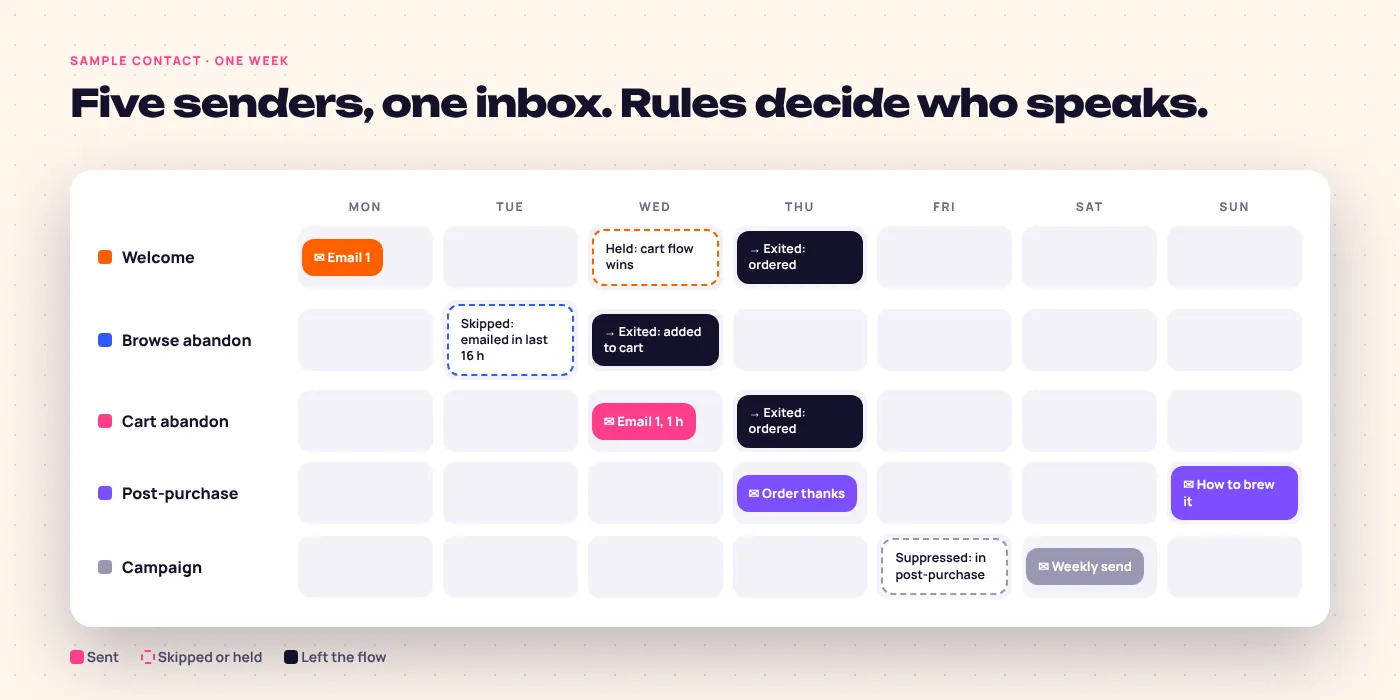
Once eight flows and a weekly campaign share one inbox, the rules between them matter more than any single email.
Smart sending
Klaviyo skips anyone emailed in the last 16 hours by default. We keep it on for sales flows, off for order and booking messages, and copy it with a filter on other platforms.
Flow priority
Only one pre-purchase flow talks at a time. Checkout beats cart, cart beats browse, browse beats the third welcome email. Across flows and campaigns, most contacts should get no more than 4 or 5 emails a week.
A/B on subject and timing
One test per flow at a time: subject line first, then timing, such as cart email one at 1 hour vs 4 hours. We judge on placed-order rate, not opens, and wait for a few hundred recipients per side.
SMS and WhatsApp hand-offs
SMS or WhatsApp joins only where it beats email: a checkout nudge after email one goes unclicked, a call reminder an hour before. Separate consent, always. See our WhatsApp marketing service.
Over-mailing shows up as spam complaints, and complaints hurt inbox placement for every email you send. If you are already landing in spam, start with email deliverability setup.
Measuring Flow Revenue Without Fooling Yourself
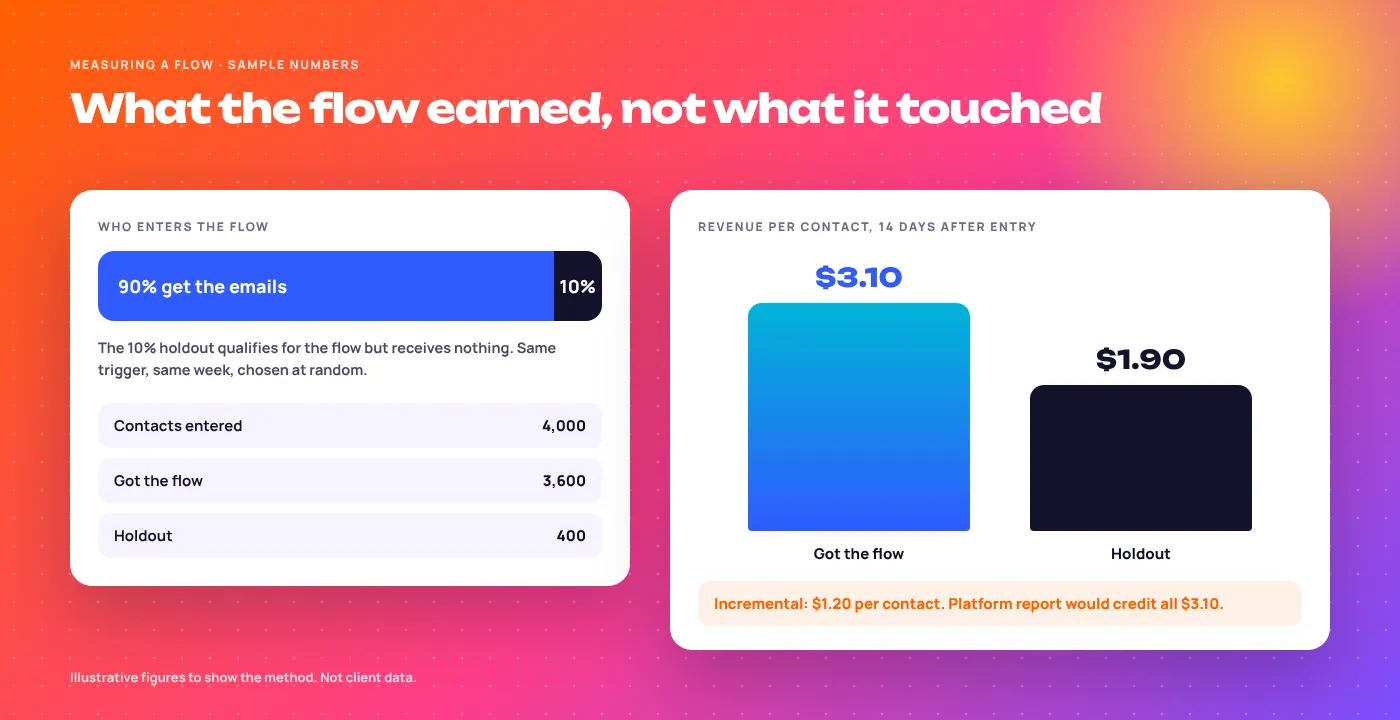
Your email platform credits a flow with any order placed within its attribution window after a click, and sometimes after an open. Plenty of those buyers would have bought anyway. So we report three numbers:
- Revenue per recipient, by flow and by email, on click-based attribution.
- Placed-order rate, compared with the same flow last quarter.
- Incremental lift from a holdout: 5 to 10% of eligible contacts get nothing, and the gap is what the flow really earned.
Holdouts need volume, so we run them on busy flows like welcome and cart, then check orders against Shopify and GA4.
How We Deliver Consistent Results: The Flow Build Sprint
The core flows are usually live in about 14 days and the full set within 30. Each step up puts more of the set live in your account.
Audit and map
We sign up, browse, cart and buy with a test address, then draw every live flow on one page with its trigger, filters and exits.
Data check
Confirm the events fire: viewed product, added to cart, started checkout, placed order, or form and CRM stages for lead flows. Consent and suppressions too.
Core three, tested
Welcome, cart and checkout, or enquiry, booked call and proposal follow-up. Every path run with test profiles and every exit tested with a real order.
The rest of the set
Browse, post-purchase, replenishment, win-back and sunset, each switched on with a holdout where volume allows.
Test and refresh
One test per flow, revenue per recipient by email, unsubscribe and complaint rates checked, and stale content rewritten.
Results From Flows We Built
One store, one lead-led business. All figures are client-confirmed; you can read the full story on each case page or browse more client success stories.
Fit Kit Bodycare: one automated email to four flows
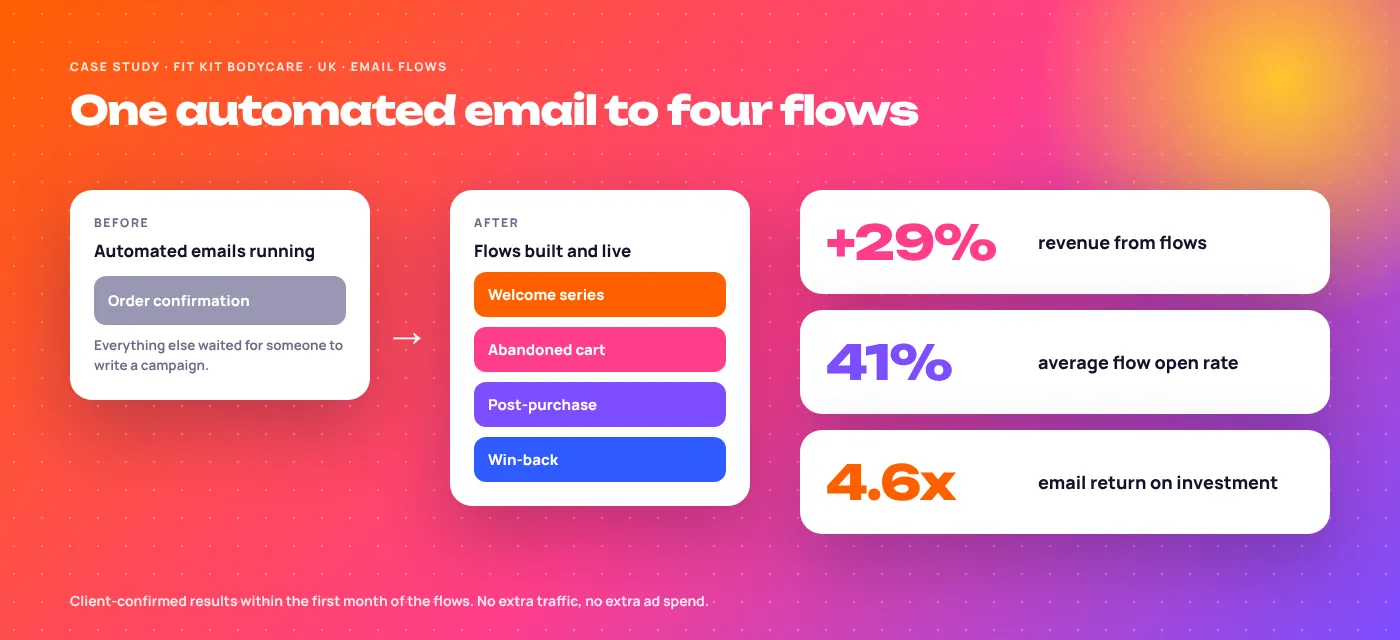
Fit Kit, a UK bodycare brand, was winning buyers at scale through Meta Ads, but its only automated email was an order confirmation. Meta’s report for its best campaigns shows 211,627 adds to cart against 67,643 purchases. That gap is what cart and checkout flows are for.
We built welcome, abandoned cart, post-purchase and win-back flows in Klaviyo and put a segmented weekly calendar on top. In the first month of the flows, with no extra traffic or ad spend:
A boutique fitness brand: lead flows that do not forget
Leads arrived from WhatsApp, website forms and ad lead forms, each in a different inbox. We moved all three into one CRM with instant routing and triggered follow-ups, the same logic a lead nurture flow runs on.
More Across Our Email Services
Flows sit next to these. Most accounts need two or three of them at once.
Common Questions Answered
What are email automation flows?
Emails that send themselves when a contact does something or meets a condition: joining your list, viewing a product, leaving a cart, buying, booking a call or going quiet. Each flow has a trigger, filters, delays, optional branches and an exit rule.
Which flows should I build first?
For a store: welcome, cart abandonment and checkout abandonment, because they reach people at peak intent. For a service business: lead magnet delivery, booked-call reminders and proposal follow-up. The rest follow in order of how many people reach each stage.
How long does it take to build email flows?
The core three are usually live in about 14 days, including testing every path, and the full set of eight in around 30. Broken tracking adds time, because flows cannot fire on events that never arrive.
How many emails should a flow have?
Welcome flows often run three to five emails, cart and checkout two to three, win-back three and sunset two. We test length and cut any email that adds unsubscribes without adding orders.
How does an abandoned cart email flow work?
When an identified contact adds to cart and does not check out, the flow waits about an hour, then shows the exact products left behind. A second email answers delivery, returns and reviews. An incentive, if any, comes last. The flow stops the moment they buy.
Is email marketing automation worth it for a service business?
Usually, yes. Most enquiries do not buy on the first call, and follow-up is the step people forget. Automated reminders and proposal follow-ups make sure every lead hears from you on time.
Will flows work with my existing platform?
Yes. We build in Klaviyo, ActiveCampaign, Brevo, Mailchimp, HubSpot and similar tools, and only suggest switching if yours cannot do something you need, like reacting to product views.
How do you stop customers receiving too many emails?
Flow priorities, smart sending or an equivalent filter, and exit rules that remove people the moment they convert. We also look at the total a contact could receive from flows plus campaigns in a week and cap it.
How do you measure whether a flow works?
Revenue per recipient and placed-order rate, checked against your store or CRM. On busy flows we add a holdout group that gets nothing, so the flow is credited only with sales it caused.
Should flows include discounts?
Sometimes, but late and sized to margin. In cart and win-back flows we lead with the product and reviews, and keep any incentive for the final email so people do not learn to wait for one.
Do flows need ongoing maintenance?
Yes, lightly. Products and offers change, and an old flow can quietly promote things you no longer sell. We review each flow monthly and run one test at a time.
Build Email Automations That Generate Revenue Around the Clock
Send us read-only access to your email platform. We map every live flow, mark the gaps and broken exits, and tell you the three flows worth fixing first. Free.
- TriggerYou request the free audit
- WaitA few working days while we map your flows
- ExitA flow map with the fixes in order