
Email Deliverability Setup That Keeps Your Emails Out of Spam
Updated
Our email deliverability services fix what sits behind every send: SPF, DKIM and DMARC records, a proper sending subdomain, Gmail and Yahoo bulk sender compliance, list hygiene and warm-up. Good emails only earn money if they reach the inbox.
- TXT SPF
- TXT DKIM
- TXT _dmarc
- TXT BIMI
- CNAME return-path
What Is Email Deliverability?
Email deliverability is the share of your emails that land in the inbox rather than spam, a tab nobody checks or a bounce. It depends on authentication records, sender reputation, list quality and how recipients react, so two brands sending the same email can see very different results.
Delivery is not deliverability. “Delivered” only means the receiving server accepted the email, even if it went straight to junk.
Why it quietly gets worse
Nobody gets an alert when Outlook starts filtering you. Clicks slide, subject lines get blamed, and the real cause sits in DNS or in contacts who stopped reading a year ago.
EmergingAds is a performance marketing agency founded in 2021, based in Gurugram, India, working with brands in the US, UK, UAE, India and Australia, with 85+ brands served. Our email deliverability services sit inside our wider email marketing management service.
One send, four destinations
What happens to a campaign after it leaves your platform.
SPF, DKIM and DMARC Setup: What DNS Records Do You Need?
You need an SPF record listing every service allowed to send for you, a DKIM key for each of those services, and one DMARC record telling inboxes what to do when checks fail. A return-path and a branded link domain help alignment and reputation, and BIMI comes last.
| Record | What it does | Sample value |
|---|---|---|
| SPFTXT on the return-path host | Lists the servers allowed to send. One SPF record per host, and no more than 10 DNS lookups, or it fails. | v=spf1 include:_spf.esp.example ~all |
| DKIMTXT or CNAME per selector | Signs each email so receivers can check it was not altered. 2048-bit keys, signing domain matching your From domain. | s1._domainkey.send.larkfield.co CNAME s1.dkim.esp.example |
| DMARCTXT at _dmarc | Tells inboxes what to do when SPF and DKIM both fail to align, and sends daily reports on who mails as you. | v=DMARC1; p=none; rua=mailto:dmarc@larkfield.co |
| Return-pathCNAME from your platform | Puts bounces on your own subdomain, so SPF passes for your domain instead of the platform’s. | bnc.larkfield.co CNAME bounces.esp.example |
| Link domainCNAME for click tracking | Branded tracking links, so you do not share the platform’s link reputation. | go.larkfield.co CNAME track.esp.example |
| BIMITXT at default._bimi | Shows your logo next to emails in supporting inboxes. Needs DMARC at quarantine or reject first. | v=BIMI1; l=https://larkfield.co/bimi/logo.svg; a=https://larkfield.co/bimi/vmc.pem |
Send marketing from a subdomain such as send.yourbrand.com. If a campaign draws complaints, your root domain and staff email are not dragged down with it. On Klaviyo this is the branded sending domain, set up as part of our Klaviyo email marketing work.
How Do You Move DMARC From p=none to Reject?
Start at p=none with reporting switched on, read the aggregate reports until every legitimate sender passes SPF or DKIM with alignment, then move to p=quarantine and finally p=reject. For most brands that takes 4 to 8 weeks, longer if there are forgotten tools sending as you.
p=noneWeeks 1 to 3Watch
Nothing is blocked. Reports show every source sending as you, including tools nobody mentioned.
Gate: all known senders pass and alignp=quarantineWeeks 3 to 6Filter
Failing mail goes to spam. We watch for anything legitimate getting caught.
Gate: two clean weeks of reportsp=rejectWeek 6 onwardBlock
Failing mail is refused. Spoofers can no longer send fake order emails as your brand.
Gate: reports reviewed monthly from hereBIMIOptionalShow the logo
Add a BIMI record and SVG logo. Gmail also needs a Verified Mark or Common Mark Certificate.
Gate: DMARC at quarantine or rejectGmail and Yahoo Bulk Sender Requirements
Since 2024, Gmail and Yahoo require bulk senders to authenticate with SPF and DKIM, publish a DMARC record, align the From domain, offer one-click unsubscribe that is honoured within two days, and keep the user-reported spam rate below 0.3%. Gmail treats anyone sending around 5,000 messages a day to its users as a bulk sender.
Google’s email sender guidelines and the Yahoo Sender Hub spell these out. Microsoft added similar rules for Outlook.com in 2025, and failing mail can now be rejected, not just filtered.
How we monitor it with Google Postmaster Tools
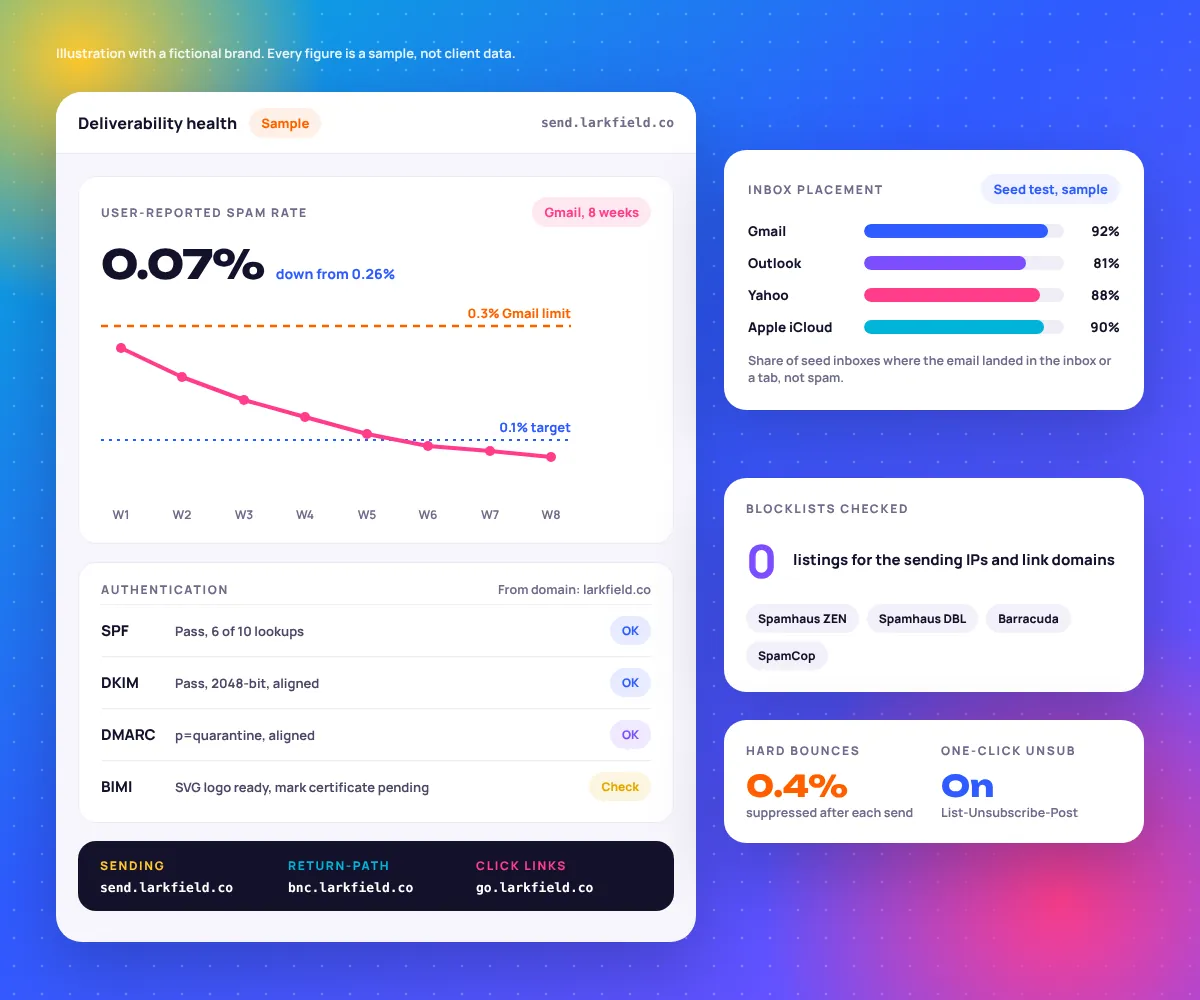
We verify your sending domain in Google Postmaster Tools and check the spam rate, authentication results and compliance status every week. Gmail shows data only above a certain daily volume, so smaller senders rely on seed tests.
- SPF and DKIM on every streamReceipts, helpdesk and CRM mail too, not just the newsletter.
- DMARC published and alignedp=none is the minimum. Your From domain must match the one that passed.
- One-click unsubscribeList-Unsubscribe-Post headers plus a visible footer link.
- Spam rate under 0.3%We aim for under 0.1% so one bad send does not tip you over.
- Valid DNS and TLSMatching forward and reverse DNS on sending IPs, and encrypted delivery.
How Long Does Email Warm-Up Take?
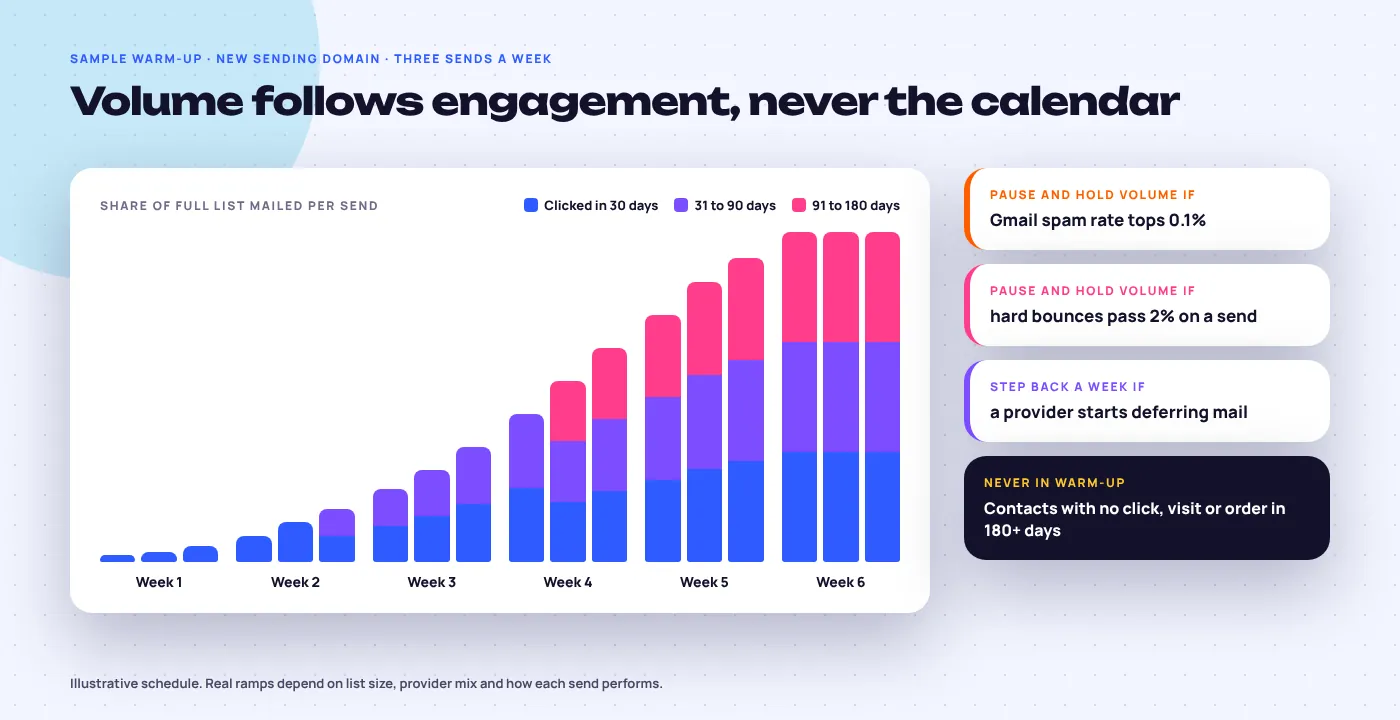
Email warm-up for a new sending domain on a shared IP usually needs 2 to 4 weeks of careful volume growth. A new dedicated IP needs about 4 to 8 weeks. The pace depends on list size and on how inboxes react, so we raise volume only after each send comes back clean.
- Start with people who clicked or bought in the last 30 days.
- Add older tiers only when complaints and bounces stay low.
Most brands do not need a dedicated IP. It suits large, steady volume, usually hundreds of thousands of emails a month.
Email List Hygiene and Engagement-Based Sending
Every email sent to someone who never reads it tells Gmail your mail is unwanted. So each campaign goes out by how recently people clicked, visited or bought. Not opens: Apple Mail Privacy Protection marks many emails opened that nobody read.
Engaged
Clicked, visited or bought in 30 daysEvery campaign. Also who we warm up with.
Warm
31 to 90 daysMost campaigns. Dropped from the extra sends in a busy sale week.
Cooling
91 to 180 daysYour best email of the month. A click moves them back up.
Sunset
No activity in 180+ daysTwo last emails. No click means suppressed, not deleted.
Email list hygiene runs underneath all of this: hard bounces, spam complaints and role addresses such as info@ are suppressed after every send. The sunset emails themselves are built as part of our email automation flows, and the tiers feed our email segmentation strategy.
Why Are My Emails Going to Spam?
Usually because inboxes do not trust the sender yet or have stopped trusting it: failing or misaligned authentication, too many complaints, mail to old or invalid addresses, or a domain on a blocklist. Content plays a smaller part, so we fix reputation first.
Opens fall at one provider only
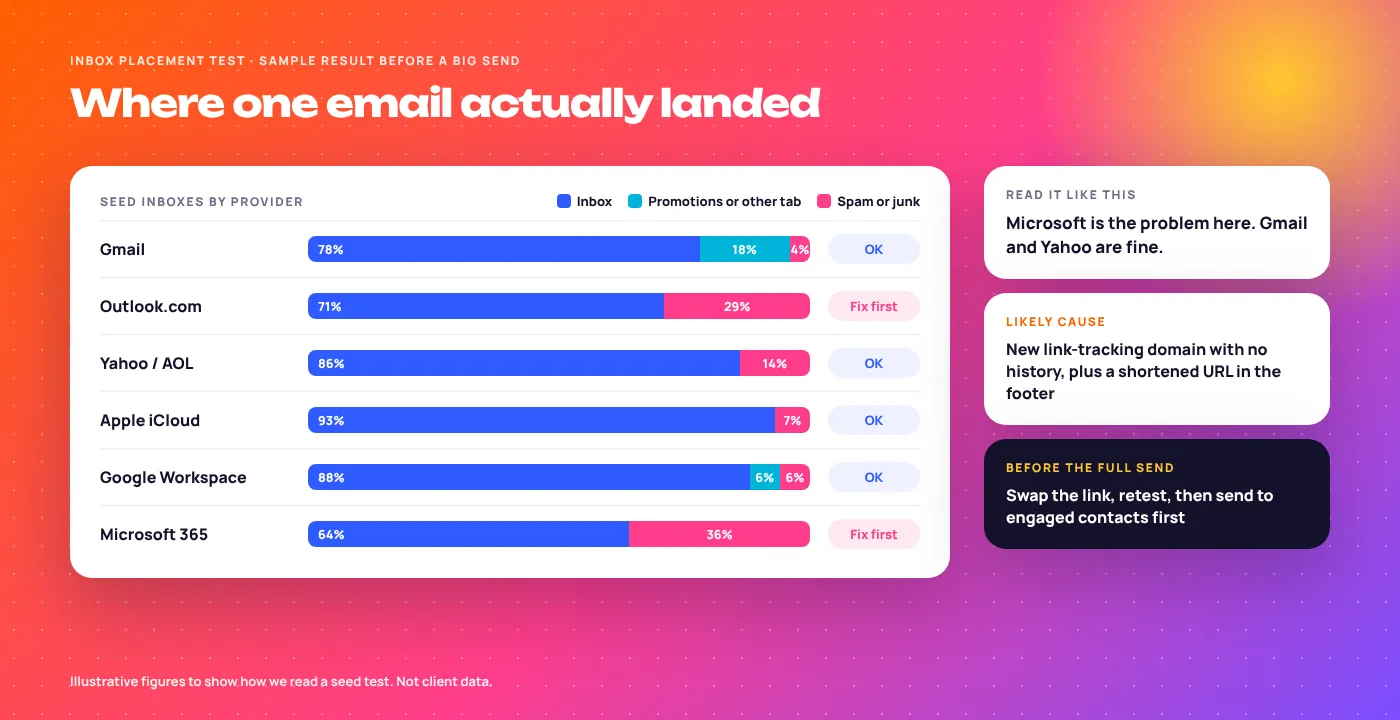
Likely cause: reputation with that provider, often Microsoft.
First check: a seed test split by provider.
Everything dropped overnight
Likely cause: a DNS change broke SPF or DKIM, or a new tool started sending.
First check: the Authentication-Results header on a live email.
Bounces climbing
Likely cause: an old list import or purchased data with spam traps.
First check: blocklists such as Spamhaus, and where those contacts came from.
One campaign lands in spam
Likely cause: content triggers: a link shortener, a blocklisted URL, or one image with no text.
First check: every link domain in the email.
How Our Email Deliverability Services Work
In this order, because fixing content before authentication wastes weeks. Most setup is live in about 14 days; DMARC enforcement follows once reports are clean.
- We know which checks pass, fail or misalign
Read the headers and DNS
We send real emails from each stream and read the Authentication-Results headers.
- Every source is named, with an owner
List every sender
Email platform, Shopify, helpdesk, CRM, invoicing. Forgotten senders stall DMARC rollouts.
- All streams pass SPF or DKIM with alignment
Fix the records
SPF, DKIM and DMARC setup on a sending subdomain: one SPF record under 10 lookups, 2048-bit DKIM, return-path and link domains, and DMARC at p=none with reports.
- Every requirement checks out on a live send
Meet the bulk sender rules
One-click unsubscribe headers, a footer link and Google Postmaster Tools verified.
- Campaigns go only to the right tiers
Clean the list and set send tiers
Suppress bounces and complainers, then build the four send tiers.
- Full volume, spam rate under 0.1%
Warm up or recover
A volume plan for a new domain, or a recovery ramp if reputation is damaged.
- p=reject, with monthly report reviews
Enforce and monitor
DMARC to quarantine, then reject, BIMI if you want it, and weekly checks on spam rate and blocklists, with inbox placement testing before big sends.
What Healthy Inboxes Look Like in Our Work
Fit Kit Bodycare: Klaviyo flows reaching real inboxes
For this UK bodycare brand we built welcome, abandoned cart, post-purchase and win-back flows in Klaviyo, with sunset rules for unengaged contacts. Within the first month:
Open rates are inflated by Apple Mail Privacy Protection, so we treat 41% as a health signal, not proof. The revenue figure matters more, and it needs mail that lands.
Read the Fit Kit Bodycare email case study →How we would approach yours
Fit Kit was not a deliverability rescue, and we will not pretend it was. If your mail is struggling, the first two weeks look like this:
- Headers, DNS and every sending source audited.
- Records fixed and DMARC reporting switched on.
- Sends limited to engaged contacts while reputation recovers.
See more results on our success stories page and the brands we work with on our clients page.
More Email Services and Reading
Email services
Email Deliverability Questions
What is email deliverability?
It is the share of your emails that reach the inbox instead of spam or a bounce. It depends mostly on authentication, sender reputation and list quality.
How do I know if I have a deliverability problem?
Look for clicks falling at one provider, bounces above 2% or a rising spam rate in Google Postmaster Tools. A seed test across providers confirms it quickly.
What are SPF, DKIM and DMARC in plain English?
They are DNS records that prove an email really comes from you. SPF lists who may send, DKIM signs each email, and DMARC tells inboxes what to do when those checks fail.
Do I need a dedicated sending subdomain or a dedicated IP?
A sending subdomain, yes. A dedicated IP, usually not: it only helps with large, steady volume.
How long does it take to warm up a new email domain?
Usually 2 to 4 weeks on a shared IP and 4 to 8 weeks on a new dedicated IP.
Is a DMARC policy of p=none enough?
It meets the Gmail and Yahoo minimum, but it does not stop anyone spoofing your domain. Treat it as the monitoring stage before quarantine and reject.
What are the Gmail and Yahoo bulk sender requirements in 2026?
Authenticate with SPF and DKIM, publish an aligned DMARC record, offer one-click unsubscribe and keep the spam rate under 0.3%. Unsubscribes must be honoured within two days.
Can you fix a damaged sender reputation?
Yes, in most cases, but it takes weeks. We fix authentication, suppress risky contacts, send only to recent clickers and rebuild volume slowly.
Is landing in the Gmail Promotions tab bad for deliverability?
No. Promotions is still the inbox, and it is where Gmail puts most marketing email. Spam placement is the problem worth fixing.
Is BIMI worth setting up?
Yes, once DMARC is enforced. Your logo beside your emails helps trust, but it will not fix a reputation problem on its own.
Fix Your Email Deliverability and Get Your Emails Into the Inbox
Send us your domain and we will tell you what is costing you inbox placement.