
Email Segmentation That Makes Every Send More Relevant
Updated
An email segmentation strategy decides who gets which email, how often, and who gets nothing at all. We build segments from clicks, orders, predicted value and what subscribers tell you, then prove each one earns its place in revenue per recipient.
- Engagement
- Lifecycle
- Purchases
- Predicted CLV
- Zero-party data
What Is an Email Segmentation Strategy?
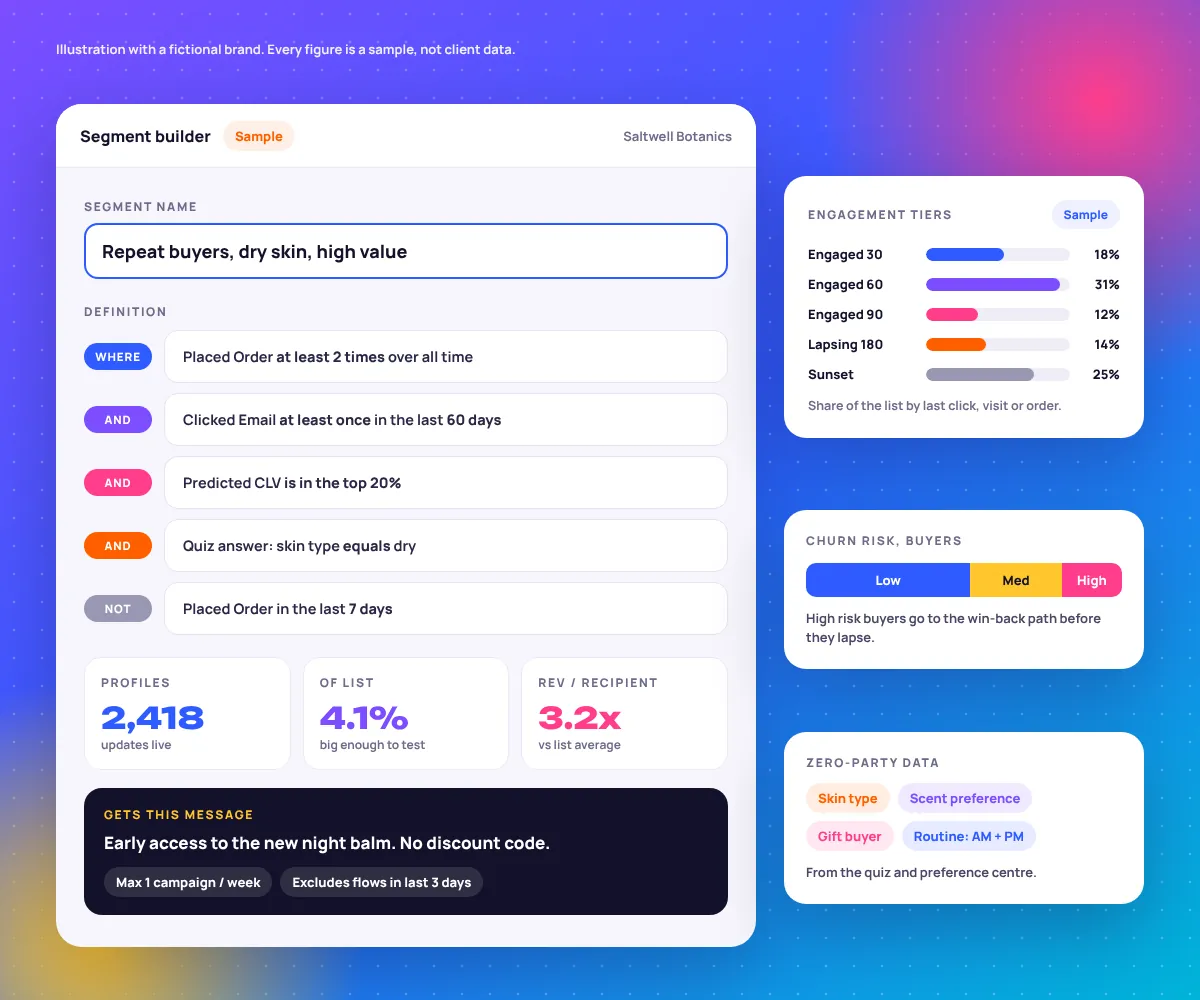
An email segmentation strategy is a written plan for splitting your list into groups by behaviour, purchase history, predicted value and stated preferences, then deciding what message, offer and frequency each group receives, and who should be suppressed.
Good email list segmentation is mostly documentation: why each segment exists, what it gets and when it was last checked. Undocumented segments become unmaintained segments.
What’s the difference between a list, a tag and a segment?
A list is a static group people join, usually through a form. A tag is a label you or a tool applies. A segment is a saved rule that updates itself, so a subscriber moves from “never bought” to “repeat buyer” without anyone touching the record.
We keep one main list and do the real work in segments. EmergingAds is a performance marketing agency founded in 2021, based in Gurugram, India, working with brands in the US, UK, UAE, India and Australia, with 85+ brands served. Segmentation is part of our email marketing management service.
Five kinds of data, in order of trust
Email Segmentation Examples, With the Exact Logic
These email segmentation examples are our starting definitions, written as they read in a segment builder. Windows get tuned to your repeat-purchase data.
ENG-30EngagementEngaged 30
Clicked any email OR Active on Site OR Placed Order in last 30 days
OR subscribed in last 14 days
Send: launches and the extra mid-week email.
LIF-01LifecycleSubscribed, never bought
Placed Order zero times
AND subscribed more than 21 days ago
AND not in welcome flow
Send: reviews, best-sellers, answers to first-order doubts.
PUR-02PurchaseSecond-order window
Placed Order exactly once
AND first order 20 to 45 days ago
Send: usage tips, then the usual next product.
AFF-01AffinityCategory fans
Viewed or bought category X 2+ times in last 90 days
AND has not bought new item Y
Send: launches from that category only.
PRD-01PredictiveValuable, cooling off
Predicted CLV in top 20%
AND Churn Risk = high
Send: a plain personal check-in before any win-back offer.
ZPD-01StatedQuiz answer match
Quiz property "skin_type" = dry
AND clicked in last 90 days
Send: picks that match the answer.
B2B-01RoleDecision makers
Job title contains Head, Director, VP or Founder
AND company size 50+
Send: outcomes and proof, not feature lists.
B2B-02Lead scoreSales-ready leads
Lead score 60+
AND lifecycle stage = Marketing Qualified Lead
AND visited demo page in last 14 days
Send: one case study and a meeting link; alert sales.
B2B-03StageOpen opportunities
Deal stage is open in the CRM
Send: nothing from nurture. Sales owns it.
SUP-01SuppressionJust bought
Placed Order in last 7 days
Exclude from: first-order offers and discount campaigns.
SUP-02SunsetGone quiet
No click, site visit or order in 180 days
AND received 10+ emails in that time
Do: one last-chance email, then suppress.
SUP-03FatigueMid-flow
Received a flow email in last 3 days
Exclude from: campaigns, so sends do not pile up.
How Do You Segment an Email List by Engagement?
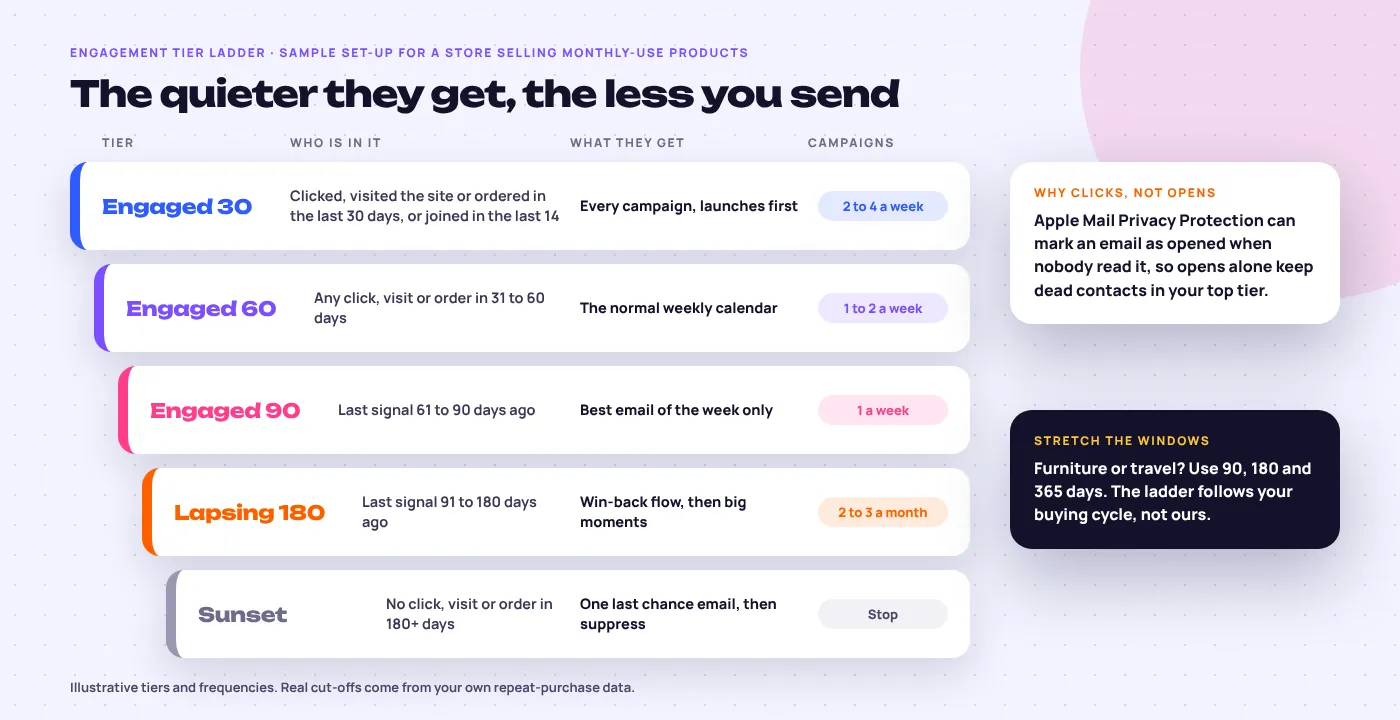
Group subscribers by how recently they last clicked, visited your site or ordered: within 30, 60, 90 and 180 days. Send most to the most recent tiers, less to the quieter ones, and move anyone silent for 180 days into a sunset path. Counting opens alone overstates engagement.
This engagement-based segmentation is the first layer we build, because it lifts results and inbox placement together. A coffee subscription and a sofa brand should not share cut-offs.
Sunset and suppression: who stops getting email
Contacts who ignore months of email drag down every average and tell Gmail and Outlook your mail is unwanted. Gmail and Yahoo expect bulk senders to keep user-reported spam complaints under 0.3%. Silent contacts get one last-chance email, then suppression. Our email deliverability setup work covers the authentication side.
Behavioural Email Segmentation: Lifecycle, Purchases and Product Affinity
Behavioural email segmentation groups people by what they did rather than who they are: where they sit in the customer lifecycle, how often and how recently they bought, and which products or categories they keep returning to. It predicts the next purchase better than age or location.
Lifecycle stage
Subscriber, first-time buyer, repeat buyer, lapsed. Each stage has one job: first order, second order, habit, or win-back. Our ecommerce email marketing page shows the full recency and frequency grid we use for stores.
Purchase behaviour and product affinity
The second order is the hardest, so one-time buyers get a segment timed to your median gap between orders. Affinity segments use viewed and bought categories, so launches reach people who care about that range.
Klaviyo predictive analytics: CLV and churn risk
Klaviyo predicts each customer’s future value and churn risk from order history. Its Help Center lists minimum requirements, roughly 500 customers with orders, at least 180 days of order history and recent orders, so smaller stores may not see these fields yet. Our Klaviyo email marketing team sets them up.
Klaviyo predictive fields we segment on
- Predicted CLV Value
- Expected future spend. Top band gets early access, not codes.
- Churn risk Risk
- Low, medium or high. High plus valuable triggers a check-in.
- Expected date of next order Timing
- Times replenishment reminders per customer.
- Average time between orders Timing
- Sets the 1.5x lapse window for each buyer.
- Predicted gender Skip
- Rarely used. Stated preferences are more accurate.
Field names as shown in Klaviyo profiles.
How Does B2B Email Segmentation Work?
B2B email segmentation groups contacts by job role, company size and industry, then by lead score and lifecycle stage in your CRM. Marketing nurtures leads that are not ready, sales takes over at the qualified stage, and anyone in an open deal is removed from automated nurture so two teams never talk over each other.
HubSpot’s default lifecycle stages (Subscriber, Lead, Marketing Qualified Lead, Sales Qualified Lead, Opportunity, Customer) make a clean backbone, with lead score adding urgency inside each stage. See how this fits our SaaS marketing campaigns.
Zero-party data: ask, then actually use it
Zero-party data is what subscribers tell you on purpose: quiz answers and preferences. It is the most accurate data you hold, and the most wasted. Our rule: only ask if the answer changes what the person receives.
Sample preference centre
Each answer feeds one segment. Fictional brand.
- New products
- Offers
- How-to guides
- Every email
- Once a week
- Big launches only
- Founder
- Marketing lead
- Operations
Customer Segmentation for Email: Who Gets What, and How Often
Customer segmentation for email only pays when each segment gets its own message. This is the starting matrix we adapt per account.
| Segment | Message | Offer | Frequency | Judged on |
|---|---|---|---|---|
| Engaged 30 | Launches, stories, best-sellers | Rarely needed | 2 to 4 a week | Revenue per recipient |
| Never bought | Reviews, comparisons, objections | First-order incentive, once | 1 to 2 a week | First-order rate |
| One-time buyers | How to use it, what to add next | Bundle or gift with purchase | Timed to usage | Second-order rate |
| Predicted top CLV | Early access, thank-yous | Access, not discounts | 1 a week | Repeat rate, margin |
| High churn risk | Personal check-in, what is new | Only if the check-in fails | 2 to 3 emails, then stop | Reactivation rate |
| MQL (B2B) | Case studies, proof, a meeting ask | Audit or consultation | 1 a week | Meetings booked |
| Sunset | One last-chance email | None | Once, then suppress | Complaints avoided |
How Many Email Segments Do You Need?
Fewer than you think. Most brands do well with 6 to 10 active segments, each with its own message and enough contacts to measure. A segment that gets the same email as its neighbour, or is too small to show a real difference in clicks or revenue, adds work without adding results.
Signs you have over-segmented
- Same email, different names. Five segments, one creative.
- Nobody can explain a segment or say when it was last checked.
- Segments with a few hundred people where one order swings the result.
- Unplanned overlaps that send some people three emails on launch day.
Segment-level reporting
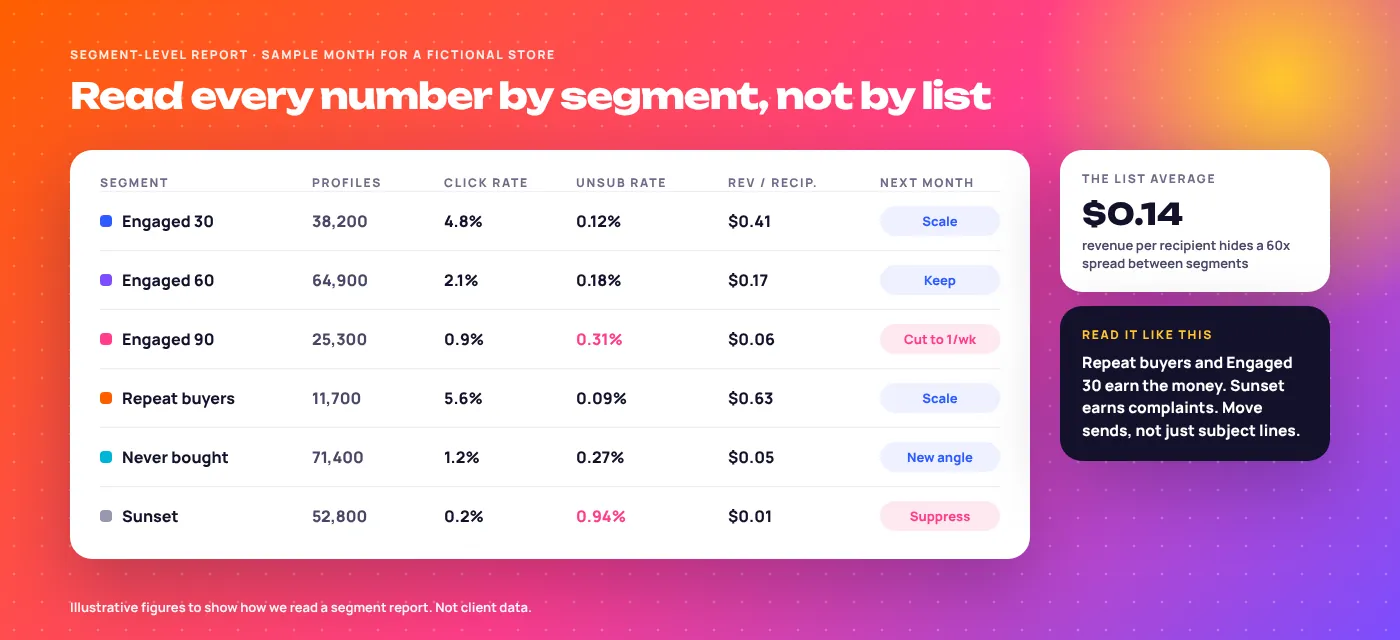
Every month we report click rate, unsubscribes, spam complaints and revenue per recipient by segment. A healthy list average can hide one segment earning the money and another earning the complaints.
How We Build Your Email Segmentation Strategy
Six steps, joined like conditions in a segment builder. First segments are usually live in about 14 days.
Audit the data you already have
Events, profile fields, consent, CRM sync and order history depth.
Output: a data map with gaps marked
Write segments in plain English
Logic, purpose, owner and review date for each, before building.
Output: a segment document you keep
Build and check the counts
Build in Klaviyo, HubSpot or ActiveCampaign, then spot-check real profiles.
Output: segments that match the document
Map messages and frequency
Fill the segment-to-message matrix and add exclusions so flows and campaigns do not collide. Our email automation flows plug in here.
Output: a calendar by segment
Test against a holdout
Compare segmented sends with a broad send on revenue per recipient and unsubscribes.
Output: keep, merge or drop for each segment
Review monthly
Segment-level report, window changes and merges, new segments only when data supports them.
Output: one page of changes per month
Is Email Segmentation Worth It? One Client’s Answer
Fit Kit Bodycare, UK
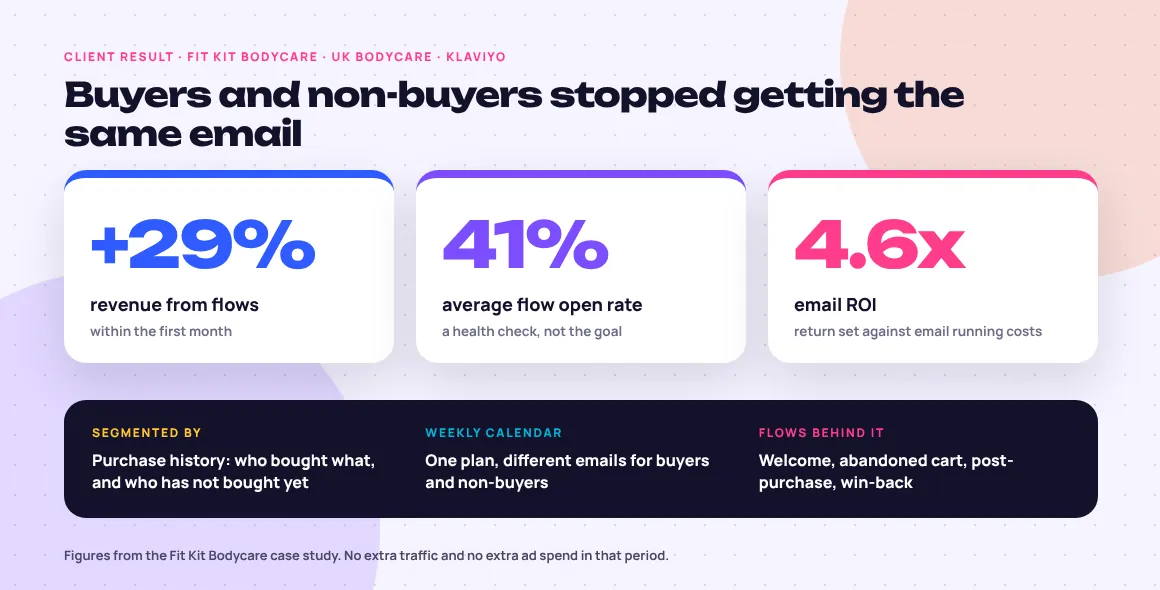
Fit Kit’s only automated email was an order confirmation. We built welcome, abandoned cart, post-purchase and win-back flows in Klaviyo, then a weekly campaign calendar split by purchase history, so buyers and non-buyers got different emails from one plan.
Within the first month: +29% revenue from flows, a 41% average flow open rate and 4.6x email ROI, with no extra traffic or ad spend. We judge it on revenue, not opens.
Read the Fit Kit Bodycare email case study →
We have no published B2B segmentation case yet, so for lead lists we start with role, lead score and stage as above. More results are on our success stories page, and the brands we work with are on our clients page.
More Email Services and Reading
Email Segmentation Questions
What is email segmentation?
It is splitting your list into groups that get different emails, usually by engagement, purchase history, predicted value or stated preferences.
How does email segmentation work in Klaviyo?
You build a segment from conditions such as clicks, orders, profile properties or predictive fields, and it updates automatically. Campaigns can target or exclude it.
Is email segmentation worth it for a small list?
Yes, kept simple. Engaged versus unengaged and buyers versus non-buyers are enough to start.
How many email segments should a brand have?
Usually 6 to 10 active ones, each with a different message and enough contacts to read results.
Should engagement segments use opens or clicks?
Clicks, site visits and orders first. Apple Mail Privacy Protection can register opens that never happened, so open-only segments keep inactive people in your top tier.
What is a sunset segment in email marketing?
It is the contacts who have not clicked, visited or bought for a long time, often 180 days. They get one last-chance email, then suppression.
What data do I need to start segmenting my email list?
Email engagement and order history are enough to start. A Shopify or WooCommerce integration gives you both; quiz answers and CRM fields come later.
What is the difference between segmentation and personalisation?
Segmentation decides who gets an email; personalisation changes what is inside it for each person. Segments come first.
Can you segment B2B email lists by lead score?
Yes. We combine lead score with lifecycle stage and job role, route sales-ready contacts to sales and remove open deals from nurture.
How long does it take to set up email segmentation?
About 14 days for the first set: data audit, segment document, build and first segmented sends. Monthly reviews follow.
Which email platforms do you segment in?
Mostly Klaviyo for ecommerce, and HubSpot or ActiveCampaign for B2B and lead generation. We also work in Mailchimp.
Send More Relevant Emails to Every Subscriber on Your List
We look at your list, segments and last month of sends, and show you which groups earn revenue and which earn unsubscribes.