
Shopify Speed Optimization That Lifts Conversion Rate and Ad Quality Scores
A slow store loses buyers before the product loads and makes every ad click cost more. We find what is slowing your Shopify store down, usually apps, images and scripts added over the years, fix it on a copy of your theme and prove the result with real visitor data.
- LCP
- 2.5s or lessmain content shows
- INP
- 200ms or lesstaps respond
- CLS
- 0.1 or lessnothing jumps
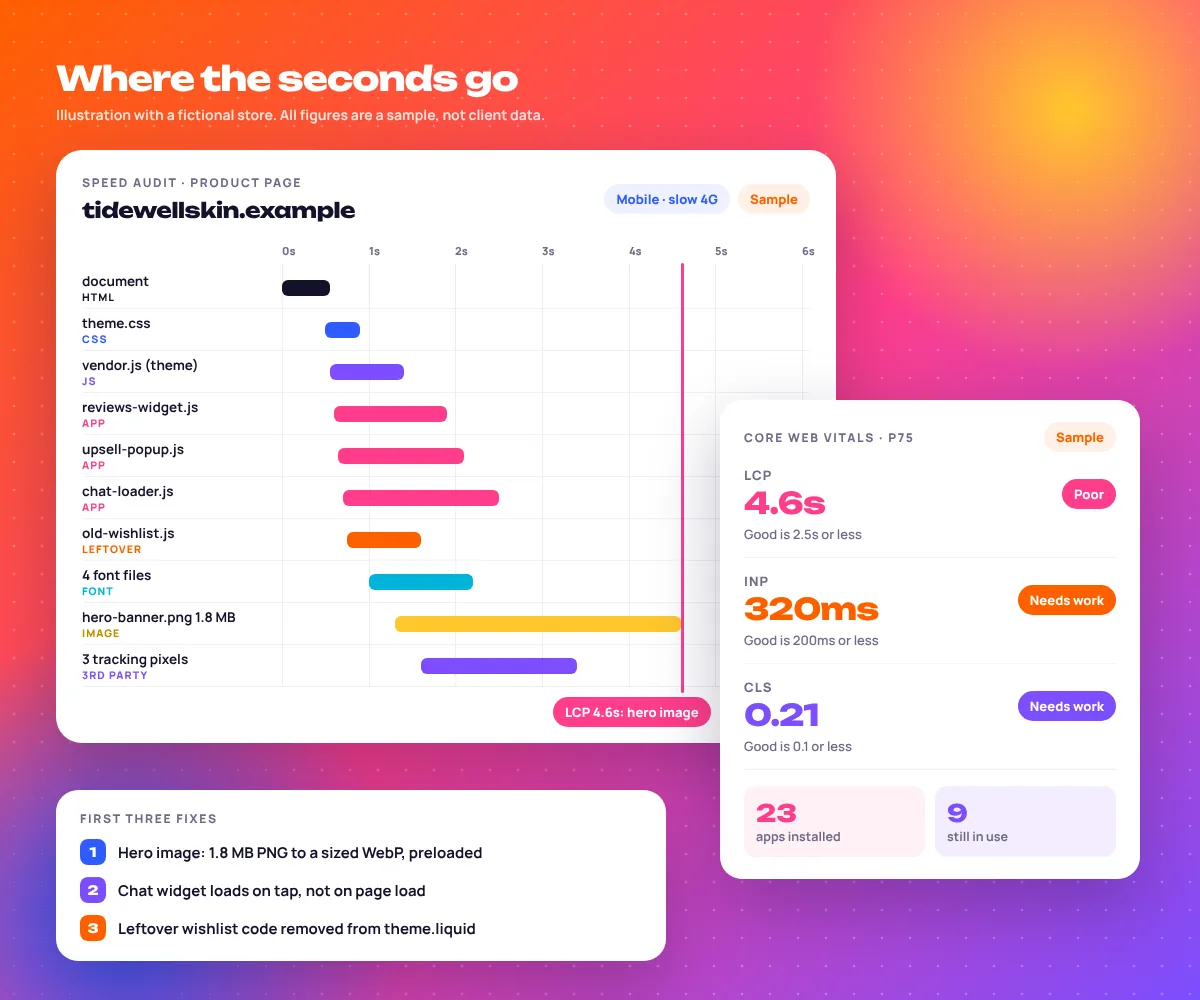
Why Slow Pages Cost You Both Sales and Ad Performance
Why is my Shopify store slow?
Almost always because of what was added on top of Shopify, not Shopify itself. The platform and its CDN are fast. The weight comes from apps that inject scripts on every page, product images uploaded at full camera size, a feature-heavy theme, extra font files and chat, review and tracking scripts competing to load first.
Stores collect these over years: a pop-up from an old sale, a wishlist app nobody uses, three pixels doing the job of one. Together they push the product image back by seconds on a mid-range phone.
Does page speed affect Google Ads Quality Score?
Yes, through landing page experience. Google Ads documentation lists it as one of three Quality Score components, alongside expected click-through rate and ad relevance, and Google’s guidance on landing pages includes making them load quickly on mobile. A slow store can lower that component and push up what you pay per click.
On Meta, compare link clicks with landing page views in Ads Manager: the gap is people you paid for who left before the page loaded. If you run Google Search ads or Meta ads for an ecommerce store, speed work makes every click you already pay for go further.
| Quality Score component | What Google looks at | Does speed touch it? |
|---|---|---|
| Expected CTR | How likely the ad is to be clicked | Not directly |
| Ad relevance | How well the ad matches the search | No |
| Landing page experience | Whether the page is relevant and easy to use, including on mobile | Yes |
Source: Google Ads Help, About Quality Score.
What Is Shopify Speed Optimization, and What Does It Measure?
Shopify speed optimization is the work of making a Shopify store load and respond faster for real shoppers, by trimming apps, scripts, images, fonts and theme code, and measuring success with Google’s Core Web Vitals instead of a single lab score.
Each is judged at the 75th percentile of real visits, as defined in Google’s Core Web Vitals documentation on web.dev.
Largest Contentful Paint
When the biggest element on screen, usually the hero or product image, appears.
- Good
- 2.5s or less, poor above 4s
- On Shopify
- A 3 MB hero image, lazy-loaded by mistake or queued behind app scripts.
Interaction to Next Paint
How fast the page reacts to a tap on a variant, menu or add to cart. It replaced FID in 2024.
- Good
- 200ms or less, poor above 500ms
- On Shopify
- Too much JavaScript: review widgets, upsell apps, sliders.
Cumulative Layout Shift
How much the layout jumps while loading.
- Good
- 0.1 or less, poor above 0.25
- On Shopify
- Late banners and pop-ups, images without width and height.
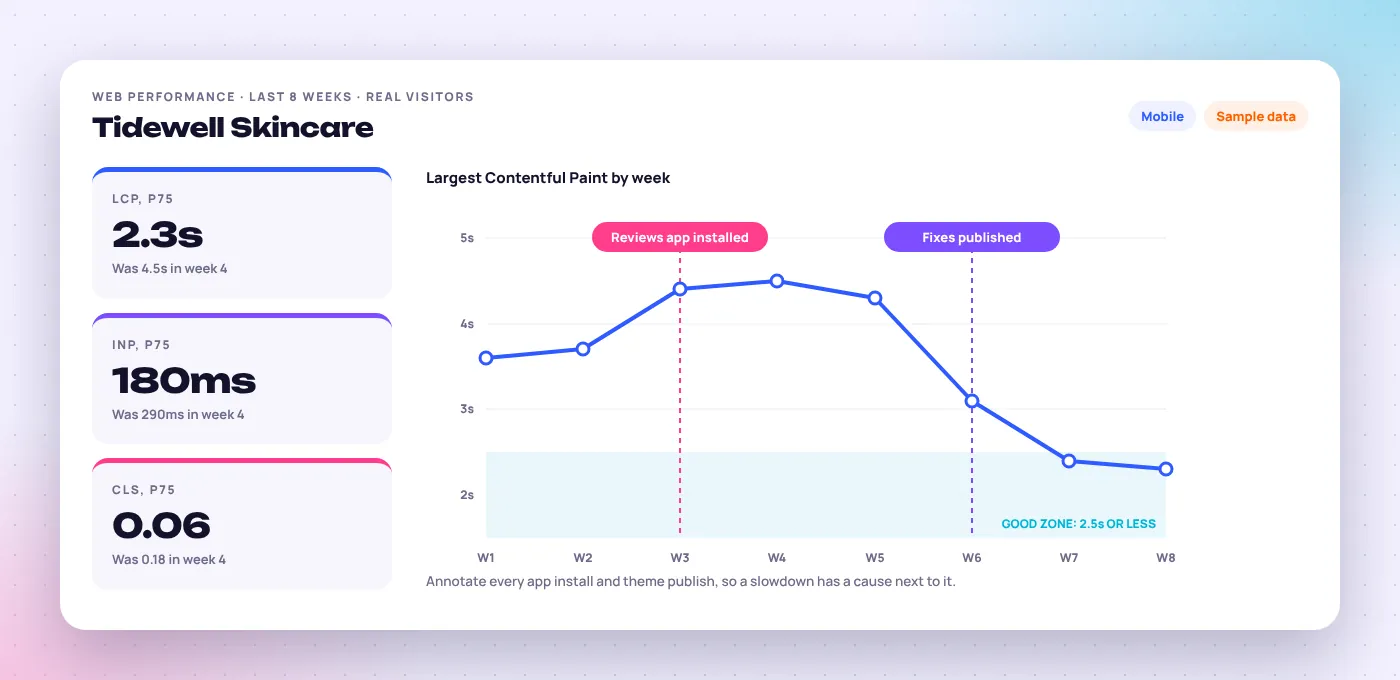
Where do you check Shopify Core Web Vitals?
Start with the Web Performance dashboard in Shopify admin, which reports LCP, INP and CLS from real visitors and marks theme and app changes on its timeline. Then use PageSpeed Insights for the page-level detail and Search Console’s Core Web Vitals report to see which page groups Google flags.
The Lighthouse score is a lab test on one simulated phone. Useful for finding causes, but Google ranks on real-visitor data, and a store can score 45 in the lab and still pass.
Shopify App Bloat: What Each App Type Adds, and the Fix
Every app here is useful to someone. The question is what it adds to every page view, and whether that buys anything.
| App type | What it usually adds | Hurts | Our fix |
|---|---|---|---|
| Product reviewsstars, photo reviews | A widget script on every page, even pages without reviews | INPCLS | Load it when the review block nears the screen; reserve its height |
| Live chatchat bubble, helpdesk | Often the heaviest script on the store | INPLCP | Show a lightweight button and load the real chat on tap |
| Pop-ups and email capture | A script, a font and a modal that appears after load | CLSINP | One tool, a delayed trigger, never over the product on mobile |
| Page builders | Their own CSS and JavaScript framework on top of the theme | LCPINP | Rebuild key pages with Online Store 2.0 sections and blocks |
| Pixels and tracking | Meta, Google, TikTok and others, sometimes installed twice | INP | One install per platform, via official channel apps or Shopify Customer Events |
| Uninstalled appsleftover code | Snippets and script tags still in the theme | LCPINP | Search the theme files and remove them on a duplicate theme |
How do you find leftover app code?
Apps built on theme app extensions use app blocks and embeds, which Shopify removes on uninstall. Older apps edited theme files directly, and that code stays. On a duplicate theme we search theme.liquid and the snippets folder for old script tags and {% render %} calls nobody recognises, then check the theme editor’s App embeds panel.
{%- comment -%} theme.liquid, still loading in 2026 {%- endcomment -%}
{% render 'wishlist-hero-init' %}   <- app removed 2023
<script src="https://cdn.old-upsell.example/loader.js"></script>
{% render 'currency-switcher' %}    <- theme already does this
How to Speed Up a Shopify Store: Theme, Images, Fonts, Scripts and Liquid
Apps are half the story. The rest lives in the theme.
Is an Online Store 2.0 theme faster?
Usually, yes. Dawn, Shopify’s reference theme, ships little JavaScript, and the newer Horizon family follows suit. Many premium themes load code for features you never switch on. If your theme predates 2021, moving often beats months of patching.
Shopify image optimization: sizing and lazy loading
Shopify’s CDN already serves WebP or AVIF. The problems are size and timing: a 4000px upload shown at 600px, or a lazy-loaded hero that arrives last. Lazy load below the fold; preload above it.
{{ image | image_url: width: 1200
  | image_tag: widths: '400, 800, 1200',
    sizes: '(min-width: 990px) 50vw, 100vw',
    preload: true, fetchpriority: 'high' }}
Fonts: two families, a handful of files
Each weight is a separate download. We keep only the weights the design uses, add font_display: 'swap' so text shows immediately, and often set body text in a system font.
{{ settings.type_header_font
  | font_face: font_display: 'swap' }}
Third-party scripts and tag management
Chat loads on tap, reviews when scrolled near, and pixels move out of theme.liquid into official channel apps or Shopify’s Customer Events, which run them in a sandbox.
We check: duplicate GA4 or Meta pixels, an unowned Google Tag Manager container, events firing twice. That overlaps with our conversion tracking setup work.
What is Liquid render cost?
Shopify’s servers render your theme’s Liquid before anything reaches the browser. Nested loops, mega menus that loop through every product and the deprecated include tag slow that step. The Shopify Theme Inspector shows a flame graph of which file took the time; we swap include for render and cut the loops.
Section rendering: fewer sections, lighter first screen
Online Store 2.0 makes sections easy to add, so homepages grow to 15 or 20, with autoplay video and two sliders. We cut the first screen back and keep cart updates on the Section Rendering API, which refreshes one section instead of the whole page.
Test on the Phone Your Customers Actually Use
Most ad traffic to a Shopify store arrives on mobile, often inside Instagram’s or TikTok’s in-app browser. An office laptop on fibre hides almost every problem on this page.
- We test on a real mid-range Android and with throttled 4G in Chrome DevTools.
- We test the product and collection pages your ads point to, not just the homepage.
- We read Shopify page speed by template, because one slow product template can hide inside a good store average.
The filmstrip shows the difference for a shopper: something useful on screen after one second instead of three, and nothing jumping under their thumb.
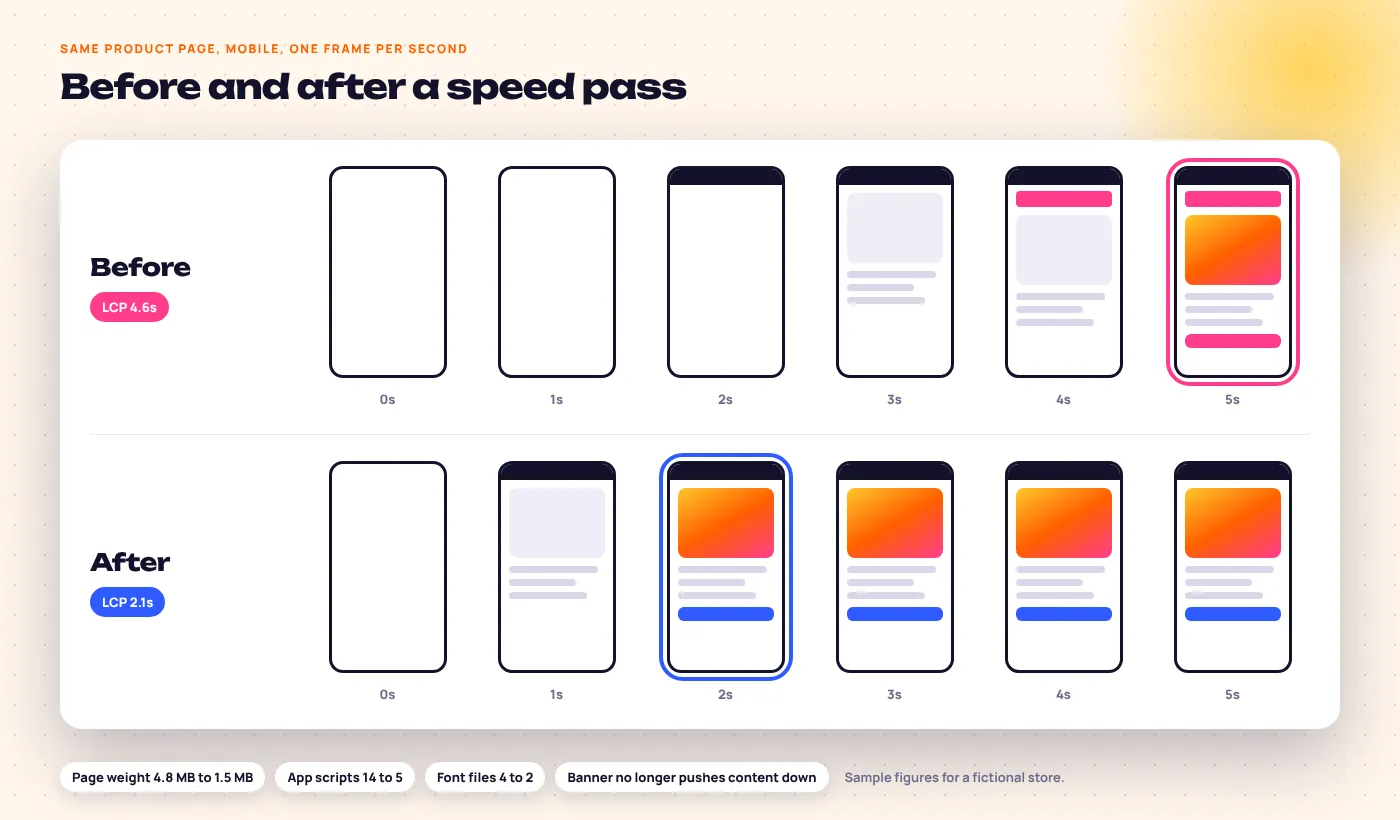
How Our Shopify Speed Optimisation Process Runs
Six steps, each leaving you something to check. Nothing touches your live theme until it is tested on a copy.
Baseline from real visitors
28 days of field data from Shopify and Search Console, plus lab runs on your top templates.
You getA scorecard per templateApp and script inventory
Every app, embed, pixel and hard-coded script, what it loads and whether anyone uses it.
You getA keep, delay or remove listTheme and Liquid profile
Waterfalls, Liquid flame graph, images, fonts and sections.
You getFixes ranked by impactFix on a duplicate theme
Changes go into an unpublished copy you can preview, so nothing breaks mid-sale.
You getA preview link to reviewCompare, then publish
Same pages, same settings. Cart, checkout and tracking tested before publishing.
You getA before and after reportWatch the field data
Field data updates over a rolling 28 days, so we recheck after four weeks.
You getThe confirmed result
How long does Shopify speed optimisation take?
A focused pass covering apps, images, fonts and theme clean-up usually takes one to two weeks of work. Stores with years of custom theme code take longer. Real-visitor data then needs about 28 days to fully reflect the change, so the confirmed result arrives roughly a month after publishing.
After that, keep it fast
Speed drifts: one new app can undo the work in a week. Rechecks after every change are part of our Shopify website management service.
Results From a Speed-Led Website Rebuild
EmergingAds is a performance marketing agency founded in 2021 and based in Gurugram, India, working with brands in the US, UK, UAE, India and Australia, with 85+ brands served. The closest published proof for this service is a website project, and we label it as one.
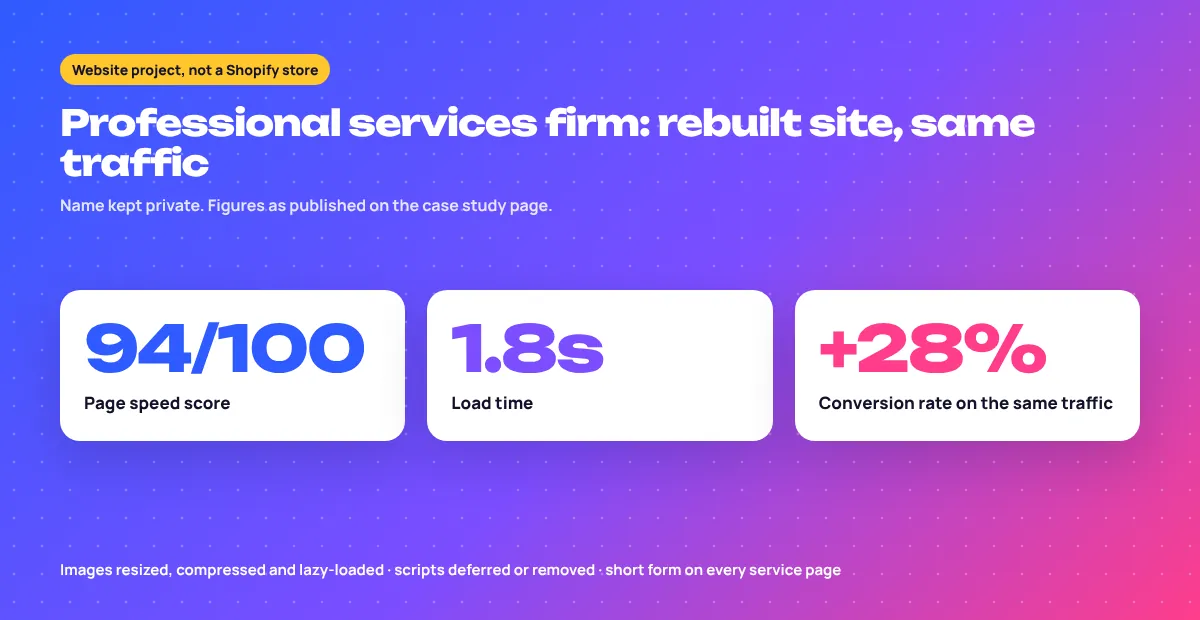
Professional services firm, name kept private
Good traffic, lost to slow pages and a contact form three clicks deep. Images were resized, compressed and lazy-loaded, scripts deferred or removed, and a short form added to every service page. Result: 94/100 page speed, a 1.8 second load time and conversion rate up 28% on the same traffic.
- Same on ShopifyImage sizing, lazy loading below the fold, cutting scripts that do nothing for visitors.
- DifferentOn Shopify most scripts come from apps, so the audit starts with the app list.
More results across paid media and websites are on our client success stories page, and the brands we work with are on our clients page.
What Usually Comes Before, Alongside and After Speed Work
Speed is one part of our website design and development services. These are the jobs that sit next to it.
Alongside
Keeping the store fast and the data clean.
By industry: ecommerce marketing and B2C marketing services. More on speed, ads and conversion in our blog articles.
Questions About Shopify Speed
Why is my Shopify store so slow on mobile?
Usually apps, oversized images and third-party scripts, which hit phones harder than laptops. Phones run the same JavaScript more slowly on slower connections, so a store that feels fine on desktop can fail Core Web Vitals on mobile.
How long does Shopify speed optimisation take?
One to two weeks of work for most stores, then about 28 days of real-visitor data to confirm the result.
Does page speed really affect my Google Ads costs?
Yes, it can. Landing page experience is one of the three Quality Score components, and a weaker Quality Score usually means paying more per click for the same position.
What is a good Shopify page speed score?
The target that matters is passing Core Web Vitals for real visitors: LCP 2.5s or less, INP 200ms or less, CLS 0.1 or less. The Lighthouse lab score helps find causes, but Google ranks on field data.
Will removing apps break features we actually use?
No. We check what each app does and whether it is used before removing anything, and test on a duplicate theme first.
Do I need a new theme to make my Shopify store faster?
Not always. Most stores gain a lot from apps, images and scripts alone. If your theme predates Online Store 2.0 or relies on a page builder, a lighter modern theme is often the better long-term fix.
Is Shopify speed optimisation worth it for a small store?
Yes, if you pay for traffic, because every visitor who leaves before the page loads is a click you paid for. Small stores often have the quickest wins.
Do you guarantee a specific PageSpeed score?
No. We benchmark your Core Web Vitals, fix what is fixable and report the real change, which depends on your theme, apps and starting point.
Can speed fixes undo themselves over time?
Yes. A new app or theme edit can bring the weight back within days, which is why we recheck after any major change.
How is this different from Shopify conversion optimisation?
Speed work is about load time and responsiveness. Shopify conversion optimisation covers the wider reasons people don’t buy, such as product content, trust and checkout friction.
Speed Up Your Shopify Store and Convert More of the Traffic You Already Have
Send us your store URL. We will run it on a mid-range phone, list the apps and scripts that load on your product pages, and send back the first three fixes we would make.
Planning a rebuild instead? Start with website design and development.
This box finished loading. Your product page should too.