
WordPress Website Design That Is Fast, SEO-Ready and Easy to Manage
Our WordPress website design services start with what the site needs to do, then build only that: a custom block theme, a short plugin list, SEO set up before launch and an editor your team can use without calling a developer.
- Theme
- Custom block theme
- Plugins
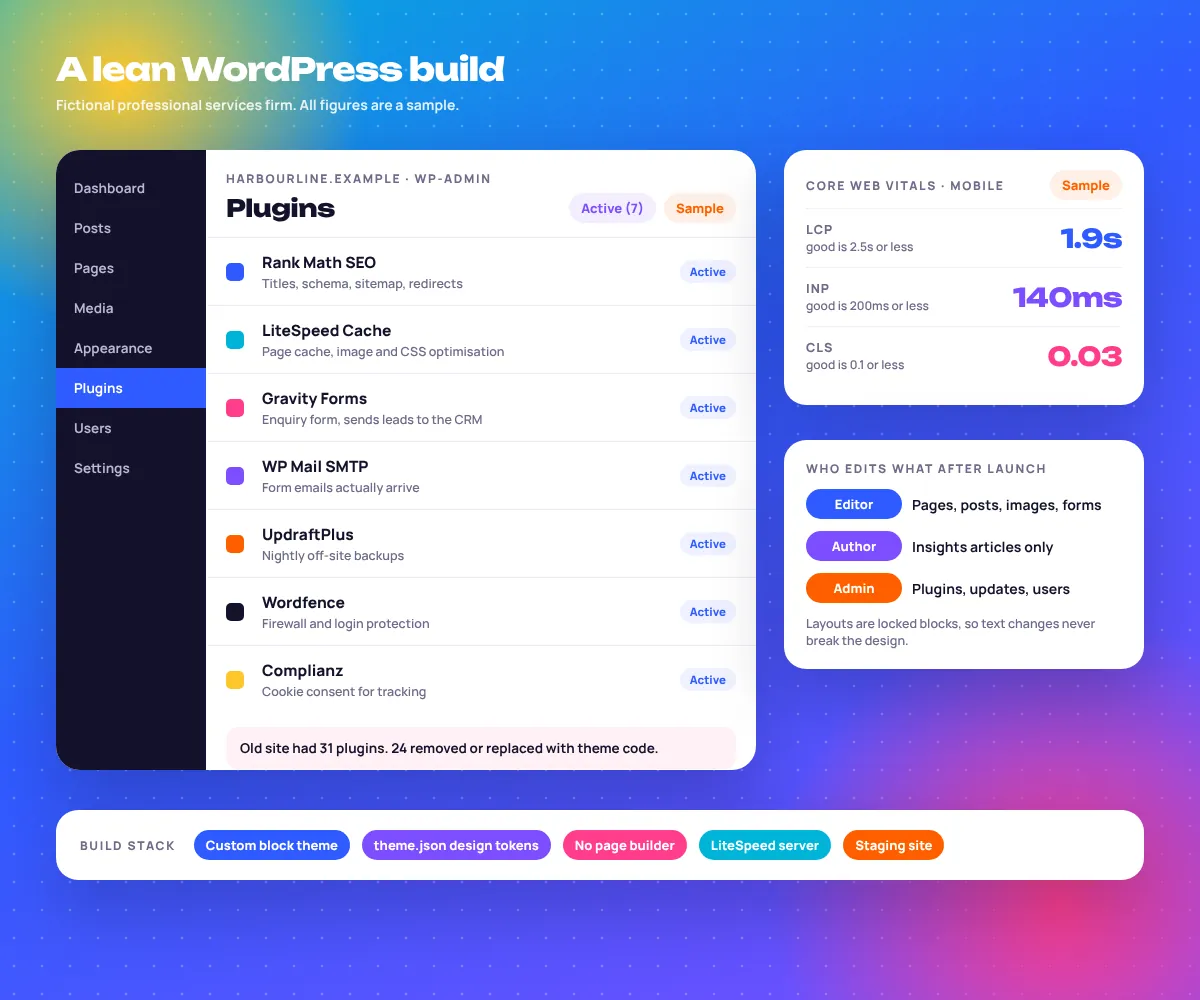
- Only what earns a place
- Handover
- Trained editors
Why Most WordPress Sites Are Slow Before They Are Even Finished
What is WordPress website design?
WordPress website design is planning, designing and building a business website on WordPress, the open-source CMS, so that it loads fast, is easy for search engines to read and lets your own team publish and edit pages without breaking the layout or calling a developer.
The trouble is how most sites are assembled: a multipurpose theme built for fifty kinds of business, a page builder on top, and a plugin for every small job. Together they can put a 6-second load on a mid-range phone before a single visitor arrives. Good WordPress website development removes those layers instead of adding a speed plugin on top.
EmergingAds is a performance marketing agency founded in 2021 and based in Gurugram, India, working with brands in the US, UK, UAE, India and Australia, with 85+ brands served. We build websites with paid traffic and enquiries in mind, because that is where a slow or confusing site costs real money.
Is plugin count really a problem?
Yes, though what each plugin loads and who maintains it matters more than the count. Every plugin can add front-end scripts, database queries and code that needs updating, and an abandoned plugin with a known vulnerability is a common way into a WordPress site.
So before we build, we sort every plugin job into three bins.
1Keep as a plugin
- SEO (Rank Math or Yoast)
- Forms
- Backups
- Firewall and login security
- Cookie consent
- SMTP email delivery
2Replace with theme code
- Custom fonts
- Header and footer scripts
- Simple sliders
- Custom post types
3Drop entirely
- Second SEO plugin
- Unused page builder add-ons
- Old sale pop-ups
- Duplicate tracking pixels
- Inactive plugins left installed
Custom WordPress Website Design vs Page Builders
Gutenberg vs Elementor: what is the difference?
Gutenberg is the block editor built into WordPress core, and block themes use it to design whole pages, headers and footers. Elementor is a separate page builder plugin with its own editor, widgets and styles. Both work. Elementor gives more drag-and-drop freedom; Gutenberg usually ships less code and has no extra plugin to depend on.
Custom WordPress website design, for us, means a custom block theme: design tokens in theme.json, layouts saved as block patterns and blocks locked where a stray drag could break the page (see the WordPress Theme Handbook on block themes). If your team already edits daily in Elementor, we build on it properly instead.
| Typical trade-offs | Custom block theme | Elementor on a light theme | Multipurpose theme |
|---|---|---|---|
| What loads on each page | Core block styles plus your theme | Builder CSS and JS on top of the theme | Theme features for many site types, used or not |
| Editing for your team | Block editor with locked patterns | Most visual freedom | Theme options panels, often confusing |
| Speed ceiling | Highest, least to remove | Good with care and caching | Lowest, lots to strip out |
| If you change agency | Standard WordPress, anyone can work on it | Needs someone who knows Elementor | Tied to one theme vendor |
| Best fit | Service firms, content sites, most rebuilds | Teams already trained on Elementor | Short-lived sites, rarely a business site |
General trade-offs, not benchmarks. In the Gutenberg vs Elementor choice, hosting, images and plugins usually matter more than the editor.
What Our WordPress Website Design Services Include
Eight areas, each with a rule we hold to. These are the parts a template site skips.
How fast should a WordPress site be?
Fast enough to pass Google’s Core Web Vitals on mobile at the 75th percentile of real visits: Largest Contentful Paint 2.5 seconds or less, Interaction to Next Paint 200 milliseconds or less and Cumulative Layout Shift 0.1 or less. Google’s web.dev Core Web Vitals guide sets these thresholds.
- Images uploaded at display size and served as WebP or AVIF, which WordPress core supports.
- The hero image loads first with high fetch priority; everything below the fold lazy-loads.
- WordPress speed optimization ends with a test on a real mid-range phone over mobile data, not only in a desktop browser.
Managed WordPress hosting and LiteSpeed
Cheap shared hosting caps how fast even a clean build can go. We recommend managed WordPress hosting or a LiteSpeed server, where the LiteSpeed Cache plugin caches pages at server level.
We also check for a current PHP 8 version, staging and a CDN. The same thinking drives our Shopify speed optimisation work.
Is WordPress secure enough for a business website?
Yes, when it is maintained. Most compromised WordPress sites run outdated plugins, weak admin passwords or abandoned themes, not a flaw in WordPress core. Updates, two-factor login and off-site backups prevent most of it.
- Two-factor login for every admin; no shared accounts.
- Nightly off-site backups, and one test restore before launch.
WordPress SEO setup from day one
Your WordPress SEO setup is done in the build, not after launch. One SEO plugin (Rank Math or Yoast SEO) handles titles, meta descriptions, the XML sitemap and schema: Organization, LocalBusiness or ProfessionalService where it fits, plus breadcrumbs and FAQs.
Clean URLs, one H1 per page and internal links between related services give our SEO services team a site they can build on.
Accessibility to WCAG 2.2 AA
We design to WCAG 2.2 level AA: colour contrast, visible focus states, keyboard navigation, labelled form fields and real alt text. If you sell to consumers in the EU, the European Accessibility Act has applied to many online services since June 2025.
Forms that reach your CRM
A form is only useful if the lead reaches a person. We connect forms to Zoho CRM, HubSpot or your inbox, send email through SMTP so notifications do not end up in spam, and block bots with Cloudflare Turnstile or reCAPTCHA. Running ads to one offer? A dedicated landing page design usually beats a service page.
Tracking you can trust
GA4 and ad pixels go through Google Tag Manager with a consent banner and Consent Mode v2, which Google requires for ad measurement from EEA visitors. A form submit fires one conversion, not three.
For the full setup, see our GA4 setup service and conversion tracking setup.
Handover and editing without a developer
A site your team is afraid to touch goes stale fast. Layouts are synced patterns and locked blocks, so editors change words and images while the design stays put.
Editors get Editor or Author roles, not Admin. For publishing ideas, see the EmergingAds blog.
- A live training session on your own site, recorded.
- All logins, domain, hosting and the theme files are yours.
Site Architecture and WordPress Site Migration
How do you migrate a WordPress site without losing rankings?
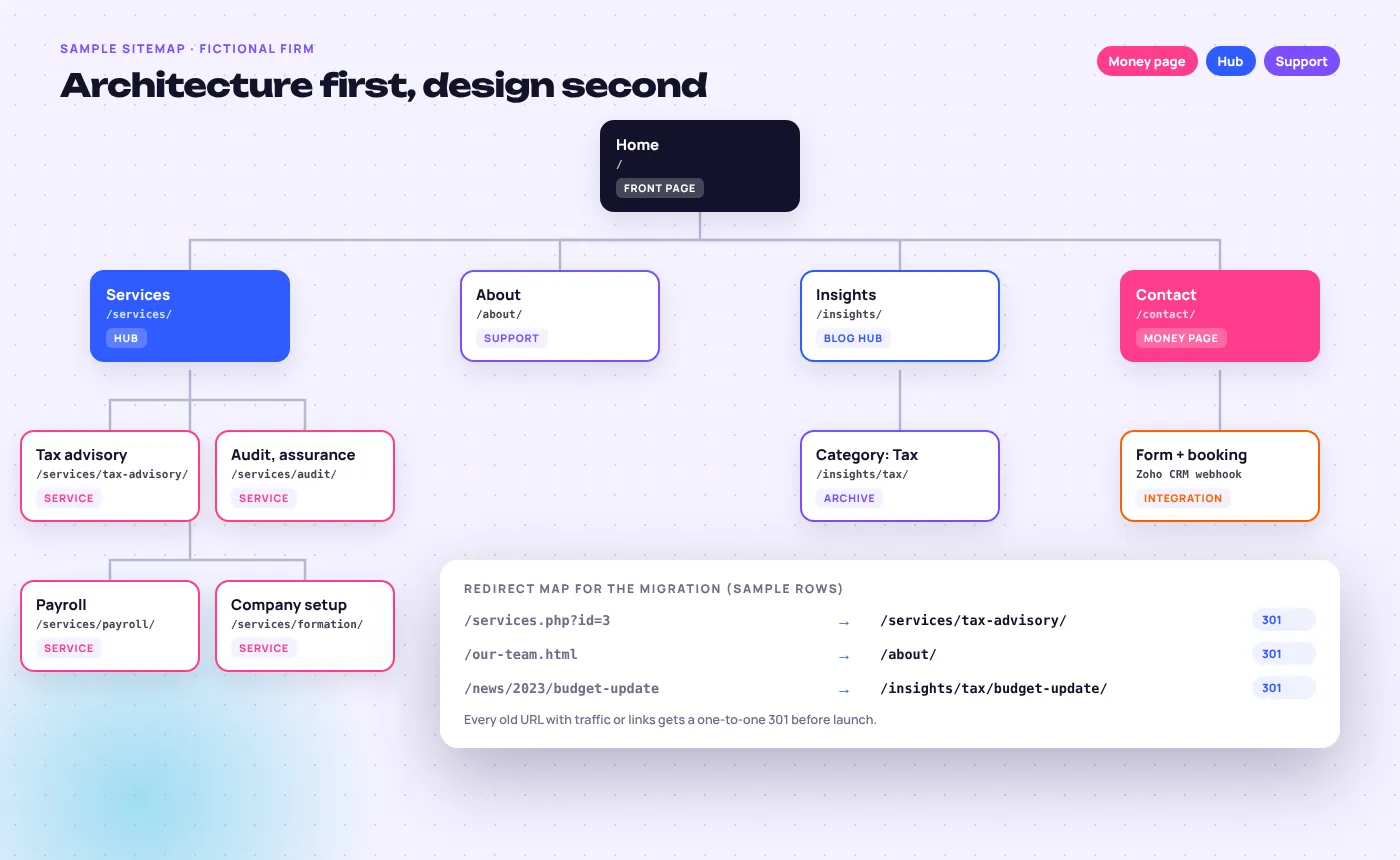
Crawl the old site first, list every URL that has traffic, rankings or backlinks, and map each one to its closest new page with a 301 redirect. Keep titles and content on pages that rank, launch on a quiet day, then submit the new sitemap in Search Console and watch for 404s.
A WordPress site migration is where rankings are usually lost, so we plan the sitemap before any design work starts. Each service gets its own page with its own URL, because one long Services page cannot rank for six different searches.
- Redirects are one-to-one, never everything pointed at the homepage, and tested before DNS changes.
- We compare Search Console data for four weeks after launch.
How We Build Your WordPress Site
How long does it take to build a WordPress website?
Most custom WordPress builds take 3 to 6 weeks from kickoff to launch. Page count, how ready your content is and any custom features such as booking or member areas decide where you land in that range. Waiting on copy is the most common delay.
Discovery
Goals, the pages that earn enquiries, and an audit of the current site.
You approveSitemap and plugin plan
Design
Mobile-first designs for each template, with real copy.
You approvePage designs
Build
Custom block theme and patterns on a staging site.
You approveStaging site review
SEO and tracking
Titles, schema, redirects, GA4, consent and form-to-CRM wiring.
You approveRedirect map and test lead
Speed and security
Image, cache and script pass, then 2FA, backups and hardening.
You approveLaunch checklist
Launch and training
Go live, watch Search Console, train your editors.
You getLogins, guide, recording
Nothing Goes Live With an Open Item
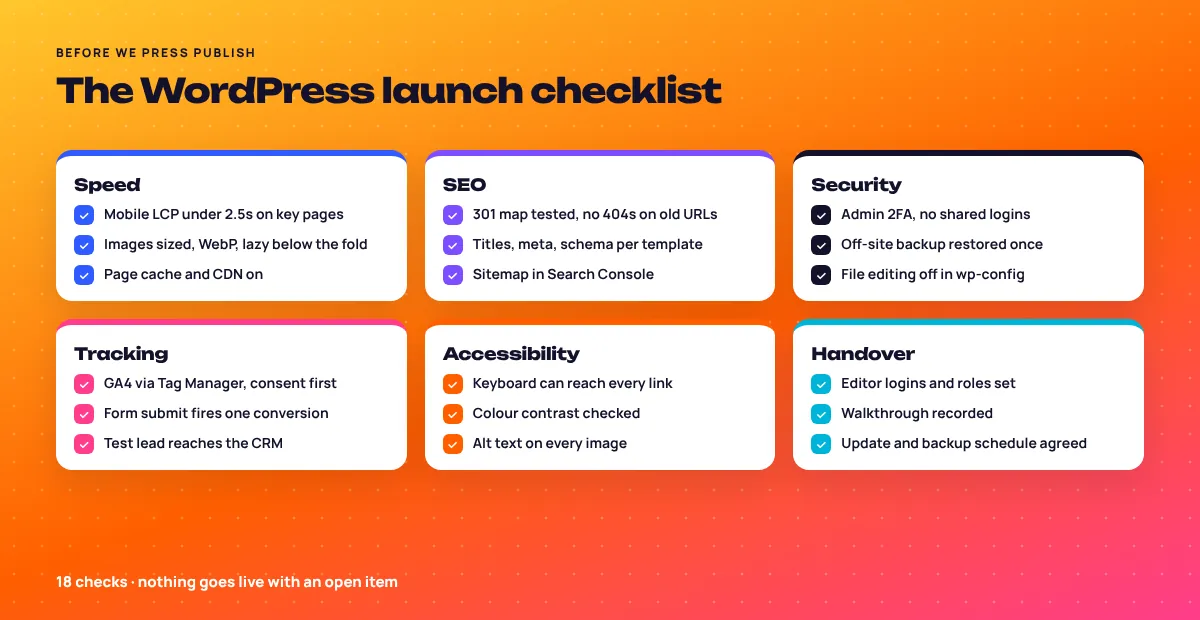
Every build passes the same 18 checks before we press Publish. Launch-day problems are nearly always a missed redirect, a form going nowhere or a tag firing twice.
The three we see skipped most often on sites we inherit:
- A test restore. An untested backup is a hope.
- A real test lead. Find it in the CRM, not just on the thank-you page.
- The “discourage search engines” box. Ticked on staging, it sometimes survives the move to live.
A Professional Services Website Rebuild, in Numbers
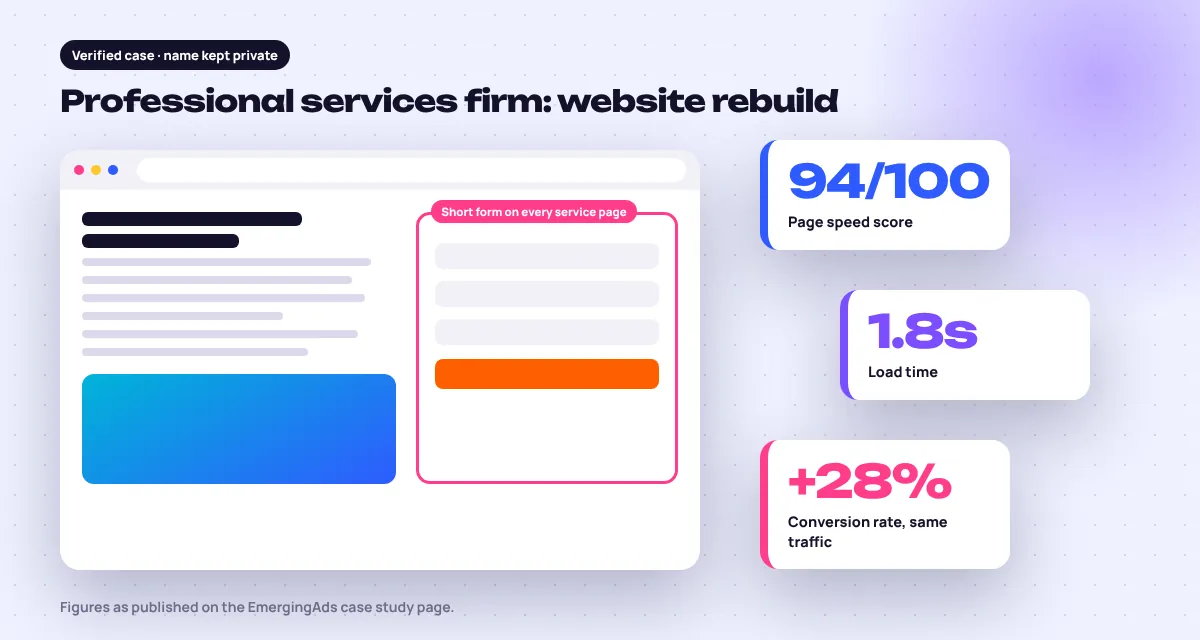
A professional services firm was losing good traffic on a slow site with the contact form three clicks deep. We rebuilt it around one path: a short form on every service page, images resized and lazy-loaded, scripts deferred or removed, plus schema and proper page titles.
Traffic stayed level. The share of visitors who got in touch went up 28%. Read the full professional services website case study, browse more client success stories or see the brands we work with.
The same pattern suits local service businesses and healthcare providers.
Related Website Services
If your site is a store or a single campaign page, one of these fits better. If you are paying for traffic already, a dedicated landing page often converts better than any page on the main site, and conversion rate optimisation tells you which page change to make next.
WordPress Website Questions, Answered
What do WordPress website design services include?
They include planning, design, build, SEO setup, speed, security, tracking and handover. With us that means a custom block theme, a short plugin list, 301 redirects, forms connected to your CRM and trained editors.
How long does it take to build a WordPress website?
Most builds take 3 to 6 weeks from kickoff to launch. Page count, content readiness and custom features such as booking or member areas decide where in that range you land.
Is WordPress good for a small business website in 2026?
Yes, for most service businesses, content-led sites and lead generation. It is flexible, you own it outright and any developer can work on it. If you mainly sell products online, Shopify is often simpler to run.
Should I use Gutenberg or Elementor for my WordPress site?
Gutenberg with a custom block theme is our default because it usually loads less code and has no extra plugin to depend on. Elementor is fine if your team already uses it daily and wants more drag-and-drop freedom.
How many plugins is too many on a WordPress site?
There is no magic number; what matters is what each plugin loads and whether it is maintained. If two plugins do the same job, or one has not been updated in a year, remove it.
Will my WordPress site be SEO-ready from launch?
Yes. Titles, meta descriptions, schema, the XML sitemap, clean URLs and internal links are built in, and we submit the sitemap in Google Search Console at launch.
Can you migrate my existing WordPress site without losing rankings?
Yes, in most cases. Every URL with traffic or backlinks gets a 301 redirect to its closest new page, ranking content stays intact and we watch Search Console for four weeks.
Is WordPress secure enough for a business website?
Yes, when it is kept updated. We set up two-factor login, a firewall, off-site backups and an update schedule.
What hosting do you recommend for WordPress?
Managed WordPress hosting or a LiteSpeed server with server-level caching. Either beats cheap shared hosting on speed and support.
Do you offer WordPress maintenance after launch?
Yes. Ongoing maintenance covers core, theme and plugin updates, backups, security monitoring and small content changes for clients who prefer not to manage it themselves.
Build a WordPress Website That Is Fast, Rankable and Built for Long-Term Growth
Send us your current site. On the free audit we time your key pages on mobile, count the plugins and tell you whether a fix or a rebuild makes more sense.
Are you ready to publish?
Double-check your site before it goes live.- Mobile speed
- Checked
- Redirects
- Mapped
- Forms to CRM
- Tested
- Editors
- Trained
- Visibility
- Public