The short answer
Performance Max works best when you feed it accurate conversion values, a clean product feed, well-organized asset groups with strong creative, useful audience signals and clear exclusions. The best practices that matter most in 2026 are: fix tracking and values first, separate brand from non-brand with brand exclusions, use the search terms and channel reports to find waste, add campaign-level negative keywords, set a new customer goal if growth matters, and give each change several weeks before judging it.
Performance Max is Google’s most automated campaign type. One campaign can show ads across Search, Shopping, YouTube, Display, Discover, Gmail and Maps, with Google deciding where, when and to whom. For many ecommerce and lead generation accounts, it has become the largest line in the budget.
It has also been one of the most frustrating campaign types to manage. For its first few years, advertisers had very little visibility into where money went or which searches triggered ads. That has changed. Google has added search term reporting, channel-level performance reporting, campaign-level negative keywords and more controls, which means the gap between a well-run and a badly run Performance Max campaign is now wider than ever.
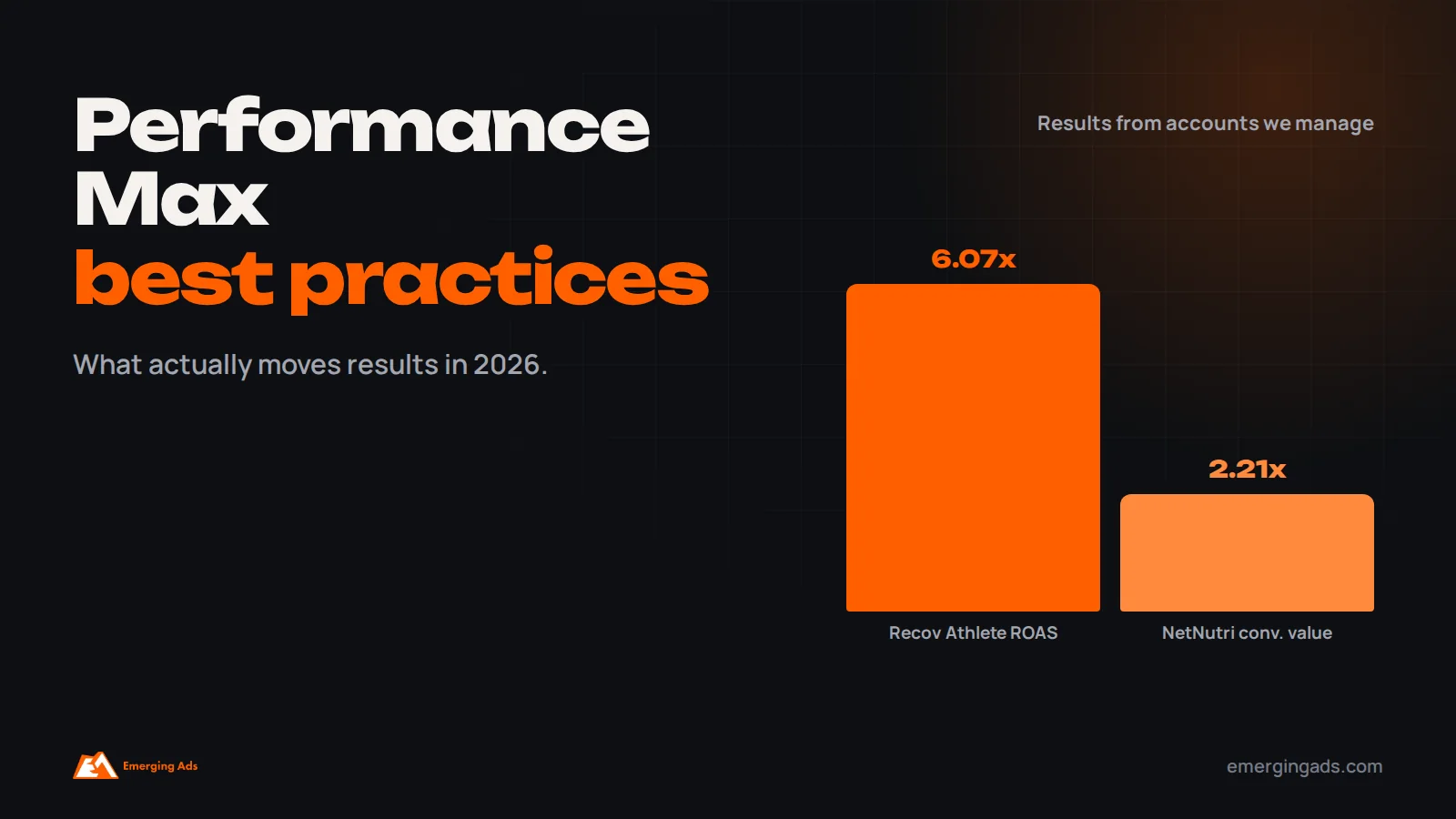
This guide covers the practices we use on the Performance Max campaigns we manage, including for NetNutri, a US supplement store running Shopping and Performance Max, and Recov Athlete, a high-ticket recovery equipment retailer where Google Ads returns 6.07x on spend.
How Performance Max actually works
You give Google a goal, usually conversions or conversion value, a budget and a set of inputs: product feed, text, images, videos, audience signals and settings. Google’s system then decides which ads to show, on which channel, to which person, at what bid, in each individual auction.
The important shift is that your job moves from controlling placements to controlling inputs. You can no longer pick every keyword or placement directly. What you can do is make sure the system optimizes towards the right outcome, has good material to work with, and is fenced off from the places it should not go.
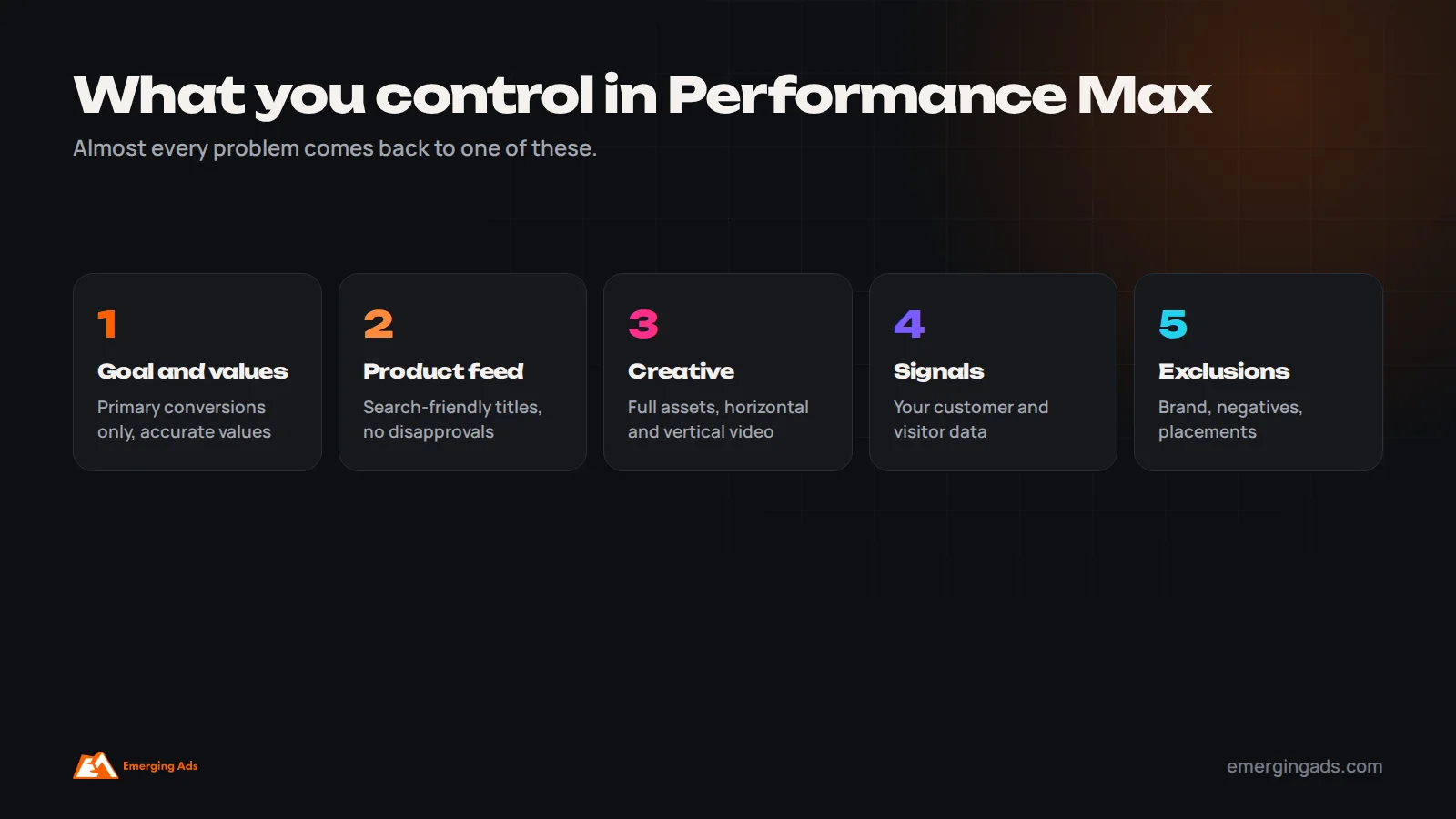
Almost every Performance Max problem we diagnose comes back to one of those three: the wrong goal, weak inputs, or missing exclusions.
Best practice 1: Fix conversion tracking and values first
Performance Max optimizes harder and more literally towards your conversion data than any other campaign type. If the data is wrong, the campaign will efficiently find more of the wrong thing.
Before launching or restructuring, check that:
- Only the actions you truly want, such as purchases or qualified leads, are set as primary conversions. Page views, add-to-carts and newsletter signups set as primary will pull the campaign towards cheap, low-value actions.
- Purchase values are accurate and in the right currency, ideally excluding tax and shipping consistently.
- Enhanced conversions are switched on to recover conversions lost to cookie limits.
- For lead generation, qualified leads or closed deals are sent back from your CRM through offline conversion imports, so Google optimizes for quality, not form volume.
If margins vary widely between products, consider sending profit or margin-adjusted values rather than revenue, or using conversion value rules. A campaign optimizing for revenue will happily sell low-margin products all day.
We cover the tracking audit in more depth in our guide to lowering Google Ads CPA. It applies to Performance Max even more strongly.
Best practice 2: Treat the product feed as your most important asset
For ecommerce, the product feed in Google Merchant Center drives Shopping placements, which usually account for a large share of Performance Max spend and results. A weak feed limits the whole campaign.
- Write product titles the way people search, with the most important attributes first, such as brand, product type, key feature, size or color.
- Fill in GTINs, brand, product type and Google product category accurately.
- Use custom labels to tag products by margin, bestseller status, season or stock level, so you can group and budget them separately.
- Fix disapprovals quickly. Disapproved products simply stop showing, often without anyone noticing.
- Keep prices and availability in sync with the site.
Our Google Shopping ads page explains how we manage feeds for clients, and our performance marketing guide covers how Performance Max fits alongside your other channels.
Best practice 3: Structure campaigns and asset groups deliberately
There are two common structural mistakes. One is putting everything in a single campaign with a single asset group, so the best and worst products, and every audience, share the same budget and the same creative. The other is splitting into so many campaigns that none has enough conversions for the system to learn.
The approach we use sits between the two:
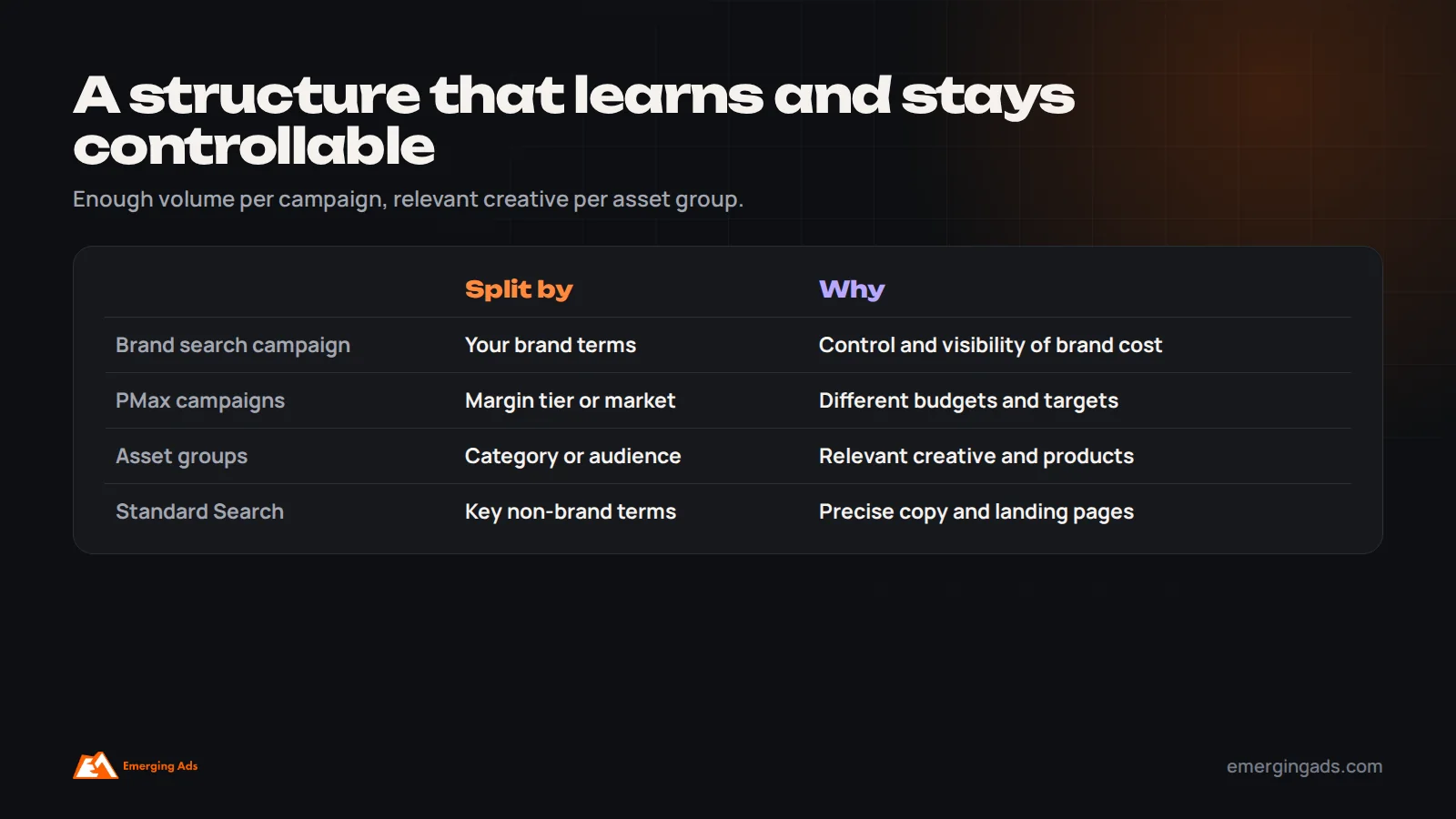
- Split campaigns where you need different budgets or targets. For example, separate campaigns for high-margin and low-margin products, or for different countries, with their own ROAS or CPA targets.
- Use asset groups for different themes within a campaign. Each asset group should match a product category or audience, with creative and listing groups that fit it. A running shoe asset group should show running creative, not the whole catalog.
- Keep enough volume per campaign. As a rule of thumb, we want each campaign to generate a steady flow of conversions every week. If a split would leave a campaign with only a handful a month, it probably should not be split.
Best practice 4: Supply strong, varied creative
Performance Max builds ads from the assets you provide. If you upload weak images and no video, Google will often generate video automatically from your images, and the result rarely represents the brand well.
For each asset group, aim to provide the full range of assets: several headlines and long headlines with different angles, descriptions that cover benefits, proof and offer, high-quality images in landscape, square and portrait formats, logos, and at least one horizontal and one vertical video. Product demonstrations, customer reviews and short creator-style videos work well for YouTube and Shorts placements.
Check asset performance reporting regularly and replace assets that consistently underperform. Do not swap everything at once, as that resets what the system has learned.
Best practice 5: Use audience signals and search themes as hints, not limits
Audience signals tell Google who your likely customers are: customer lists, website visitors, custom segments based on search terms, and interests. Search themes tell it which searches are relevant to an asset group. Both are hints that help the campaign start in the right place. Google can and will go beyond them.
The strongest signals are usually your own data: customer match lists of past buyers and remarketing lists of site visitors. Custom segments built from the search terms your best customers use come next. Broad interest categories add little.
Do not expect signals to restrict targeting. If you need to keep the campaign away from certain audiences or searches, use exclusions, covered next.
Best practice 6: Separate brand from non-brand
Left alone, Performance Max will often spend a meaningful share of budget on searches for your own brand name. Those searches convert extremely well, which makes the campaign’s ROAS look excellent. But many of those people were already looking for you and would likely have found you through organic results or a cheap brand search campaign.
The result is a campaign that looks brilliant in reports while finding few genuinely new customers. To fix it:
- Apply brand exclusions in Performance Max so it does not serve on your brand searches.
- Run a separate, tightly controlled brand search campaign so you can see brand cost and performance on their own.
- Compare Performance Max results before and after the change on new customer acquisition, not just ROAS.
Expect reported ROAS to drop when you do this. That is the real performance of the non-brand campaign becoming visible, not a problem.
Best practice 7: Use the new reports to find waste
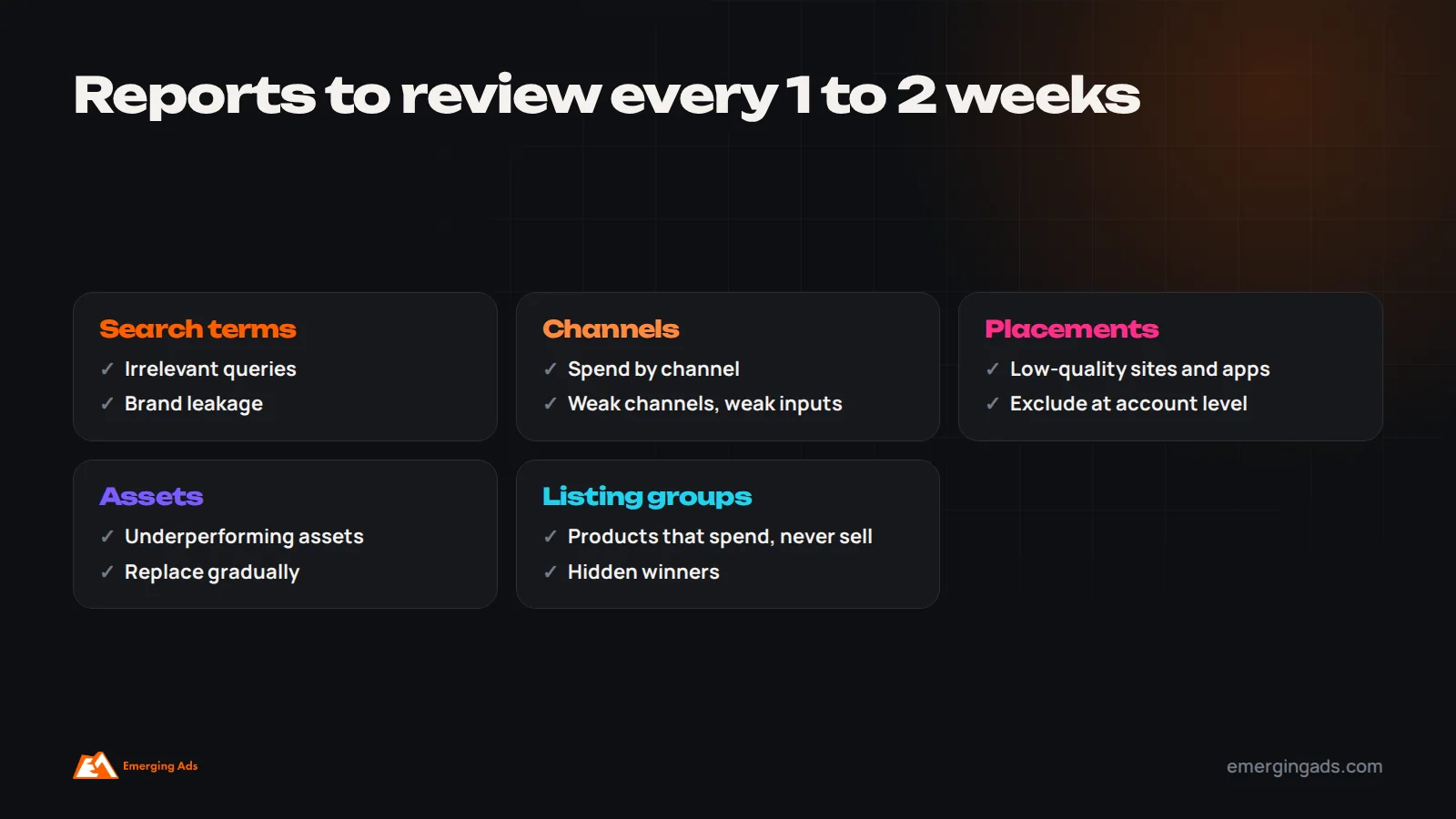
Performance Max now offers much more visibility than it used to. We review these every week or two:
- Search terms report: shows the actual searches that triggered ads on Search and Shopping. Look for irrelevant, low-intent or competitor terms that spend without converting.
- Channel performance report: shows how spend and results split across Search, Shopping, YouTube, Display and other channels. If a large share of spend goes to a channel with poor results, it usually points to weak inputs for that channel, such as missing video.
- Placement report: shows websites, apps and YouTube channels where ads ran on the Display and video networks. Exclude low-quality placements at account level.
- Asset and listing group reports: show which creative and products drive results.
Best practice 8: Add campaign-level negative keywords
For years, the only way to add negative keywords to Performance Max was through account-level lists or by asking Google support. Campaign-level negative keywords are now available, which makes Performance Max far easier to keep clean.
Use the search terms report to find patterns of waste, such as “free”, “jobs”, “DIY”, “used” or irrelevant product types, and add them as negatives. Combine them with account-level negative keyword lists for terms you never want any campaign to serve on. Be careful not to over-exclude: Performance Max finds valuable searches you would not have thought of, and aggressive negatives can choke that discovery.
Best practice 9: Set a new customer goal if growth matters
Performance Max can optimize for new customer acquisition, either by bidding higher for new customers or by only targeting new customers. This requires customer lists or conversion data that let Google tell new and existing customers apart.
If the business goal is growth rather than re-selling to existing customers, this setting changes what the campaign does. Combined with brand exclusions, it pushes Performance Max towards genuinely incremental sales. Value the new customer appropriately, based on what a typical new customer is worth to you over time.
Best practice 10: Set realistic targets and change them slowly
Performance Max responds strongly to target ROAS and target CPA settings. Set the target too aggressively and the campaign will restrict spend to only the safest auctions, often your brand and existing customers. Set it too loosely and it will spend freely on marginal traffic.
Start with a target close to recent actual performance, then tighten or loosen it in steps of around 10 to 20%, waiting at least one to two weeks between changes. For a new campaign, consider starting with maximize conversion value without a target until there is enough data, then add a target.
Best practice 11: Give it time, and change one thing at a time
It also helps to keep a simple change log: the date, what changed and why. When performance moves three weeks later, you will know what to look at, rather than guessing which of several changes was responsible.
Performance Max needs time to learn. Google suggests allowing a learning period after launch or major changes, and in our experience a fair evaluation needs four to six weeks for most campaigns, longer for low-volume ones.
The biggest self-inflicted problem we see is constant tinkering: new assets on Monday, a target change on Wednesday, a budget change on Friday. Each change gives the system something new to learn. Plan changes, batch them, and leave the campaign alone long enough to see what they did.
Budgets, seasonality and sales periods
Performance Max adjusts bids based on what it has learned about conversion rates. During short, unusual periods, such as a flash sale or Black Friday, conversion rates can jump far above normal for a few days, and the system may not react quickly enough on its own.
For planned events, Google offers seasonality adjustments, which tell bidding to expect a temporary change in conversion rate for a set period. Use them for short events of a few days, not for long seasons, which the system learns naturally. Raise budgets ahead of the event rather than on the day, so the campaign is not limited by budget when demand peaks. And exclude periods of broken tracking from the data using data exclusions, so a tracking outage does not teach the campaign that conversions suddenly stopped.
Day to day, avoid frequent large budget changes. If a campaign is consistently limited by budget while meeting its target, raise it in steps. If it is hitting the budget but missing its target, the answer is usually the target or the inputs, not more money.
Should you run a feed-only Performance Max campaign?
Some advertisers run Performance Max with only a product feed and no creative assets, which keeps most spend on Shopping placements and behaves much like the old Smart Shopping campaigns. It can be a useful option for stores without good video or image assets, or for advertisers who want Shopping-style results with Performance Max reach on search.
The tradeoff is that the campaign misses YouTube, Discover and other placements where good creative can find new customers, and Google may still generate some assets automatically. We usually treat feed-only as a starting point, then add strong creative once it is available.
Performance Max vs Standard Shopping and Search
Performance Max does not have to replace everything. For many accounts, the best results come from a mix:
- Brand search campaign: for control over brand terms and costs.
- Performance Max: for broad reach across channels and products.
- Standard Search for key non-brand terms: where you want precise control over ad copy and landing pages, or where Performance Max is not covering important searches well.
- Standard Shopping: sometimes useful for testing, specific product groups or when you need tighter control than Performance Max allows.
On NetNutri, Shopping and Performance Max split the work across a large multi-brand supplement catalog. The account produced 10,271 purchases and $794,281 in conversion value at 2.21x, with an average cost per click of $0.46, reported on purchases rather than Google’s general conversions column.
Performance Max for lead generation
Performance Max can work for lead generation, but it is riskier than for ecommerce, because without a product feed it leans more on Display, YouTube and Discover, where spam form fills are common. If you use it for leads:
- Import qualified lead or closed deal data from your CRM, and optimize for those rather than raw form submissions.
- Add basic spam protection and qualifying questions to forms.
- Watch lead quality closely in the first weeks and compare it with search campaigns.
- Consider whether final URL expansion should be off, so traffic only goes to pages built to convert.
A Performance Max audit checklist
- Primary conversions are only the actions you truly want, with accurate values.
- Enhanced conversions are on; offline conversions are imported for lead gen.
- The product feed has no significant disapprovals, and titles are search-friendly.
- Custom labels exist for margin, bestsellers or seasonality.
- Campaigns are split only where budgets or targets need to differ.
- Each asset group has a theme, full assets and at least one horizontal and one vertical video.
- Brand exclusions are applied, with a separate brand search campaign.
- Campaign-level negatives cover known waste patterns.
- Search term, channel and placement reports are reviewed every week or two.
- A new customer goal is set if growth is the priority.
- Targets are realistic and changed gradually.
- Changes are batched and given four to six weeks to evaluate.
The most common Performance Max mistakes
- Judging success on reported ROAS that is mostly brand and returning customers.
- Optimizing towards micro-conversions such as page views or add-to-carts.
- One campaign and one asset group for an entire varied catalog.
- No video, so Google auto-generates low-quality video.
- Ignoring the search terms and channel reports now available.
- Constant changes that keep the campaign learning.
- Launching Performance Max before conversion tracking has been verified.
If you would like a second opinion on your setup, our Performance Max team can review structure, feed, tracking and exclusions, or you can start with a Google Ads audit. For wider account management, see our Google Ads service. If cost per click is your main concern, read how to lower cost per click with Google Ads.
Frequently asked questions
What is Performance Max in Google Ads?
Performance Max is an automated Google Ads campaign type that serves ads across Search, Shopping, YouTube, Display, Discover, Gmail and Maps from one campaign, optimizing towards your conversion goals using your feed, creative and audience signals.
How long does Performance Max take to learn?
Allow at least four to six weeks after launch or major changes for a fair evaluation, longer for low-volume campaigns. Avoid frequent changes during that period.
Can I add negative keywords to Performance Max?
Yes. Campaign-level negative keywords are now available, alongside account-level negative keyword lists and brand exclusions. Use the search terms report to decide what to exclude.
Why is my Performance Max ROAS so high?
Often because it is spending on your brand searches and returning customers, which convert very well. Apply brand exclusions and check new customer acquisition to see the true incremental performance.
Should I use Performance Max or Standard Shopping?
Many ecommerce accounts use Performance Max as the main campaign, but Standard Shopping can still help for testing or when you need tighter control over specific products. They can run side by side with clear roles.
How many asset groups should a Performance Max campaign have?
Enough to give each major product category or audience its own relevant creative, but not so many that each has too little data. Many accounts work well with a handful of themed asset groups per campaign.
Does Performance Max work for lead generation?
It can, but it needs CRM data on qualified leads, form spam protection and close monitoring of lead quality, because it leans more heavily on Display and video placements without a product feed.
Can I see where Performance Max ads run?
Yes. Performance Max now provides search term reporting, channel performance reporting and placement reports, which show far more than earlier versions did.