The short answer
A technical SEO checklist makes sure search engines and AI answer engines can crawl, render, understand and trust your pages. The checks that matter most are indexation and crawl control, site speed and Core Web Vitals, clean on-page structure, valid structured data, mobile usability, and a healthy link profile. Fix anything blocking indexation first, then speed, then structure. Most sites only need a full audit once or twice a year, with monthly checks in Search Console in between.
Technical SEO is the part of search nobody sees when it works. A visitor never notices that a canonical tag is correct or that a sitemap only lists live pages. They only notice when it is broken, and usually they notice indirectly, because rankings drop or new pages never appear in Google at all.
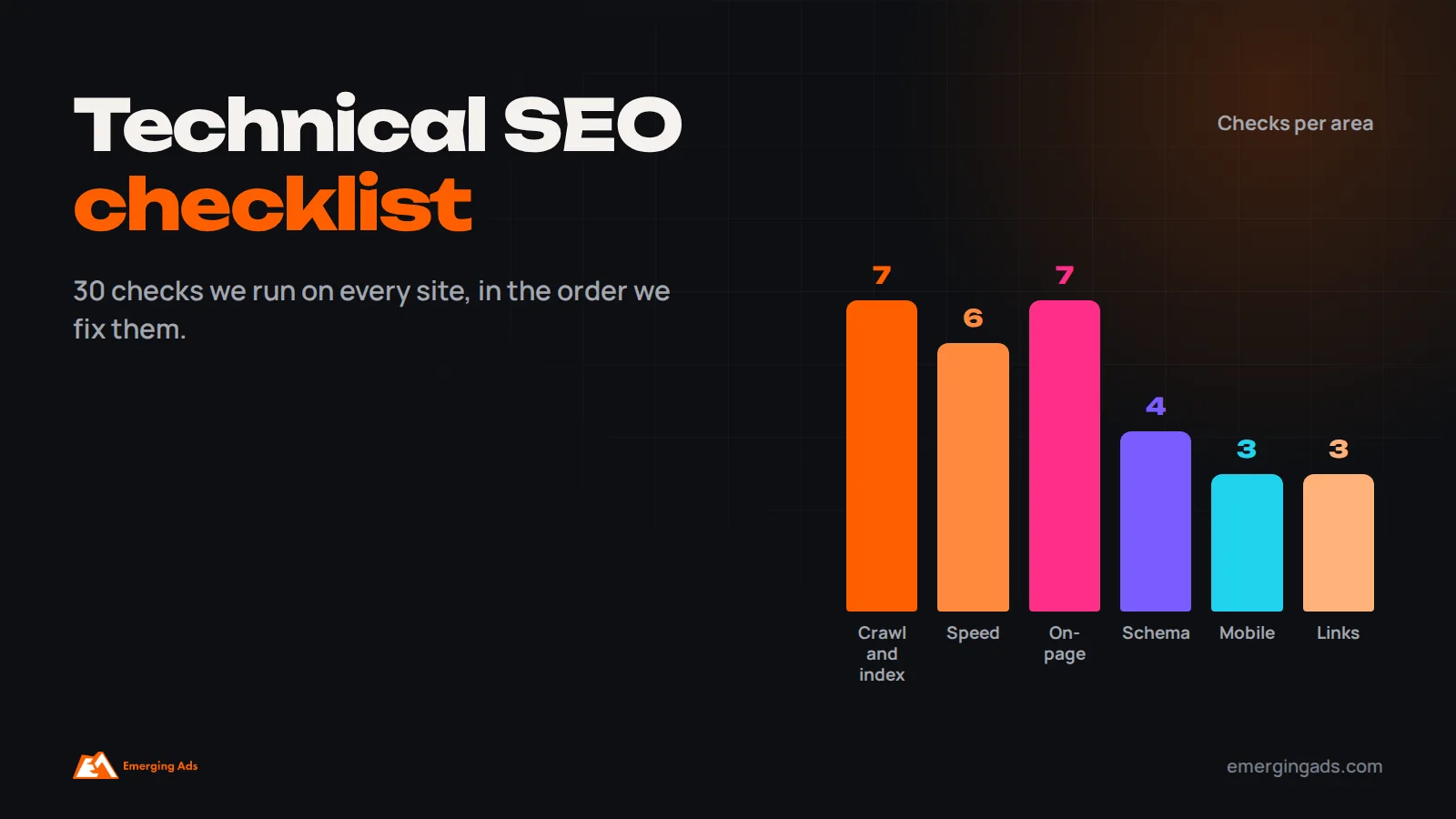
This is the checklist we run on every site we audit, grouped the way we actually work through it. It has grown from 27 items to 30 over the past year, mostly because AI answer engines such as Google’s AI Overviews, ChatGPT and Perplexity now matter alongside classic search, and a few technical details affect whether your content can be used there too.
For each item we explain what to check, why it matters and what “good” looks like. You do not need expensive tools for most of it. Google Search Console, a crawler such as Screaming Frog (the free version covers 500 URLs), PageSpeed Insights and a browser will get you a long way.
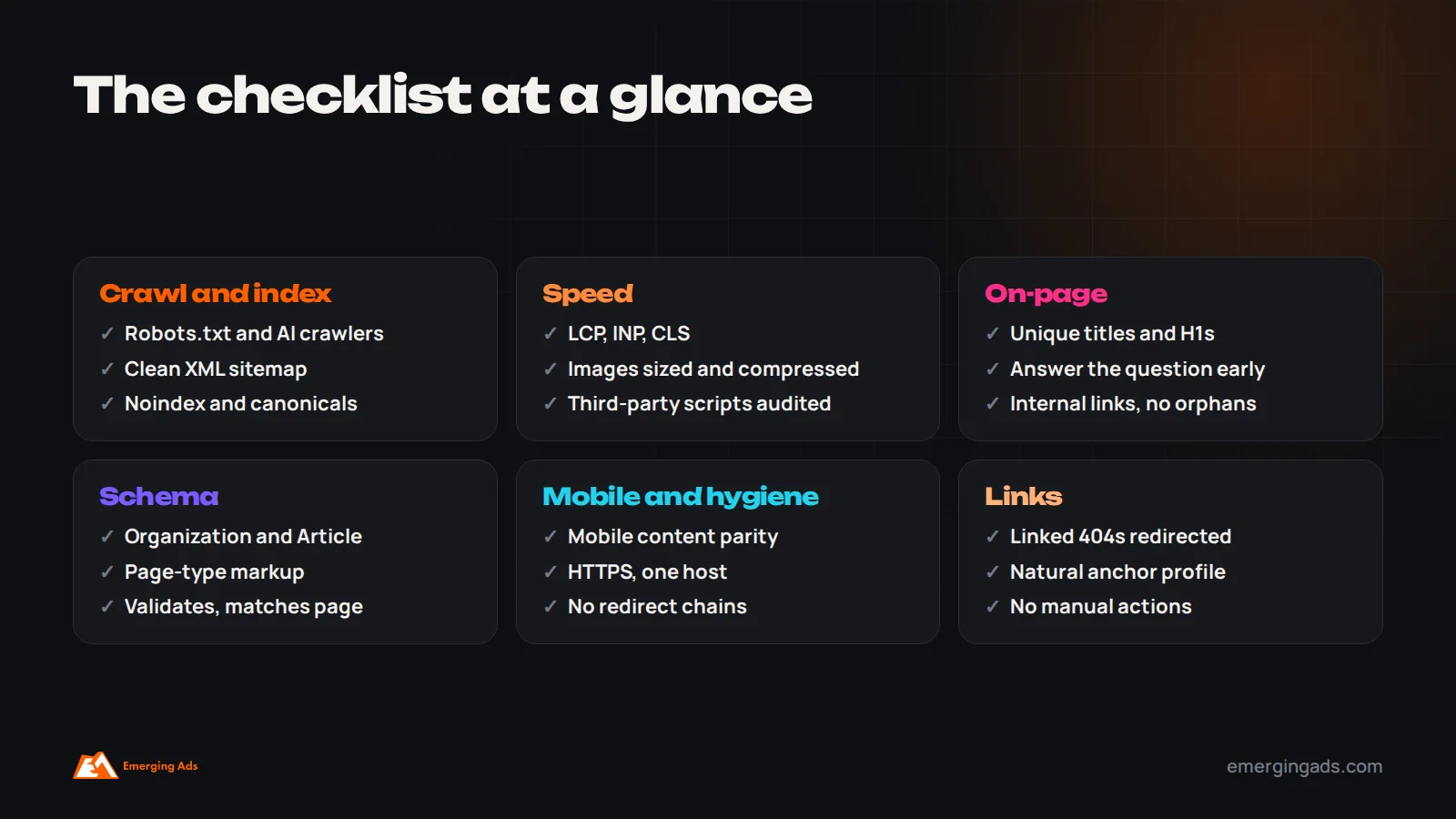
Crawlability and indexation (items 1 to 7)
If search engines cannot find or index a page, nothing else on this list matters for that page. This is always where we start.
- Robots.txt is not blocking important content. Check that key sections, CSS and JavaScript files are crawlable. We still find staging-era “Disallow: /” rules on live sites more often than you would expect.
- AI crawler access is a deliberate decision. Robots.txt can allow or block crawlers such as GPTBot, ClaudeBot and PerplexityBot. Blocking them may reduce the chance of your content appearing or being cited in their answers. Decide on purpose rather than inheriting a plugin default.
- The XML sitemap lists only indexable, canonical pages that return 200. No redirects, no 404s, no noindexed URLs, no parameter duplicates. A clean sitemap is a strong hint about what you actually want indexed. Submit it in Search Console.
- Important pages are indexed. In Search Console’s page indexing report, review “Crawled, currently not indexed” and “Discovered, currently not indexed”. Large numbers there often point to thin, duplicate or weakly linked pages.
- Noindex tags are only where you intend them. Crawl the site and filter for noindex. Thank-you pages and internal search results should be noindexed. Category pages and blog posts usually should not.
- Canonical tags point to the right URL. Each indexable page should have a self-referencing canonical, and duplicates should canonicalize to the main version. Watch for canonicals pointing to redirected or noindexed URLs.
- No unresolved crawl errors on pages that matter. Fix 404s on URLs that still receive backlinks or internal links, with a 301 to the closest relevant page. Remove internal links to dead URLs entirely.
A note on JavaScript rendering
If your site relies heavily on JavaScript to load content, use Search Console’s URL inspection tool to view the rendered HTML and confirm the main text, links and structured data are present. Google can render JavaScript, but it does so at a cost and sometimes later than crawling. Many AI crawlers do not render JavaScript at all, so content that only exists after scripts run may be invisible to them.
Site speed and Core Web Vitals (items 8 to 13)
Speed is one of the few technical factors that affects rankings and conversion rate at the same time. A faster site earns more from the same traffic, which is why we prioritize it beyond its direct SEO weight. On a professional services site we rebuilt, a faster site with the contact form brought forward lifted conversions by 28% without any extra traffic.
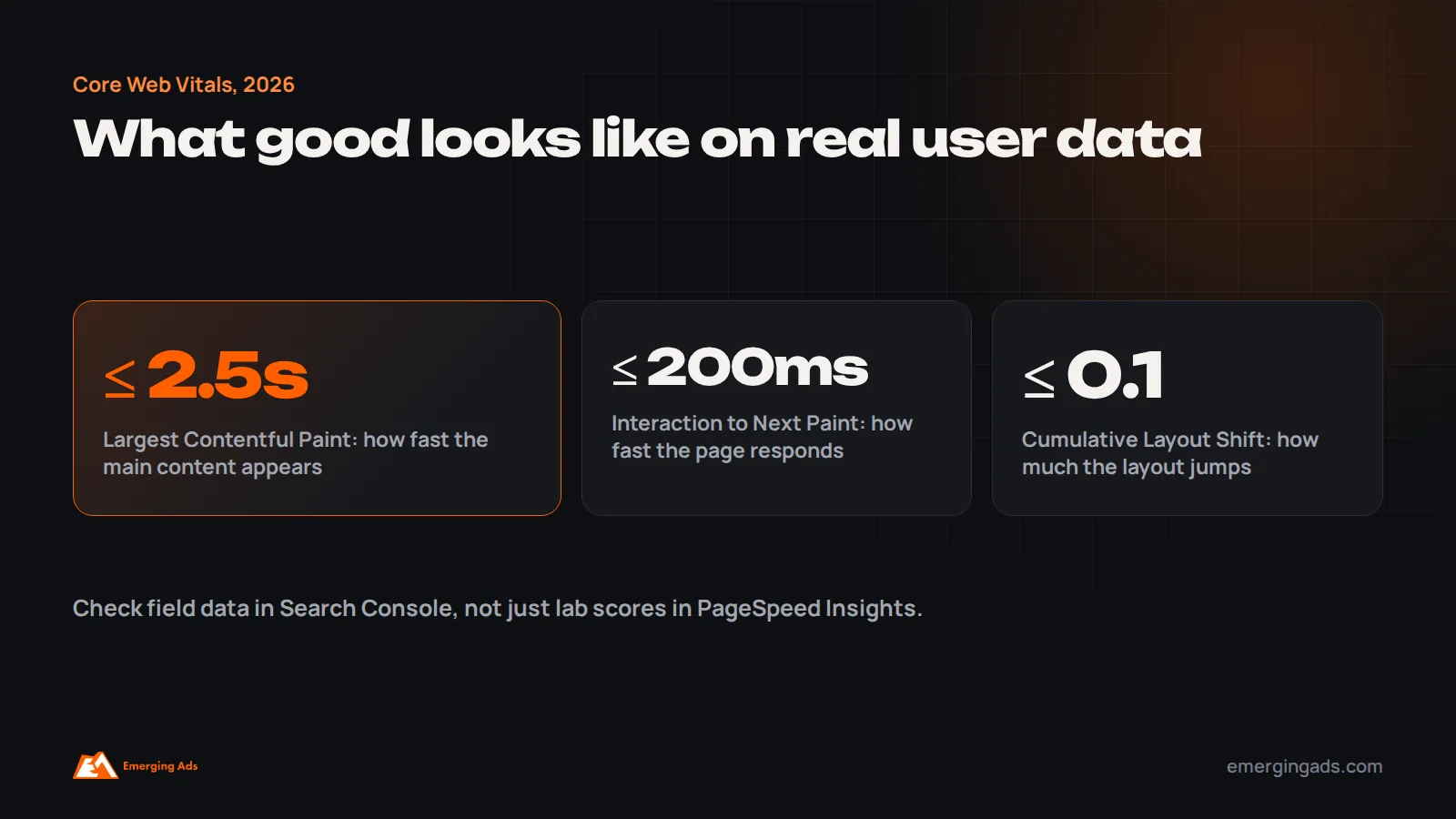
- Largest Contentful Paint (LCP) at or under 2.5 seconds. Slow hero images, render-blocking scripts and slow server response are the usual causes. Preload the main image and serve it in a modern format at the right size.
- Interaction to Next Paint (INP) at or under 200 milliseconds. INP replaced First Input Delay as a Core Web Vital in March 2024. Heavy JavaScript, chat widgets and third-party tags are the common culprits.
- Cumulative Layout Shift (CLS) at or under 0.1. Reserve space for images, embeds and ads with width and height attributes, and avoid injecting banners above content after load.
- Field data, not just lab scores. Use the Core Web Vitals report in Search Console, which reflects real users. A perfect lab score with failing field data means real visitors are having a worse experience than your tests show.
- Images are compressed and sized correctly. WebP or AVIF, responsive sizes with srcset, and lazy loading below the fold but not on the main above-the-fold image.
- Third-party scripts are audited. List every tag, pixel and widget. Remove anything nobody uses, and delay non-essential scripts until after the page is interactive.
On-page structure (items 14 to 20)
These checks make sure each page clearly communicates what it is about, to search engines and to the language models that now summarize the web.
- Every indexable page has a unique, descriptive title tag. Roughly 50 to 60 characters, primary topic near the start, written for a human deciding whether to click.
- Meta descriptions are unique and specific. They are not a ranking factor, but they influence clicks. Google often rewrites them, which is usually a sign they did not match the query well.
- One clear H1 per page, with a logical H2 and H3 structure. Headings should describe sections, not decorate them. Question-style H2s often map well to how people search and how AI answers are assembled.
- The main question is answered early. A direct, plain answer near the top of the page helps featured snippets and AI answers quote you accurately. Detail can follow.
- No duplicate or near-duplicate pages competing for the same query. Keyword cannibalization splits signals. Merge, redirect or differentiate pages that target the same intent.
- Internal links connect related pages with descriptive anchor text. Important pages should be reachable within three clicks from the homepage. Orphan pages, which have no internal links pointing at them, should be linked or removed.
- URLs are clean and stable. Short, readable, lowercase, hyphenated. Avoid changing URLs without redirects, and avoid parameters creating crawlable duplicates.
Schema and structured data (items 21 to 24)
Structured data does not guarantee rich results, and it is not a direct ranking boost. What it does is remove ambiguity about what a page contains and who is behind it, which helps both search engines and AI systems interpret you correctly.
- Organization schema on the homepage, with name, logo, URL and official social profiles in sameAs. This helps connect your brand entity across the web.
- Article schema on blog posts, with author, publish date and modified date. Real author information supports the experience and expertise signals Google describes in its quality guidelines.
- Page-type schema where it genuinely applies: Product and Offer for ecommerce, LocalBusiness for physical locations, FAQPage where a page really has questions and answers, and breadcrumb markup for navigation. Google now shows FAQ rich results for very few sites, but the markup still describes the content clearly.
- Structured data validates and matches visible content. Test with Google’s Rich Results Test and Schema Markup Validator. Markup describing things that are not on the page can lead to manual actions.
Mobile and technical hygiene (items 25 to 27)
- The mobile version contains the same content as desktop. Google indexes the mobile version first. Content hidden or removed on mobile may as well not exist for rankings.
- The whole site runs on HTTPS with no mixed content. One canonical host (with or without www), with every other variant redirecting to it in a single hop.
- Redirect chains and loops are cleared. Each redirect should go straight to the final URL. Chains waste crawl effort and dilute link value. Update internal links to point at final URLs directly.
Backlink profile and authority (items 28 to 30)
- Pages with valuable backlinks still resolve. Use your backlink tool to find linked URLs returning 404 and redirect them to the most relevant live page. This is often the quickest authority win in an audit.
- The anchor text profile looks natural. Mostly branded and URL anchors, with some descriptive ones. A heavy share of exact-match commercial anchors can be a risk signal.
- No obvious manipulative link patterns. Check Search Console for manual actions. Google mostly ignores spammy links rather than penalizing for them, so disavow files are rarely needed unless you have a manual action or a known history of paid links.
Extra checks for ecommerce sites
Online stores create technical problems that brochure sites never face, mostly because product catalogs generate huge numbers of URLs automatically. These are the extra checks we add for any store.
- Faceted navigation. Filters for size, color, price and brand can create millions of URL combinations. Decide which filtered pages deserve to be indexed because people search for them, such as “black leather boots”, and keep the rest out of the index with canonicals, noindex or by not generating crawlable links to them.
- Product variants. If each color or size has its own URL, either give each variant genuinely unique content or canonicalize variants to the main product. Thousands of near-identical variant pages dilute signals.
- Out-of-stock and discontinued products. Temporarily out-of-stock pages should usually stay live with clear availability information. Permanently discontinued products with backlinks or traffic should redirect to the closest alternative or category, not to the homepage.
- Pagination on category pages. Paginated pages should be crawlable with normal links and should not all canonicalize to page one, or products deeper in the list can drop out of the index.
- Product structured data. Price, availability, reviews and shipping details in Product markup, kept in sync with the page, support rich results in search and in Google’s shopping surfaces.
For larger catalogs, these issues often matter more than everything else on this checklist combined.
International and multi-location sites
If you serve several countries or languages, hreflang tells Google which version of a page to show to which audience. The most common errors we find are missing return links, where page A points to page B but B does not point back, hreflang pointing to redirected or noindexed URLs, and country codes used incorrectly, such as “uk” instead of “gb”. Each language version should also have its own self-referencing canonical, not one pointing to the main market.
For businesses with several physical locations, each location should have its own crawlable page with consistent name, address and phone details, matching its Google Business Profile. Our local SEO work covers this in depth.
The tools we actually use, and what for
You do not need a large tool stack for a solid technical audit. This is what we rely on:
- Google Search Console for indexing status, Core Web Vitals field data, manual actions, sitemaps and URL inspection. It is free and it is Google’s own view of your site.
- A crawler, usually Screaming Frog, to find broken links, redirect chains, missing tags, duplicate titles, canonical problems and orphan pages across the whole site.
- PageSpeed Insights and Chrome DevTools for diagnosing why specific templates are slow.
- A backlink tool, such as Ahrefs or Semrush, for linked 404s and anchor text patterns.
- Google’s Rich Results Test for structured data validation.
A sensible workflow is to crawl the site first, then compare the crawl against Search Console’s indexing data. The differences between what exists, what you want indexed and what Google has actually indexed are where most of the important findings come from.
What changes for AI search and answer engines
Generative engine optimization gets a lot of attention, and much of the advice is speculative. From a technical point of view, the honest summary is that the same foundations matter more: crawlable, fast pages with clear structure and accurate structured data. A few points are worth adding to a modern checklist:
- Serve important content in HTML. As mentioned above, many AI crawlers do not run JavaScript.
- Make answers quotable. Clear definitions, specific numbers, short summary sections and well-labeled tables are easier for an answer engine to extract and cite.
- Keep entity information consistent. Business name, address, services and leadership should match across your site, Google Business Profile, directories and social profiles.
- Treat llms.txt as optional. Some sites now publish an llms.txt file describing their content for language models. It is cheap to add, but there is no strong evidence yet that major answer engines rely on it, so do not prioritize it over the basics.
Our guides on generative engine optimization and getting started with ChatGPT SEO go further into the content side.
What we find most often
After running this checklist on a large number of sites, a handful of issues come up far more than the rest. If you only have an afternoon, check these first.
- Sitemaps full of junk: redirected URLs, tag archives, attachment pages and test pages listed alongside real content.
- Slow main images: a 2 MB hero photo, uncompressed, lazy-loaded when it should be preloaded. This alone often fails LCP on mobile.
- Too many scripts: old tracking pixels, abandoned chat tools and A/B testing snippets nobody remembers adding.
- Thin archive pages indexed: date archives, author archives on single-author blogs and tag pages with one post each.
- Orphaned pages: good articles and landing pages with no internal links, so neither visitors nor crawlers find them.
Notes for WordPress sites
WordPress powers a large share of the web, and it has its own common traps. Attachment pages, where every uploaded image gets its own thin URL, should redirect to the file or parent post; most SEO plugins have a setting for this. Tag and author archives are often worth noindexing on smaller sites. Caching and image optimization plugins can transform speed, but stacking several plugins that do overlapping jobs can make things slower, not faster. And theme or page builder changes can quietly alter heading structure and markup across every page at once, so re-crawl after any theme update.
How to prioritize what you find
An audit that produces 140 issues and no order is not much use. We sort findings into three groups:
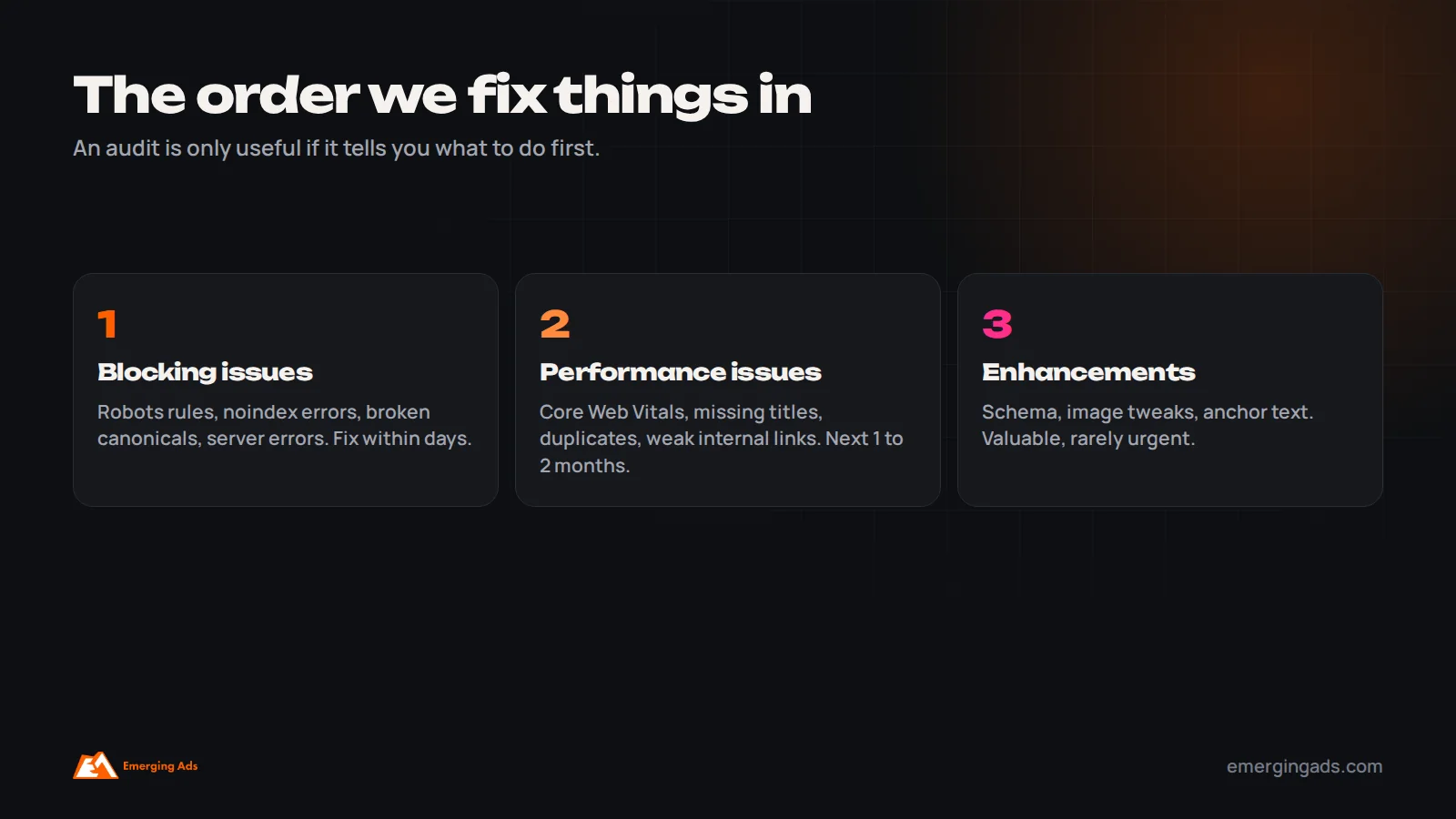
- Blocking issues stop pages from being crawled or indexed: robots rules, noindex errors, broken canonicals, server errors. Fix these first, usually within days.
- Performance issues make pages slower or less clear: Core Web Vitals failures, missing titles, duplicate content, weak internal linking. These are the main work of the next one to two months.
- Enhancements help pages be understood or shown better: schema, image optimization, anchor text tweaks. Valuable, but rarely urgent.
Within each group, start with the templates that affect the most important pages. Fixing a product page template fixes every product at once, which is usually worth more than perfecting a single article.
How often to run a technical SEO audit
For most business sites, a full audit once or twice a year is enough, plus a check after any redesign, platform migration or major plugin change. In between, a monthly look at Search Console covers most surprises: indexing changes, Core Web Vitals regressions, manual actions and crawl errors.
If traffic drops suddenly, start with technical checks before assuming an algorithm update. Our guides on diagnosing a sudden traffic drop and recovering from a Google algorithm update walk through that process.
If you would rather have this done for you, our SEO team runs this full checklist as the first stage of every engagement, with a prioritized fix list your developers can act on. Online stores have their own extra layer of checks for faceted navigation, product variants and out-of-stock pages, which we cover in our ecommerce SEO work.
Frequently asked questions
What is a technical SEO checklist?
It is a structured list of checks that confirm search engines can crawl, render, index and understand your website. It covers areas such as robots.txt, sitemaps, canonical tags, site speed, mobile usability, structured data and redirects, rather than the content or keywords themselves.
What should I check first in a technical SEO audit?
Start with indexation: robots.txt, noindex tags, canonical tags and the page indexing report in Google Search Console. If important pages cannot be indexed, speed and schema improvements will not help them.
What are good Core Web Vitals scores?
Google’s thresholds for a good experience are Largest Contentful Paint at or under 2.5 seconds, Interaction to Next Paint at or under 200 milliseconds, and Cumulative Layout Shift at or under 0.1, measured on real user data.
How often should I do a technical SEO audit?
A full audit once or twice a year suits most sites, plus after any redesign or migration. Check Search Console monthly for indexing, Core Web Vitals and manual action issues in between.
Does schema markup improve rankings?
Not directly. Structured data helps search engines understand your content and can make pages eligible for rich results, which can improve click-through rate. It needs to match the visible content on the page.
Should I block AI crawlers like GPTBot?
It is a business decision. Blocking them may keep your content out of training data and answers, but it can also reduce the chance of being cited in AI search results. Many marketing-led businesses allow them so they can be referenced.
Can I do a technical SEO audit myself?
Yes, for most small and mid-sized sites. Google Search Console, PageSpeed Insights and a site crawler cover the essentials. Complex sites, large ecommerce catalogs and migrations benefit from specialist help.
How long does it take to see results from technical SEO fixes?
Fixes to indexing problems can show within days to a few weeks once Google recrawls the pages. Speed and structural improvements usually take several weeks to reflect in rankings and traffic.