
Amazon Listings That Rank Higher and Convert More
Amazon listing optimization is the work of rewriting a product detail page, from title and bullets to backend search terms, images and A+ Content, so it matches what shoppers search for and converts the traffic it already gets.
Updated
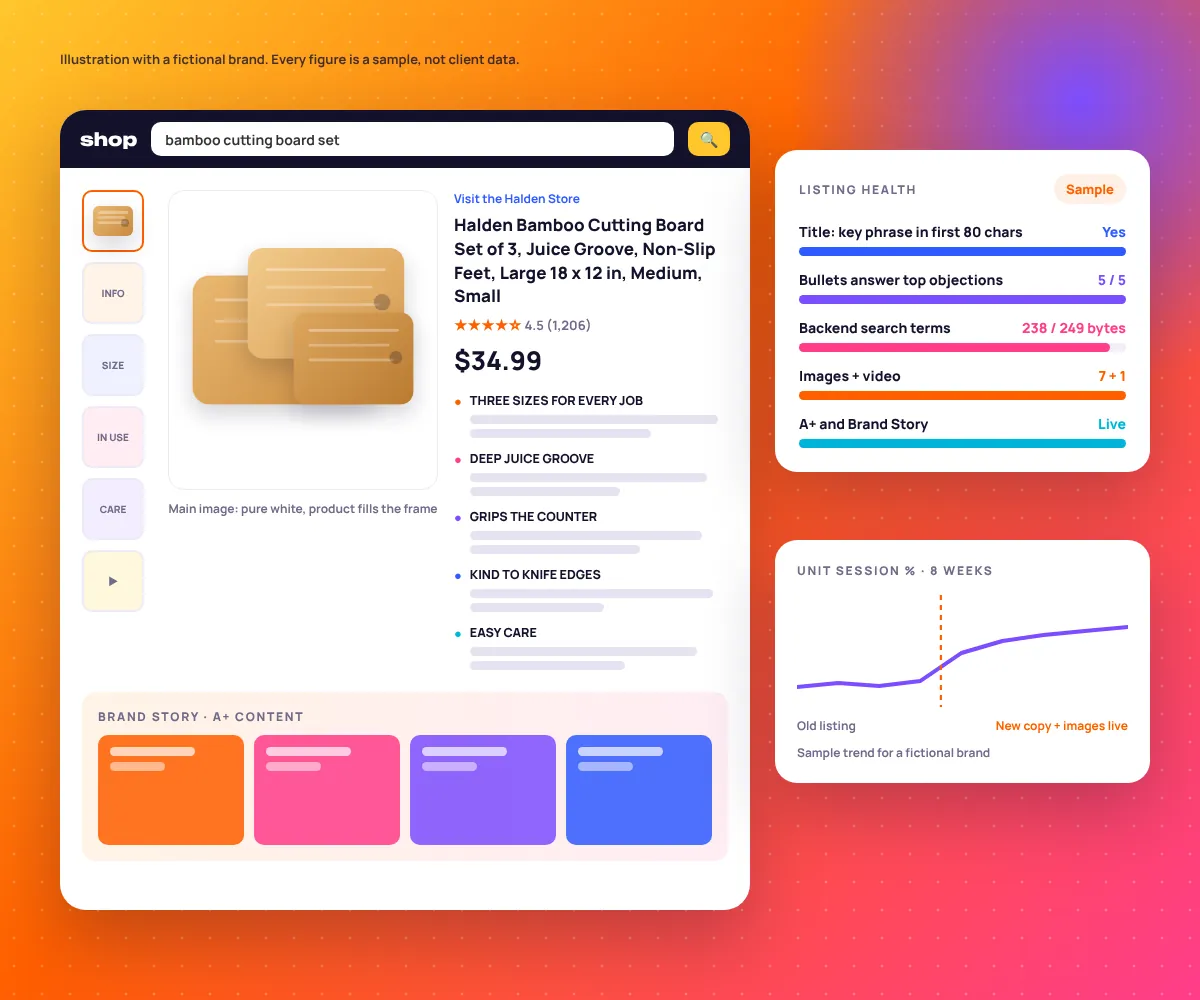
What Is Amazon Listing Optimization?
It is fixing the parts of a detail page that decide whether Amazon shows your product for a search and whether shoppers buy once they land. Words drive relevance. Images, reviews, price and A+ Content drive conversion. Amazon’s search rewards listings that sell, so the two problems are always linked.
Sellers call Amazon’s ranking system A9 or A10, but Amazon publishes no formula, so we work from Seller Central Help and your own reports. This service covers the page itself. Bids and campaigns sit with our Amazon PPC management team, on the same plan.
EmergingAds is a performance marketing agency founded in 2021 and based in Gurugram, India. We work with brands in the US, UK, UAE, India and Australia and have served 85+ brands across paid media, SEO and ecommerce.
Where a Weak Listing Loses Rank and Sales
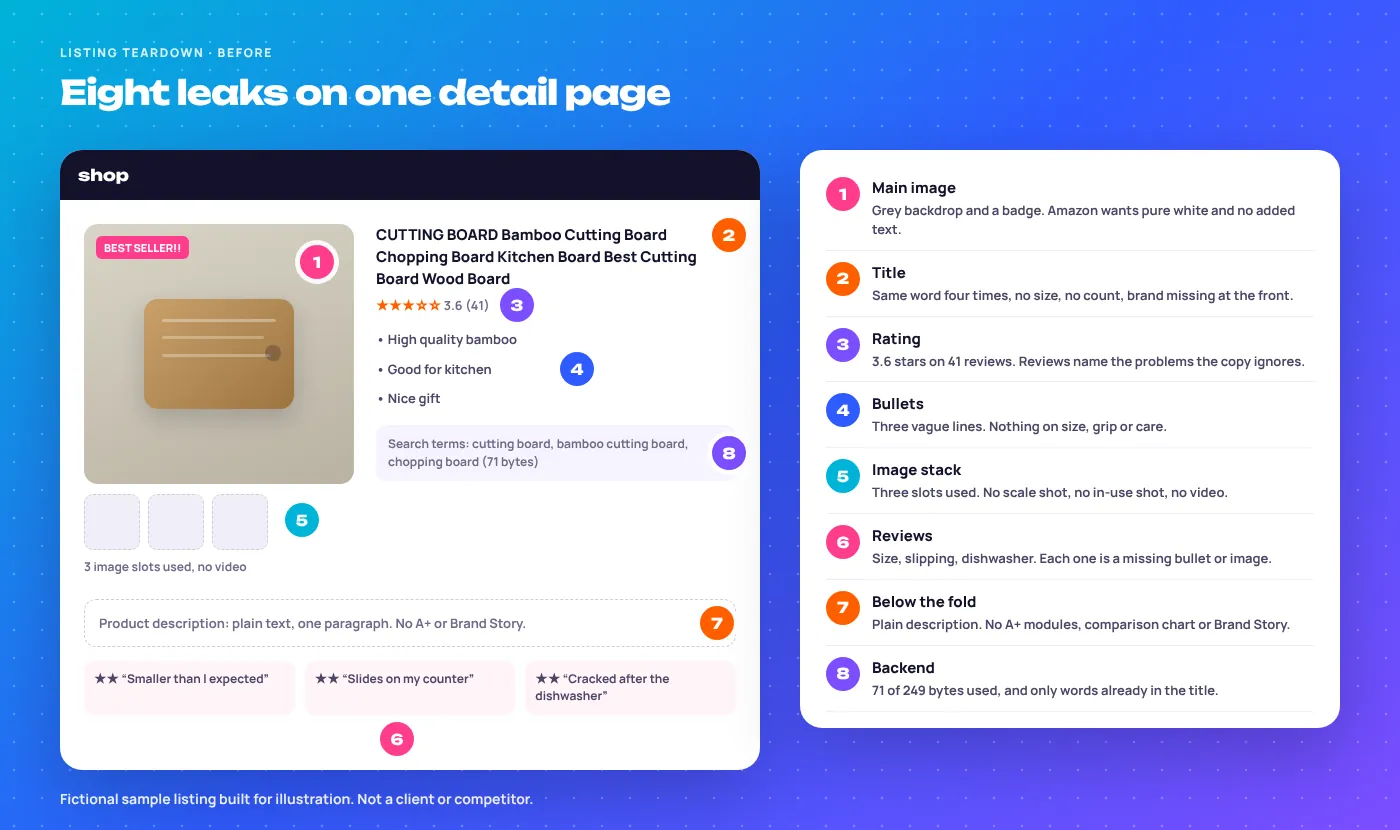
A made-up listing, but every problem on it turns up in real audits. Only two of the eight are about keywords.
Amazon Product Title Optimization: How Long Should a Title Be?
Amazon’s product title requirements cap most categories at 200 characters including spaces, and some category style guides ask for less. Length is not the goal. Put the brand and the main search phrase first, because mobile search results often show only the first 70 to 80 characters before cutting off.
The same rules ban decorative symbols such as ! $ ? and any word used more than twice, apart from little words like “and” or “for”. Break them and Amazon may suppress the listing.
| Category type | Title pattern we start from | Watch out for |
|---|---|---|
| Home and kitchen | Brand + material + product + key feature + size + count | Sizes written two ways in one title |
| Grocery and supplements | Brand + product + flavour or form + size + pack count | Health claims your style guide does not allow |
| Electronics | Brand + model + product type + main spec + compatibility | Device names you are not certified for |
| Apparel | Brand + department + product + style + material | Size and colour in the parent title |
| Beauty | Brand + product + key ingredient + benefit + size | Words like “best” or “No.1” |
Starting patterns. Your category style guide overrides them.
Bullet Points and Amazon Backend Search Terms
Five bullets is the norm, each short enough to read on a phone. We open every bullet with a capitalised benefit, then the proof, and the doubt buyers raise most in reviews goes first.
How do backend search terms work?
Backend search terms are a hidden field that Amazon indexes but shoppers never see. According to Seller Central Help, the field must stay under 250 bytes in most marketplaces, and going over can mean none of it is indexed. Use it for synonyms and phrasings that do not fit the visible copy.
- Leave out brand names (yours or anyone else’s), ASINs, and words like “best”, “new” or “on sale”.
- Skip repeats. Words already in the title or bullets gain nothing from a second mention.
- Count bytes, not characters. Accented letters and Arabic script take two bytes each, which matters on Amazon.ae.
- chopping
- boards
- butcher
- block
- carving
- tray
- wooden
- serving
- platter
- charcuterie
- meal
- prep
- reversible
- housewarming
- colour
- color
- dishwasher
- free
- eco
- friendly
- kitchenware
Spaces only, no commas, no words already in the title. These three never go in:
- competitorbrand
- B0XXXXXXXX
- best
Amazon Main Image Requirements and the Image Stack
On a phone, shoppers swipe the images before they read a word. The main image wins the click; the rest of the stack answers questions.
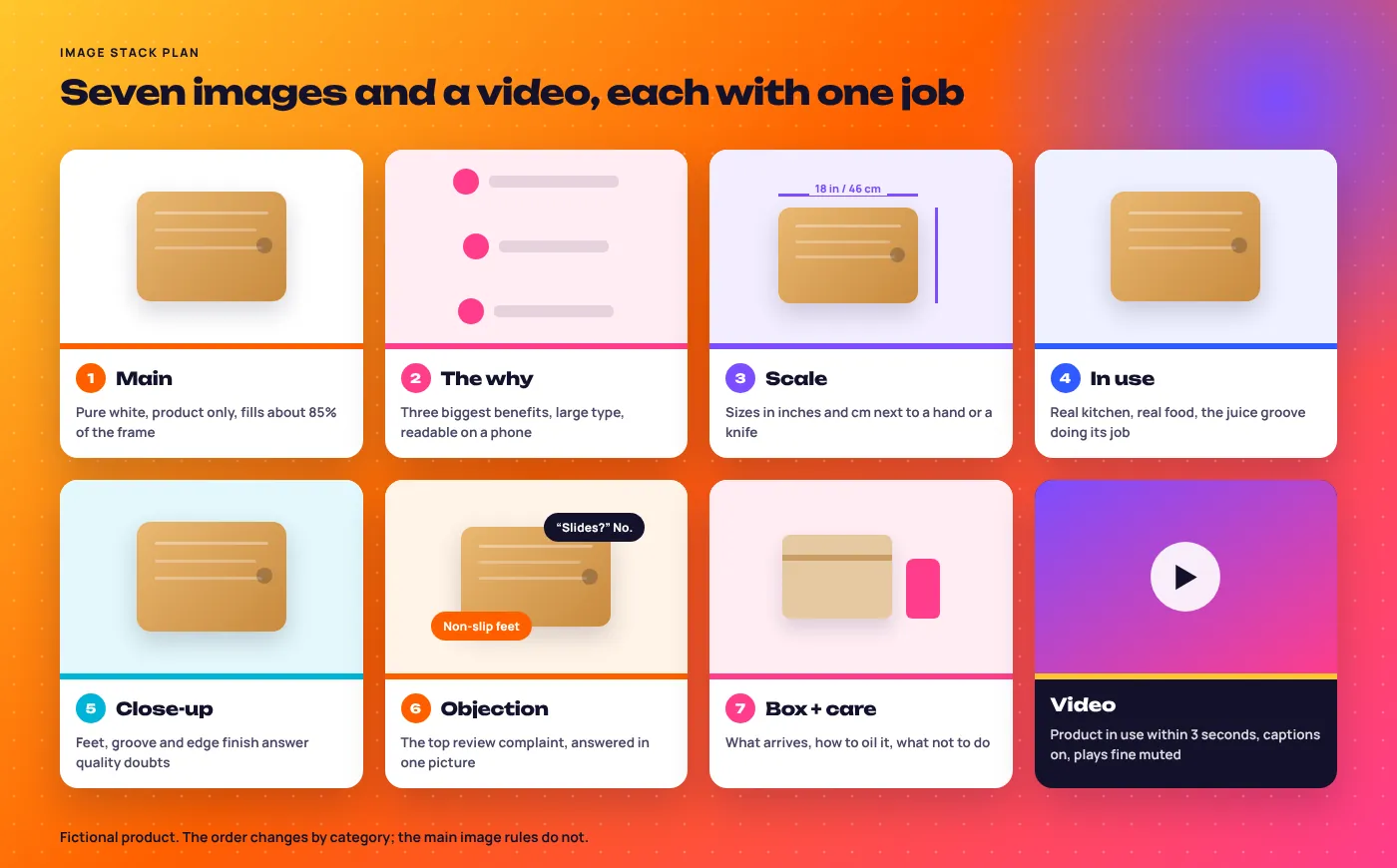
Amazon main image requirements, from its product image guidelines:
- Pure white background (RGB 255, 255, 255).
- Product fills about 85% of the frame, shown as sold.
- No text, logos, badges or borders on the main image.
- 1,000 pixels or more on the longest side so zoom works.
Product video
Brand-registered sellers can add video. Show the product in use within seconds and add captions, as many shoppers watch muted.
What’s the Difference Between A+ Content, Premium A+ and Brand Story?
Amazon A+ Content replaces the plain description with image and text modules. Premium A+ allows more modules plus video and interactive layouts. Brand Story is a separate carousel about your brand that appears on every product you sell. All three need Amazon Brand Registry.
| Feature | What it is | Best used for |
|---|---|---|
| A+ Content | Up to five modules: images, comparison chart, text blocks | Comparing your sizes or variants, care and use, the “why us” story |
| Premium A+ | Up to seven larger modules with video, hotspots and carousels | Products bought on detail and trust, such as electronics or skincare |
| Brand Story | A scrolling carousel shown on all your products | Moving shoppers to your other products and your Store |
Premium A+ eligibility has changed more than once. We check the current rules in A+ Content Manager for your account.
Amazon generally does not use A+ text for ranking, so we write it for the nearly convinced buyer, not for keywords, and judge it on conversion rate.
Reviews, Amazon Vine and the Fixes Hiding in Them
Rewarding buyers for reviews breaks Amazon policy. What works is reading the 1 to 3 star reviews and fixing the listing that set the wrong expectation.
For new products, Amazon Vine lets brand-registered sellers send units to trusted reviewers while a product has fewer than 30 reviews. Vine reviews can be harsh, so fix the listing before you enrol.
How Do You Optimise an Amazon Listing for Rufus?
Rufus is Amazon’s AI shopping assistant. Amazon says it answers from product details, reviews and community Q&A. To show up in its answers, state who the product is for, what it does and what it does not do, in plain sentences, and fill every structured attribute in your catalogue data.
- Write for questions. “Is it dishwasher safe?” needs a clear yes or no on the page.
- Fill attributes. Material, dimensions, care and age range in the flat file, not only in the bullets.
- Keep facts consistent. If the title says 18 in and an image says 17 in, AI answers get it wrong.
Conversion Rate and Search Query Performance for Listings
Two reports judge a listing: Unit Session Percentage (Amazon’s conversion rate) in Business Reports, and Search Query Performance in Brand Analytics, which shows where shoppers drop off for each search.
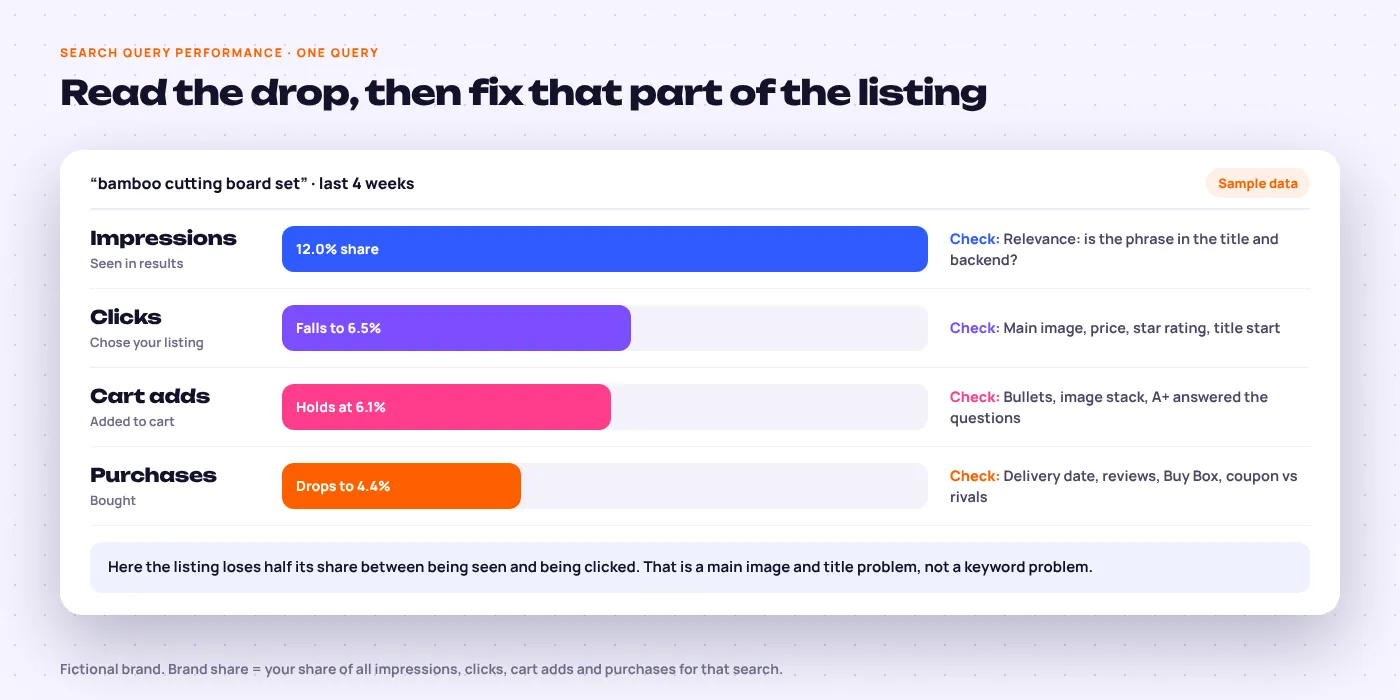
A drop from impressions to clicks points at the main image, price, rating or title. A drop from cart to purchase is usually delivery speed, the Buy Box or a cheaper rival.
Where traffic allows, we test with Manage Your Experiments, Amazon’s A/B tool for titles, main images, bullets and A+ Content. Tests typically run four to ten weeks.
Keyword Research for Amazon Listings, Field by Field
Every phrase gets one home, based on how many people search it and how well it converts.
- Pull real search dataBrand Analytics, Search Query Performance and your ads’ search term report.
- Reverse-check competitorsHelium 10 on the five products that outrank you, plus Amazon autocomplete.
- Borrow buyer languageReview words like “charcuterie” that tools miss.
- Assign each phrase a fieldTop phrases in the title, the next tier in bullets, synonyms in the backend.
- Check it is indexedAfter upload, we search each phrase with your ASIN to confirm Amazon picked it up.
Amazon Listing Optimisation Checklist
What we check on every ASIN. Limits are typical; your category style guide has the final word.
| Field | Rule of thumb | Most common mistake |
|---|---|---|
| Title | Brand and main phrase first, under 200 characters | Same word three or more times |
| Bullets | Five, benefit first, top objection first | Feature lists with no reason to care |
| Backend search terms | Under 250 bytes, no repeats, no brand names | Copying the title into the field |
| Main image | Pure white, about 85% fill, 1,000 px or more | Badges, props or text on the main image |
| Image stack | Every slot used, each with one job | Five near-identical studio shots |
| A+ and Brand Story | Comparison chart plus care and use | Keyword-stuffed text blocks |
| Attributes | Every relevant field filled in catalogue data | Size or material only in the bullets |
| Reviews | Low reviews read monthly, fixes made | Ignoring the same complaint for a year |
How Long Does Amazon Listing Optimisation Take?
The rewrite itself takes about two weeks per product group. Amazon usually picks up the new copy within a few days. Conversion rate changes show in Business Reports within weeks, while organic rank movement tends to build over one to three months, depending on how competitive the category is.
- Week 1Audit
Teardown and keyword map
Every field scored, reviews mined, search data pulled for each ASIN.
Audit and field-by-field keyword map - Week 2Write
Titles, bullets and backend
Copy written to your style guide, checked by you before anything goes live.
Approved copy, uploaded - Weeks 2 to 4Design
Image stack and A+
Briefs for your photographer or our designers, then A+ and Brand Story built.
Image brief, A+ modules - Weeks 4 to 12Measure
Index checks, tests and fixes
Indexing confirmed, one experiment at a time, conversion tracked against the old baseline.
30 and 90 day report
How We’d Approach Your Listing
We have not published an Amazon listing case study yet, so we will not show you a made-up one. Here is what we can show.
Google Shopping feed titles follow almost the same rules as Amazon titles, which is how Artsy Packaging grew from £12k to £85k in monthly revenue at 9.2x ROAS. Image and offer testing drove the US baby brand in our Simple Seed Baby case study to 4x ROAS across Meta, Google and Klaviyo. See more in our success stories or the brands we work with.
For your listing, we start with the free audit: a teardown like the one above, on your real ASINs, with fixes ranked by impact.
Amazon Services That Work With Your Listing
Listing work is part of our wider Amazon advertising service. Selling food or groceries? See our food industry marketing. Selling direct as well? See ecommerce marketing, or read guides on the EmergingAds blog.
Amazon Listing Questions Answered
What is Amazon listing optimisation?
It is improving a product detail page so it ranks for the right searches and converts more visitors: title, bullets, backend terms, images, video, A+ Content and attributes.
How long does Amazon listing optimisation take to show results?
Conversion changes usually show within weeks; rank takes longer. Amazon picks up new copy within a few days, and organic rank tends to move over one to three months depending on competition.
How many characters can an Amazon product title have?
Up to 200 characters in most categories, including spaces. Some categories set a lower limit in their style guide, and mobile search shows only the start, so the main phrase goes first.
How do Amazon backend search terms work?
They are a hidden field Amazon indexes for search. Keep it under 250 bytes, use spaces rather than commas, and add only words that are not already in your title or bullets.
Is A+ Content worth it?
Yes, for most brand-registered sellers. It mainly helps conversion, which then supports rank. We measure it by comparing Unit Session Percentage before and after it goes live.
Can you optimise my listing if I am not brand registered?
Yes, partly. Titles, bullets, backend search terms and images are open to all sellers. A+ Content, Brand Story, video, Vine and Brand Analytics need Amazon Brand Registry.
Can I put competitor brand names in my backend search terms?
No. Amazon’s search terms rules ban other brands’ names, and breaking them risks suppression. Reaching competitor shoppers is a job for ads.
How do I get my product recommended by Rufus, Amazon’s AI assistant?
Answer real questions in plain sentences and fill every attribute. Rufus draws on product details, reviews and Q&A, so clear, consistent facts give it something to quote.
Do you optimise listings for Amazon UK, UAE and India as well as the US?
Yes. Each marketplace gets its own keyword research: “colour” in the UK, “color” in the US, and Arabic phrases on Amazon.ae.
How often should I update my Amazon listing?
Review it every quarter and after any wave of similar complaints. Change one major element at a time, such as the title or main image, so you can tell what moved conversion.
Find Out What Your Listing Is Missing
Send us your top ASINs. We send back a teardown of each, the keywords it is missing and the fixes in order. Free, no pitch deck.
