How to Do Keyword Research Yourself

Key Takeaways
- Real keyword research starts with your own sales data and customer language, not a tool, the tool only tells you volume and difficulty once you already know what to search for
- Search volume alone is a poor filter, a keyword with 50 searches a month that converts at 8% often beats a keyword with 5,000 searches that converts at 0.3%
- Free tools (Google Search Console, Google Keyword Planner, Google’s own autocomplete and People Also Ask) can get a small business 80% of the way there before paying for anything
- Search intent, whether someone is browsing, comparing, or ready to buy, matters more than raw volume when deciding which keywords are worth building a page around
- A keyword research process that isn’t revisited quarterly goes stale, search behavior shifts with seasons, new competitors, and changes in how people phrase what they’re looking for
Why Most DIY Keyword Research Goes Wrong From the Start
Most keyword research goes wrong before anyone opens a tool. The typical approach is to type a broad guess into a keyword tool, get back a list of a few hundred terms sorted by search volume, and start writing content around whichever numbers look biggest. That process feels productive because it produces a spreadsheet, but it skips the one step that actually determines whether the resulting content will ever rank or convert: understanding what a real person is trying to accomplish when they type that phrase into Google.
Search volume is a popularity number, nothing more. It tells you how many people search a term in a given market over a given period, it tells you nothing about whether those searchers are your customers, whether they’re ready to buy, or whether the intent behind the search even matches what you sell. A local bakery chasing a 40,000-a-month keyword like ‘bread recipes’ will lose to recipe blogs every time, while a keyword like ‘gluten free bakery near me’ with 90 monthly searches will bring in actual paying customers within weeks.
The fix is treating keyword research as a sequence, not a single tool session. You start with what you already know about your business and your customers, expand that list systematically, filter it by intent and realistic difficulty, and only then start building content or landing pages around what’s left. Skipping straight to a tool and sorting by volume is the single most common reason DIY keyword research produces a list that looks impressive but never moves the needle.
Step 1: Mine Your Own Business for Seed Keywords
Before opening any keyword tool, write down every phrase a real customer has actually used to describe your product or service, pulled from sales calls, support tickets, reviews, and even internal Slack messages where someone paraphrased what a customer asked for. This is the single highest-signal source of keyword ideas available to you, because it reflects the exact language your actual buyers use, not the language a generic tool guesses they might use.
- Pull the last 20-30 support tickets or sales emails and note the exact phrases customers used to describe their problem
- Check your Google Business Profile Q&A and review sections for recurring questions and phrasing
- Look at your own site search data if you have an on-site search bar, it’s a direct record of what visitors are looking for and not finding
- Ask your sales or customer service team what questions come up most often before someone buys
- Review competitor product pages and reviews for language patterns your own copy might be missing
This seed list will usually be 15-30 phrases long and feel unglamorous compared to a tool’s export of hundreds of terms, but it’s the foundation everything else builds on. Every later step exists to expand and validate this list, not replace it, a keyword tool that suggests a term with zero connection to how your actual customers talk is usually a term worth ignoring, regardless of its volume.
Step 2: Expand Your List With Free Tools
With a seed list in hand, free tools become genuinely useful for expansion rather than starting-point guessing. Google’s own autocomplete, typed directly into a search box, shows real queries people are actively making, right now, in your target market. Scrolling to the bottom of any results page for a ‘People Also Ask’ box and a ‘Related Searches’ section adds more, often surfacing phrasing you wouldn’t have thought to write down yourself.
| Tool | Cost | Best for |
|---|---|---|
| Google Search Console | Free | Queries you already rank for, including ones you never targeted on purpose |
| Google Keyword Planner | Free with an Ads account | Volume ranges and closely related term suggestions |
| Google Autocomplete + People Also Ask | Free | Real phrasing patterns and question-based long-tail ideas |
| AnswerThePublic (limited free tier) | Free/paid | Question and preposition-based keyword clusters |
| Ahrefs / Semrush (paid) | Paid | Competitor keyword gaps, precise difficulty scoring, click data |
Google Search Console deserves special attention because it’s the only source on this list showing what your own site is already ranking for, including queries you never deliberately targeted. It’s common to find a page quietly getting impressions for a valuable long-tail phrase you could rank higher for with a small on-page tweak, that’s a far cheaper win than building new content from scratch, and it costs nothing beyond ten minutes of looking.
Step 3: Read Search Intent Before You Read Search Volume
Once you have an expanded list, the next filter is intent, not volume. Every search query falls roughly into one of four buckets: informational (someone learning something), navigational (someone looking for a specific site or brand), commercial investigation (someone comparing options before buying), and transactional (someone ready to buy right now). Building the wrong type of content for a keyword’s actual intent is one of the fastest ways to waste the effort you just put into research.
- Informational: ‘what is keyword research’ – answer the question thoroughly, don’t pitch a service mid-explanation
- Navigational: ‘ahrefs login’ – not a keyword worth targeting unless it’s your own brand
- Commercial investigation: ‘best keyword research tools for small business’ – a comparison or listicle format wins here
- Transactional: ‘buy ahrefs subscription’ or ‘keyword research agency near me’ – a direct landing page with a clear call to action performs best
A simple gut-check for intent: type the exact keyword into Google yourself and look at what’s already ranking in the top five results. If they’re all blog posts explaining a concept, Google has decided this is an informational query, and a sales-heavy landing page won’t outrank them no matter how well it’s optimized. If the top results are comparison pages or service pages, that tells you the commercial or transactional format is what Google, and by extension real searchers, expect to find.
Step 4: Judge Difficulty Without a Paid Tool
Paid tools assign a numeric keyword difficulty score, but you can approximate the same judgment manually by looking at who currently ranks. Search the exact keyword and look at the top ten results: are they large, well-known domains with obvious authority, or a mix of smaller sites, forums, and local businesses similar in size to yours? The latter is a strong signal that a well-optimized page from you has a realistic shot at competing.
- Count how many of the top 10 results are large national or global brands versus small/local businesses
- Check whether any top-10 result looks thin or outdated, that’s an opening for a genuinely better page to outrank it
- Note if forums, Reddit threads, or Q&A sites rank, that often signals thinner competition than it first appears
- If every top-10 spot is a major publisher or established brand with deep content, treat that keyword as a longer-term target, not a quick win
This manual approach isn’t as precise as a paid tool’s algorithmic score, but it’s accurate enough for a small business deciding where to spend limited content and outreach effort, and it costs nothing beyond time already spent understanding search intent in the previous step.
Step 5: Group Keywords Into Topics, Not a Flat List
A spreadsheet of 200 unrelated keywords is hard to act on. The more useful structure groups related keywords into topic clusters, each anchored by one primary page targeting the highest-value term in the cluster, supported by related pages or sections covering the narrower variations. This mirrors how Google itself increasingly evaluates topical authority, rewarding sites that comprehensively cover a subject rather than scattering thin pages across unrelated phrases.
For example, a small accounting firm might group ‘small business bookkeeping cost,’ ‘how much does a bookkeeper charge,’ and ‘bookkeeping pricing packages’ into a single pricing-focused cluster served by one comprehensive page, rather than three thin competing pages that would end up cannibalizing each other’s rankings. Grouping first, writing second, prevents this kind of accidental internal competition and makes the eventual content plan far easier to execute against.
Step 6: Prioritize With a Simple Scoring System
Once keywords are grouped into clusters, prioritize which cluster to tackle first using a simple weighted score rather than gut feel. A workable formula for a small business: score each cluster 1-5 on business relevance (does it match what you actually sell), 1-5 on estimated realistic ranking difficulty (5 being easiest), and 1-5 on commercial intent (transactional scoring highest). Add the three numbers and tackle the highest-scoring clusters first.
| Cluster | Relevance | Difficulty (5=easy) | Intent | Total |
|---|---|---|---|---|
| Pricing/cost pages | 5 | 4 | 5 | 14 |
| Comparison/best-of pages | 4 | 3 | 4 | 11 |
| Broad educational topics | 3 | 2 | 2 | 7 |
| Local/location-specific pages | 5 | 5 | 5 | 15 |
This kind of scoring won’t be perfectly scientific, and that’s fine, the goal isn’t precision, it’s forcing a deliberate decision about where limited content-writing time goes first instead of defaulting to whatever topic feels most interesting to write about that week.
Free vs Paid Keyword Research Tools: What You Actually Need
A genuinely honest answer here: most small businesses can run a complete, useful keyword research process using only free tools for the first six to twelve months. Google Search Console, Google Keyword Planner, and manual SERP analysis cover seed expansion, volume ranges, and difficulty estimation well enough to make good content decisions. Paid tools like Ahrefs or Semrush earn their subscription cost once you’re managing dozens of pages and need to track ranking movement, competitor gaps, and click-through data at scale.
The mistake worth avoiding is assuming a paid tool subscription is a prerequisite to starting, it isn’t, and spending a monthly retainer on a tool before you’ve proven out a manual process with free resources often means paying for data you don’t yet know how to act on.
Common Keyword Research Mistakes Small Businesses Make
A handful of mistakes show up repeatedly in DIY keyword research, and most of them are avoidable with the steps above already in place.
- Chasing high-volume, low-relevance keywords because the number looks impressive in a spreadsheet
- Ignoring long-tail, lower-volume keywords that convert far better because they’re more specific to buyer intent
- Building one page per keyword instead of grouping related terms into a single comprehensive page
- Never checking Google Search Console for keywords already generating impressions with room to improve
- Treating keyword research as a one-time project instead of a quarterly habit that adapts to seasonal and market shifts
How Often to Redo Your Keyword Research
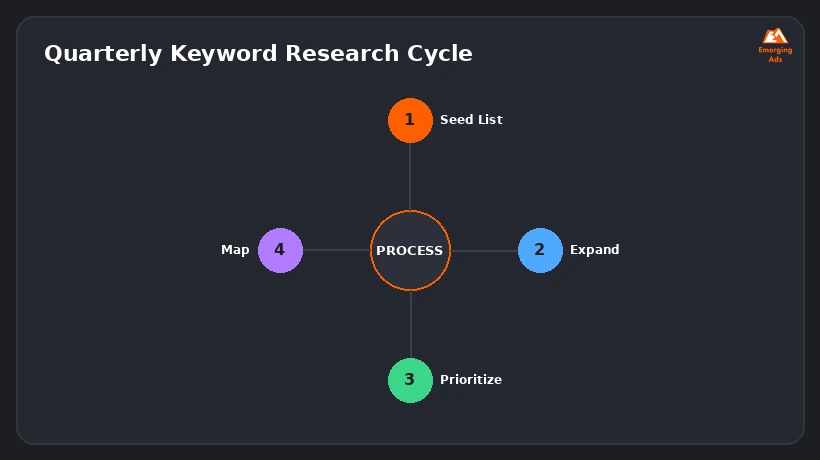
Search behavior isn’t static. New competitors enter a market, seasonal demand shifts what people search for, and the exact phrasing people use to describe a problem evolves over time, particularly as voice search and conversational AI search results change how questions get typed. A quarterly light-touch review, checking Search Console for new query patterns and re-running the top few clusters through a fresh SERP check, keeps a keyword strategy from going stale without requiring a full rebuild every time.
When It Makes Sense to Bring in Outside Help
DIY keyword research works well for a business with the time to run this process consistently and the patience to learn from what does and doesn’t rank over the following months. It becomes a weaker fit once a business is managing dozens of pages across multiple product lines or locations, competing against well-resourced competitors with dedicated SEO teams, or simply doesn’t have the internal hours to dedicate to quarterly re-research and content production at the pace needed to keep up.
At that point, the value of outside help isn’t a secret keyword list a freelancer or agency has access to that you don’t, it’s the combination of paid-tool efficiency, pattern recognition from having done this across many accounts, and simply having dedicated hours each month to keep the process running consistently rather than it falling to the bottom of an already full to-do list.
Want us to look at your account?
We’ll audit your setup and tell you exactly where the budget is leaking, free.
Get Your Free Ad AuditFrequently Asked Questions
Can I really do keyword research without paying for a tool?
Yes, for most small businesses, Google Search Console, Google Keyword Planner, and manual SERP analysis cover the majority of what’s needed. Paid tools become more valuable once you’re managing a larger volume of pages and need to track competitor movement at scale.
How many keywords should I target per page?
One primary keyword per page, supported by a handful of closely related secondary keywords naturally worked into the content. Targeting too many unrelated keywords on a single page tends to dilute relevance for all of them rather than ranking well for any.
Is search volume the most important number to look at?
No, search intent and realistic ranking difficulty matter more for a small business with limited content resources. A lower-volume, high-intent keyword that converts well often outperforms a high-volume keyword with mismatched or ambiguous intent.
How long does keyword research take to actually show results?
Most new content targeting a realistic, well-matched keyword starts showing early ranking movement within 4-8 weeks, with more meaningful traffic and ranking stability typically building over 3-6 months, depending on competition and site authority.
What’s the difference between a seed keyword and a long-tail keyword?
A seed keyword is a short, broad starting term (like ‘bookkeeping’), while a long-tail keyword is a longer, more specific phrase built from it (like ‘small business bookkeeping cost for a 5-person company’). Long-tail keywords usually have lower volume but higher conversion intent.
Should I use the exact keyword phrase word-for-word in my content?
Use it naturally where it fits, particularly in the title, one H2, and the opening paragraph, but modern search engines understand semantic variations well enough that forcing an exact-match phrase repeatedly reads poorly and isn’t necessary for ranking.
How do I find keywords my competitors are ranking for that I’m not?
This specific gap analysis is one area where a paid tool genuinely helps, since it can directly compare a competitor’s ranking keywords against your own. Without one, manually searching a competitor’s likely target terms and checking their ranking position is a slower but workable substitute.
Does keyword research matter as much with AI-powered search results?
Arguably more, not less. Understanding what real questions people ask and in what phrasing helps content get referenced by AI-generated answers too, the underlying skill of matching content to genuine search intent hasn’t changed, only some of the result formats have.
What’s a reasonable first step if I’ve never done keyword research before?
Start with Step 1 in this guide: write down 15-20 phrases your actual customers have used to describe what they need, pulled from real conversations, before opening any tool at all. That list alone will meaningfully improve whatever a tool later suggests.
How do I know if a keyword is actually worth targeting for my business?
Score it against relevance to what you sell, realistic difficulty based on who currently ranks, and commercial intent, then prioritize clusters that score well across all three rather than chasing any single high number in isolation.
Ready to fix what’s costing you conversions?
Book a free, no-pressure audit of your ad account or website.
Get Your Free Ad Audit