
The short answer
HubSpot suits small businesses that want a polished, easy-to-use CRM with strong reporting, a large integration ecosystem and room to grow into marketing, sales and service tools, starting free and paying more per seat and per feature as you scale. GoHighLevel suits businesses and agencies that want an all-in-one system, combining CRM, pipelines, funnels, websites, booking, SMS, email and reviews, at a flat monthly price with unlimited contacts, and are willing to accept a steeper learning curve. The right choice depends on your sales process, team size, budget model and how much you value simplicity versus breadth.
HubSpot and GoHighLevel come up together in almost every CRM conversation we have with small businesses. On the surface they do similar things: store contacts, track deals, send emails, automate follow-up and report on results. In practice they are built on very different ideas, and choosing the wrong one can mean months of frustration or paying for far more than you use.
We set up and run both platforms for clients, including lead routing, follow-up automation and integrations with ads and WhatsApp, as part of our marketing automation work. This comparison is based on that experience. Both are good tools; the question is which fits your business.
Pricing and features change often on both platforms, so treat specific details as accurate at the time of writing and check the vendors’ current pages before deciding.

Two different philosophies
HubSpot started as a marketing platform and grew into a suite of connected “hubs” for marketing, sales, service, content and operations, all built on a shared CRM. It emphasizes ease of use, clean design, reliable reporting and a huge marketplace of integrations. You start with a free CRM and add paid hubs and higher tiers as needs grow.
GoHighLevel, now often called HighLevel, was built primarily for marketing agencies serving local and small businesses. It bundles many tools that a small business would otherwise buy separately: CRM and pipelines, website and funnel builder, forms and surveys, calendars and booking, email and SMS marketing, two-way messaging inbox, reputation management, membership sites and more. Agencies can white-label it and resell it to clients.
Put simply, HubSpot aims to be the best-organized home for customer relationships as a company grows. GoHighLevel aims to replace a stack of separate tools with one affordable system.
Pricing models compared
The two platforms charge in fundamentally different ways.
HubSpot offers a free CRM with basic contact management, deals, forms and email tools. Paid hubs come in Starter, Professional and Enterprise tiers, priced largely per seat, with additional costs for marketing contacts on marketing plans and onboarding fees on higher tiers. Costs can start low and rise significantly as you add users, contacts and advanced features such as sophisticated automation and custom reporting.
GoHighLevel charges a flat monthly subscription per account, with plans typically differing by number of sub-accounts and agency features, and generally including unlimited contacts and users. Usage-based costs, such as SMS, email sending, phone calls and some AI features, are billed separately based on volume.
| Pricing factor | HubSpot | GoHighLevel |
|---|---|---|
| Starting point | Free CRM | Paid monthly plan, trial available |
| Main cost driver | Seats, tiers, marketing contacts | Plan level plus usage (SMS, email, calls) |
| Contacts | Marketing contacts priced on marketing plans | Generally unlimited |
| Users | Paid seats on most paid tiers | Generally unlimited |
| How costs scale | Rise with team size and features | Mostly flat, plus usage |
For a solo founder or tiny team with simple needs, HubSpot’s free tools can be enough. For a small business that would otherwise pay for a CRM, a website builder, a booking tool, an SMS tool and a review tool separately, GoHighLevel’s flat price can be much cheaper overall. For a growing sales team that needs advanced automation and reporting, HubSpot’s costs rise but so do its capabilities.

CRM and pipeline management
Both platforms handle contacts, companies, deals and pipelines well enough for most small businesses.
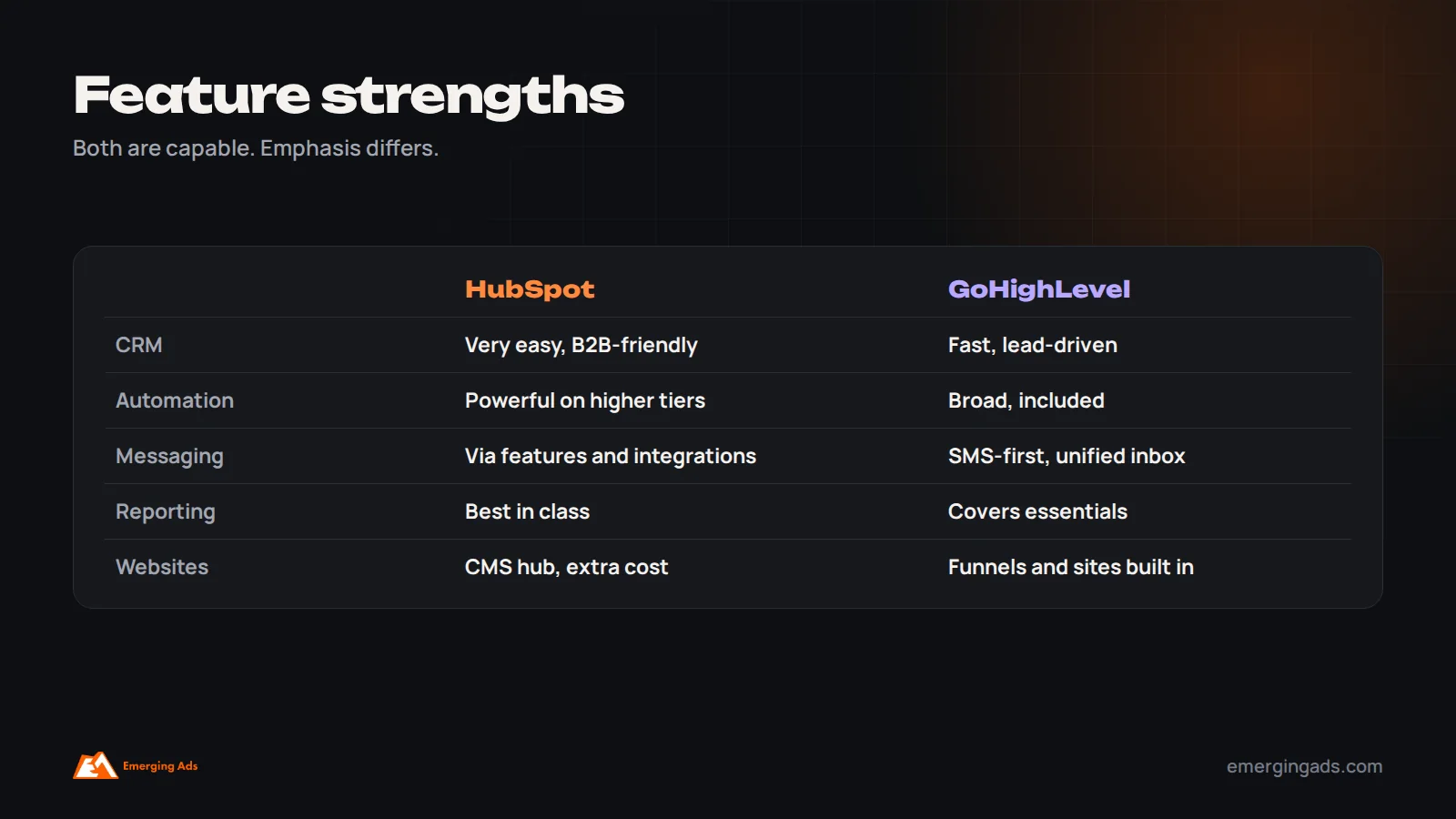
HubSpot’s CRM is widely regarded as one of the easiest to use, with clear contact records, activity timelines, deal pipelines, tasks and a strong mobile app. It handles companies and contacts as related records, which suits B2B sales with several people per account.
GoHighLevel’s CRM is functional and fast for lead-driven businesses, with pipelines, opportunities, tags, custom fields and a unified conversations inbox combining SMS, email, social messages and calls. It is particularly suited to businesses where speed of response to inbound leads matters most, such as clinics, gyms, home services and real estate.
Automation and follow-up
Automation is where many small businesses gain the most, because it ensures every lead gets a fast response and consistent follow-up.
HubSpot’s workflows are powerful and well designed on Professional and higher tiers, with branching logic, lead scoring, task creation and integration with sales sequences. Starter tiers offer simpler automation. The visual builder is clear, and automation connects tightly with reporting.
GoHighLevel’s workflows are included on standard plans and cover a wide range of triggers and actions: form submissions, booked appointments, pipeline changes, missed calls, inbound messages and more, with actions across SMS, email, voicemail drops, tasks and internal notifications. The breadth is impressive for the price; the builder can feel less polished, and complex workflows need careful testing.
Whichever you choose, the principles of good follow-up are the same, and our article on CRM automation mistakes covers the gaps we find most often.
SMS, WhatsApp and two-way messaging
GoHighLevel was built with SMS and two-way messaging at its core, including a shared inbox, missed-call text-back and integrations with messaging channels. For businesses whose customers prefer to message, especially in markets where texting or WhatsApp is the norm, this is a major strength.
HubSpot supports conversations through a shared inbox, live chat, email and integrations, and offers SMS and WhatsApp capabilities through its own features or third-party integrations depending on plan and region. It is capable but generally not as messaging-first. Our WhatsApp marketing team often integrates WhatsApp with either platform for clients in the Gulf and India.
Email marketing capabilities
HubSpot’s marketing email tools are polished, with a drag-and-drop editor, templates, personalization, A/B testing on higher tiers and strong reporting connected to the CRM. Marketing emails count against your marketing contacts, which affects cost as lists grow. For B2B nurture and newsletters, it is one of the most capable options available.
GoHighLevel includes email campaigns and automated emails within workflows, with templates and a builder that covers everyday needs. Deliverability depends heavily on correct setup of your sending domain and authentication, which applies to every platform. For ecommerce brands with complex product-based email, a dedicated tool such as Klaviyo is often better than either; our comparison of Klaviyo vs Mailchimp covers that side.
Booking, calendars and appointments
For appointment-based businesses, booking is central. GoHighLevel includes calendars with booking pages, round-robin assignment, automated confirmations and reminders by SMS and email, and no-show follow-up, all connected to pipelines. This is one of its strongest features for clinics, salons, gyms, consultants and home services.
HubSpot offers meeting scheduling links connected to team calendars, which work well for sales demos and consultations. Complex appointment businesses with many services, staff and locations sometimes integrate a dedicated booking tool with HubSpot.
Reviews and reputation management
GoHighLevel includes reputation features that request reviews automatically after appointments or purchases and help manage responses, which suits local businesses where Google reviews strongly influence new customers. HubSpot does not focus on review management natively; businesses typically integrate a third-party review tool. If reviews are central to how you win customers, factor this into the comparison.
Websites, funnels and landing pages
GoHighLevel includes a website and funnel builder, forms, surveys, booking calendars and membership areas, so a small business can run its entire lead capture process inside one system. The builder is practical rather than design-led, and suits landing pages and simple sites.
HubSpot offers landing pages and forms within its marketing tools, and a full content management system through its CMS hub. These are polished and integrate tightly with the CRM, but advanced website features come at additional cost. Many HubSpot users keep their main website on another platform and connect it.
Reporting and analytics
Reporting is one of HubSpot’s clearest advantages. Dashboards, attribution reports, pipeline reports and custom reports, especially on Professional and Enterprise tiers, are among the best available for small and mid-sized businesses, and they are easy to share with leadership.
GoHighLevel provides dashboards for pipelines, appointments, conversations and campaign performance that cover the essentials for most small businesses. Its reporting is less flexible and less polished, and businesses with complex attribution needs often export data or use additional tools.
Integrations and ecosystem
HubSpot’s app marketplace is very large, with native integrations for most popular business tools, accounting systems, ecommerce platforms and ad platforms. Its API is mature and widely supported.
GoHighLevel integrates with major ad platforms, payment providers, calendars and many tools through native connections, webhooks and integration platforms such as Zapier. Its own built-in tools reduce the need for many integrations in the first place.
Ease of use and learning curve
HubSpot is generally easier for non-technical teams to learn, with intuitive navigation, extensive help documentation, free training through HubSpot Academy and a consistent interface across hubs.
GoHighLevel has a steeper learning curve because it does so much, and its interface can feel crowded. Many small businesses get the most from it when an agency or specialist sets it up and builds templates, then the team uses it day to day. Snapshots, which are pre-built templates of workflows, funnels and pipelines, help speed up setup.
Support and reliability
HubSpot offers tiered support, with more support on higher plans, plus a large community and many certified partners. GoHighLevel offers support channels and has a large, active community of agencies and users who share templates and advice. Both platforms are widely used and generally reliable; for either, ensure you understand which support level your plan includes.
For agencies: white-label and resale
GoHighLevel’s agency features are a major reason for its popularity: agencies can manage many client sub-accounts, white-label the platform under their own brand and resell it as their own software. HubSpot has a strong partner program for agencies that sell and implement HubSpot, but it is not designed to be white-labeled and resold in the same way.

Connecting to Google, Meta and other ad platforms
Both platforms can capture leads from ad platforms and report on their sources, but the details matter for performance marketing. Make sure lead forms from Meta, Google and LinkedIn sync automatically, that UTM parameters and click identifiers are captured on website forms, and that sales outcomes can be sent back to the ad platforms as offline conversions. HubSpot has mature native integrations with major ad platforms, including audience syncing and attribution reporting on higher tiers. GoHighLevel connects with major ad platforms for lead capture and conversion reporting, with some advanced use cases handled through integrations. Whichever you choose, closing the loop between CRM outcomes and ad platforms is what lets campaigns optimize for customers rather than form fills. Our guide to attribution modeling covers why.
How team size changes the decision
Solo founders and very small teams often do well starting with HubSpot’s free CRM if their needs are simple, or with GoHighLevel if they need booking, messaging and funnels from day one and would otherwise pay for several tools.
Teams of three to fifteen are where the choice matters most. HubSpot costs rise with seats and features, while GoHighLevel stays mostly flat. The deciding factors are usually the sales process, the importance of messaging and booking, and how much reporting leadership needs.
Larger teams with structured sales processes tend to prefer HubSpot for its permissions, reporting, sales tools and ecosystem, though some multi-location service businesses run very successfully on GoHighLevel with a strong setup.
Data, security and compliance
Both platforms handle personal data, so check how each supports your obligations under data protection laws in your markets, such as GDPR in the UK and EU and rules in the UAE, Saudi Arabia and India. Look at user permissions, data export, consent tracking for email and SMS, and messaging rules, which are strict in some countries. For SMS in particular, registration requirements and consent rules vary by country and can affect deliverability and cost. Make sure whoever sets up the system configures consent and opt-outs correctly from the start.
How to run a fair trial of both
If you are undecided, test both against your real process rather than a demo. Write down your actual lead sources, the steps from enquiry to sale, the messages you send, the reports you need and the people who will use the system. Then build a simplified version of that process in each platform during the trial: connect one real lead source, create your pipeline, build a basic follow-up workflow and set up the key report. Ask the people who will use it daily to try both. The platform your team finds easier to use consistently is usually the right choice, even if the other has more features on paper.
AI features on both platforms
Both platforms have added AI features in recent years. HubSpot includes AI assistance for writing emails and content, summarizing records and conversations, and helping build reports and workflows, with more capabilities on higher tiers. GoHighLevel offers AI tools for content, conversation replies, and AI agents that can answer inbound messages and calls or book appointments, often billed as usage. These features can save time, especially for small teams handling many inbound enquiries, but they need careful setup and monitoring. Review AI replies regularly, set clear boundaries on what an assistant can promise customers, and keep a human in the loop for anything involving pricing, complaints or sensitive information.
Multi-location and franchise businesses
Businesses with several locations, such as clinics, gyms, salons or franchises, need each location to manage its own leads and bookings while leadership sees combined results. GoHighLevel’s sub-account structure maps naturally to locations, with shared templates and separate inboxes and calendars, which is one reason it is popular with multi-location service brands. HubSpot handles multiple locations through teams, permissions, properties and pipelines within one account, which works well when central reporting and consistent processes matter most. Think about who needs to see what, and how leads should be routed to the right location, before choosing.
Thinking two to three years ahead
The cheapest system today is not always the right one for the next few years. Consider how many people will use the CRM in two years, how your sales process might change, whether you plan to add new services, markets or locations, and how much reporting investors or leadership will expect. A business expecting to build a structured sales team may be better served by starting on HubSpot, even if it costs more at first. A business expecting to stay lean and service-focused may never need more than GoHighLevel offers. Migrating later is possible, but it is easier to choose with the next few years in mind.
Which should you choose?
Here is how the decision usually comes down in practice for the businesses we work with.
Choose HubSpot if
- You want the easiest possible CRM for your team to adopt.
- You run B2B sales with companies, multiple contacts and longer sales cycles.
- Reporting and attribution matter to leadership.
- You expect to grow into advanced marketing, sales and service tools.
- You rely on many other business tools that need native integrations.
- You are happy to pay more as your team and needs grow.
Choose GoHighLevel if
- You are a local or service business where fast response to inbound leads is critical.
- Your customers prefer SMS or messaging over email.
- You want one system for CRM, booking, funnels, messaging, email and reviews.
- You want unlimited contacts and users at a predictable monthly price.
- You are an agency wanting to manage or resell to many clients.
- You have help setting it up, or time to learn it properly.
Example scenarios
A physiotherapy clinic with two locations, receiving leads from Google and Meta ads, needing instant text replies, online booking, reminders and review requests: GoHighLevel usually fits well, because those functions are built in at a flat price.
A B2B software company with a growing sales team, longer sales cycles, multiple stakeholders per deal and a board asking for pipeline reports: HubSpot usually fits better, with its sales tools, company records and reporting.
A boutique fitness studio handling enquiries from WhatsApp, website forms and ad lead forms: either can work. The boutique fitness brand in our case study needed all three sources in one CRM with instant routing and follow-up, which is the kind of setup GoHighLevel handles efficiently, though HubSpot can do the same with the right plan and integrations.
What a good setup looks like on either platform
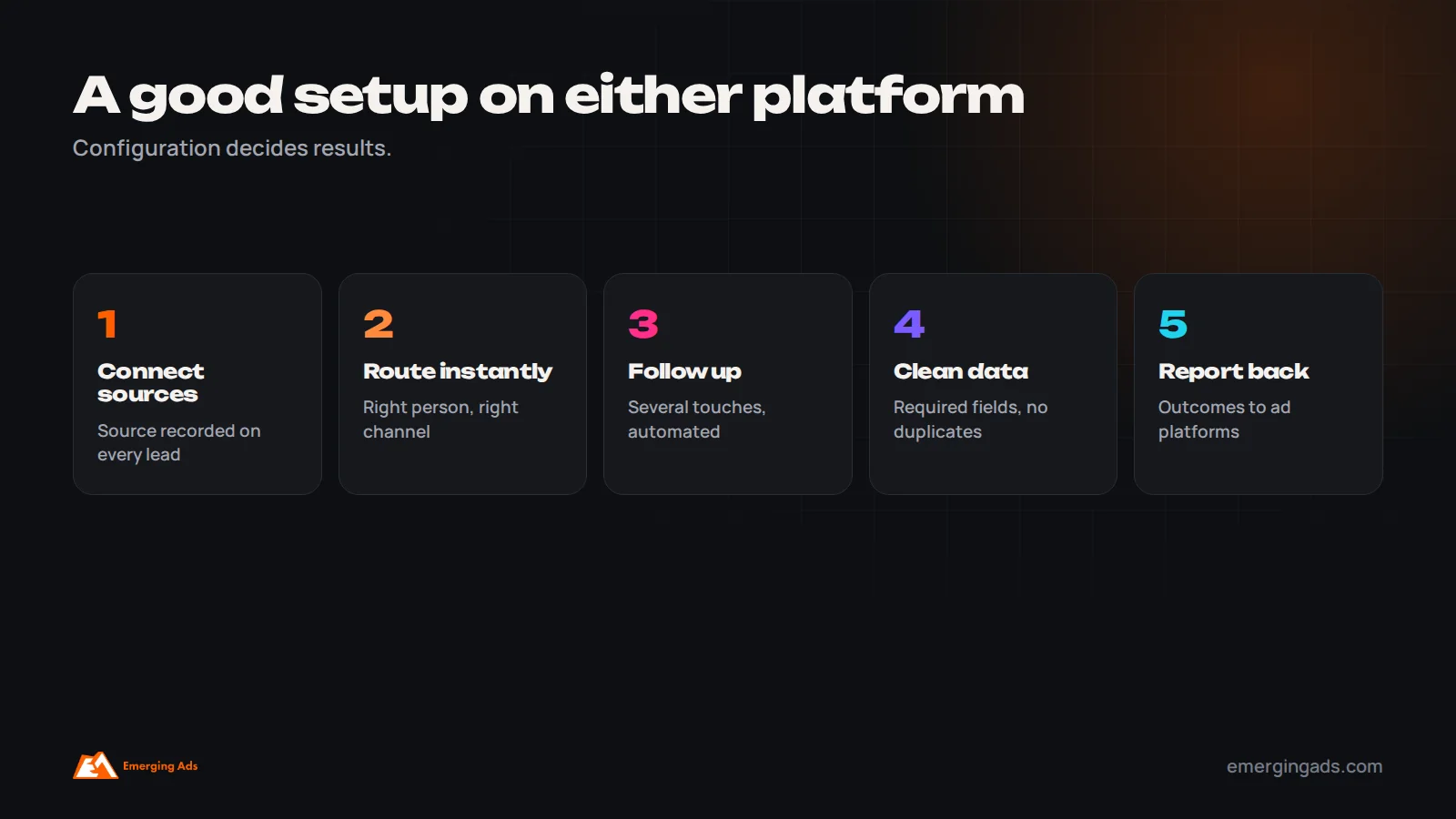
In our experience, the quality of the setup decides results far more than the choice of platform. A well-configured system on either one beats a half-configured system on the other, every time.
- Every lead source connected automatically, with the source recorded.
- Instant routing to the right person, with notifications on the channel they use.
- Immediate acknowledgment messages and a follow-up sequence of several touches.
- Clear pipeline stages that match how you actually sell.
- Required fields kept to the essentials, and duplicates prevented.
- Error alerts on integrations so nothing breaks silently.
- Dashboards showing leads by source, response time, conversion by stage and revenue by source.
- Sales outcomes sent back to ad platforms so campaigns optimize for real customers.
Switching between them
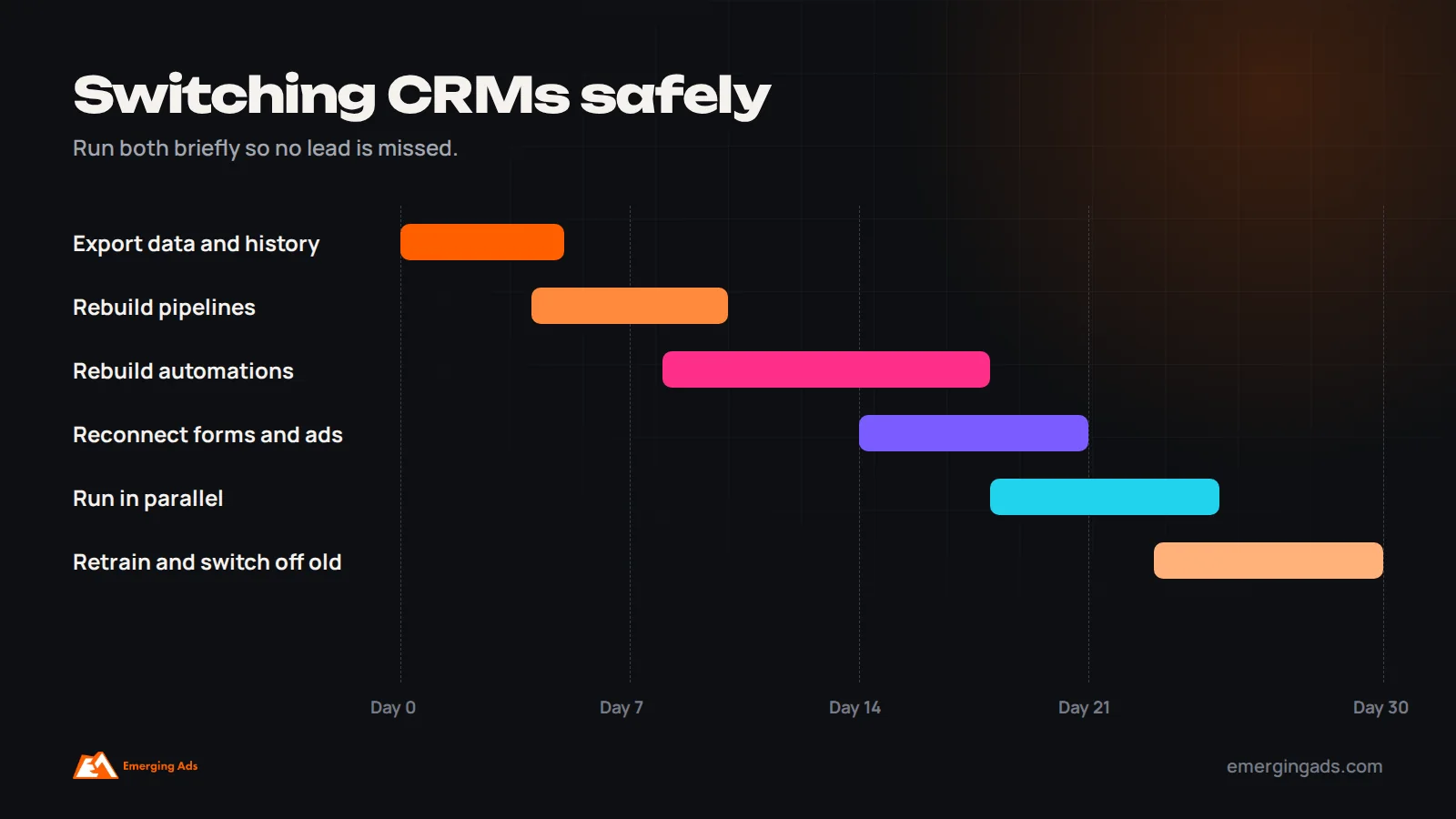
Businesses move in both directions: from GoHighLevel to HubSpot as sales teams grow and reporting needs increase, and from HubSpot to GoHighLevel to consolidate tools and reduce cost. Migration involves exporting contacts, companies and deals with history, rebuilding pipelines and automations, reconnecting forms and integrations, and retraining the team. Plan for a few weeks, run both briefly, and switch off old automations so leads are not contacted twice.
Hidden costs to consider
With HubSpot, the main hidden costs are additional seats as the team grows, marketing contact tiers as the list grows, onboarding fees on higher tiers, and add-ons for features you assumed were included. With GoHighLevel, the main hidden costs are usage fees for SMS, email, calls and some AI features, which grow with volume, and the time or agency fees needed for setup and maintenance. In both cases, map your expected users, contacts and message volumes for the next year before comparing prices.

Common mistakes when choosing a CRM
These come up repeatedly when businesses ask us to rescue a CRM that is not working. Most of them have nothing to do with which platform was chosen and everything to do with how the decision was made and how the system was set up. Avoiding them matters more than picking the “right” tool.
- Choosing on price alone without mapping your actual sales process.
- Buying advanced tiers before using the basics well.
- Underestimating setup time and training.
- Not connecting lead sources, so data is still copied by hand.
- Ignoring how the team prefers to work, which decides adoption.
- Forgetting usage-based costs and future seat costs.
If you would like help choosing or setting up either platform, our marketing automation and automation channels teams build CRM systems with lead routing, follow-up and ad platform integration. For the longer nurture side, see our guide to lead nurture automation.
Frequently asked questions
Is HubSpot or GoHighLevel better for small businesses?
HubSpot suits small businesses that want an easy, polished CRM with strong reporting and room to grow. GoHighLevel suits lead-driven local and service businesses, and agencies, that want an all-in-one system at a flat price.
Is GoHighLevel cheaper than HubSpot?
Often, if you would otherwise pay for several separate tools, since GoHighLevel bundles many features with unlimited contacts and users. Usage costs for SMS, email and calls are extra. HubSpot’s free CRM can be cheaper for very simple needs.
Is HubSpot really free?
HubSpot offers a free CRM with core features. Advanced automation, reporting, more users and marketing features require paid tiers.
Which is easier to use?
HubSpot is generally easier for non-technical teams. GoHighLevel has a steeper learning curve because it includes many tools, and often benefits from expert setup.
Which is better for SMS and WhatsApp?
GoHighLevel is more messaging-first, with built-in SMS and a unified inbox. HubSpot supports messaging through its features and integrations, depending on plan and region.
Can agencies resell GoHighLevel?
Yes. GoHighLevel offers agency plans with sub-accounts and white-labeling, so agencies can manage and resell it under their own brand.
Which has better reporting?
HubSpot’s reporting and dashboards are generally stronger and more flexible, especially on higher tiers.
Can I switch from one to the other later?
Yes, but plan for a few weeks to migrate data, rebuild automations, reconnect integrations and retrain the team.