
The short answer
WhatsApp broadcast campaigns send the same message, usually a pre-approved template with optional images, video and buttons, to many opted-in customers at once, with each person receiving it as a private chat. On the free WhatsApp Business app, broadcast lists only reach people who saved your number. On the WhatsApp Business Platform, you can send campaigns at scale to segmented, opted-in audiences, with personalization, tracking and automation. They work because WhatsApp messages are read quickly and invite replies, but they need consent, careful segmentation and moderate frequency to avoid blocks and rising costs.
For businesses in markets where WhatsApp is the main way people communicate, such as the Gulf, India, Latin America and much of Europe and Southeast Asia, broadcast campaigns have become one of the most effective ways to reach customers. A WhatsApp message lands in the same place as messages from friends and family, gets noticed quickly and can start a real conversation.
That power cuts both ways. A relevant, well-timed broadcast can drive sales within minutes. An irrelevant or too-frequent one gets blocked, harms your sender quality and can restrict how many people you can message in future.
This guide explains how WhatsApp broadcasts work on the app and the Business Platform, what you need before sending, how to segment and write campaigns, when to send, how to measure results and the mistakes to avoid. For the cost side, see our guide on what WhatsApp for ecommerce costs.

What a WhatsApp broadcast campaign is
A broadcast campaign sends one message to many recipients. Unlike a group chat, each recipient receives the message privately, as if sent only to them, and their replies come back to you individually. Recipients cannot see each other.
For businesses, broadcasts are used for product launches, sales and offers, restock alerts, event invitations, appointment availability, content updates, re-engagement and important announcements. When combined with automation, they can also trigger follow-up flows based on how people respond, such as clicking a button or replying with a keyword.
Broadcasts on the app vs the Business Platform
WhatsApp Business app broadcast lists
The free app lets you create broadcast lists of contacts. Messages are delivered only to people who have saved your business number in their phone contacts, which limits reach significantly. Lists have size limits, there is no proper segmentation by behavior, no detailed analytics and no integration with your store or CRM. It suits very small businesses with a modest number of loyal customers.
WhatsApp Business Platform campaigns
The Business Platform, accessed through Meta or a Business Solution Provider, supports campaigns to opted-in customers whether or not they saved your number. Messages use pre-approved templates, can include images, video, documents and buttons, and can be personalized with variables such as name or last product purchased. Providers add segmentation, scheduling, analytics, automation and integrations with ecommerce platforms and CRMs. Template messages are charged by Meta per message, with rates depending on category and country. This is how most growing businesses run broadcasts.

What you need before sending
- Opt-in. WhatsApp requires that people agree to receive messages from your business before you send them templates. Collect opt-in clearly at checkout, on forms, through website buttons or in conversation, and explain what kind of messages they will receive.
- A verified business and phone number on the Business Platform, with a clear display name and profile.
- Approved templates for each campaign type, categorized correctly as marketing or utility.
- A segmented audience, rather than one list of everyone.
- A plan for replies, because broadcasts generate conversations that need answering.
- Tracking, with tagged links so analytics can attribute visits and sales.
Segment your audience
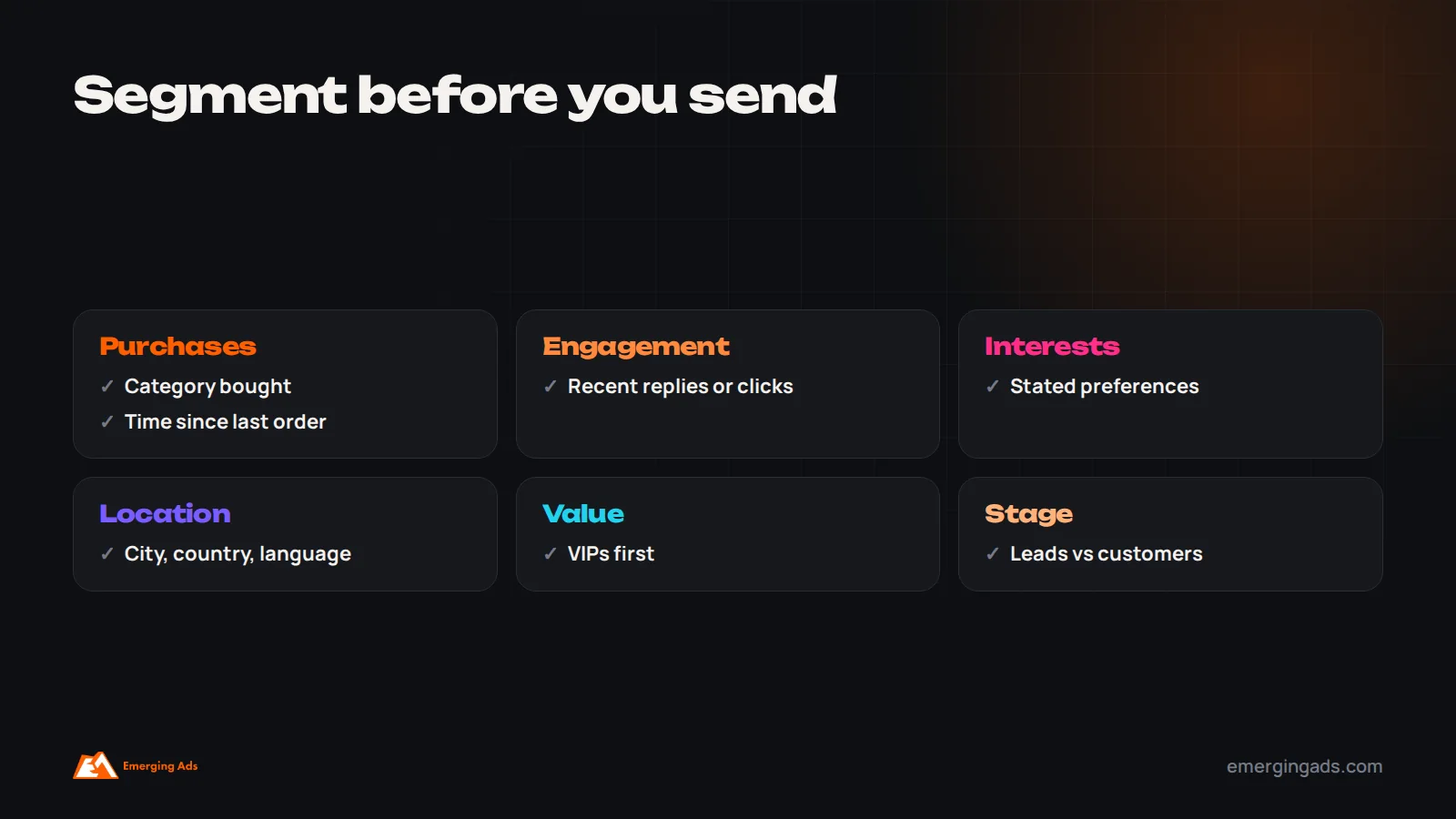
Sending every broadcast to every contact is the fastest way to raise costs and blocks. Segment by what makes a message relevant:
- Purchase history: category or product bought, number of orders, time since last order.
- Engagement: people who replied to or clicked recent messages.
- Interests: preferences collected at signup or inferred from browsing.
- Location and language: city, country and preferred language, such as Arabic or English.
- Customer value: VIP customers who should hear about launches first.
- Stage: leads who have not bought yet versus existing customers.
Smaller, relevant broadcasts usually produce more revenue and fewer blocks than large, generic ones.
Writing broadcast messages that work
WhatsApp is a personal space, so messages should read like a helpful note from a real business rather than an advert.
- Lead with the point. The first line should say why you are messaging, because notifications show only the beginning.
- Keep it short. Two to four short sentences usually work best.
- Personalize meaningfully, using name, last purchase or location where it adds relevance.
- Use one clear call to action, as a button where possible, such as “Shop the collection” or “Book a slot”.
- Add a strong image or short video when it helps show the product or offer.
- Offer quick reply buttons for common responses, such as “Yes, tell me more” or “Not now”.
- Match the language to the customer, and write naturally rather than translating word for word.
- Make opting out easy, for example with a “Stop” option.
Types of broadcast that work well
- Product launches and new collections, sent first to customers most likely to care.
- Back in stock alerts for people who asked to be notified.
- Limited-time offers, such as weekend sales or seasonal events, used sparingly.
- Personalized recommendations based on past purchases.
- Event and appointment availability, such as classes, consultations or open days.
- Useful content, such as tips, guides or how-to videos related to products customers bought.
- Re-engagement for customers who have not bought in a while, with a relevant reason to return.
When to send, and how often
Timing affects response. Send when your customers are likely to have a moment to read and act, which varies by market and audience. In many Gulf markets, evenings are busy browsing times, and daily rhythms shift significantly during Ramadan. In India, evenings and weekends are often strong for consumer brands. Test send times with your own audience rather than relying on general rules.
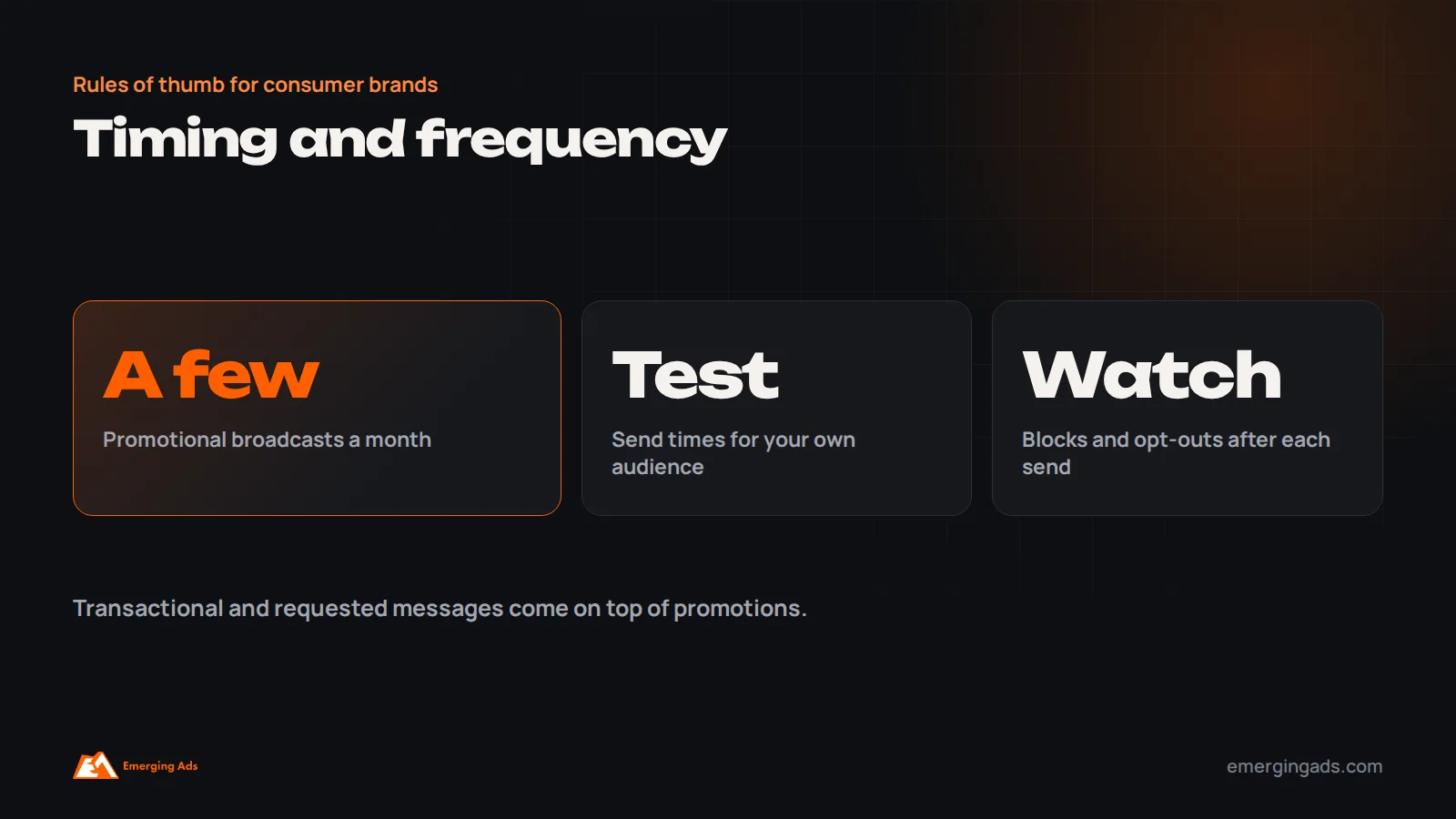
Frequency is even more important. Because WhatsApp feels personal, tolerance for promotional messages is lower than for email. For most consumer brands, a few marketing broadcasts a month to engaged segments is a sensible starting point, with transactional and requested messages, such as order updates or back in stock alerts, on top. Watch opt-out and block rates after each campaign and adjust.
Personalization that feels helpful, not creepy
Personalization makes broadcasts more relevant, but on a personal channel like WhatsApp it needs a light touch. Using a customer’s first name, referencing the category they usually buy, or mentioning that a product they asked about is back in stock all feel helpful. Referencing very specific browsing behavior, such as “we saw you looked at this three times yesterday”, can feel intrusive. A good test is whether a friendly shop assistant who knew the customer would say the same thing in person. Keep personalization tied to things the customer would expect you to know, such as their purchases, stated preferences and requests.
Handling the replies
Unlike email, WhatsApp broadcasts invite replies, and a successful campaign can generate hundreds of conversations within an hour. Plan for it. Schedule campaigns when your team is available, prepare saved answers for the questions the campaign is likely to raise, set up a chatbot or automated replies for common questions such as delivery times and sizes, and route complex questions or purchase-ready customers to a person quickly. Slow or missing replies waste the attention the broadcast created, and can turn a positive response into frustration.
Replies are also valuable feedback. Questions that come up repeatedly show what the message did not explain, and objections show what stops people buying. Use them to improve the next campaign, your product pages and your email content.
Testing broadcasts
Test broadcasts the same way you would test email, with a few adjustments for WhatsApp. Send two versions of a message to small random samples of a segment, such as with and without an image, with different first lines, or with different button wording, then send the better version to the rest. Test send times on different days. Compare a single message with a short sequence for launches. Judge tests on conversions and revenue per recipient, while watching opt-outs and blocks closely; a version that sells slightly more but doubles blocks is usually not the winner.
Seasonal campaigns in the Gulf
In the UAE, Saudi Arabia and the wider Gulf, WhatsApp campaigns often play a large role around Ramadan, Eid, White Friday and national days. Daily routines change during Ramadan, with evening and late-night activity rising, so timing campaigns around iftar and later evening often works better than daytime sends. Messages that respect the season, such as gift ideas for Eid, iftar offers for restaurants or helpful content, tend to perform better than generic promotions. Our Ramadan marketing guide covers seasonal planning in more detail.
A simple campaign process for your team
A short, repeatable process keeps quality high as campaigns become regular. Plan the month’s broadcasts in advance alongside email and social. For each one, define the segment, the goal, the template, the call to action and the follow-up path. Get templates approved early, since approval can take time. Test on several phones and languages before sending. Brief the team answering replies. After each campaign, record results and lessons in one shared place. Over a few months, this record becomes the best guide to what your customers respond to on WhatsApp.
Combining broadcasts with automation
Broadcasts are most powerful when they start a flow rather than end with a single message. For example, a launch broadcast with buttons can route people who tap “Show me more” to a short product carousel, those who tap “Not now” to a later reminder, and those who reply with a question to the support inbox or a chatbot. A broadcast offering appointment slots can let people book directly through a WhatsApp flow. Many providers support these interactive paths, which turn a one-way announcement into a conversation that leads to a sale.
How to measure broadcast campaigns
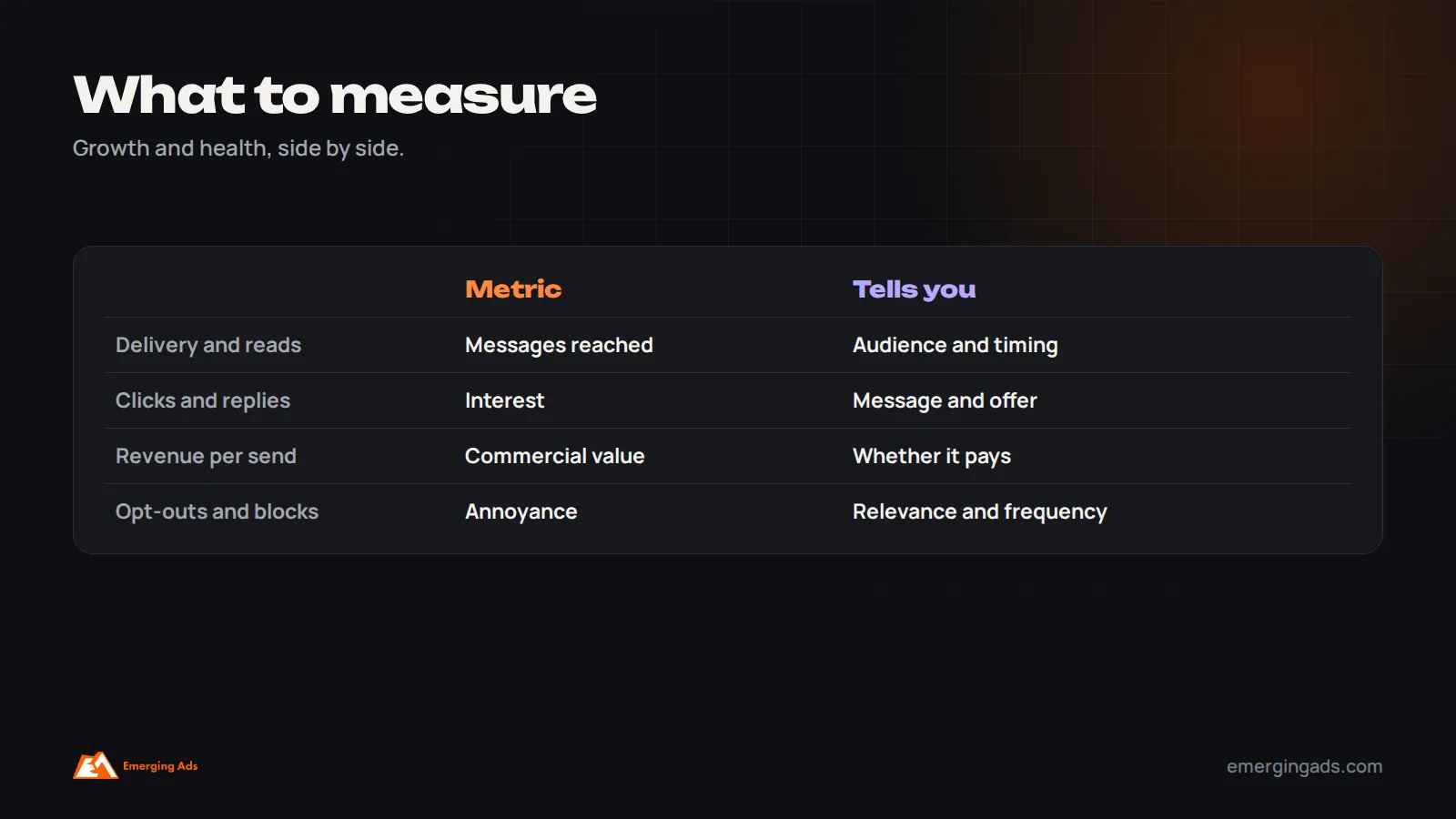
- Delivery rate: the share of messages delivered.
- Read rate: the share of delivered messages read, where available.
- Click and button response rates.
- Replies and conversations started.
- Conversions and revenue, tracked with tagged links and store data.
- Cost per conversion, including Meta message fees and provider costs.
- Opt-outs and blocks, which signal relevance or frequency problems.
- Quality rating of your phone number, which affects how many people you can message.
Compare WhatsApp results with email and SMS for similar messages, so you know which channel suits which type of campaign.
Protecting your quality rating
Meta tracks how recipients respond to your messages, including blocks and reports, and assigns your phone number a quality rating. Low quality can limit how many people you can message each day and, in serious cases, lead to restrictions. Protect it by messaging only opted-in customers, keeping broadcasts relevant and segmented, limiting promotional frequency, honoring opt-outs immediately and pausing to review after any campaign that causes a spike in blocks.

How broadcasts compare with email and SMS
WhatsApp broadcasts are not a replacement for email. Each channel has strengths. Email is cheaper per message, better for longer content and rich product showcases, and accepted for more frequent sending. SMS reaches nearly every phone and suits very short, urgent messages, but offers limited formatting and no rich interaction. WhatsApp combines rich media, buttons and two-way conversation with high attention, at a per-message cost for templates and lower tolerance for frequent promotions.
The strongest programs use each for what it does best: email for newsletters, education and most promotional campaigns; WhatsApp for launches to loyal customers, back in stock alerts, time-sensitive offers, appointment availability and anything that benefits from a reply; and SMS where WhatsApp is less common. Coordinate them so the same customer does not receive the same offer on three channels in one afternoon. Our guide to improving ecommerce email results covers the email side.
Growing an opted-in WhatsApp audience
Broadcasts are only as valuable as the audience you can reach. Grow opt-ins steadily and honestly. Add a WhatsApp opt-in checkbox at checkout, with clear wording about what customers will receive. Offer WhatsApp updates on signup forms and popups, as an alternative or addition to email. Place WhatsApp chat buttons on product pages, so customers who start conversations can be invited to receive updates. Use Click-to-WhatsApp ads to start conversations with new prospects. Include a QR code on packaging, receipts or in-store displays. Make the value clear: early access, restock alerts, exclusive offers or useful tips.
Never buy lists or add numbers without consent. It breaks WhatsApp’s rules, damages your quality rating and produces audiences that do not want to hear from you.
An example campaign
A skincare brand in the UAE launches a new vitamin C serum. Three days before launch, it sends a broadcast in Arabic and English to customers who bought skincare in the last six months and engaged with recent messages, offering early access with a short video of the serum and two buttons: “Get early access” and “Not interested”. People who tap the first button receive a link to a private early access page; people who tap the second are excluded from further launch messages. On launch day, a second, shorter message goes only to people who opened but did not buy, highlighting reviews from early buyers. Replies with questions about skin types go to a trained team member. The brand tracks sales from tagged links, replies, opt-outs and blocks, and compares the results with its launch email to the same customers.

Rules and policies to respect
Beyond opt-in, WhatsApp’s business and commerce policies restrict certain products and services, such as some regulated goods, and require businesses to represent themselves accurately. Templates must be categorized correctly; sending promotional content under a utility template can lead to rejection or restrictions. Data protection laws in your markets also apply to how you collect, store and use customer phone numbers and conversation data. Keep consent records, honor opt-outs across every system, and review the rules for each market you serve before scaling campaigns.
Broadcasts for service and B2B businesses
Broadcasts are not only for retail. Service businesses use them to share appointment availability, seasonal reminders, new services and helpful updates with existing clients. Clinics remind patients about check-ups and announce new treatments. Gyms share class schedules and challenges. Education providers send course launches and deadlines. B2B companies in markets where WhatsApp is the normal business channel use it, carefully, for event invitations, product updates and account news to contacts who have agreed to receive them. The same rules apply: consent, relevance, moderate frequency and a clear next step. For longer B2B relationships, broadcasts work best as part of a wider nurture program, covered in our guide to lead nurture automation.
Interactive messages and WhatsApp Flows
Beyond text, images and buttons, the Business Platform supports more interactive formats through providers. List messages let customers choose from a menu of options. Product messages and catalogs let them browse items inside the chat. WhatsApp Flows let businesses build simple forms and screens within WhatsApp, such as booking an appointment, choosing a size, completing a short survey or signing up for an event, without leaving the conversation. Used thoughtfully, these turn a broadcast into a complete journey: announce, choose, confirm, all within one chat. Start simple, then add interactivity where it removes steps for the customer.
What the first 90 days usually look like
Businesses new to WhatsApp broadcasts typically spend the first month setting up the platform, collecting opt-ins and getting templates approved, while sending transactional messages and answering inbound chats. In the second month, they run their first segmented broadcasts to their most engaged customers, learning which messages, times and offers work. By the third month, they usually have a monthly rhythm of broadcasts, a growing opted-in audience and clear data on revenue per campaign, opt-outs and quality rating, which guides how far to scale.
Examples by industry
Fashion and beauty: new arrivals to customers who bought similar items, back in stock alerts, VIP early access to sales, and styling or skincare tips.
Restaurants and food delivery: weekly specials, new menu items and seasonal offers to nearby customers, timed before meal times.
Fitness and wellness: class schedules, new programs, trial offers for leads and reminders for members who have not visited recently.
Real estate: new listings matching saved preferences, open house invitations and market updates.
Education: course launches, application deadlines, webinars and open days.
Events: early bird tickets, line-up announcements and last chance reminders.
Setting up your first campaign, step by step
- Choose a provider on the WhatsApp Business Platform and verify your business and number.
- Import opted-in contacts with consent records, and add tags for segmentation.
- Create and submit templates for your first campaign types.
- Build your first segment, such as engaged customers who bought in the last 90 days.
- Write a short message with an image and one clear button, using tagged links.
- Send a test to your team on different phones.
- Schedule the campaign at a time suited to your audience.
- Have the team ready to answer replies.
- Review results within a few days, including opt-outs and blocks.
Starting small with the free app
If you are a small business just starting, the free WhatsApp Business app is a reasonable first step. Set up your business profile with opening hours, location and a catalog, create quick replies for common questions, and ask customers to save your number so broadcast lists reach them. Keep lists small and relevant, such as regular customers or people interested in a specific product, and send only occasional, genuinely useful messages. When manual work becomes too much, when you need several team members on the same number, or when you want automation and proper analytics, move to the Business Platform. The habits you build on the app, especially restraint and relevance, will carry over.
A pre-send checklist
Before every broadcast, check that the audience is opted in and segmented, the template is approved and in the right category, the message is short with one clear action, links are tagged for tracking, images and buttons display correctly on different phones, the language matches the audience, opt-out is easy, the send time suits the audience, and the team is ready to reply. Two minutes on this list prevents most of the problems that damage results.
Common broadcast mistakes
Most WhatsApp problems we see trace back to one or more of these habits. Each one is easy to fix, and fixing them usually improves revenue and reduces blocks at the same time.
- Messaging people who never opted in.
- Sending every broadcast to everyone.
- Too many promotional messages.
- Long, email-style messages.
- No clear call to action or button.
- Nobody available to answer replies.
- Ignoring blocks, opt-outs and quality rating.
- Using the free app’s broadcast lists for a business that has outgrown them.
If you would like help, our WhatsApp marketing team sets up and runs broadcast campaigns and automation, especially for brands in the Gulf and India, as part of our marketing automation work. For the email side of your retention program, see our guide to ecommerce email flows.
Frequently asked questions
What is a WhatsApp broadcast campaign?
It is one message sent to many opted-in recipients at once, with each person receiving it as a private chat and replying individually. Businesses use it for launches, offers, alerts and announcements.
What is the difference between a WhatsApp broadcast and a group?
In a group, everyone sees all messages and members. In a broadcast, each recipient receives the message privately, cannot see other recipients and replies only to the business.
Why are my WhatsApp broadcast messages not delivered?
On the free Business app, broadcasts only reach people who saved your number. On the Business Platform, delivery can be limited by opt-in, template approval, quality rating or messaging limits.
Do I need permission to send WhatsApp broadcasts?
Yes. Businesses must collect opt-in before sending template messages, and should explain what customers will receive and make opting out easy.
How often should I send WhatsApp broadcasts?
For most consumer brands, a few promotional broadcasts a month to engaged segments is a sensible start, adjusted based on opt-out and block rates.
How much do WhatsApp broadcasts cost?
On the Business Platform, Meta charges per template message, with rates depending on message category and country, plus any provider fees. The free app’s broadcast lists cost nothing but are limited.
Can WhatsApp broadcasts include images and buttons?
Yes, on the Business Platform templates can include images, video, documents, call-to-action buttons and quick reply buttons.
How do I measure WhatsApp campaign results?
Track delivery, reads, clicks, replies, conversions, revenue, cost per conversion, opt-outs, blocks and your number’s quality rating.