The short answer
To improve ecommerce email marketing results, fix deliverability first, then grow the list with a better signup offer, build the core automated flows, send campaigns to engaged segments instead of the whole list, write emails around one clear idea with a strong subject line, test the things that move revenue, and measure revenue per recipient rather than open rates. Most stores see the biggest gains from flows and segmentation, not from sending more emails.
Email is one of the few marketing channels an ecommerce brand fully owns. No algorithm decides whether subscribers see your message, no platform raises the price of reaching them each year, and every customer you acquire through paid ads can be reached again for almost nothing. That is why email often produces a large share of revenue for well-run stores, and why so many stores underperform with it.
When we audit ecommerce email programs, the problems are rarely creative. They are structural: emails landing in spam, flows missing or half-built, every campaign sent to every subscriber, success measured by open rates that no longer mean much, and no testing at all. Fixing those foundations usually lifts results more than any redesign.
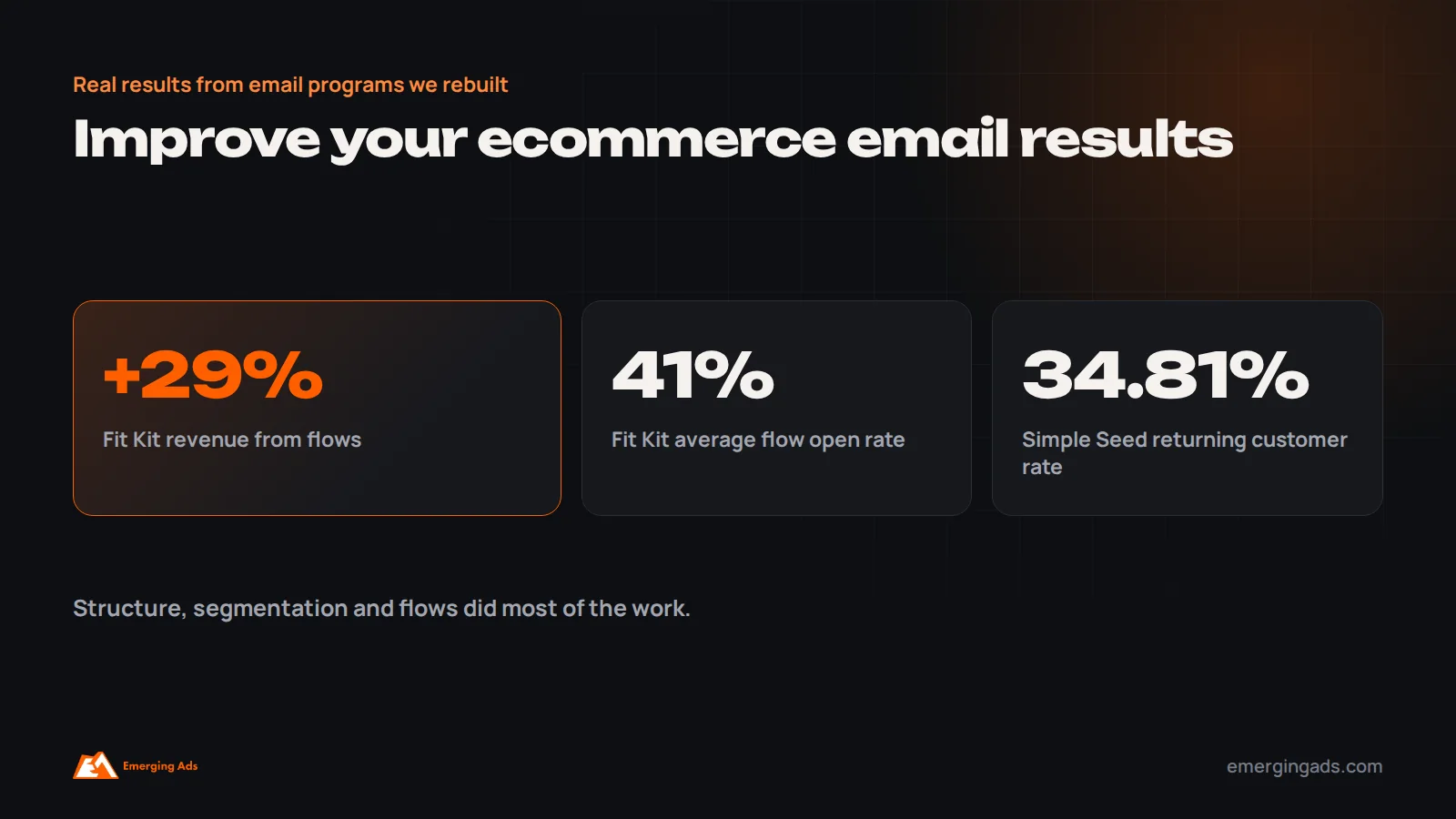
This guide covers the changes that improve results most, in roughly the order we make them. On our Fit Kit Bodycare account, rebuilding flows lifted revenue from flows by 29% with a 41% average flow open rate. For The Simple Seed Baby, retention email helped raise the returning customer rate from 21.62% to 34.81%.

Start with an honest baseline
Before changing anything, measure where you are. Pull the last 90 days of data and note:
- Email revenue as a share of total store revenue, split into flows and campaigns.
- Revenue per recipient for each major flow and for campaigns overall.
- Click rate and placed order rate for campaigns.
- List growth per month, and the share of new subscribers who go on to buy.
- Bounce, unsubscribe and spam complaint rates.
- Your total list size versus the number of people who engaged in the last 90 days.
That last comparison is often revealing. Many stores have large lists where only a fraction of subscribers have opened or clicked anything in months. Sending to the full list makes results look worse and harms deliverability for everyone.
Fix deliverability before anything else
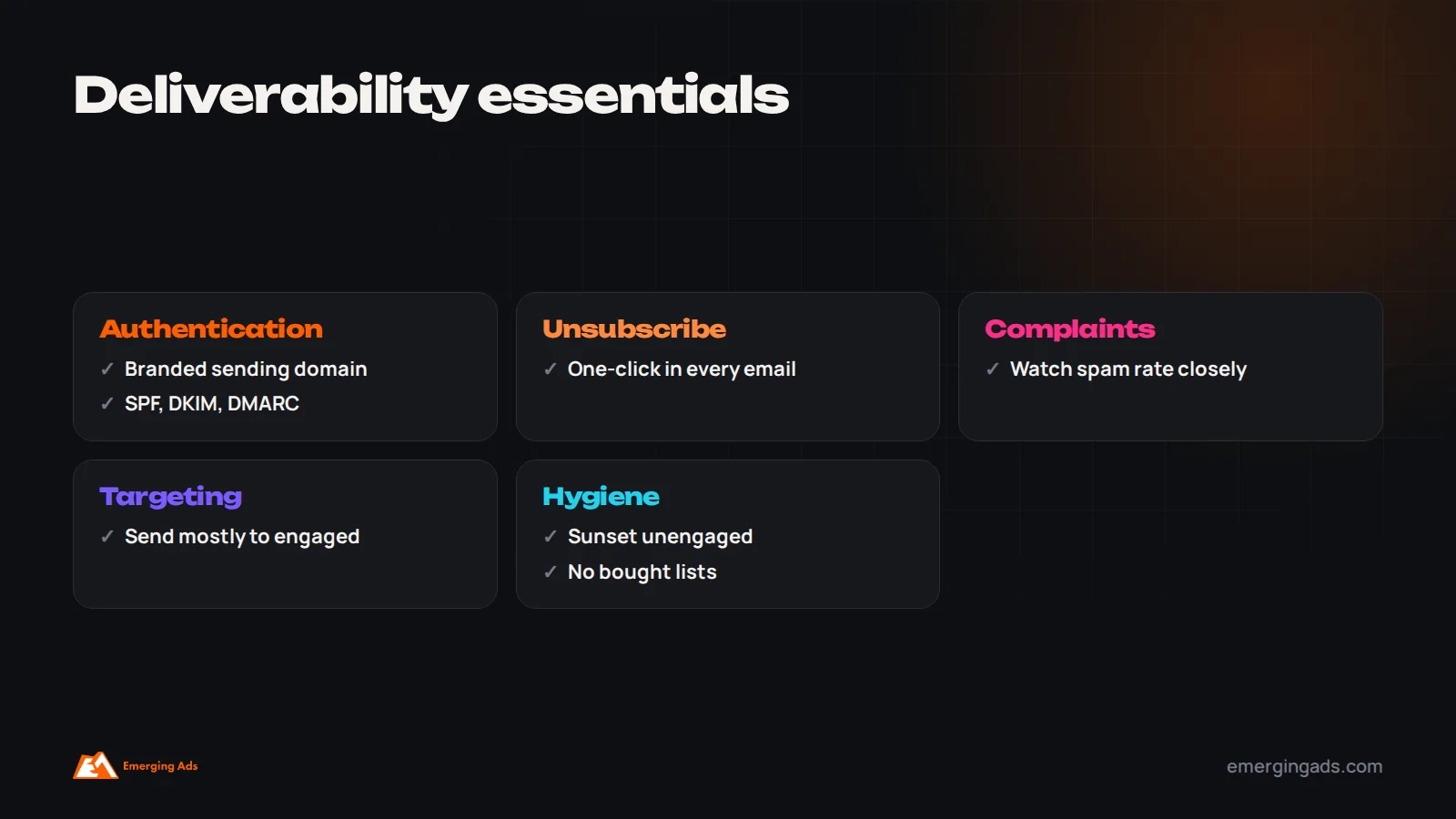
The best email in the world earns nothing in a spam folder. Since 2024, Gmail and Yahoo have required bulk senders to authenticate their email with SPF, DKIM and DMARC, offer one-click unsubscribe and keep spam complaint rates low. Many stores still send from a shared domain or have incomplete authentication.
Check these first:
- A branded sending domain set up in your email platform, with SPF, DKIM and a DMARC record.
- One-click unsubscribe in every marketing email, which most platforms now add automatically.
- Spam complaint rate kept well below the thresholds mailbox providers watch. If complaints rise, frequency or targeting is usually the cause.
- Engagement-based sending, so most campaigns go to people who have recently opened, clicked or bought.
- A sunset policy that asks long-unengaged subscribers whether they still want emails, then suppresses those who do not respond.
Deliverability problems are invisible in most dashboards. Emails are “delivered” to the spam folder. If revenue has been falling while send volume stays flat, check deliverability before rewriting anything.
Grow the list with a better offer
Every other improvement is limited by how many people you can email. Most stores capture only a small share of visitors, often because the signup offer is weak or the form is poorly timed.
- Make the offer worth it. A first-order discount, free shipping, early access to launches, a gift with first order, a quiz that recommends products, or a genuinely useful guide. The best offer depends on your margins and audience.
- Time the popup sensibly. Show it after some engagement, such as scrolling or time on page, or on exit intent, rather than the moment someone lands.
- Use multi-step forms. Ask for email first, then phone number for SMS or WhatsApp as an optional second step.
- Capture at checkout. Make sure the marketing consent checkbox at checkout syncs correctly to your email platform.
- Use other touchpoints: footer forms, account creation, back-in-stock requests, quizzes and giveaways, being careful that giveaway subscribers are real prospects.
Test offers and timing on a portion of traffic. A small lift in capture rate compounds every month.
Build and improve the core flows
Automated flows typically earn the most revenue per email, because they reach people at the moment they act. If you only have a welcome email and a basic cart reminder, building out the core flows is usually the single biggest opportunity.
The essential five are the welcome series, abandoned checkout and cart, browse abandonment, post-purchase and win-back. We cover timing, content and build order in detail in our guide to the five essential ecommerce email flows.
If your flows already exist, improve them:
- Add exit conditions so people who buy stop receiving “did you forget?” emails.
- Split new and returning customers, so each gets a relevant message.
- Update outdated content, such as old shipping times, discontinued products and past branding.
- Check dynamic product blocks show the right products and prices.
- Review timing: the first abandoned checkout email often performs best within a few hours.
Send campaigns to segments, not the whole list
Sending every campaign to every subscriber is the most common reason campaign results disappoint. It lowers engagement, raises unsubscribes and spam complaints, and gradually pushes more email into spam folders.
Start with three simple segments:
- Engaged: people who opened, clicked or bought recently, for example in the last 90 days. Send most campaigns here.
- Customers: people who have bought, split into first-time and repeat buyers where possible.
- Less engaged: people who have not engaged recently. Send them fewer, higher-value emails, such as major sales, and eventually a sunset sequence.
Then add segments by behavior and interest: category buyers, high-value customers, people who browsed a category but never bought, and subscribers by location. Even modest segmentation usually raises revenue per recipient. Our explainer on how Klaviyo works shows how segments are built.

Plan campaigns as a calendar, not a scramble
Campaigns work better when they follow a plan. A simple monthly calendar mixes several types of email:
- Product and launch emails: new arrivals, restocks and featured products.
- Educational and value emails: how-to content, guides, styling or usage tips.
- Social proof emails: reviews, customer stories, user-generated content.
- Brand emails: behind the scenes, founder notes, sustainability or sourcing stories.
- Promotional emails: sales and offers, used deliberately rather than constantly.
A balance of value and promotion keeps subscribers engaged and stops the list from expecting a discount in every email.
Find the right sending frequency
There is no universal right frequency. Many ecommerce brands send one to three campaigns a week to engaged subscribers, more around major sales and launches. What matters is how your list responds. If revenue rises with more sends while unsubscribe and spam complaint rates stay low, you may have room to send more. If complaints and unsubscribes climb, pull back or target more tightly.
Frequency can also vary by segment. Highly engaged customers often welcome more email than people who have not opened in months.
Write subject lines that earn the open
Subject lines decide whether the rest of the email gets a chance. The ones that work best are usually clear rather than clever: they tell the reader what is inside and why it matters to them. Specific beats vague. “Your summer linen edit: 12 new pieces” beats “Something special for you”.
- Lead with the most important words, since mobile clients show only the first few.
- Use the preview text to add information, not repeat the subject line.
- Personalize meaningfully, such as by product category or past purchase, rather than just inserting a first name.
- Avoid misleading subject lines. They may raise opens once, but they damage trust and increase complaints.
Write emails around one clear idea
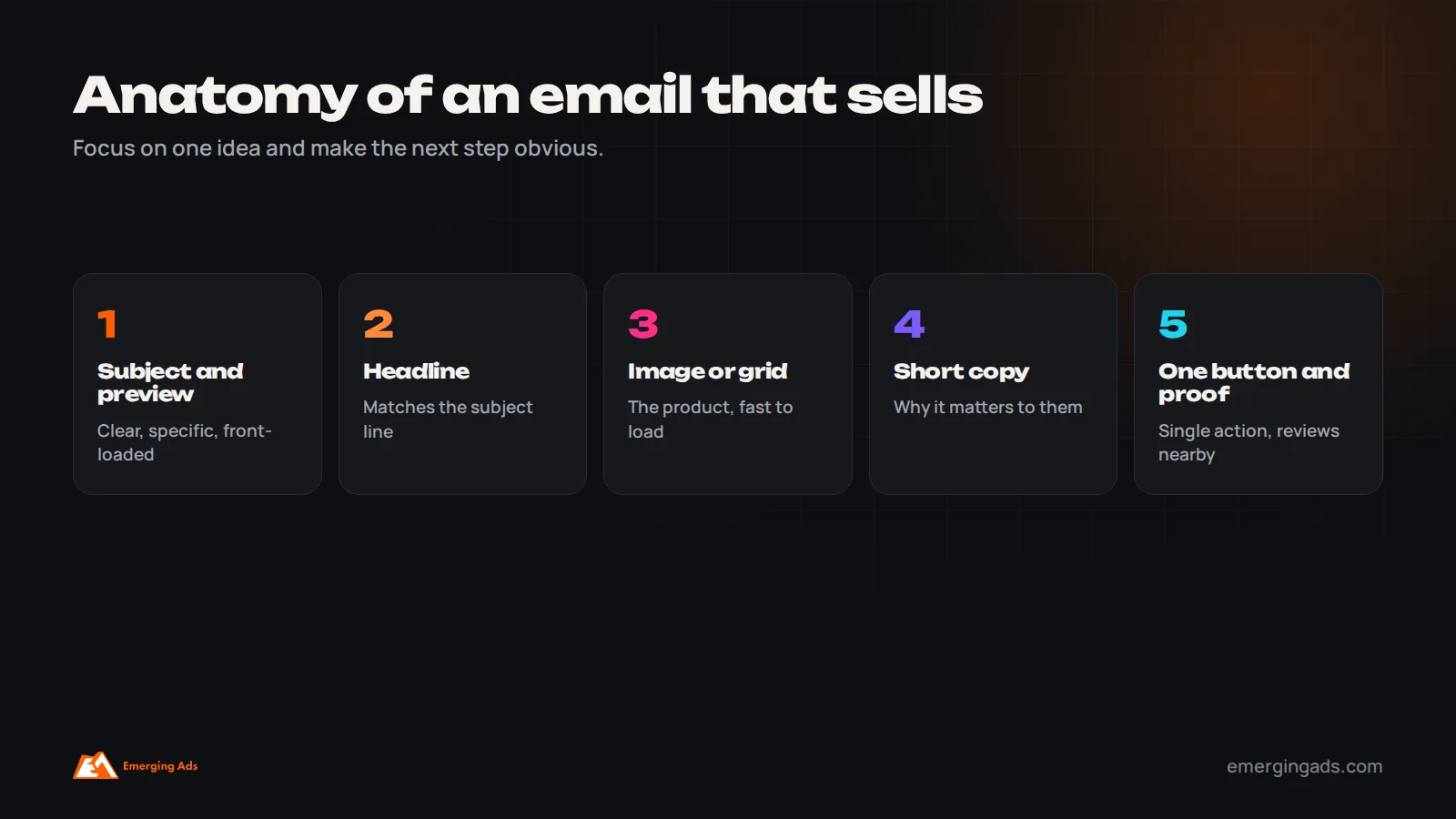
Emails that try to say five things usually say none of them well. The best performing campaigns we see focus on one idea, one product or collection and one call to action, with supporting content that reinforces it.
Structure most emails with a clear headline that matches the subject line, a strong image or product grid, a short block of copy explaining why it matters, a single primary button, and supporting proof such as reviews. Keep the most important content at the top, since many readers never scroll. Write in your brand’s real voice, and make sure the email reads well with images turned off.
Personalization beyond the first name
Inserting a first name into a subject line is the weakest form of personalization. The forms that move revenue use what customers have actually done. Show products from categories someone has browsed or bought. Recommend complementary items based on their last order. Time replenishment emails to when a product is likely to run out. Mention their loyalty status or points balance. Adjust content by location, with the right currency, delivery times and local events.
Most ecommerce email platforms support dynamic content blocks that change per recipient within the same campaign, so you do not need a separate email for each segment. Start with one or two dynamic elements, such as recommended products and location-specific shipping messages, and expand as you see results.
How priorities differ by type of store
Consumable products, such as supplements, skincare, coffee and pet food, should prioritize post-purchase education, replenishment reminders and subscription offers, because repeat purchases drive most of the value.
Fashion and accessories benefit from frequent new-arrival campaigns, browse and cart abandonment, back-in-stock alerts and style-led content, with segments by category and size where available.
High-ticket products, such as furniture and electronics, need fewer, more helpful emails: buying guides, comparisons, reviews, financing information and longer nurture flows, because purchase decisions take weeks.
Gift-led brands see strong seasonal peaks and benefit from date-based reminders, gift guides and early shipping deadline communication.
Design for mobile first
Most ecommerce emails are opened on phones. That means single-column layouts, large tap targets, short paragraphs, readable font sizes and images that load quickly. Test every email on a phone before sending, including in dark mode, where some designs become hard to read. Simple designs often outperform elaborate ones, and they are faster to build, which makes it easier to send consistently.
Use offers deliberately
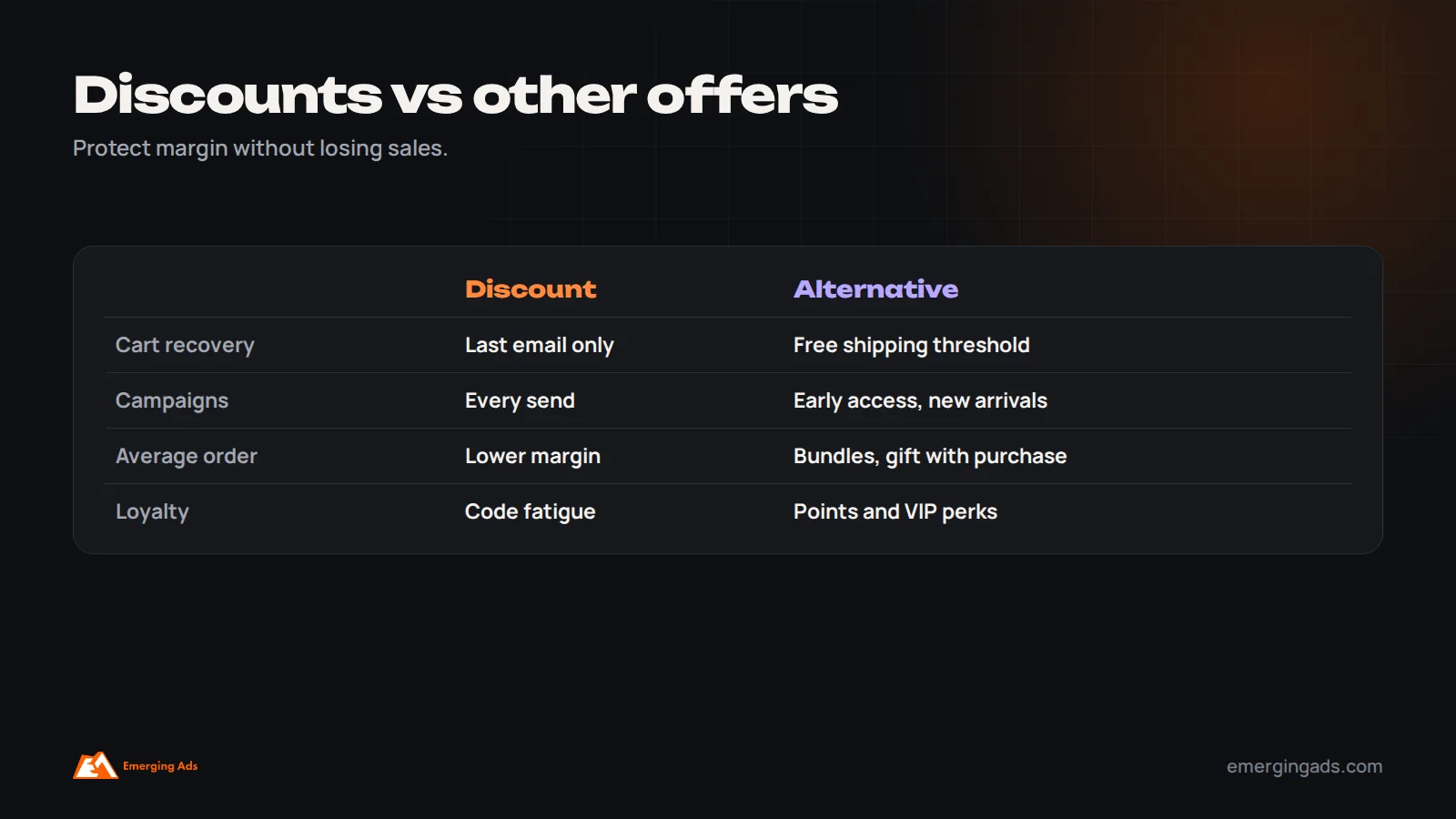
Discounts work, but they have costs: lower margins, and a list that learns to wait for the next sale. Use them where they change behavior, such as in the last email of an abandoned checkout flow, for win-back, and for planned sales events, rather than in every campaign.
Alternatives often work as well without training customers to wait: free shipping thresholds, gifts with purchase, bundles, early access for subscribers, loyalty points, and limited editions. Measure promotions on revenue and margin, not just conversion rate.
Test what moves revenue
Testing improves results steadily, but only if you test things that matter and measure the right outcome. Prioritize:
- Signup offer and popup timing.
- Timing and incentive in the abandoned checkout flow.
- Subject lines on large campaigns.
- Content approach, such as product grid versus single hero product, or educational versus promotional.
- Send time and day for your audience.
Judge tests on revenue per recipient or placed order rate, not opens. Test one change at a time, with enough recipients to reach a clear result, and record what you learn.
Measure the numbers that matter
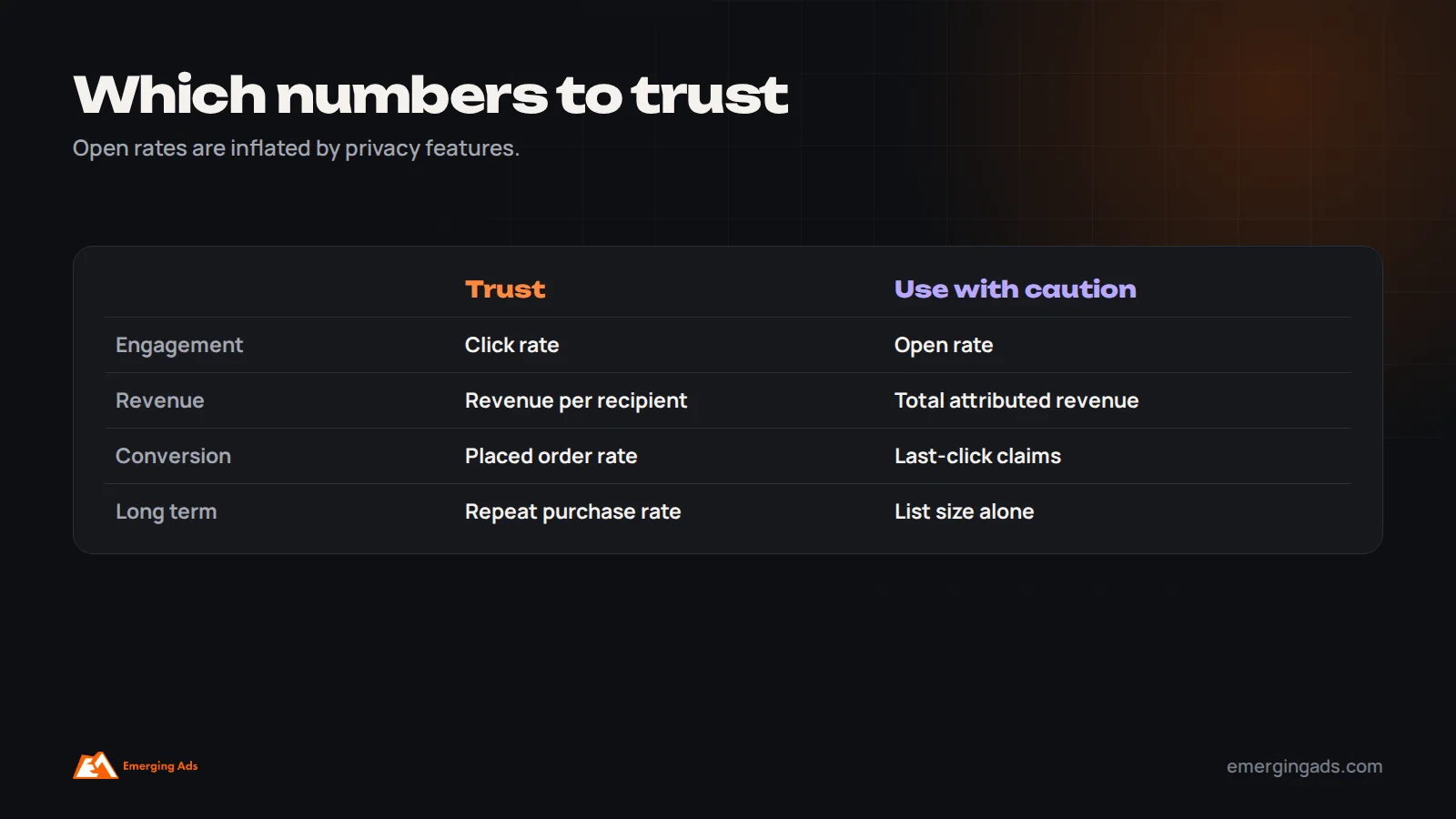
Apple’s Mail Privacy Protection records many opens automatically, which makes open rates unreliable. Focus on:
- Revenue per recipient, which makes campaigns and flows of different sizes comparable.
- Click rate, a more reliable engagement signal than opens.
- Placed order rate, the share of recipients who bought.
- Unsubscribe and spam complaint rates, which tell you if frequency or targeting is wrong.
- Email’s share of total revenue, compared over time.
- Repeat purchase rate and customer lifetime value, which show email’s real long-term impact.
Remember that email platforms attribute revenue generously, often counting any purchase within a few days of an open or click. Use attributed revenue to compare emails with each other, and compare totals against store revenue to keep perspective.
Use reviews and user-generated content
Reviews and customer photos are some of the most persuasive content you can put in an email, and they cost nothing to create. Feature recent reviews in post-purchase and abandonment flows, build occasional campaigns around customer stories, and show real customers using products. Many review platforms integrate with email tools, so the latest reviews for a specific product can appear automatically in that product’s emails. Social proof is especially effective for new subscribers who have not bought yet and need reassurance that the product delivers.
Add SMS or WhatsApp where it helps
SMS and WhatsApp reach people faster than email and can add meaningful revenue in high-intent moments, such as abandoned checkout, launches, restocks and time-limited offers. They are also more intrusive and more expensive per message, so use them selectively and with clear consent. In markets such as the Gulf and India, WhatsApp is often preferred to SMS. Our WhatsApp marketing team runs it alongside email for stores in those markets, and our guide to WhatsApp for ecommerce costs explains the economics.
Think in terms of retention, not just sends
The biggest long-term value of email is turning first-time buyers into repeat customers. A store where a third of customers come back is in a completely different position from one where only one in ten does, because every customer acquired through ads becomes more valuable.
Focus retention efforts on the period after the first purchase: delivery and usage help, review requests, cross-sells timed to when the product is used, replenishment reminders and a reason to come back. That is also why email and paid acquisition should be planned together. Our guide to scaling Meta ads explains how retention lets brands keep scaling acquisition profitably.
Plan for peak periods early
Black Friday, Christmas, Ramadan, Diwali and other major shopping periods bring the highest revenue and the most crowded inboxes. Plan several weeks ahead: grow the list in the months before, warm up engagement so subscribers are active when the peak arrives, build segments for early access, schedule a sequence rather than a single email, and prepare flows for the extra traffic. Our Black Friday marketing checklist covers the full timeline.
Connect email to your paid advertising
Email and paid ads work better together. Sync engaged segments and customer lists to Meta and Google, so you can exclude recent buyers from acquisition campaigns, retarget subscribers who have not bought, and build lookalike audiences from your best customers. Use paid social to grow the list with lead ads or signup-focused campaigns when the economics work. And make sure the welcome series is strong before scaling paid acquisition, because every new subscriber from ads passes through it. Our guide to Meta ads for ecommerce covers the ad side.
A quick email audit you can run this week
- Check that your sending domain is authenticated with SPF, DKIM and DMARC.
- Compare total list size with subscribers who engaged in the last 90 days.
- List which of the five core flows are live, and when each was last updated.
- Check that buyers exit abandonment flows when they purchase.
- Look at the audience for your last ten campaigns: whole list or segments?
- Compare revenue per recipient for flows and campaigns.
- Check unsubscribe and spam complaint rates for the last month.
- Send yourself a test of your main flows and read them on a phone.
Most stores find at least three clear opportunities from this list alone.
Build a workflow you can sustain
Consistency beats occasional brilliance in email. Many stores start strong, then campaigns become irregular as the team gets busy, flows go untouched for a year and nobody checks deliverability. A simple workflow prevents that.
Keep a monthly calendar with campaign themes agreed a few weeks ahead. Build a small library of reusable templates, such as product launch, educational, social proof and sale layouts, so each new email starts from a proven structure rather than a blank page. Assign one owner for email performance, even in a small team. Review flows quarterly, checking content, timing and performance. And hold a short monthly review of the key metrics, comparing them with the previous month and the same month last year.
Make emails accessible
Accessible emails reach more people and usually perform better for everyone. Use real text rather than putting important words inside images, since images may be blocked and screen readers cannot read them. Add descriptive alt text to images. Keep sufficient contrast between text and background, use readable font sizes, and make buttons large enough to tap. Write link text that describes the destination, such as “Shop the linen collection”, rather than “Click here”. These changes take little time once they are part of your templates.
Use your customers’ words
The best email copy often comes straight from customers. Read reviews, support conversations and post-purchase survey answers, and note the phrases people use to describe the problem your product solves and why they chose you. Those phrases make stronger subject lines, headlines and product descriptions than anything written from scratch, because they reflect what real buyers care about. Refresh this research every few months, especially before major campaigns.
Common mistakes that hold results back
These appear in most of the ecommerce email programs we audit, often several at once. The good news is that each one is fixable within weeks, and fixing them usually improves results more than any new campaign idea. Start with whichever affects the most subscribers.
- Sending every campaign to the whole list.
- Judging success on open rates.
- Missing or half-built flows.
- No authentication or branded sending domain.
- A discount in nearly every email.
- Emails that try to say too many things.
- No testing, or testing small things with no impact.
- Never cleaning the list, so cost and spam complaints rise.
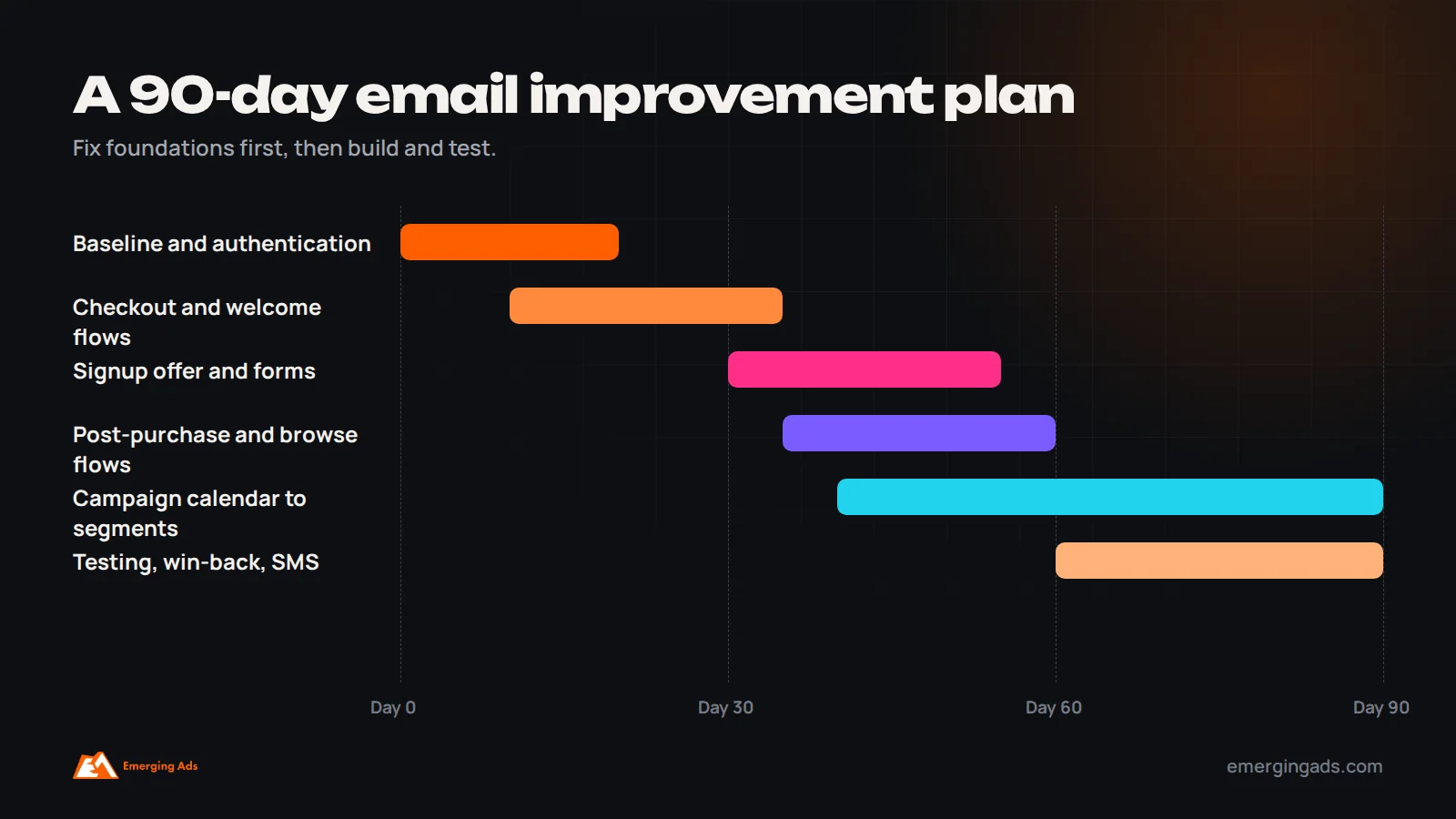
A 90-day plan to improve email results
- Days 1 to 30: measure the baseline, fix authentication and sending domain, set up engaged segments, and build or repair abandoned checkout and welcome flows.
- Days 30 to 60: improve the signup offer and form, build post-purchase and browse abandonment flows, and move campaigns to a planned calendar sent mainly to engaged segments.
- Days 60 to 90: add win-back and sunset flows, start a regular testing program, add SMS or WhatsApp for high-intent moments if relevant, and compare results with the baseline.
Who should run email in a growing store?
In small stores, email is often run by the founder or a generalist marketer alongside many other tasks, which is why flows go stale and campaigns become irregular. As email revenue grows, it deserves a clear owner: someone responsible for the calendar, flows, segmentation, testing and deliverability, with time set aside each week. Some brands hire an email specialist; others use an agency for strategy, flow builds and testing while keeping day-to-day campaigns in-house. Whichever you choose, give the owner access to store data and a regular slot to review results with whoever runs paid acquisition, because the two channels affect each other more than most teams realize.
Does the platform matter?
Every major ecommerce email platform can run the practices in this guide. Platforms built for ecommerce, such as Klaviyo, make store-data segmentation and behavioral flows easier. Simpler tools can work well for smaller stores. Our comparison of Klaviyo vs Mailchimp covers the tradeoffs. The habits matter more than the tool.
If you want help, our Klaviyo email marketing and wider email marketing teams audit, build and run ecommerce email programs. You can also start with a free audit.
Frequently asked questions
How can I improve my ecommerce email marketing?
Fix deliverability, grow the list with a better signup offer, build the core automated flows, send campaigns to engaged segments, focus each email on one idea, test what moves revenue and measure revenue per recipient.
How often should an ecommerce store send emails?
Many stores send one to three campaigns a week to engaged subscribers, more during major sales. Adjust based on revenue, unsubscribes and spam complaints for your list.
What is a good email revenue share for ecommerce?
It varies widely by brand and business model. Compare against your own history and aim for steady growth in flow revenue and repeat purchase rate.
Why are my email open rates unreliable?
Apple’s Mail Privacy Protection records many opens automatically, inflating open rates. Click rate, placed order rate and revenue per recipient are more reliable.
How do I stop emails going to spam?
Authenticate your sending domain with SPF, DKIM and DMARC, include one-click unsubscribe, send mainly to engaged subscribers, sunset unengaged ones and keep complaint rates low.
Should every email include a discount?
No. Use discounts where they change behavior, such as cart recovery, win-back and planned sales, and use free shipping, bundles, early access or gifts elsewhere.
What should I test first in email marketing?
Start with the signup offer, abandoned checkout timing and incentive, and subject lines on large campaigns, judging tests on revenue per recipient.
How long does it take to improve email results?
Deliverability and flow fixes can show results within weeks. A full program of segmentation, testing and retention usually shows clear gains within about three months.