
The short answer
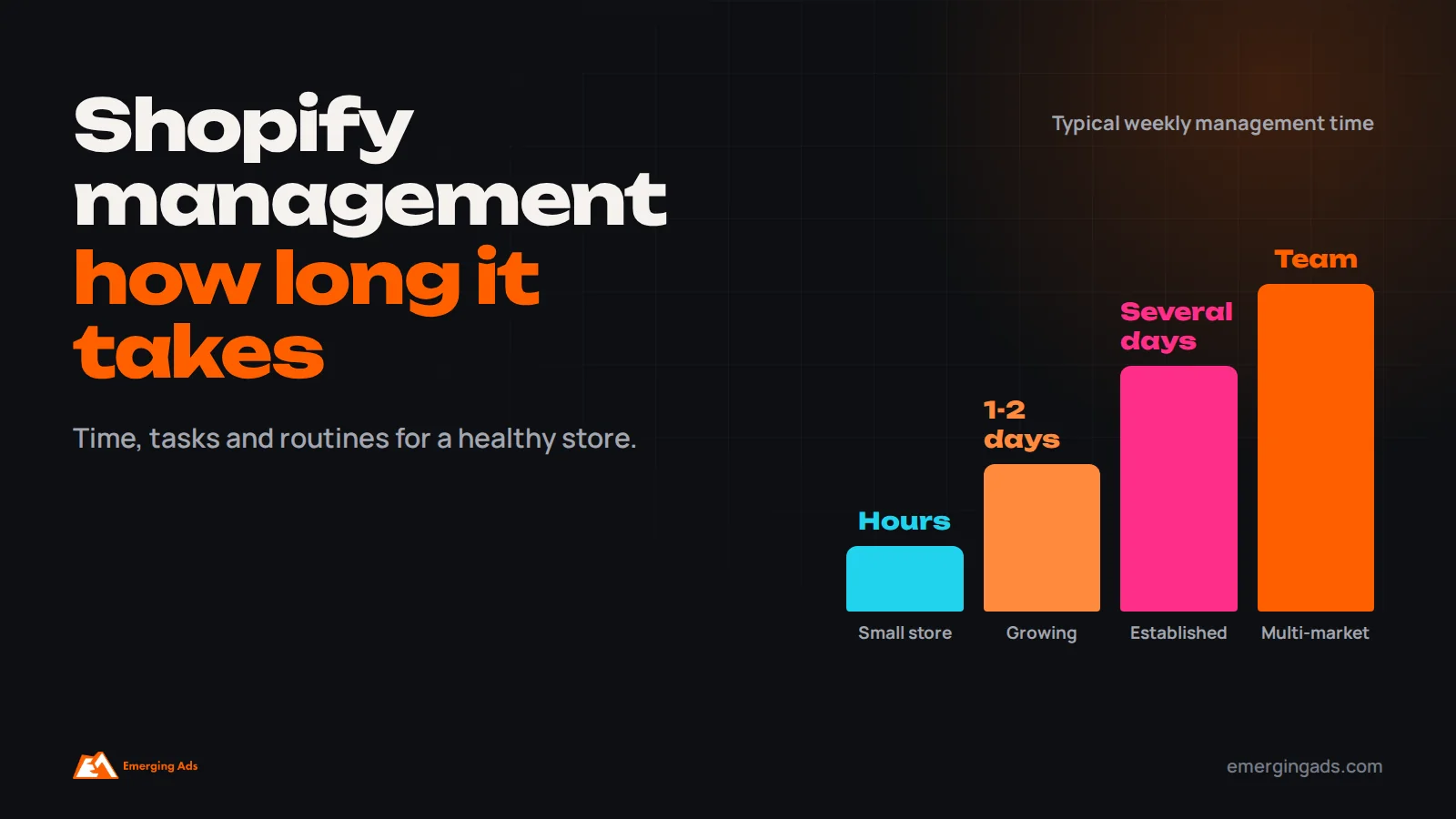
Shopify website management usually takes a few hours a week for a small store with a stable catalog, around a day or two a week for a growing store with regular launches and promotions, and a full-time role or more for large stores with big catalogs, several markets and frequent campaigns. The time goes into product updates, merchandising, content, promotions, app and theme maintenance, speed and tracking checks, customer experience improvements and reporting. Planning a regular routine prevents small problems from becoming costly ones.
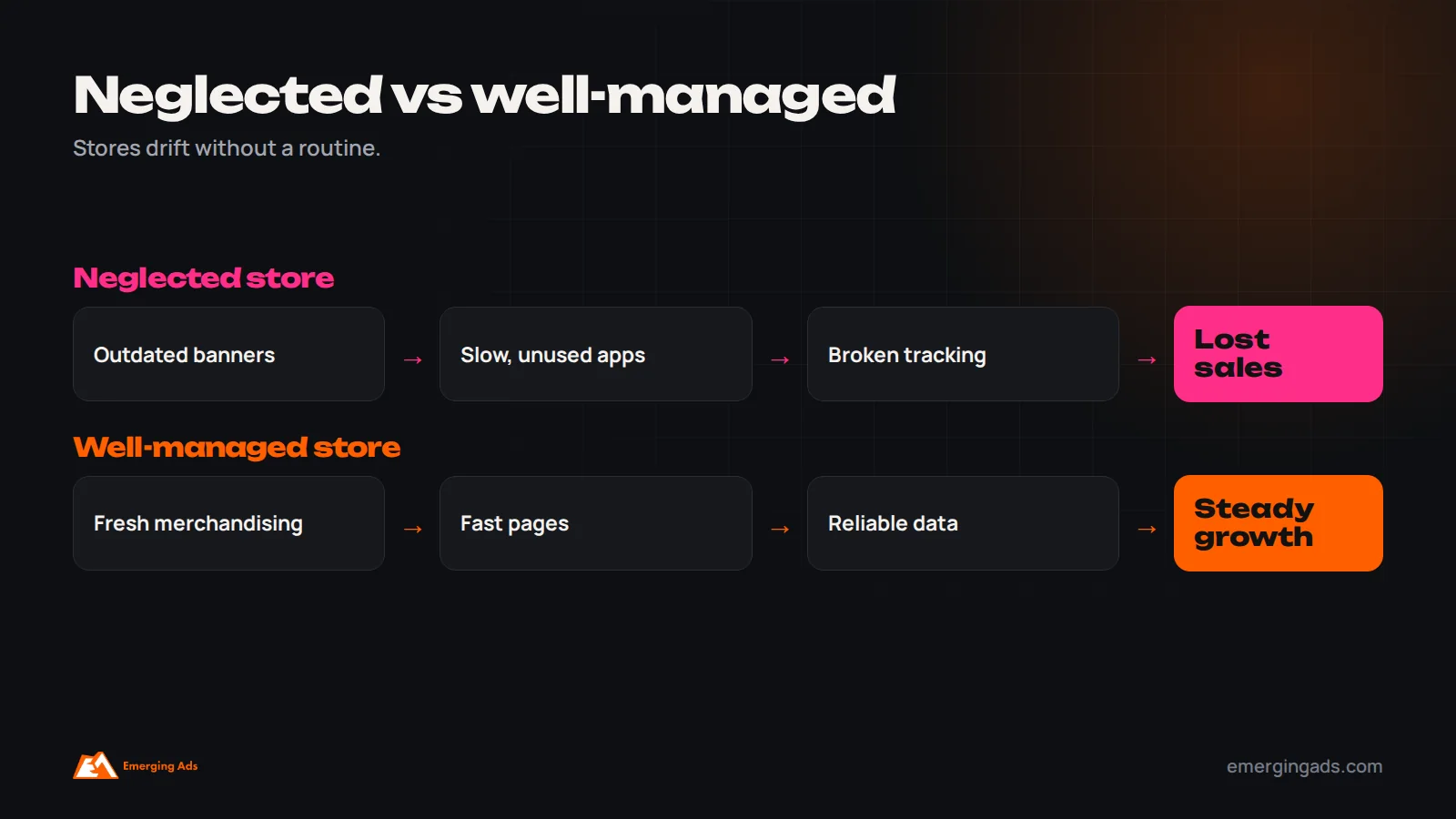
Launching a Shopify store is only the beginning. Once the store is live, someone has to keep products accurate, update collections and homepage content, set up promotions, maintain apps and the theme, monitor speed and tracking, fix issues, improve conversion and report on results. Many store owners underestimate this work, then find that their store slowly falls behind: outdated banners, broken links, apps slowing pages and tracking that no longer matches real orders.
We manage Shopify stores for brands in the UK, US, Gulf and India through our Shopify service. This guide explains how much time Shopify website management typically takes, what the work involves, how it changes as stores grow, and how to decide between doing it yourself, hiring in-house or using an agency. If you are still building your store, see our guide on how long Shopify store setup takes.
Typical time by store size
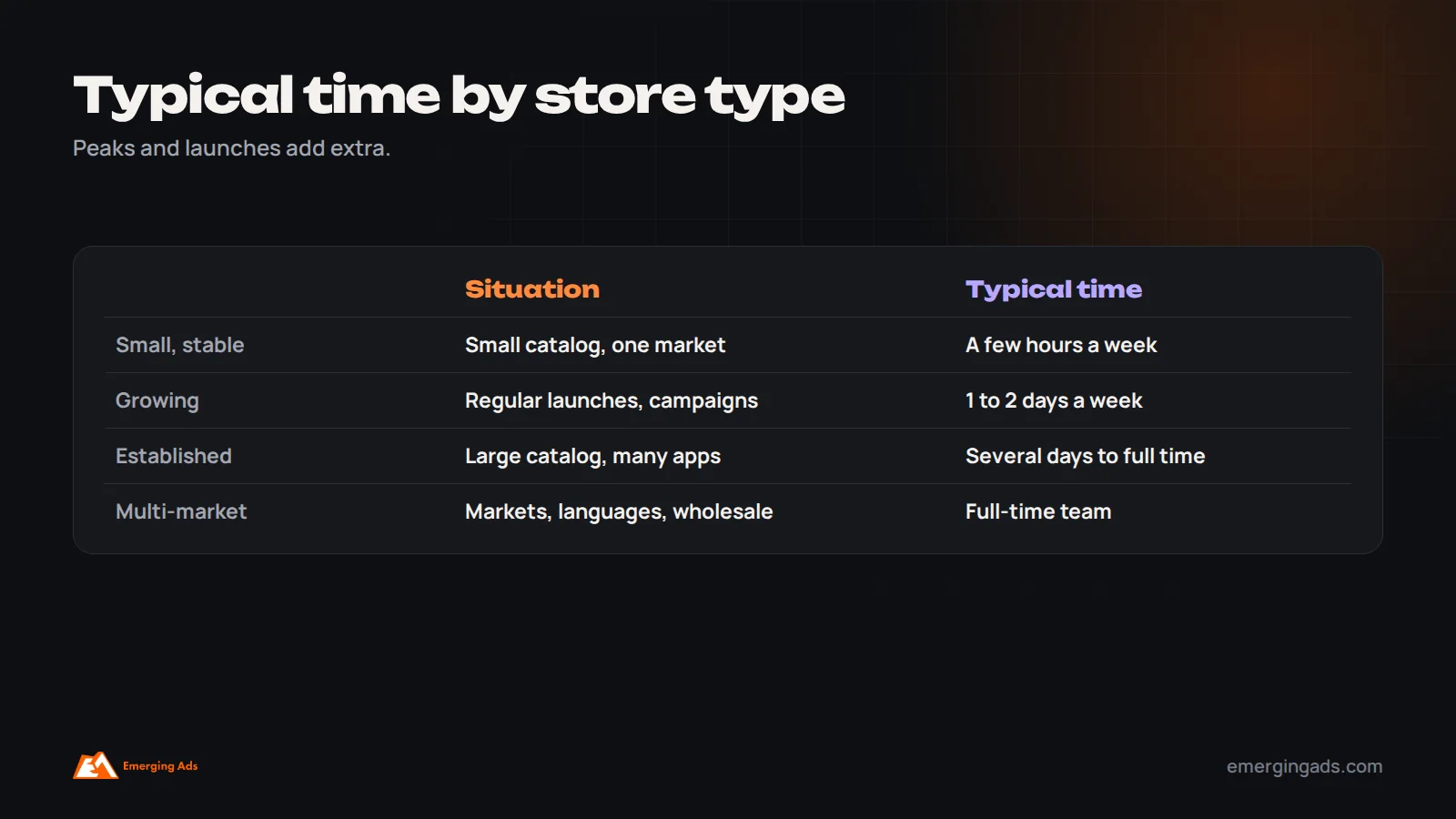
Management time depends mostly on catalog size, how often you launch products and run campaigns, and how many markets and integrations the store has.
| Store type | Typical situation | Typical management time |
|---|---|---|
| Small, stable store | Small catalog, few promotions, one market | A few hours a week |
| Growing store | Regular new products, monthly campaigns, active marketing | One to two days a week |
| Established brand | Large catalog, frequent launches, several apps and integrations | Several days a week to full time |
| Multi-market or Plus store | Several markets, languages, wholesale, complex integrations | A full-time team |
These are typical ranges. Time rises around peak seasons, product launches, redesigns and migrations.
What Shopify management involves
Store management covers far more than adding products. These are the main areas that take time each month, and each one affects sales, speed or the accuracy of your marketing data.
Products and inventory
Adding new products, updating descriptions, images, prices, variants and inventory, archiving discontinued items and keeping product data accurate for feeds and marketplaces.
Merchandising and collections
Organizing collections, ordering products, updating navigation and featuring the right products for each season and campaign.
Homepage and content
Updating banners, featured sections, landing pages and blog content to reflect current campaigns and seasons.
Promotions
Setting up discounts, sales, bundles, gift cards and free shipping thresholds, and removing them afterwards.
Apps and theme maintenance
Reviewing apps, removing unused ones, updating settings, applying theme updates and fixing conflicts.
Speed and technical health
Monitoring page speed, broken links, errors, mobile experience and SEO basics. Our technical SEO checklist covers the essentials.
Tracking and analytics
Checking that analytics, ad pixels, server-side tracking and product feeds still work after changes. Our guide on Meta pixel tracking explains why this matters.
Conversion improvements
Testing and improving product pages, collection pages, cart and checkout. See our guide to conversion rate optimization.
Reporting
Reviewing sales, conversion rate, average order value, traffic sources and returning customers.

What makes management take longer
Several factors increase the time a Shopify store needs each week. A large catalog with many variants means more product updates, inventory changes and data cleanup. Frequent product launches and drops require new product pages, collections, homepage updates and campaign landing pages each time. Many markets and languages multiply content, pricing and shipping updates. A long list of apps creates more settings to maintain, more potential conflicts and more speed issues. Custom theme code requires developer time for updates and fixes. Integrations with inventory, ERP, accounting, marketplaces and fulfillment partners need monitoring when data stops syncing. Active marketing, with weekly campaigns, email, social and paid ads, means more landing pages, promotions and tracking checks. And seasonal peaks such as Black Friday, Christmas, Ramadan and Diwali concentrate work into short periods. Understanding which of these apply to your store helps estimate realistic time and budget.

Keeping product data clean
Product data is the foundation of the store. It affects search on your site, Google Shopping and Meta catalog ads, marketplace listings, filtering and the customer’s decision to buy. Over time, product data often drifts: inconsistent titles, missing attributes, outdated images, wrong weights, discontinued items still visible and variants named differently across products. A regular data review, perhaps monthly, keeps titles and descriptions consistent, fills missing attributes, updates images, checks prices and compare-at prices, and archives items that should no longer appear. Clean data reduces customer questions and returns, improves ad performance and makes merchandising faster.
Preparing for peak seasons
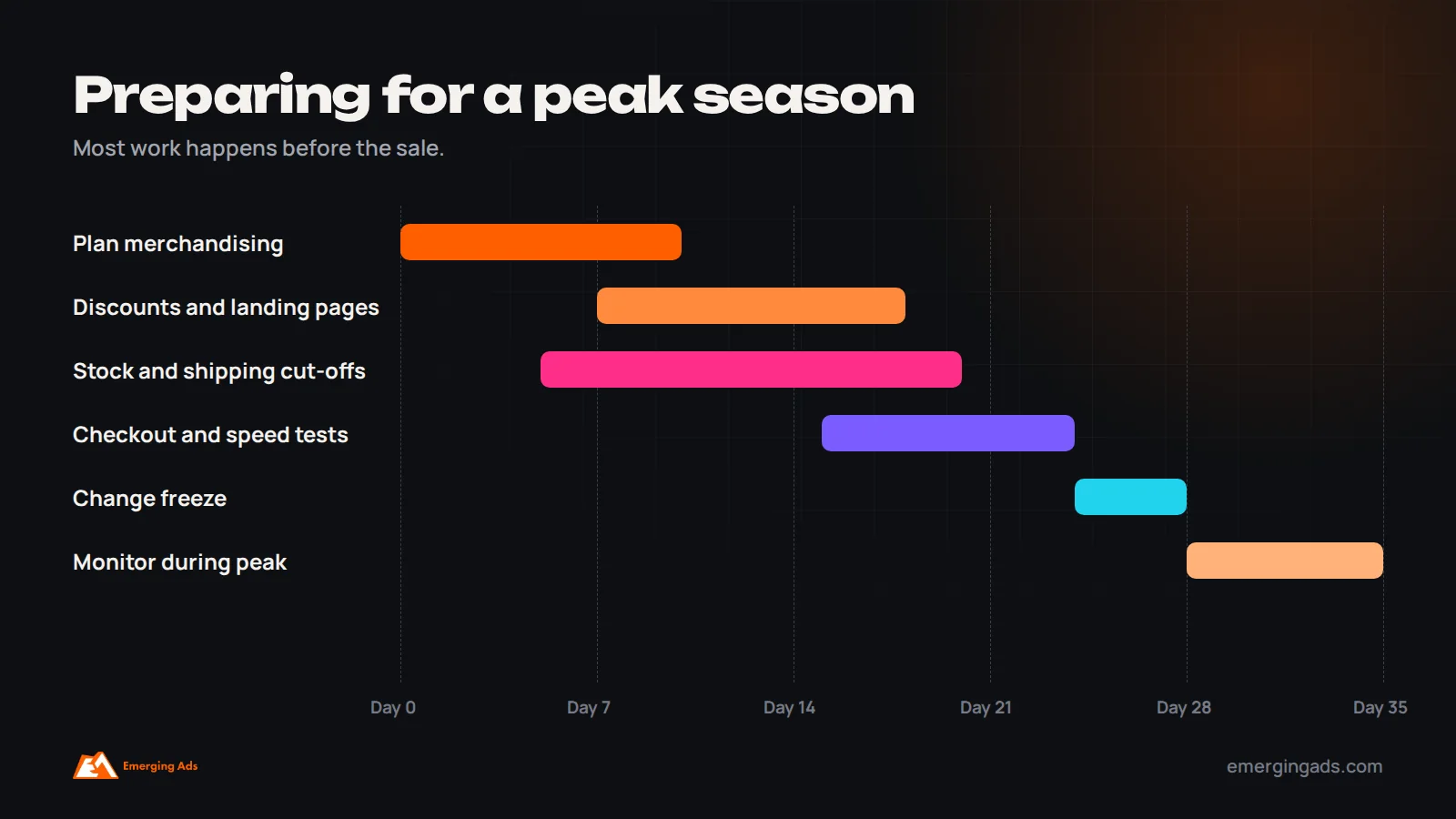
Peak seasons need extra management time weeks in advance. Before a major sale or holiday, plan merchandising and landing pages, prepare discount codes and automatic discounts, check stock and fulfillment capacity, update shipping cut-off dates, test checkout with real orders, check page speed under higher traffic, freeze major theme or app changes in the final week, and confirm tracking. During the peak, monitor orders, stock, errors and customer messages closely. Afterwards, remove promotions, update content for the next season and review results. Our Black Friday checklist covers the biggest retail peak in detail.
A sensible management routine
A predictable routine keeps the store healthy and makes management time easier to plan. Adapt the frequency to your store size and activity, but keep the habit consistent.
Daily: check orders, stock alerts, customer messages and any errors.
Weekly: update products and merchandising, review promotions, check tracking and key metrics.
Monthly: refresh homepage and campaign content, review app list and speed, analyze sales and conversion, plan next month’s campaigns.
Quarterly: review theme updates, conversion improvements, SEO and content, and plan seasonal peaks.

Managing apps without slowing the store
Shopify apps add useful features, from reviews and subscriptions to upsells and loyalty programs, but every app can add scripts, settings and costs. Over time, many stores accumulate apps that are no longer used, duplicate features already built into the theme or Shopify itself, or conflict with each other. A quarterly app review keeps the store fast and manageable: list every installed app, its purpose, cost and owner; remove apps no longer needed, including leftover code from uninstalled apps; check whether newer theme or Shopify features could replace an app; and test page speed after changes. Before installing anything new, ask whether it solves a real problem, whether it is well supported and how it affects speed.
Theme updates and development work
Shopify themes receive updates with new features, performance improvements and fixes. Stores using heavily customized themes may need developer time to apply updates without losing customizations. Keep a record of custom changes, test updates on a duplicate theme before publishing, and schedule larger changes away from peak periods. Small development tasks, such as new sections, layout tweaks or integration fixes, are common in ongoing management; budget for a few hours of developer support each month for a growing store, more for complex stores.
Ongoing conversion improvements
Management is not only maintenance; it is also the main opportunity to grow sales from existing traffic. Regular improvements to product pages, such as better images, clearer descriptions, size guides, reviews near the add-to-cart button and delivery information, often lift conversion. Collection pages benefit from better filtering and sorting. Cart and checkout improvements, such as express payment options, clear shipping costs and fewer distractions, reduce abandonment. Review analytics monthly to find the pages with the most traffic and the biggest drop-offs, and improve those first. Small, consistent improvements compound over a year.
Customer experience and support
Store management also covers the parts of the customer experience that live on the website: shipping and returns pages, FAQs, order tracking, contact options and post-purchase emails. Customer questions are a valuable signal. If many customers ask the same thing, such as delivery times or sizing, update the relevant page so the answer is visible before they need to ask. Review returns reasons regularly, since they often point to product page problems, such as misleading images or unclear sizing.
What to review each month
A monthly management report should cover sales, orders and conversion rate compared with the previous month and the same month last year; average order value; traffic by source; top and bottom performing products and pages; returning customer rate; page speed; tracking accuracy compared with real orders; issues found and fixed; and plans for the next month. A short, consistent report keeps everyone focused on what is improving and what needs attention.
A week in the life of a small Shopify store
For a small store with a stable catalog of a few dozen products, management might look like this. On Monday, the owner spends half an hour reviewing weekend orders, checking for errors, replying to customer messages and noting any low-stock products. On Wednesday, an hour goes into adding a new product, updating a collection and refreshing a homepage banner for an upcoming promotion. On Friday, another hour is spent setting up a weekend discount, checking that tracking recorded the week’s orders correctly and reviewing basic sales numbers. Once a month, a longer session of two or three hours covers app review, speed checks, content updates and planning the next month. In total, that is roughly three to five hours a week, rising before peak seasons.
A week in the life of a growing brand
A growing brand with a few hundred products, monthly launches and active advertising needs considerably more time. A typical week might include adding and merchandising new products, building a landing page for a launch or campaign, setting up and testing discounts, coordinating homepage and email content with marketing, reviewing product feed errors in Merchant Center and Meta Commerce Manager, checking tracking after any theme or app changes, testing a product page improvement, reviewing returns reasons, handling a small development request and preparing a weekly report. That adds up to one to two days a week, often handled by an ecommerce manager with agency or developer support for technical tasks.
Managing multi-market and Plus stores
Stores selling in several countries, with multiple languages, currencies, pricing rules, tax settings and shipping options, need significantly more management. Every product change may need translating and checking in each market, promotions differ by region, and integrations with ERP, warehouse and marketplace systems require monitoring. Shopify Plus stores often have custom checkout logic, B2B features and automation that need specialist attention. These businesses typically have a dedicated ecommerce team, with roles covering merchandising, content, development, CRO and analytics, supported by agencies for specialist work.
SEO as part of store management
Search visibility depends on ongoing care, not a one-time setup. Management should include writing unique product descriptions rather than supplier text, keeping titles and meta descriptions accurate, adding helpful content to collection pages, fixing broken links and redirecting discontinued products to relevant alternatives, monitoring Search Console for errors and indexing issues, and updating important pages over time. Ecommerce stores that neglect these tasks often see organic traffic slowly decline. Our ecommerce SEO team covers this work for Shopify stores.
Security, access and backups
Shopify handles hosting and core security, but store owners still need good practices. Give staff and agencies their own accounts with appropriate permissions rather than sharing logins, remove access for people who no longer need it, use two-step authentication, keep records of theme changes, and consider backup tools for product data and theme files. These simple habits protect the store and make it easier to recover from mistakes, such as an accidental bulk edit or a broken theme change.
An example management plan
Consider a skincare brand with around 150 products, selling in the UK and the Gulf. Its in-house ecommerce manager handles daily orders, product updates, merchandising and promotions. An agency provides monthly support covering theme updates and small development tasks, tracking checks after changes, a conversion improvement each month based on analytics, SEO updates for key collections and a monthly performance report. Before Black Friday and Ramadan, the agency adds extra hours for landing pages, speed testing and checkout checks. This combination gives the brand daily responsiveness plus specialist expertise, without hiring a full team.
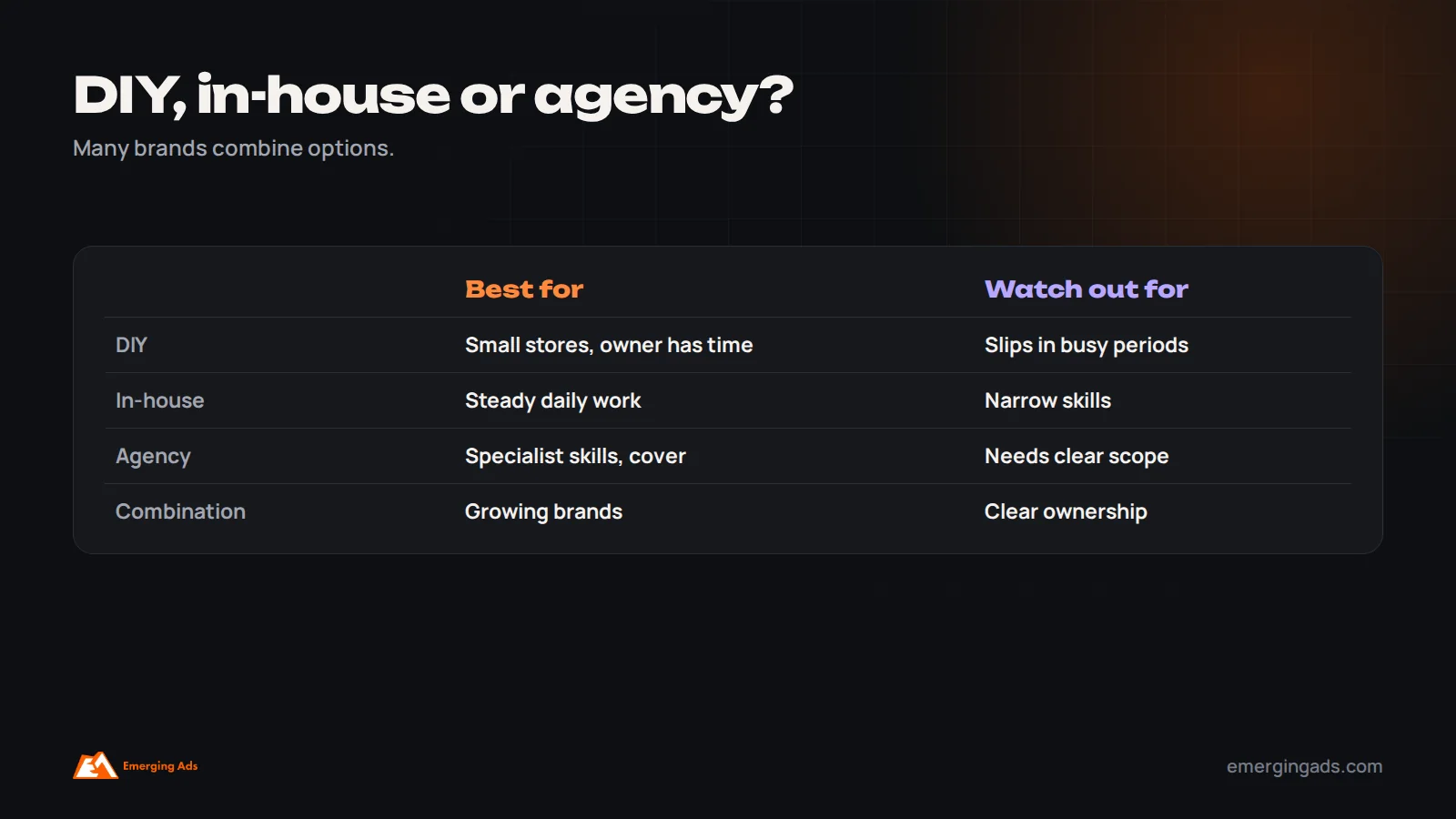
DIY, in-house or agency?
The right setup depends on your store size, your budget and the specific skills your store needs.
Doing it yourself works for small stores when the owner has time and basic skills, but management tends to slip during busy periods. An in-house ecommerce manager suits growing brands with enough work to justify a role and benefits from deep product knowledge. An agency or freelancer suits brands that need specialist skills, such as development, CRO, SEO and tracking, without hiring several people, or that want reliable cover. Many brands combine an in-house person for day-to-day tasks with agency support for technical and growth work.
What Shopify management costs
The cost of managing a Shopify store depends on who does the work and how much there is. Owners managing their own store pay with their time, which is often the most expensive resource in a small business. An in-house ecommerce manager costs a salary plus tools and training. Agencies and freelancers usually charge monthly retainers for a defined scope, such as a set number of hours for updates, development, CRO and reporting, or hourly rates for ad hoc tasks. On top of management, budget for the Shopify plan, apps, theme licenses, and occasional larger projects such as redesigns or migrations. Compare options on what is included and on the value of improvements, not just on hourly rates. Our guide on agency pricing explains common models.
Choosing a Shopify management partner
If you hire help, look for proven Shopify experience with stores like yours, a clear scope of monthly tasks, fast response times for urgent issues, development skills for theme work, understanding of tracking and analytics, a structured approach to conversion improvements, and simple reporting. Ask how they handle theme updates, how quickly they respond to problems during peak periods, and how they decide what to improve each month. Make sure you keep ownership of the store, apps and data, with staff accounts for the partner rather than shared logins.
Automating routine tasks
Shopify includes automation tools, and many apps add more, which can save hours each week. Common automations include tagging customers and orders based on behavior, alerting the team about low stock or high-value orders, hiding out-of-stock products or moving them to the end of collections, scheduling promotions to start and end automatically, and sending orders to fulfillment partners. Email platforms automate customer journeys such as welcome, abandoned cart and post-purchase messages. Automation reduces manual work and errors, but each automation should be documented and reviewed occasionally to make sure it still does what you expect.
Common Shopify management mistakes
- No regular routine, so problems pile up unnoticed.
- Installing apps without reviewing speed or removing unused ones.
- Making major theme changes just before peak seasons.
- Not checking tracking after updates.
- Letting product data become inconsistent.
- Leaving expired promotions and outdated banners live.
- Treating management as maintenance only, with no conversion improvements.
A quick monthly checklist
Each month, confirm that products, prices and stock are accurate; collections and navigation reflect current priorities; the homepage and banners are current; expired promotions are removed; apps are reviewed and unused ones uninstalled; page speed is acceptable on mobile; analytics and ad tracking match real orders; product feeds have no major errors; customer questions and returns reasons are reviewed; at least one conversion improvement has been tested; and the monthly report is shared and discussed. A store that passes this checklist each month stays healthy and keeps improving.
How store management supports marketing
A well-managed store makes every marketing channel more effective. Paid ads convert better when landing pages are fast, product information is accurate and promotions work smoothly at checkout. Email campaigns perform better when product links, images and prices are correct. Google Shopping and Meta catalog ads depend on clean product feeds. SEO depends on unique content, working links and good site structure. When marketing and store management are disconnected, ads can send traffic to sold-out products, expired offers or slow pages, wasting budget. Coordinate a shared calendar between whoever manages the store and whoever runs marketing, so launches, promotions and campaigns are prepared together. Our guides to scaling Meta ads and ecommerce email flows show how store quality affects results.
Stock and fulfillment coordination
Inventory problems create some of the most frustrating customer experiences: products shown as available that cannot be shipped, long delays without explanation, or popular items sold out during a campaign. Store management should include regular checks that inventory levels sync correctly with warehouses, fulfillment partners and marketplaces, alerts for low stock on bestsellers, back-in-stock notifications for customers, and clear delivery time information on product pages. During promotions, coordinate with operations so stock and fulfillment capacity match expected demand.
Accessibility and inclusive design
An accessible store is easier for everyone to use and reaches more customers. Management should include checking that images have descriptive alt text, color contrast is sufficient, text is readable at different sizes, buttons and links have clear labels, forms work with keyboards and screen readers, and videos have captions. Many themes support accessibility well out of the box, but customizations and apps can introduce problems, so include accessibility in quarterly reviews.
How management needs change as you grow
Management needs grow in stages. In the early stage, the owner handles most tasks, focusing on products, basic content and promotions. As sales grow, the store needs more consistent merchandising, conversion work, tracking and reporting, often handled by a dedicated person or agency. At scale, specialist roles emerge for merchandising, development, CRO, SEO, analytics and international operations. Recognizing when the store has outgrown its current setup, for example when updates are delayed, errors go unnoticed or growth stalls, helps you add support before problems cost sales.
Documenting how your store works
As more people touch a Shopify store, documentation saves time and prevents mistakes. Keep a simple shared document listing installed apps and what each does, custom theme changes and where they live, automation rules, integration details, discount conventions, product data standards such as naming and tagging, and step-by-step instructions for common tasks like launching a product or setting up a sale. When staff change or an agency joins, good documentation shortens onboarding from weeks to days and reduces the risk of breaking something that was set up for a reason.
Using AI to speed up management
AI tools, including features built into Shopify and many apps, can speed up parts of store management: drafting product descriptions, generating alt text, summarizing customer reviews, suggesting email subject lines and analyzing sales trends. They save time on repetitive work but still need human review. Check AI-written product descriptions for accuracy, especially sizes, materials and claims, and edit them to match your brand voice. Use AI to free up time for higher-value tasks such as merchandising decisions, conversion improvements and planning.
Deciding how much time your store needs
To estimate the time your store needs, list every recurring task, from product updates and promotions to tracking checks and reporting, estimate how often each occurs and how long it takes, then add time for peaks, launches and improvement work. Compare that total with the time available from you or your team. If the gap is large, or if important tasks such as conversion work and tracking checks keep slipping, it is a sign the store needs more dedicated support.
Frequently asked questions
How long does Shopify website management take?
A few hours a week for small stable stores, one to two days a week for growing stores, and full-time or more for large, multi-market stores.
What does Shopify management include?
Products and inventory, merchandising, content, promotions, apps and theme maintenance, speed and technical health, tracking, conversion improvements and reporting.
How often should I update my Shopify store?
Check orders and errors daily, update products and promotions weekly, refresh content monthly and review theme, apps and conversion quarterly.
Should I hire an agency to manage Shopify?
An agency suits brands needing specialist skills or reliable cover; in-house suits brands with steady daily work. Many combine both.
Do Shopify apps slow down stores?
They can. Review apps regularly, remove unused ones and test speed after installing new ones.
Why check tracking regularly?
Theme updates, app changes and checkout changes can break analytics and ad tracking, which harms ad performance and reporting.
When does Shopify management take the most time?
Before and during peak seasons, launches, redesigns and migrations.
Can Shopify management improve sales?
Yes. Accurate products, timely merchandising, fast pages and ongoing conversion improvements all lift sales.