
The short answer
Leadpages is a landing page builder for small businesses. It lets you create landing pages, simple websites, pop-ups and alert bars with drag-and-drop templates, connect forms to your email platform or CRM, deliver lead magnets, take payments and test page variations, without a developer. It converts leads when you pair it with a specific offer, clear copy that matches your ads, proof near the call to action, a short form and fast follow-up. The tool makes building easy; the strategy behind each page decides the results.
Most small businesses do not have a developer on call, yet they need pages for ads, promotions, lead magnets, events and bookings. Leadpages was built for that situation: a tool that lets non-technical owners and marketers publish conversion-focused pages quickly. It has been used by coaches, consultants, local service businesses, course creators and small ecommerce brands for years.
But a builder alone does not create leads. Many small businesses publish a Leadpages template with their logo and wonder why few people sign up. This guide explains what Leadpages is, its main features, how it fits with your other tools, what makes Leadpages pages convert, how to measure results and when another tool may suit you better. If you want help building pages, our guide on choosing a Leadpages agency covers what to look for.
What Leadpages is
Leadpages is a hosted, drag-and-drop page builder focused on lead generation. You choose a template or start from a blank layout, edit text, images, forms and buttons visually, and publish to a Leadpages domain or your own domain. Pages are hosted by Leadpages, so you do not need to manage servers or install plugins. The platform includes tools aimed at turning visitors into leads and customers, rather than general website features.
Main features
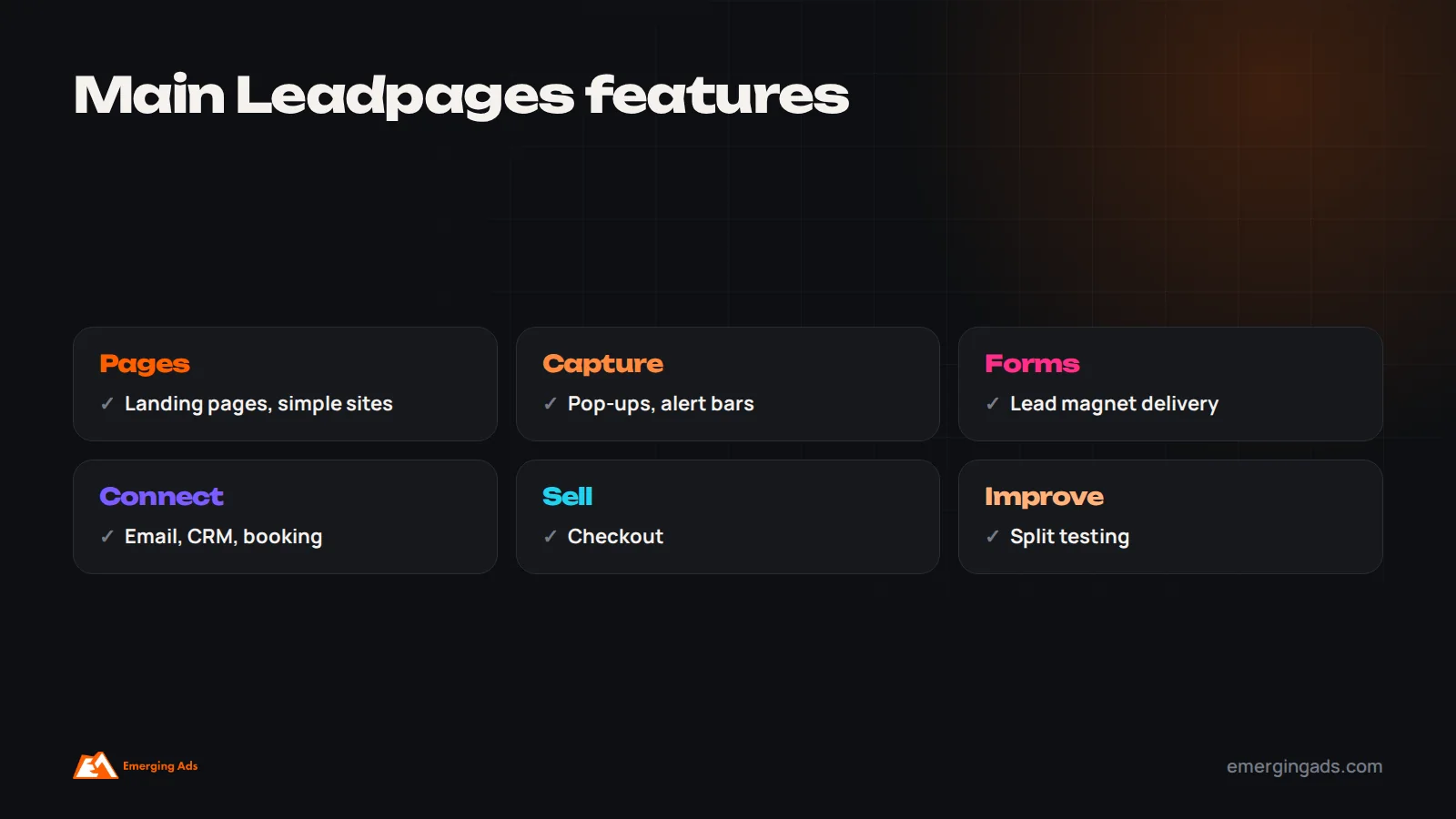
Leadpages focuses on the features small businesses need to capture leads and sell, rather than every feature a full website platform offers. These are the main tools available.
- Landing pages: templates for lead magnets, webinars, consultations, sales, events and thank-you pages.
- Simple websites: small multi-page sites for businesses that do not need a complex CMS.
- Pop-ups and alert bars: capture visitors on any page, including existing websites.
- Forms and lead magnet delivery: collect details and automatically deliver files.
- Integrations: connect to email marketing tools, CRMs, webinar and booking tools, payment processors and analytics, directly or through integration platforms.
- Checkout: accept payments on pages for simple products, services or digital downloads.
- Split testing: compare page variations on some plans.
- Conversion guidance: built-in suggestions to improve page layouts.
Features and plans change over time, so check the current Leadpages plan comparison before choosing.
Who Leadpages suits
Leadpages is designed for businesses that need focused campaign pages quickly, without any technical help.
Leadpages suits small businesses and solo professionals who run ads or promotions and need focused pages quickly: coaches and consultants capturing leads and booking calls, local service businesses running Google or Meta campaigns, course creators promoting lead magnets and webinars, event organizers, and small online sellers with a few products. It suits teams that want speed and simplicity more than deep customization.
How Leadpages converts leads
Leadpages provides structure that supports conversion: single-goal layouts without distracting navigation, prominent forms and buttons, fast hosting, mobile-responsive templates and simple integrations for follow-up. But the elements that decide conversion are in your hands:
- A specific offer worth giving contact details for.
- A clear headline that matches the ad or link visitors clicked.
- Short, persuasive copy explaining what they get and why it matters.
- Proof such as reviews, testimonials and results near the call to action.
- A short form asking only for what you need.
- Fast follow-up once someone submits.
Our guide to conversion rate optimization explains each in more depth.

Getting started: building your first page
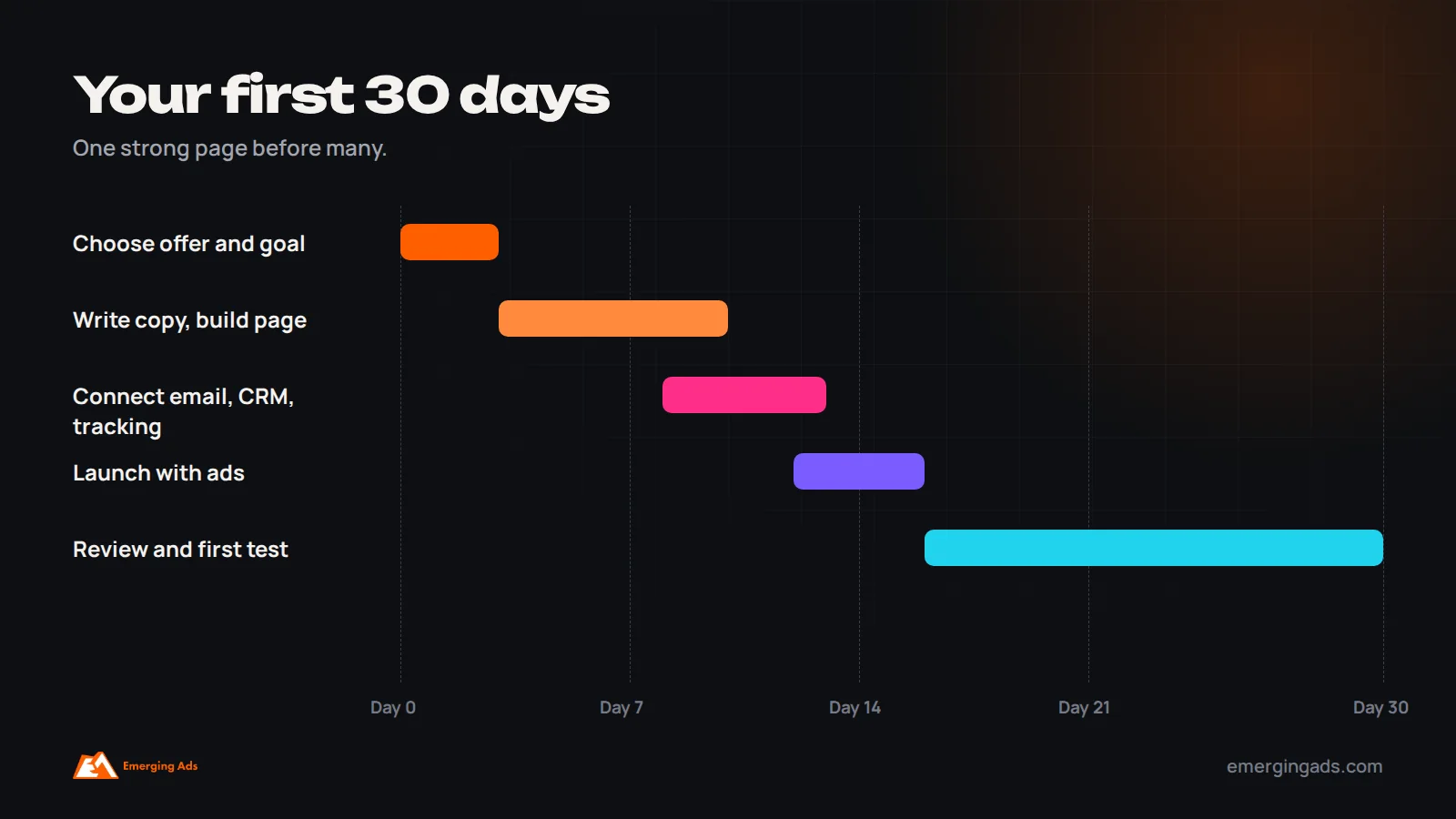
A practical first project is a single landing page for your most important offer. Start by deciding the one action you want visitors to take, such as booking a free consultation, downloading a guide or registering for a webinar. Choose a template designed for that goal rather than the prettiest one. Replace the template copy entirely with your own: a headline stating the main benefit for your audience, a short paragraph explaining the offer, three or four bullet points on what they get, a testimonial or review near the form, and a button that says exactly what happens next. Keep the form to two or three fields. Add real photos of your business or team. Set up the thank-you page to confirm the action and suggest a next step, such as booking a call or following you on social media. Connect the form to your email platform, add tracking, test the whole journey on your phone, then send traffic. This first page will teach you more than any template gallery.
Page types small businesses use most
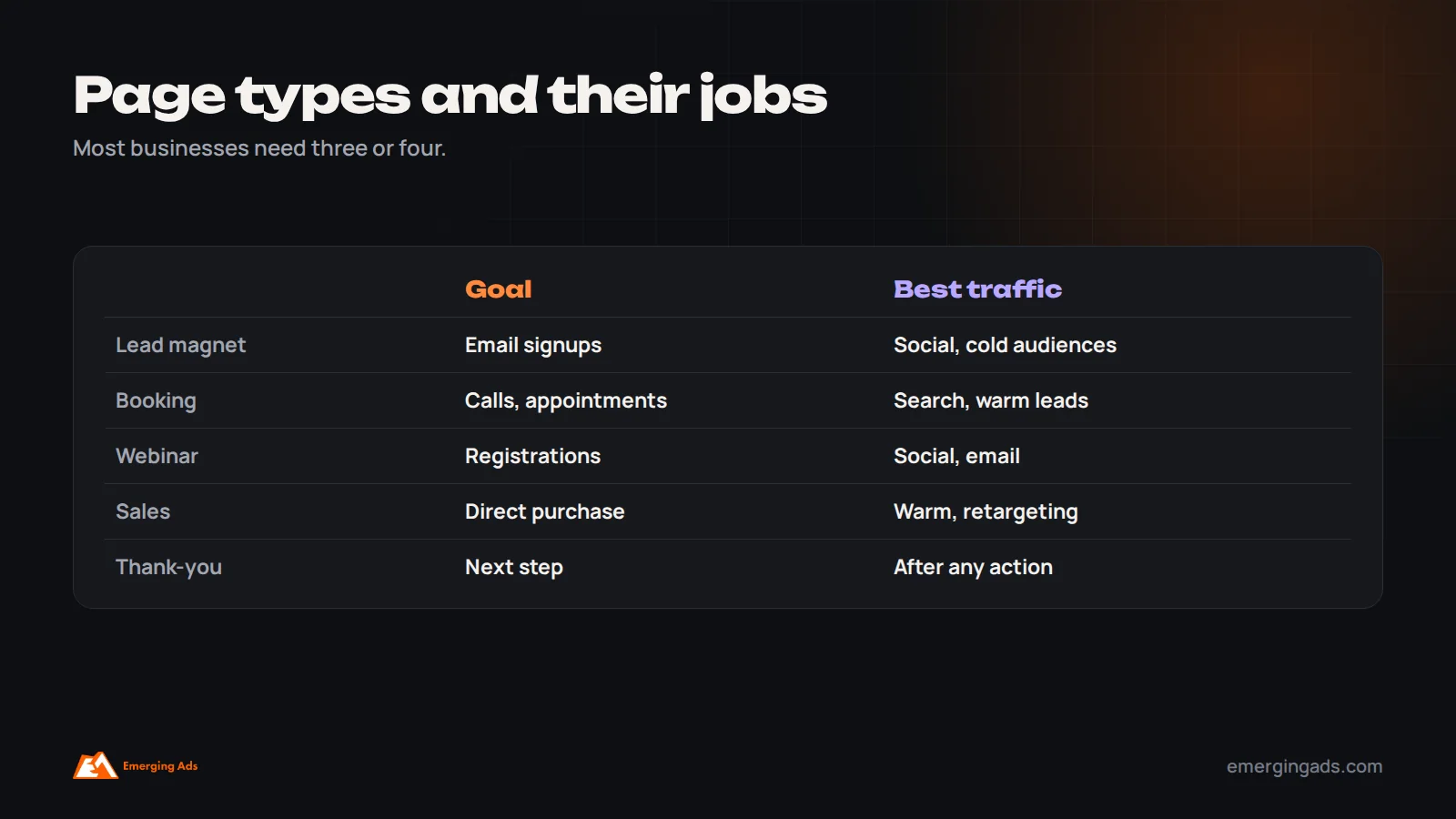
Lead magnet pages offer a guide, checklist, template or short training in exchange for an email address, ideal for social media traffic from people not yet ready to buy. Consultation and booking pages invite visitors to schedule a call or appointment, often with an embedded calendar, and suit service businesses running search ads. Webinar and event pages handle registrations and send reminders. Sales pages sell a product, package or program directly with checkout. Promotion pages support time-limited offers or seasonal campaigns. Thank-you pages confirm actions and move people to the next step. Most small businesses benefit from three or four of these working together.
Using pop-ups and alert bars well
Leadpages pop-ups and alert bars can be added to existing websites to capture visitors who would otherwise leave. Used thoughtfully, they work well: an exit pop-up offering a useful guide, a timed pop-up on a blog post inviting newsletter signup, or an alert bar promoting a limited offer or event. Used carelessly, they annoy visitors. Show them after some engagement rather than immediately, make them easy to close on mobile, offer something genuinely useful and avoid showing several at once. Measure their effect on overall conversions, not just signups.
Using Leadpages with ads
Leadpages is particularly useful for paid campaigns, because you can quickly create a page that matches each ad. People who search “emergency plumber near me” should land on a page about fast response in their area; people who click an Instagram ad about a free guide should see that guide immediately. Matching the page headline, image and offer to the ad improves conversion and, on Google Ads, can improve landing page experience and lower costs. Duplicate a proven page and adjust it for each campaign, rather than sending all traffic to one generic page. Our guides to lowering Google Ads CPA and scaling Meta ads explain how pages and ads work together.
Writing copy that converts on Leadpages
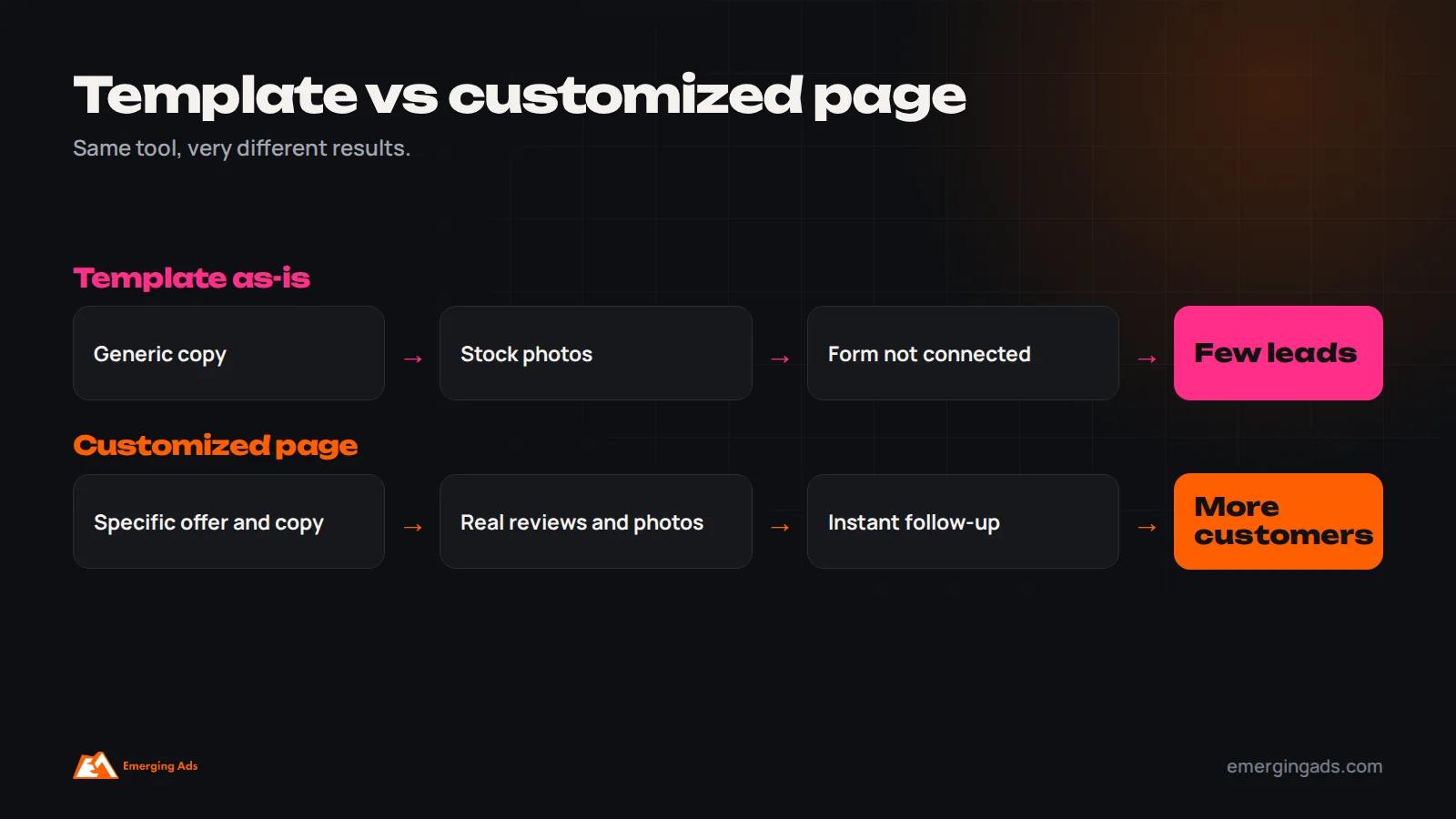
Leadpages templates come with placeholder copy designed to show the layout, not to sell your offer. Replacing it with strong, specific copy is the single most important step. Start with the headline: state the main benefit for your visitor in plain language, ideally echoing the words they used in their search or the promise in the ad they clicked. Follow with one or two short sentences explaining who the offer is for and what problem it solves. Use bullet points to list what visitors get, focusing on outcomes rather than features. Address the main objection near the form, such as “No obligation” for consultations or “Takes ten minutes to read” for guides. Make the button describe the action and benefit, such as “Send me the checklist” rather than “Submit”. Write the way your customers speak, using phrases from reviews, sales calls and support conversations. Then cut anything that does not help visitors decide.
Design choices that help conversion
Good Leadpages design is about clarity rather than decoration. Put the headline, a short explanation and the call to action in the first screen on mobile. Use real photos of your team, work or product rather than generic stock images. Keep the layout simple, with plenty of space and one clear visual path toward the form. Use contrasting colors for buttons so they stand out. Remove navigation links and footer clutter that pull visitors away. Make sure images are compressed so pages load quickly. Test the page on a real phone, since most visitors from social media and many from search will see it there first.
Choosing lead magnets that bring the right leads
A lead magnet should attract people who are likely to become customers, not just anyone who wants something free. The best lead magnets solve a small, specific problem closely related to what you sell. A bookkeeper might offer a tax deadline checklist for small businesses; a fitness coach might offer a four-week beginner plan; a renovation company might offer a guide to planning a kitchen remodel. Keep them short and immediately useful. After download, a follow-up sequence should deliver more value and introduce your paid offer. Track not only how many people download each lead magnet, but how many become customers, and focus on the magnets that bring buyers.
Split testing in practice
On plans that include split testing, Leadpages lets you send traffic to different versions of a page and compare conversion rates. Test the elements most likely to change results first: the headline, the offer itself, the length of the form, the main image and the button wording. Change one major element at a time so you know what caused any difference. Wait until each version has enough visitors and conversions to give a reliable answer before deciding; small samples often mislead. Keep a simple record of tests and results, so each new page benefits from what you have already learned.
Leadpages for local businesses
Local service businesses, such as clinics, contractors, salons, gyms and repair services, can use Leadpages to create focused pages for each service and campaign: a free estimate page for a roofing company, a new patient offer for a dental practice, a trial class page for a gym. Include the service area, opening hours, local reviews and a click-to-call button, and send traffic from Google Search ads, Local Services Ads where available and local social campaigns. Make sure enquiries reach the team quickly, since local customers often contact several businesses and choose the first to respond. Our guide to local business marketing covers the wider strategy.
Leadpages for coaches, consultants and course creators
Coaches, consultants and course creators are among the most common Leadpages users, because their businesses depend on capturing leads, nurturing them and inviting them to calls, webinars or programs. A typical setup includes a lead magnet page for social media traffic, a webinar registration page with reminders, a booking page for discovery calls with qualifying questions, and a simple sales page for programs or workshops, all connected to an email platform that runs welcome and nurture sequences. Testimonials with specific results, a clear explanation of who the offer is for and honest claims are especially important in these categories. Our guides to coaching business marketing and online course marketing cover the wider strategy.
What happens after the form matters most
A page that collects leads is only half of a system. The other half is what happens next. Every form submission should trigger an immediate confirmation, by email and, where appropriate, SMS or WhatsApp, that delivers what was promised and sets expectations. Service businesses should alert the right person to call or message within minutes, because response speed strongly influences whether leads become customers. Leads not ready to buy should enter a nurture sequence that shares useful content, stories and proof before inviting them to the next step. Track what happens to leads after they arrive, such as calls booked, appointments held and sales, so you can judge pages on customers rather than form submissions. Our guide to lead nurture automation explains how to structure this.
Domains, branding and trust
Publishing pages on your own domain, such as a subdomain of your main website, usually looks more trustworthy than a generic platform address, and keeps branding consistent. Use your logo, brand colors and fonts so pages feel connected to your business. Include basic trust information, such as your business name, contact details and privacy policy, and make sure forms explain how you will use people’s information. These small details reassure visitors who arrive from ads and have never heard of you.
An example: a small business using Leadpages well
Consider a small accounting practice that wants more small business clients. It creates three Leadpages pages. The first offers a free year-end tax checklist for small business owners, promoted with Meta ads to local business owners; the form asks only for name and email, and a five-email sequence follows with practical tips and an invitation to a free consultation. The second is a consultation booking page for Google Search ads targeting searches such as “small business accountant” in its city, with a short explanation of services, reviews from local clients, a photo of the team and an embedded calendar. The third is a pop-up on its blog offering the same checklist. All forms connect to the practice’s email platform and CRM, and the team receives an alert for every booking. After a month, it tests a new headline on the booking page and finds a version focused on saving time converts better. It tracks consultations and new clients by source, and shifts budget toward the search campaign that produces the most clients.
What Leadpages costs
Leadpages is sold as a monthly or annual subscription, with plans differing in features such as the number of sites, split testing, checkout options and support. Annual billing usually costs less per month. Beyond the subscription, budget for your email platform, any integration tools, a custom domain, design or copywriting help if needed, and ad spend to drive traffic. Check Leadpages’ current pricing page for plan details, since pricing and features change. For most small businesses, the subscription is a small cost compared with the value of even a few additional customers each month, provided pages are built and followed up well.
Keeping pages current
Landing pages need occasional upkeep. Offers expire, prices change, testimonials age and integrations can break when other tools update. Review live pages monthly: submit a test form to make sure leads still arrive where they should, check that offers, dates and prices are current, confirm tracking still works, and test loading speed on mobile. Archive pages that no longer receive traffic, and refresh the best performers with new proof and improvements from testing.
Page speed and mobile experience
Visitors from ads and social media often arrive on phones, sometimes on slower connections, and leave quickly if a page takes too long to load. Leadpages hosts pages on fast infrastructure, but heavy images, large background videos and too many embedded scripts can still slow them down. Compress images before uploading, avoid autoplay videos above the fold, limit third-party widgets, and check loading speed with tools such as PageSpeed Insights. On mobile, make sure the headline, offer and button are visible without scrolling, buttons are large enough to tap easily, and forms are quick to complete with a thumb.
Tracking leads to their source
To know which campaigns produce customers, track every lead back to its source. Add your analytics and ad platform tracking to each page, fire conversion events only on genuine form submissions or completed bookings, capture campaign details from UTM parameters in hidden form fields, and pass them into your CRM with the lead. Then compare cost per lead and, more importantly, cost per customer by campaign and page. Our guide on Meta pixel tracking setup covers the essentials for social campaigns.
AI tools and Leadpages
Leadpages and similar platforms now include AI features that can draft headlines, copy and page layouts. They are useful for speeding up first drafts and generating variations to test. They cannot know your customers, your proof or your best offer, so treat AI output as a starting point. Replace generic phrases with specific details, real testimonials and the words your customers use, then test the result against your current page.
A pre-launch checklist
Before sending traffic to any Leadpages page, check that the page has one clear goal; the headline matches the ad or link visitors clicked; the copy explains the offer in the customer’s words; real proof appears near the button; the form asks only for essential details; the button states what happens next; the page loads quickly and reads well on a phone; the form is connected to your email platform or CRM and a test submission arrives correctly; confirmation messages and team alerts work; analytics and ad tracking fire on real submissions; and the thank-you page offers a sensible next step. Fixing gaps here before launch saves wasted ad spend afterwards.
When Leadpages may not be the right choice
Leadpages is not ideal for every situation. Businesses that need a large, content-rich website with many pages, a blog and complex navigation are usually better served by a full website platform. Ecommerce stores with many products need a proper store platform. Teams running very large ad programs with heavy testing may prefer dedicated tools with more advanced experimentation. And businesses that already use an all-in-one platform with a capable page builder may not need another subscription. Choose the tool that fits your stage and the way your team works.
Leadpages for B2B and professional services
B2B firms and professional services use Leadpages for webinar registrations, gated reports, consultation requests and event signups. These pages need credibility above all: named experts, client logos where permitted, case studies with specific outcomes, clear explanations of process and pricing approach, and privacy information. Forms can include one or two qualifying questions, such as company size or role, so sales teams can prioritize leads. Connect submissions to your CRM so follow-up is fast and tracked.
Connecting Leadpages to your tools
Integrations are what turn a single page into a complete, working lead generation system for your business.
Leads only become customers if they reach the right system and get followed up. Connect forms to your email platform to trigger welcome sequences, to your CRM to create contacts and tasks, to booking tools for consultations, and to payment systems for sales. Add analytics and ad pixels so you can measure which campaigns produce leads. Test every connection with a real submission before sending traffic. Our article on CRM automation mistakes covers common follow-up gaps.
Measuring Leadpages results
Judge every page by the paying customers it produces over time, not just by the number of form submissions it collects.
- Conversion rate by page and traffic source.
- Cost per lead from paid campaigns.
- Lead quality: how many become calls, customers or sales.
- Split test results for headlines, offers and forms.
- Page speed and mobile performance.

Leadpages compared with alternatives
Leadpages is one of several good options, and the best choice depends on your website, your other tools and how your team prefers to work.
Alternatives include page builders inside website platforms such as WordPress, Shopify and Wix; dedicated landing page tools such as Unbounce and Instapage; funnel builders such as ClickFunnels; and all-in-one platforms such as GoHighLevel that include page builders alongside CRM and automation. Leadpages stands out for ease of use and small-business focus. If you need complex funnels, deep customization, advanced testing at scale or tight integration with an existing website, another option may suit better.

Common mistakes
These are the problems we see most often on small business Leadpages accounts.
- Publishing templates without changing the copy.
- One generic page for every ad and audience.
- Long forms that discourage signups.
- No proof near the call to action.
- Forms not connected to follow-up.
- No tracking or testing.
Frequently asked questions
What is Leadpages?
A drag-and-drop landing page builder for small businesses, with templates, pop-ups, alert bars, forms, integrations, checkout and testing features.
How does Leadpages help convert leads?
It provides focused, mobile-friendly layouts and integrations. Conversion depends on your offer, copy, proof, form length and follow-up.
Do I need a developer to use Leadpages?
No. It is designed for non-technical users, though complex integrations may need some setup help.
Can Leadpages replace my website?
For very small businesses it can host a simple site, but many use it alongside an existing website for campaign pages.
Does Leadpages integrate with email tools?
Yes, with many email platforms and CRMs directly or through integration platforms.
Can I test pages in Leadpages?
Split testing is available on some plans, letting you compare variations of headlines, offers and layouts.
Is Leadpages good for ads?
Yes. Dedicated pages matched to each ad typically convert better than sending traffic to a homepage.
What are alternatives to Leadpages?
Website platform page builders, Unbounce, Instapage, ClickFunnels and all-in-one platforms such as GoHighLevel.