Common Mistakes to Avoid With LinkedIn Ads
Key Takeaways
- Audiences under roughly 50,000 people usually can’t sustain a campaign long enough to gather useful data before frequency gets too high.
- Choosing the Website Visits objective when you actually want leads is one of the most common setup mistakes we see.
- LinkedIn creative fatigues faster than most teams expect, plan refreshes every 3-4 weeks.
- Lead Gen Forms convert better than website landing pages for cold B2B traffic, but the leads need faster follow-up.
- Company size and seniority filters stacked too narrowly can shrink reach to the point where the algorithm can’t optimize.
Sizing Your Audience Correctly
LinkedIn’s targeting is powerful because it lets you stack filters: job title, seniority, company size, industry, skills. That power is also the most common source of failed campaigns, because each additional filter shrinks the audience, and LinkedIn’s ad auction needs enough volume to actually optimize delivery.
As a rough guide, audiences under 50,000 people struggle to sustain a campaign for more than a few weeks before frequency climbs too high and cost per result rises. If your ideal audience is genuinely that narrow, that’s fine, but plan for a smaller budget, longer creative rotation, and don’t expect the volume a broader campaign would generate.
Picking the Wrong Campaign Objective
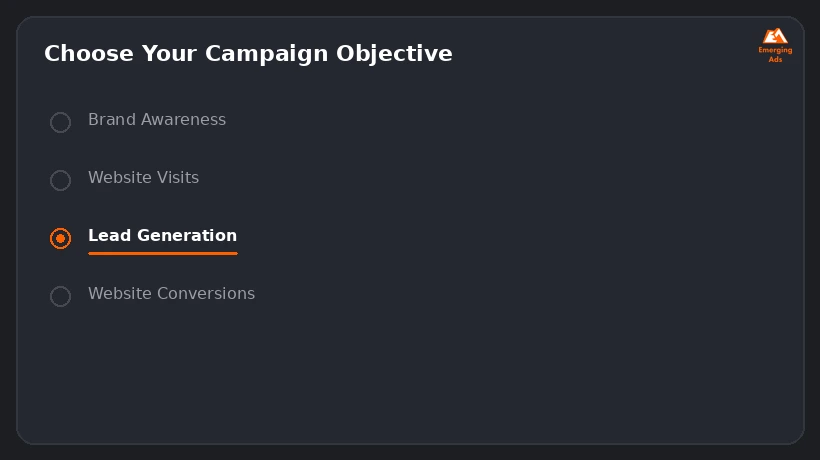
LinkedIn Campaign Manager asks you to choose an objective before you can even build the campaign, and this choice changes how the algorithm optimizes delivery. A campaign built under Website Visits will optimize for clicks, not conversions, even if your landing page has a form on it. If lead generation is the actual goal, use the Lead Generation objective, or Website Conversions if you’re sending traffic to your own site and have conversion tracking correctly installed.
- Brand Awareness: optimizes for impressions, rarely the right choice for a lead-gen budget
- Website Visits: optimizes for clicks, useful for driving traffic but not for lead volume
- Lead Generation: uses LinkedIn’s native Lead Gen Forms, pre-filled with profile data
- Website Conversions: optimizes toward a pixel-tracked conversion event on your own site
Letting Creative Run Until It’s Stale
LinkedIn’s audience sizes are smaller than Meta’s or Google’s, which means frequency builds up faster. The same ad shown to the same narrow professional audience for eight weeks straight will fatigue, click-through rate drops and cost per result climbs even if nothing else about the campaign changed. Plan creative refreshes every three to four weeks for any campaign running continuously, and have at least two to three ad variants live at once so the algorithm has room to rotate.
Landing Pages vs Lead Gen Forms
Native Lead Gen Forms pre-fill with the user’s LinkedIn profile data, which removes friction and typically produces a lower cost per lead than sending cold B2B traffic to an external landing page. The tradeoff is lead quality: because filling out the form takes almost no effort, some leads are lower intent than someone who clicked through to your site and filled out a form manually. The fix isn’t to avoid Lead Gen Forms, it’s to follow up fast. Leads from Lead Gen Forms cool off quickly, and response time within the first hour meaningfully affects conversion to a qualified opportunity.
Tracking Gaps That Hide the Real Cost Per Lead
LinkedIn’s own reporting shows cost per lead based on form fills or conversion events, but it can’t tell you which of those leads actually became a qualified opportunity or closed deal. Without pushing LinkedIn lead data into your CRM and tracking it through to close, teams end up optimizing toward cheap leads that never convert to revenue. Connect Lead Gen Forms to your CRM directly (LinkedIn supports native integrations with most major CRMs) rather than relying on manual CSV exports, which introduces delay and dropped leads.
Want us to look at your account?
We’ll audit your setup and tell you exactly where the budget is leaking, free.
Get Your Free Ad AuditFrequently Asked Questions
What’s the minimum audience size for LinkedIn Ads to work well?
Roughly 50,000 people is a reasonable floor for sustained campaigns. Smaller audiences can still work but need smaller budgets and more frequent creative refreshes.
Should I use Lead Gen Forms or send traffic to my website?
Lead Gen Forms typically produce lower cost per lead due to reduced friction. Use them if you have a fast follow-up process; use website conversions if lead quality matters more than volume and your landing page is strong.
How often should I refresh LinkedIn ad creative?
Every three to four weeks for continuously running campaigns, sooner if you notice click-through rate dropping and frequency climbing.
Why is my LinkedIn cost per lead so much higher than Meta or Google?
LinkedIn’s B2B professional targeting commands a premium, the audience is smaller and more specific than consumer platforms. Compare cost per qualified opportunity, not just cost per lead, before concluding it’s inefficient.
What objective should I choose for lead generation?
The Lead Generation objective for native Lead Gen Forms, or Website Conversions if you’re driving to your own site with proper conversion tracking installed.
How fast should I follow up on LinkedIn Lead Gen Form submissions?
As close to real-time as possible, ideally within the first hour. Response speed has a measurable effect on whether a lead converts to a qualified conversation.
Can I retarget website visitors on LinkedIn?
Yes, through the LinkedIn Insight Tag, which also enables conversion tracking for the Website Conversions objective.
Is Sponsored Content or Message Ads better for B2B?
It depends on the goal. Sponsored Content works well for awareness and lead gen in-feed; Message Ads (InMail) can work for highly targeted, personalized outreach but fatigue quickly if overused.
How many ad variants should run at once?
Two to three per campaign is a reasonable range, enough for the algorithm to rotate without splitting budget so thin that none gather meaningful data.
Does company size targeting reduce reach significantly?
Yes, stacking company size on top of job title and seniority filters can shrink an audience fast. Check the estimated audience size in Campaign Manager before layering on more filters.
Ready to fix what’s costing you conversions?
Book a free, no-pressure audit of your ad account or website.
Get Your Free Ad Audit